
Maven WrapUp
A one page revision of the whole Maven course, covering build tool basics, installation, project creation, goals, dependencies, repositories, the POM, IDEs, the lifecycle, testing and Spring Boot.
You started with a simple question (why do we even need a build tool?) and finished by building, testing and running a Spring Boot web application with Maven. This page is the summary note for the whole course. Keep it open the next time you need to revise quickly or debug a build.
What you covered
| Area | The key idea | Lesson |
|---|---|---|
| Build tools | Compile, test and package automatically, and manage libraries for you | Why and what is build tool |
| Installation | JDK first, then Maven's bin on PATH. Verify with mvn -v | Installing Maven |
| Project creation | mvn archetype:generate with quickstart (JAR) or webapp (WAR) | Maven Java Project |
| Vocabulary | Archetype, groupId, artifactId, version, packaging (GAV) | Maven Terminologies |
| Goals | clean, compile, test, package. Each runs the ones before it | Maven Goals |
| Dependencies | Declare libraries in <dependencies>. Maven fetches them and their transitive dependencies | Maven Dependencies |
| Repositories | Local ~/.m2 first, then Central or a company repository | Maven Repositories |
| POM | Coordinates, properties, dependencies, build plugins | Maven POM.xml file |
| Effective POM | Your POM merged with the Super POM, parents and defaults, in memory | Effective POM |
| IDEs | IntelliJ and Eclipse run the same Maven on the same structure | IntelliJ, Eclipse |
| Lifecycle | clean, default and site lifecycles. validate to deploy | Maven Build LifeCycle Summary |
| Testing | JUnit tests in src/test/java. A failing test fails the build | Maven Java Project Unit Testing |
| Spring Boot | Initializr, starter parent, embedded Tomcat, Maven Wrapper | Maven SpringBoot App Demo |
The big picture
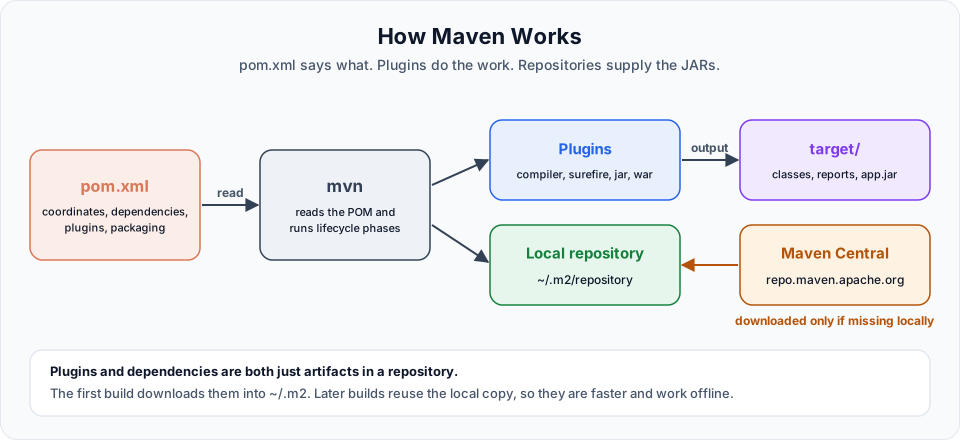
Command cheat sheet
# Standalone Java project (JAR)
mvn archetype:generate -DgroupId=com.telusko -DartifactId=telusko-app -DarchetypeArtifactId=maven-archetype-quickstart -DarchetypeVersion=1.5 -DinteractiveMode=false

# Web project (WAR)
mvn archetype:generate -DgroupId=com.telusko -DartifactId=telusko-web-app -DarchetypeArtifactId=maven-archetype-webapp -DarchetypeVersion=1.5 -DinteractiveMode=false| Command | What it does |
|---|---|
mvn -v | Show Maven version, Maven home and the Java it uses |
mvn clean | Delete target/ |
mvn compile | Compile src/main/java to target/classes |
mvn test | Compile and run unit tests |
mvn package | Compile, test and build the JAR or WAR |
mvn clean package | Fresh build from scratch. The everyday command |
mvn verify | Package plus integration checks. Good default for CI |
mvn install | Also copy the artifact into ~/.m2/repository |
mvn deploy | Also upload it to a remote repository (needs distributionManagement) |
mvn dependency:tree | Show direct and transitive dependencies |
mvn help:effective-pom | Show the merged POM Maven really uses |
mvn test -Dtest=CalcTest | Run one test class |
mvn package -DskipTests | Build without running tests (use with care) |
mvn -o package | Offline build from the local repository |
./mvnw ... / mvnw.cmd ... | Same commands through the project's Maven Wrapper |
Mistakes worth remembering
| Mistake | Symptom | Fix |
|---|---|---|
| Running Maven outside the project folder | "there is no POM in this directory" | cd into the folder with pom.xml |
JAVA_HOME points to bin or a JRE | "JAVA_HOME is not defined correctly" or "No compiler is provided" | Point it to the JDK root |
| No Java version in an old POM | "Source option 5 is no longer supported" | Set maven.compiler.release |
{name} instead of ${name} | Literal {...} in errors | Always use ${...} |
Dependency pasted outside <dependencies> | Imports do not compile | Move it inside, reload the IDE |
Test class not named *Test | Tests run: 0 | Follow Surefire's naming patterns |
| Fixed version on a library the parent manages | Version conflicts at runtime | Remove the version, let the parent manage it |
Where Maven shows up next in the bootcamp
- Docker: a Dockerfile builds the project with Maven and copies the JAR or WAR into an image. See Single Stage Dockerfile with Maven Spring Boot and Dockerizing A Maven Web Application.
- Jenkins: every pipeline in the Jenkins course runs a Maven build and test stage before building the Docker image.
- AWS: the Elastic Beanstalk and ECS projects in the AWS course deploy JARs that Maven produced.
When one of those builds fails, the skills from this course (reading Maven output, checking mvn -v, looking at the dependency tree and the effective POM) are how you find the cause quickly.
Try It Yourself
- Without looking at the lessons, create a quickstart project, add spring-core, write one JUnit 5 test, and run
mvn clean verify. - Install that project with
mvn installand use it as a dependency in a second project. - Add the Maven Wrapper to your project with
mvn wrapper:wrapper, then build with./mvnw clean package(ormvnw.cmd). - Explain to someone else, in under two minutes, what happens when you type
mvn package.
Official references
- Apache Maven: Maven in 5 Minutes
- Apache Maven: Introduction to the Build Lifecycle
- Apache Maven: Maven Wrapper
Written By: Shramik Masti
How is this guide?
Last updated on
Maven SpringBoot App Demo
Generate a Spring Boot web project with Maven from Spring Initializr, import it into Eclipse, add a controller, service and JSP page, fix the missing JSP dependency, and run it on an embedded Tomcat server.
Getting Started
A practical roadmap for learning Terraform, from installation and credentials to state, variables, outputs, S3 buckets, taint and reusable modules on AWS.