
Why and what is build tool
Understand the steps between writing Java code and running it on a server, why doing them by hand does not scale, and how a build tool like Maven automates both building and dependency management.
Software development has two big parts. The first is writing the code. The second is giving life to that code: turning the .java files a developer writes into something a server can actually run. That second part is called the build, followed by deployment. A build tool exists to make the build part automatic, repeatable and boring.
To see why that matters, look at what really happens to a Java application before it can run.
The execution flow of a Java application
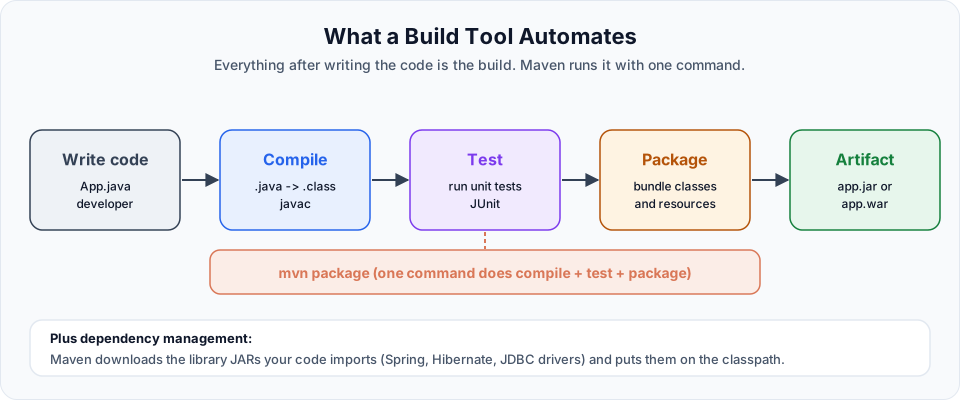
| Step | Input | Output | Who does it |
|---|---|---|---|
| Write code | Your logic | .java files (source code) | Developer |
| Compile | .java files | .class files (bytecode) | javac |
| Test | Compiled classes and test classes | Pass or fail report | A test framework such as JUnit |
| Package | .class files plus resources | A .jar or .war file | The jar tool, or a build tool |
| Deploy | The archive | A running application | Server, Docker, Kubernetes |
Everything after writing the code, up to producing the archive, is the build. Deployment is the separate step that comes after it, and later in the bootcamp you will see Docker and Kubernetes take over that part.
JAR or WAR?
The archive you produce depends on what kind of application you are building.
| Archive | Full name | Use it for |
|---|---|---|
.jar | Java ARchive | A standalone application, a command line tool, or a library that other projects will use. Spring Boot apps are also packaged as JARs with an embedded server inside |
.war | Web application ARchive | A traditional web application that you deploy into a servlet container such as Apache Tomcat |
If you are writing code that other teams will reuse (a library), you also package it as a JAR and share it with them.
Doing the build by hand
You can do all of this without any build tool. For a tiny project, it looks like this:
# 1. Compile the application: .java -> .class
javac -d out src/com/telusko/App.java

# 2. Compile and run the tests. You must download JUnit 4 and Hamcrest yourself first
javac -d test-out -cp out:lib/junit-4.13.2.jar test/com/telusko/AppTest.java
java -cp out:test-out:lib/junit-4.13.2.jar:lib/hamcrest-core-1.3.jar \
  org.junit.runner.JUnitCore com.telusko.AppTest

# 3. Package only the application classes into a JAR
jar cf telusko-app.jar -C out .
Look at step 2. You had to know that JUnit 4 needs a second JAR (Hamcrest) and type both paths correctly. On Windows the classpath separator is ; instead of :, so even the commands are different per operating system.
It works for one class. Now imagine 400 classes, 150 test classes, resource files, three environments and ten developers. Every developer runs slightly different commands, someone forgets to run the tests, and nobody can reproduce last month's release. Manual builds do not scale.
The second problem: libraries
Real applications use code written by other people. You might use Spring, Hibernate, a JDBC driver for MySQL, or a JSON library. That code is not part of the JDK. When you install the JDK, you only get the standard library (classes like String, ArrayList and LocalDate that you can use with a simple import).
Without a build tool, using a third party library means:
- Open a browser and search for the library's JAR file
- Download the right version (and hope it is the right one)
- Find out which other JARs that library needs, and download those too
- Add every JAR to your IDE's build path by hand
- Repeat on every developer machine and on the build server
These external libraries are called dependencies: your project depends on them to compile or run. Managing them by hand is slow and fragile. Two developers end up with two different versions of the same library, and the bug only appears on one machine.
The classic symptom
"It compiles on my machine but not on yours" is very often a dependency problem: a JAR that exists on one laptop and not on the other, or a different version of it. A build tool removes that whole class of problems.
What a build tool does
A build tool acts like an assistant for the developer. You describe the project once, in a file, and the tool:
- Compiles the source code
- Runs the unit tests and stops the build if any test fails
- Packages the result into a JAR or WAR
- Downloads the libraries your project needs (and the libraries they need) and puts them on the classpath automatically
- Does all of this the same way on every machine: your laptop, a colleague's laptop and the CI server
With Maven, the whole manual build above becomes one command:
mvn packageThat is why Maven is one of the most widely used build tools in the Java and backend world. Gradle is the other popular choice, and Ant is an older tool you may still see in legacy projects. The ideas you learn here (compile, test, package, dependencies, repositories) carry over to all of them.
Try It Yourself
- Write a one line
Hello.java, then compile it withjavac Hello.javaand run it withjava Hello. Notice the.classfile that appears. - Package it by hand with
jar cfe hello.jar Hello Hello.classand run it withjava -jar hello.jar. - List three libraries (for example Spring, a JDBC driver, JUnit) that a typical backend project needs and that are not part of the JDK.
- Think about your current or last project: how were dependencies added? Write down one problem that a build tool would have prevented.
Official references
Written By: Shramik Masti
How is this guide?
Last updated on
Introduction to Maven
A short tour of what this Maven crash course covers, what you need before starting, and how the lessons build from build tool basics to a Spring Boot project.
What is Maven and What it can do
Learn what Apache Maven is, why it is called a project management tool and not only a build tool, and the four jobs it does for every Java project.