
Introduction
Why Apache Maven exists, how pom.xml, plugins and repositories work together, the core Maven vocabulary, and where Maven fits with Git, Docker, Jenkins and the rest of the DevOps toolchain.
A Java project is more than its .java files. To turn it into something that runs, someone has to compile it, fetch the right versions of every library it uses, run its tests, and package it into a JAR or WAR. Done by hand, that process differs from one laptop to the next, and "it builds on my machine" becomes the most common sentence in the team.
Maven replaces that with a standard. You describe the project once in pom.xml, and Maven builds it the same way on every machine: your laptop, a colleague's laptop, and the CI server.
What Maven is
Apache Maven is an open source build automation and dependency management tool for Java, maintained by the Apache Software Foundation. It rests on three ideas:
- A declarative project model.
pom.xmlsays what the project is and what it needs, not step by step how to build it. - Convention over configuration. Code lives in
src/main/java, tests insrc/test/java, output intarget. Follow the conventions and you write almost no build logic. - Repositories of artifacts. Libraries and plugins are downloaded on demand from Maven Central and cached locally.
How the pieces fit
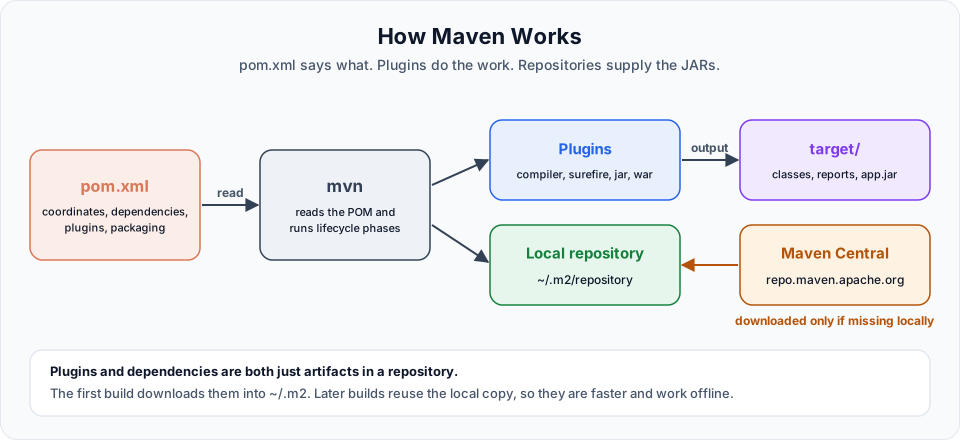
You type:      mvn package
Maven reads:   pom.xml (+ Super POM defaults = effective POM)
Maven runs:    validate -> compile -> test -> package   (lifecycle phases)
Plugins do:    compiler:compile, surefire:test, jar:jar
Maven fetches: missing plugins and libraries from Central into ~/.m2
You get:       target/telusko-app-1.0-SNAPSHOT.jar
Maven's core is small. The real work is done by plugins, and plugins are just artifacts in a repository like any library. That is why the very first build on a new machine downloads so much, and why every later build is much faster.
Core vocabulary
| Term | Meaning |
|---|---|
| POM | Project Object Model, the pom.xml file that describes the project |
| Coordinates (GAV) | groupId:artifactId:version, the unique address of a project or library |
| Packaging | The output format: jar, war or pom |
| Archetype | A project template used by mvn archetype:generate |
| Dependency | A library the project needs, declared in <dependencies> |
| Transitive dependency | A library your dependency needs, fetched automatically |
| Scope | Where a dependency is available: compile, test, provided, runtime |
| Repository | Storage for artifacts: local (~/.m2), Central, or a company remote |
| Lifecycle | An ordered list of phases: clean, default and site |
| Phase | One step in a lifecycle, such as compile, test or package |
| Plugin and goal | The code that does the work, and one task inside it (compiler:compile) |
| Effective POM | Your POM merged with the Super POM, parents and defaults |
| SNAPSHOT | A version still in development, such as 1.0-SNAPSHOT |
| Maven Wrapper | mvnw scripts that download and run a fixed Maven version for the project |
Why Maven matters in DevOps
As a DevOps engineer you may not write much Java, but you will build a lot of it. Pipelines call Maven, Docker images are built from Maven output, and a large share of failed builds turn out to be Maven problems: a failing test, an unreachable repository, a wrong Java version.
| Tool | How it works with Maven |
|---|---|
| Git | Stores pom.xml and src, never target/ |
| Docker | A build stage runs Maven, then the JAR or WAR is copied into a runtime image |
| Jenkins | Every pipeline has a Maven build and test stage |
| Nexus / Artifactory | Company repositories that Maven downloads from and deploys to |
| AWS | Elastic Beanstalk, ECS and EC2 run the artifacts Maven produced |
Maven versions in 2026
The current release is Maven 3.10.0 (September 2026), and the 3.9.x line is still supported. Both run on Java 8 or newer, though you should use a JDK 17 or 21 for modern projects. Maven 4 is in the release candidate stage and is not recommended for production yet. Linux package managers often ship an older 3.x, which is fine for learning. For team projects, the Maven Wrapper pins one exact version for everyone.
Maven is not the only Java build tool. Gradle is the other major choice, and Ant still appears in older projects. The concepts you learn here (dependencies, repositories, a build lifecycle, coordinates) transfer directly to them.
What to focus on first
Do not try to memorise every phase and plugin. A small set appears everywhere:
mvn -vmvn clean packagemvn testmvn verifymvn installmvn dependency:treemvn help:effective-pom./mvnw clean package
Once those are comfortable, the rest of Maven is mostly reading pom.xml carefully.
Never put passwords or tokens in pom.xml. It is committed to Git. Repository credentials belong in ~/.m2/settings.xml on the machine, or in your CI tool's secret store.
Start with Introduction to Maven and move through the sidebar in order.
Official references
- Apache Maven: What is Maven?
- Apache Maven: Introduction to the POM
- Apache Maven: Introduction to the Build Lifecycle
Written By: Shramik Masti
How is this guide?
Last updated on
Getting Started
A practical roadmap for learning Apache Maven, from why build tools exist to projects, goals, dependencies, repositories, the POM, IDEs, the build lifecycle, unit testing and Spring Boot.
Introduction to Maven
A short tour of what this Maven crash course covers, what you need before starting, and how the lessons build from build tool basics to a Spring Boot project.