
Getting Started
A practical roadmap for learning Jenkins, from installing it on AWS to freestyle jobs, agents, pipelines, shared libraries and a full CI/CD pipeline with Docker and Amazon EKS.
Building and deploying software by hand works for one change on one server. It falls apart when ten developers push code every day to four environments. Someone forgets to run the tests, someone deploys an old file, and the team spends its evenings repeating the same commands. Jenkins takes that work over: every push is fetched, built, tested, packaged and deployed the same way, every time.
This course teaches Jenkins from absolute scratch. You start by installing it on a Linux server in AWS, click together your first jobs, then move to the way real teams work: pipelines written as code. The last section joins everything from the bootcamp into one CI/CD system that takes code from GitHub, builds it with Maven, packages it with Docker, pushes it to Docker Hub and deploys it to Kubernetes on Amazon EKS.
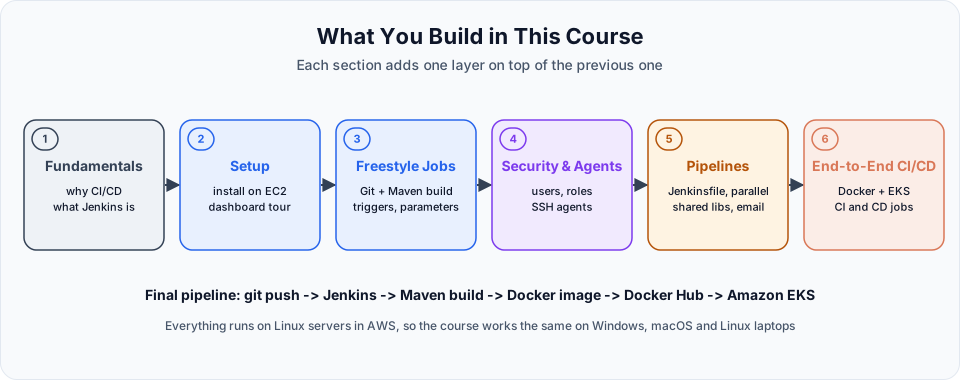
By the end you will be able to:
- Explain CI, continuous delivery and continuous deployment, and where Jenkins fits
- Install the current Jenkins LTS with Java 21 on Ubuntu, complete the setup wizard and secure it
- Create freestyle jobs that clone from GitHub and build with Maven
- Start builds automatically with cron schedules, Poll SCM and GitHub webhooks
- Use build parameters, users, matrix and role-based permissions
- Connect an SSH agent so builds run away from the Jenkins controller
- Write declarative and scripted pipelines, parallel stages and shared libraries
- Send build result emails from a pipeline
postblock - Build and push Docker images and deploy them to Amazon EKS from Jenkins
- Split a single pipeline into separate CI and CD pipelines
Who this is for
This course is for anyone who wants to automate how software is built and shipped: DevOps and cloud learners, developers who are tired of manual deployments, testers who want automated test runs, and system administrators moving into DevOps.
You should be comfortable on a Linux terminal and with SSH, and know basic Git and Maven. For the last section you need Docker and Kubernetes basics. Every one of these has its own course in the bootcamp: Linux, Git, Maven, Docker and Kubernetes.
How the course is organised
| Stage | Section | What it covers |
|---|---|---|
| Foundations | 01 Jenkins Fundamentals | The build and deployment problem, CI/CD, what Jenkins is |
| Setup | 02 Jenkins Setup | Installing Jenkins on EC2, the setup wizard, the dashboard and Manage Jenkins |
| Jobs | 03 Freestyle Jobs | Shell jobs, Git + Maven builds, build triggers, parameterized jobs |
| Operations | 04 Security & Distributed Builds | Users, authentication and authorization, controller and agent architecture, SSH agents |
| Pipeline as code | 05 Jenkins Pipelines | Declarative pipelines, Maven builds, parallel stages, shared libraries, scripted pipelines, email |
| Project | 06 End-to-End CI/CD with Jenkins, Docker & Kubernetes | Preparing Jenkins, EKS tooling, cluster creation, Docker build and push, EKS deployment, CI and CD pipelines |
01 - Jenkins Fundamentals
Why building and deploying by hand is slow and error prone, which steps happen between a git push and a running application, and how a CI/CD tool automates them. You also meet Jenkins itself: an open source, Java-based automation server that works with any tech stack.
02 - Jenkins Setup
Launching an Ubuntu server on AWS, installing Java 21 and the Jenkins LTS from the official repository, opening port 8080 safely, entering the initial admin password, installing the suggested plugins and creating the admin user. Then a tour of the dashboard and the Manage Jenkins page: tools, plugins, nodes, credentials and users.
03 - Freestyle Jobs
Your first jobs, configured through the web UI. A shell job that shows how workspaces and console output work, a job that clones a Spring Boot project from GitHub and builds a WAR with Maven, automatic triggers (Build periodically, Poll SCM with Jenkins cron and the H symbol, GitHub webhooks), and parameterized jobs that ask for input such as the target environment.
04 - Security & Distributed Builds
Running Jenkins for a team. Creating users, choosing a security realm, and limiting what each person can do with matrix-based and role-based authorization. Then the controller and agent architecture (called master and slave in older material): why builds should not run on the Jenkins server, and how to connect a second EC2 instance as an SSH agent and run jobs on it.
05 - Jenkins Pipelines
Pipeline as code. Writing declarative pipelines with agent, tools, stages and steps, generating steps with the Snippet Generator, running independent stages in parallel, moving shared code into a Jenkins shared library, writing a scripted pipeline in Groovy, and sending success and failure emails through the Email Extension plugin and Gmail SMTP.
06 - End-to-End CI/CD with Jenkins, Docker & Kubernetes
The project that ties the bootcamp together. You prepare the Jenkins server with Docker, install kubectl, the AWS CLI and eksctl, create an Amazon EKS cluster, and connect Jenkins to it. Then you build a pipeline that builds and pushes a Docker image to Docker Hub, deploy that image to EKS, combine everything into one CI/CD pipeline, and finally split it into independent CI and CD pipelines the way larger teams run them.
How to actually learn this
Jenkins has a lot of screens and settings. Reading about them is not enough. You learn Jenkins by building jobs, breaking them, and reading the console output until it makes sense.
Run your own Jenkins
Install Jenkins on your own EC2 instance and do every demo there. Seeing the workspace folders, the logs and the agent connection on a real server makes the concepts stick.
Read the console output from the top
Almost every failed build explains itself in its log: a wrong branch name, a missing JDK, a Java version error on an agent, a typo in a library name. Make reading logs a habit before searching the internet.
Move from clicks to code
Do each task once as a freestyle job so you see what Jenkins does, then do it again as a pipeline. By section 6, everything you build should be in a Jenkinsfile.
Keep secrets in credentials and clean up
Passwords, tokens and keys go into Jenkins credentials, never into job scripts or screenshots. Stop your EC2 instances and delete your EKS cluster when you finish a session.
Watch your AWS bill
A small Jenkins server on EC2 is cheap, and some instance types are free tier eligible. The EKS cluster in section 6 is not free: you pay for the control plane and the worker nodes every hour they exist. Create it when you start that section and delete it with eksctl delete cluster when you are done.
Head to the Introduction for the big picture, then start with Welcome to the Jenkins.
Written By: Shramik Masti
How is this guide?
Last updated on
Blue-Green Deployment: Zero Downtime Release (Hands-On)
Run blue and green Deployments side by side on EKS, test green through a NodePort Service, switch the live LoadBalancer to green by changing one selector label, and roll back instantly.
Introduction
Why Jenkins exists, how the controller, agents, jobs, pipelines and plugins fit together, the core Jenkins vocabulary, and where Jenkins sits among Git, Maven, Docker, Kubernetes and AWS.