
Introduction
Why Jenkins exists, how the controller, agents, jobs, pipelines and plugins fit together, the core Jenkins vocabulary, and where Jenkins sits among Git, Maven, Docker, Kubernetes and AWS.
Writing code is only half of software development. The other half is giving that code life: fetching it, compiling it, testing it, packaging it, building an image, and deploying it where users can reach it. Every one of those steps can be done by hand. The trouble is that they must be done for every change, in every environment, without mistakes, and people are bad at repeating the same twenty commands perfectly.
Jenkins is an open source automation server that does this work for you. You describe the steps once, and Jenkins runs them every time the code changes, in the same order, on the right machines, and records exactly what happened.
What Jenkins is
Jenkins is a Java web application that you run on your own server. It began in 2004 as a project called Hudson, was renamed Jenkins in 2011, and today is maintained by a large community under the Continuous Delivery Foundation. Three things explain why it is still everywhere:
- It runs anywhere Java runs. Linux, Windows, macOS, a container. The current LTS line needs Java 21 or 25.
- It works with any tech stack. Jenkins does not compile code itself. It runs your build tools (Maven, Gradle, npm, dotnet, Docker), so it can build anything you can build from a terminal.
- Plugins. Close to two thousand plugins connect it to Git hosts, build tools, clouds, chat and email, security scanners and Kubernetes.
The trade-off: you host and maintain Jenkins yourself. That means upgrades, backups and security are your job, which is why this course spends time on users, permissions, agents and credentials, not only on pipelines.
How the pieces fit
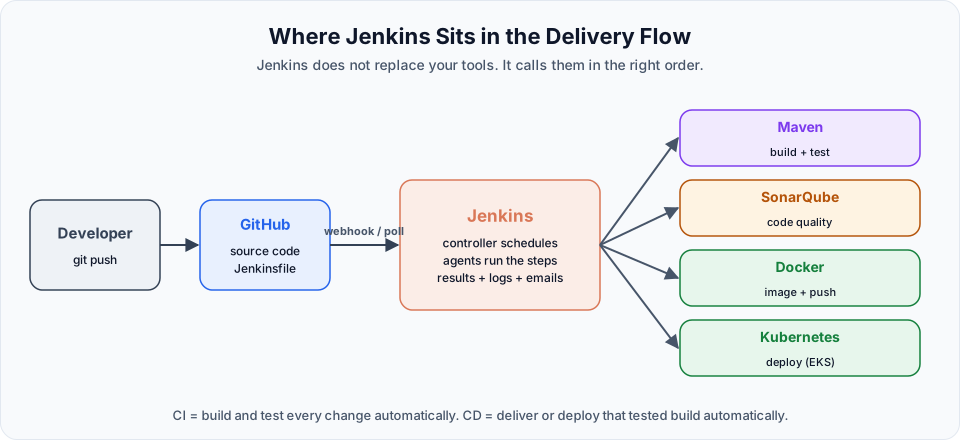
You push:        git push origin main
GitHub tells:    Jenkins (webhook) or Jenkins asks GitHub (Poll SCM)
The controller:  queues a build of the job and picks a node with a free executor
The agent:       clones the repo into a workspace, runs the steps (mvn, docker, kubectl)
Jenkins records: the result, the console log, archived artifacts, and sends notifications
The controller is the Jenkins server you log in to. It stores configuration, plugins and credentials, and schedules work. Agents are the machines that actually run builds. On a fresh install there is only the controller's built-in node, which is fine for learning. Real setups send all builds to agents.
Core vocabulary
| Term | Meaning |
|---|---|
| Controller | The central Jenkins server: web UI, configuration, plugins, credentials, scheduling. Older material calls it "master" |
| Agent | A machine or container that runs builds for the controller. Older material calls it "slave" |
| Node | Any machine that can run builds: the built-in node or an agent |
| Executor | A slot on a node that runs one build at a time |
| Label | A tag on agents (linux, docker) that jobs use to choose where to run |
| Job (project) | A configured task, such as "build this repository" |
| Freestyle project | A job configured with web forms |
| Pipeline | A job defined as code, in declarative or scripted syntax |
| Jenkinsfile | The file in your Git repository that contains the pipeline code |
| Stage / step | A named phase of a pipeline / a single command inside it |
| Build | One run of a job, numbered #1, #2, #3 |
| Workspace | The folder on a node where a build checks out code and works |
| Console output | The full log of a build |
| Artifact | A file a build keeps, such as a WAR or JAR |
| Trigger | What starts a build automatically: schedule, poll, webhook, upstream job |
| Plugin | An add-on that gives Jenkins new features |
| Credential | A secret (password, token, SSH key, kubeconfig) stored encrypted and referenced by ID |
| Shared library | Reusable pipeline code kept in its own Git repository |
Freestyle jobs and pipelines
Jenkins offers two main ways to define work, and this course teaches both in that order:
| Freestyle job | Pipeline | |
|---|---|---|
| Defined in | Web forms | Code (Jenkinsfile) |
| Versioned in Git | No | Yes |
| Stages and visual progress | No | Yes |
| Complex flows (parallel, conditions, approvals) | Limited | Built in |
| Typical use today | Small utility jobs, learning | Almost all CI/CD |
Freestyle jobs are the quickest way to understand what Jenkins does. Pipelines are how teams actually work, because the build process is reviewed and versioned like application code.
Where Jenkins fits with the other DevOps tools
Jenkins is the conductor. It does not replace any tool you learned earlier in the bootcamp; it calls them in the right order.
| Tool | How Jenkins uses it |
|---|---|
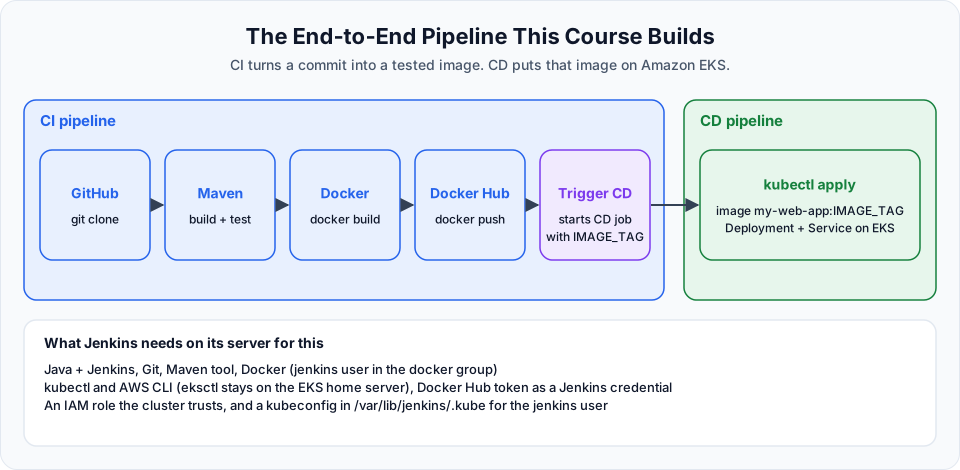
| Git and GitHub | Source of the code and the Jenkinsfile. Webhooks start builds on every push |
| Maven | Compiles, tests and packages the Java application into a JAR or WAR |
| Docker | Packages the build into an image and pushes it to Docker Hub |
| Kubernetes | Runs the image. Jenkins applies the manifests with kubectl |
| AWS | Hosts the Jenkins server (EC2) and the Kubernetes cluster (EKS) |
| Terraform and Ansible | Often run from Jenkins too, to create and configure infrastructure |
Jenkins is not the only CI/CD tool. GitHub Actions and GitLab CI/CD are popular, especially for teams whose code already lives on those platforms. The ideas transfer directly: triggers, stages, agents (runners), secrets and artifacts exist in all of them. Learning Jenkins well makes the others easy.
Jenkins versions in 2026
Jenkins ships two release lines. The weekly line gets new features every week. The LTS (long-term support) line is a stable release picked every few months and patched for security issues. Use LTS for anything that matters. At the time of writing, the current LTS is 2.580.1 (30 September 2026), and since 2.555.1 the LTS line requires Java 21 or Java 25. Java 17, which many older tutorials install, is no longer supported.
Jenkins is a high-value target
A Jenkins server holds credentials for your Git hosting, registries and cloud accounts, and can run any command on its agents. Keep it on the LTS line and update plugins regularly, never leave "Anyone can do anything" enabled, restrict port 8080 in your security group, and keep secrets only in the credential store.
What to focus on first
Do not try to learn every plugin. A small core covers almost everything in this course:
- Installing Jenkins and finding your way around Manage Jenkins
- Reading console output and the stage view
- Git checkout, the Maven tool and
shsteps - Triggers, especially GitHub webhooks
- Credentials, and why secrets never go into a job or a
Jenkinsfile - Declarative pipeline structure:
pipeline,agent,tools,stages,stage,steps,post
Start with Welcome to the Jenkins and move through the sidebar in order.
Official references
Written By: Shramik Masti
How is this guide?
Last updated on
Getting Started
A practical roadmap for learning Jenkins, from installing it on AWS to freestyle jobs, agents, pipelines, shared libraries and a full CI/CD pipeline with Docker and Amazon EKS.
Welcome to the Jenkins
What this Jenkins CI/CD course covers, how the lessons are set up on an AWS Linux server, and what you will be able to automate by the end.