
Welcome to the Jenkins
What this Jenkins CI/CD course covers, how the lessons are set up on an AWS Linux server, and what you will be able to automate by the end.
Building and deploying an application by hand is slow. You pull the code, run the build, copy the file, restart the server, and then do it all again for the next change. It is also repetitive and easy to get wrong, because a person under pressure will eventually skip a step. That is why teams hand this work to a CI/CD tool, and Jenkins is the one you will find in the largest number of companies.
This course teaches Jenkins from absolute scratch. You do not need any previous CI/CD experience. You only need to be comfortable on a Linux terminal and know the basics of Git and Maven, which earlier courses in this bootcamp cover.
What you will learn
The course moves in a straight line from "what is this tool" to a real end-to-end pipeline:
| Part | What you do |
|---|---|
| Foundations | Understand the build and deployment problem and what Jenkins is |
| Setup | Install Jenkins on a Linux server in AWS and find your way around the dashboard |
| Freestyle jobs | Create jobs that pull code from GitHub, build it with Maven, run on a schedule or on a push, and accept parameters |
| Security and agents | Create users, control what they can do, and run builds on a separate agent machine over SSH |
| Pipelines | Write a Jenkinsfile, run stages in parallel, reuse code with shared libraries, write scripted pipelines and send email notifications |
| End-to-end CI/CD | Build a Docker image, push it to a registry and deploy it to Amazon EKS from a Jenkins pipeline, then split CI and CD into separate pipelines |
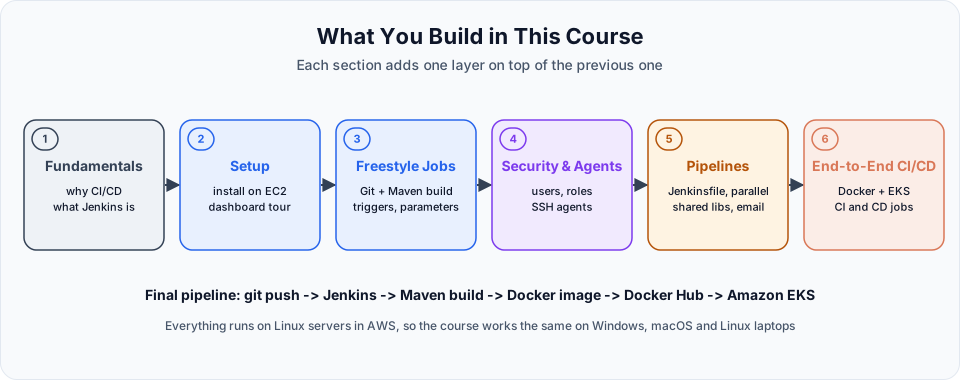
How the lessons are set up
Every demo runs on a Linux machine in the AWS cloud, not on a laptop. That choice keeps things the same for everyone: whether you use Windows, macOS or Linux at home, you connect to the same kind of server over SSH and type the same commands.
It also matches real life. In companies, Jenkins almost always runs on a Linux server, and the builds run on Linux agents. Getting comfortable there now pays off later.
Cloud resources cost money
A small EC2 instance for Jenkins is cheap, and some sizes fall inside the AWS free tier. The EKS cluster used in the last section is not free. Stop or delete what you are not using at the end of each session.
What you need before starting
- An AWS account and the ability to launch an EC2 instance and connect to it with SSH. The Linux course walks through this.
- Basic Git: clone, commit, push. See the Git course.
- Basic Maven: what
mvn packagedoes and where the JAR ends up. See the Maven course. - For the last section: Docker and Kubernetes basics from the Docker and Kubernetes courses.
How to get the most out of it
Do every demo yourself on your own server. Jenkins is a tool with a lot of screens and settings, and you only remember where things are after you have clicked through them a few times. When a build fails (and many will), read the console output from the top. Almost every Jenkins problem tells you what went wrong in that log.
Next, we look at the problem Jenkins solves: Understanding Build & Deployment.
Official references
Written By: Shramik Masti
How is this guide?
Last updated on
Introduction
Why Jenkins exists, how the controller, agents, jobs, pipelines and plugins fit together, the core Jenkins vocabulary, and where Jenkins sits among Git, Maven, Docker, Kubernetes and AWS.
Understanding Build & Deployment
Walk through every step between a developer's git push and a running application, see why doing them by hand fails at scale, and where CI/CD tools fit.