
What is Jenkins: A Beginner's Guide
Understand what Jenkins is, what CI and CD mean, why a Java-based open source automation server works with any tech stack, and how the course lab is set up.
We saw that building and deploying by hand is repetitive, slow and easy to get wrong. Jenkins is the tool that takes that work off your hands.
Jenkins in one sentence
Jenkins is a free, open source automation server that builds, tests and deploys your software automatically whenever the code changes.
It is usually called a CI/CD tool, and it is one of the most popular ones in the industry. It started in 2004 as a project called Hudson and was renamed Jenkins in 2011. Today it is maintained by a large open source community under the Continuous Delivery Foundation.
What CI and CD mean
CI/CD is an approach that automates building, testing and deploying your application every time a developer changes the source code.
| Term | Stands for | What it means in practice |
|---|---|---|
| CI | Continuous Integration | Every push is fetched, compiled and tested automatically, so broken code is found within minutes, not days |
| CD | Continuous Delivery | Every change that passes CI is packaged and ready to release. A person approves the final push to production |
| CD | Continuous Deployment | Same as delivery, but changes that pass all checks go to production with no manual approval |
You will hear "CD" used for both. The difference is only whether a human presses the final button. Most companies start with continuous delivery and move towards continuous deployment as their tests improve.
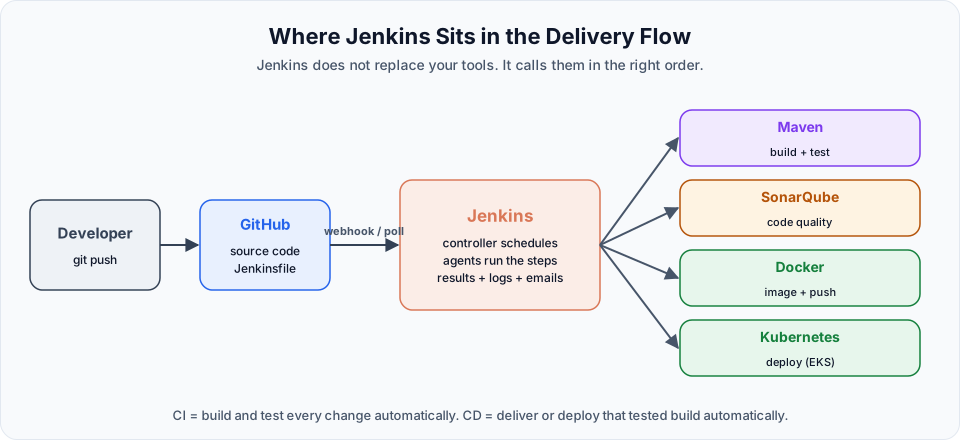
Why Jenkins works everywhere
It is written in Java. Jenkins runs on the Java Virtual Machine, so it works on Linux, Windows and macOS, and in a Docker container. The only real requirement is a supported Java version (Java 21 or 25 for current releases, which we install in the next section).
It does not care about your tech stack. Jenkins itself does not compile anything. It runs commands for you. So it can build an Angular or React frontend, a Java or .NET backend, a Python service, or a mobile app. If you can build it from a terminal, Jenkins can automate it.
It integrates with almost everything. Jenkins has close to two thousand plugins. With them it can:
- fetch code from GitHub, GitLab or Bitbucket,
- build with Maven, Gradle or npm,
- run code analysis with SonarQube,
- build and push Docker images,
- deploy to Kubernetes, or to servers on AWS or any other cloud,
- send emails or chat messages with the result.
Jenkins compared with other CI/CD tools
| Tool | Where it runs | Pipeline file | Notes |
|---|---|---|---|
| Jenkins | Your own server (self-hosted) | Jenkinsfile (Groovy) | Free, very flexible, huge plugin ecosystem. You maintain the server |
| GitHub Actions | GitHub's runners or your own | .github/workflows/*.yml | Tightly tied to GitHub |
| GitLab CI/CD | GitLab's runners or your own | .gitlab-ci.yml | Tightly tied to GitLab |
The biggest practical difference: with Jenkins, you run and look after the server yourself. That is more work, but it also means full control, no per-minute billing, and it works with any Git host. Many large companies still run their most important pipelines on Jenkins for those reasons.
How we will practise
You could install Jenkins on your own laptop, but this course does everything in the cloud:
- Create a Linux machine (an EC2 instance) in AWS.
- Connect to it over SSH.
- Install Java and Jenkins on it.
- Open the Jenkins web UI in your browser and work from there, from the first job to the end-to-end CI/CD pipeline.
This approach is the same whatever operating system you use at home, and it is how Jenkins is run in real teams. If you have never created an EC2 instance, the Linux course shows how: Launching a Linux VM on AWS.
Key words you will meet soon
| Term | Meaning |
|---|---|
| Job (project) | A task you configure in Jenkins, for example "build this repository" |
| Build | One run of a job. Each build has a number: #1, #2, #3 |
| Console output | The full log of a build. Your first stop when something fails |
| Workspace | The folder on the server where Jenkins checks out code and runs the build |
| Plugin | An add-on that gives Jenkins a new feature, such as Git or Maven support |
| Pipeline | A job written as code in a Jenkinsfile |
| Controller and agent | The main Jenkins server, and the extra machines that run builds for it |
You will use every one of these in the next few lessons.
Try It Yourself
- In one or two sentences, explain the difference between continuous delivery and continuous deployment to a friend.
- Open plugins.jenkins.io and search for plugins for three tools you already use (for example Git, Maven, Docker). Note the exact plugin names.
- If you do not have one yet, create an AWS account and set a billing alert, so you are ready for the installation lesson.
Official references
Written By: Shramik Masti
How is this guide?
Last updated on
Understanding Build & Deployment
Walk through every step between a developer's git push and a running application, see why doing them by hand fails at scale, and where CI/CD tools fit.
Jenkins Installation and Initial Setup
Launch an Ubuntu 24.04 EC2 instance, install Java 21 and the Jenkins LTS from the official repository, open port 8080, enter the initial admin password and finish the setup wizard.