
Understanding Build & Deployment
Walk through every step between a developer's git push and a running application, see why doing them by hand fails at scale, and where CI/CD tools fit.
Software development has two big halves. The first is writing the code. The second is giving that code life: turning it into something that runs on a server where real users can reach it. Developers spend most of their time on the first half. A DevOps engineer owns the second.
Before we touch Jenkins, it helps to be clear about what that second half actually contains, because Jenkins is only a tool for automating it.
What happens after git push
A developer writes code and pushes it to a repository such as GitHub or Bitbucket. From that moment, the build and deployment process starts. In a typical Java project it looks like this:
| Step | What happens | Typical tool | Required? |
|---|---|---|---|
| 1. Fetch the code | Get the latest commit from the repository | Git, GitHub, Bitbucket | Yes |
| 2. Compile and package | Compile the source, run unit tests, produce a JAR or WAR | Maven, Gradle | Yes |
| 3. Code quality analysis | Scan for bugs, code smells, coverage and security issues | SonarQube | Optional |
| 4. Store the artifact | Keep the JAR or WAR in a versioned store for later use or rollback | Nexus, Artifactory | Optional |
| 5. Build an image | Package the app and its runtime into a container image | Docker | If you use containers |
| 6. Deploy | Run the new version where users can reach it | Kubernetes, an application server | Yes |
Once step 6 is done, end users can access the new version of the application.
Steps 3 and 4 are optional in the sense that small teams sometimes skip them. In most companies they are standard, because they catch problems early and make rollbacks easy.
The exact tools change with the tech stack. A React app is built with npm, a .NET app with dotnet, a Python service may skip compilation and go straight to tests and an image. The shape of the flow stays the same.
Every step can be done by hand
None of these steps needs a special tool. You could do all of them yourself:
git clone https://github.com/<your-user>/<your-app>.git   # 1. fetch
cd <your-app>
mvn clean package                                          # 2. compile, test, package
mvn sonar:sonar                                            # 3. code analysis (needs a SonarQube server)
mvn deploy                                                 # 4. upload artifact (needs Nexus settings)
docker build -t <your-user>/<your-app>:1.0 .               # 5. image
docker push <your-user>/<your-app>:1.0
kubectl apply -f deployment.yaml                           # 6. deploy
For one change, on one environment, that is fine. Now think about a real project.
Why manual does not scale
Real projects do not have one environment. They usually have at least four:
| Environment | Who uses it |
|---|---|
| Development | Developers check that their change works with the rest of the code |
| Testing / QA | Testers run functional and regression tests |
| Pre-production (staging) | A copy of production for final checks |
| Production | Real users |
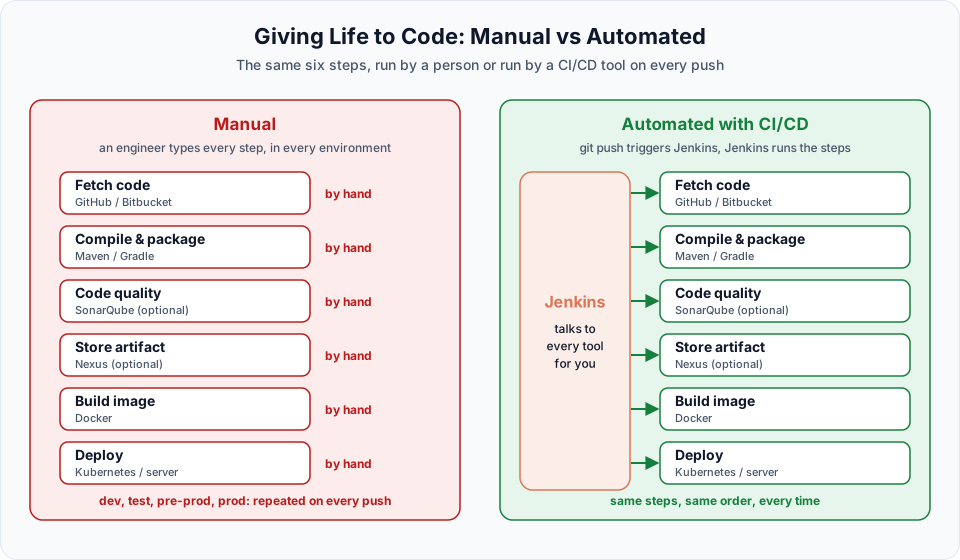
Every time any developer pushes code, some or all of the six steps need to run again, often for more than one environment. Done by hand, that creates three problems:
- Repetitive. The same commands, many times a day. Engineers spend their time babysitting builds instead of improving things.
- Error prone. Someone forgets to run the tests, builds from the wrong branch, or deploys an old JAR. These mistakes are hard to spot until users complain.
- Slow. A change waits until someone is free to build and deploy it. Feedback to the developer comes hours or days later.
What we need instead
We need a tool that starts the whole process the moment code is pushed, and then:
- takes the code from GitHub,
- talks to Maven (or Gradle, npm, and so on) to compile, test and package it,
- talks to SonarQube and Nexus when the project uses them,
- talks to Docker to build and push an image,
- talks to Kubernetes to deploy the new version,
- and tells the team clearly when any step fails.
That category of tool is called a CI/CD tool. The well-known ones are Jenkins, GitHub Actions and GitLab CI/CD, and there are many others (Azure Pipelines, CircleCI, Argo Workflows, Tekton). They all solve the same problem. Jenkins is open source, runs anywhere, and has been the most widely used option for over a decade, so it is the one this course teaches. Once you understand Jenkins, the others are quick to learn.
Automation does not remove the steps
CI/CD does not make the six steps disappear. It runs exactly the same steps you would run by hand, in the same order, every single time. That consistency is the real value.
Next, let us see what Jenkins actually is: What is Jenkins: A Beginner's Guide.
Try It Yourself
- Pick a project you have built before (any language). Write down the exact commands you run to go from a fresh clone to a running application.
- Mark which of those commands match the six steps in the table above, and which steps your project skips.
- Estimate how long the full manual process takes you. Multiply it by 10 pushes a day and 4 environments.
- List two mistakes you or a teammate have made while building or deploying by hand. Keep the list. By the end of this course, each one should have an automated answer.
Official references
Written By: Shramik Masti
How is this guide?
Last updated on
Welcome to the Jenkins
What this Jenkins CI/CD course covers, how the lessons are set up on an AWS Linux server, and what you will be able to automate by the end.
What is Jenkins: A Beginner's Guide
Understand what Jenkins is, what CI and CD mean, why a Java-based open source automation server works with any tech stack, and how the course lab is set up.