
What is Maven and What it can do
Learn what Apache Maven is, why it is called a project management tool and not only a build tool, and the four jobs it does for every Java project.
Now that the need for a build tool is clear, let us put a name and a shape to it. Apache Maven is a free, open source build automation and dependency management tool for Java projects, developed and maintained by the Apache Software Foundation. "Maven" and "Apache Maven" mean the same thing. The command you type is mvn.
Maven is often described as more than a build tool. Its own documentation calls it a "project management and comprehension tool", because it does not just compile code. It also manages the project's structure, its libraries, its tests, its version and its packaging, all from one description file.
The core idea: describe, do not script
With older tools like Ant you wrote step by step instructions: compile this folder, copy that file, create this JAR. Maven works the other way round. You describe your project in a file called pom.xml (who it is, what it depends on, how it should be packaged), and Maven already knows the standard steps to build it.
That approach is called convention over configuration. If you follow Maven's conventions (put code in src/main/java, tests in src/test/java), you write almost no build configuration at all.
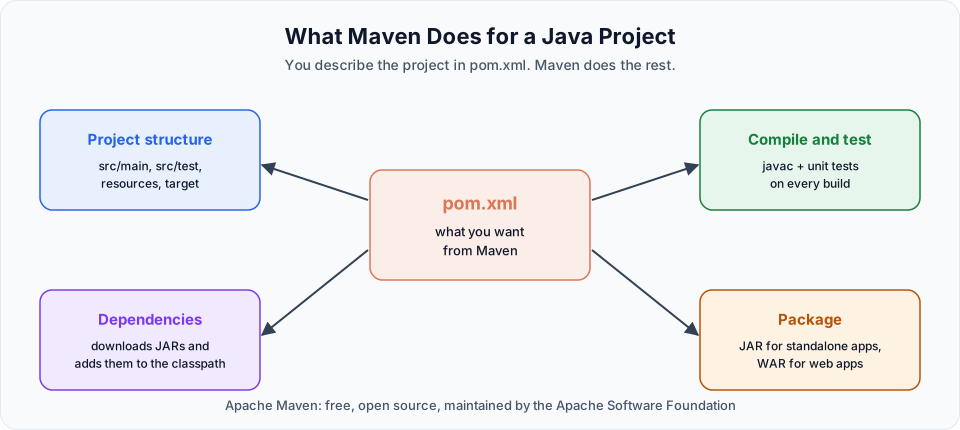
What Maven can do for you
1. Give every project the same structure
Maven gives a fixed project layout. Application code, resources, test code, test resources and build output each have one agreed place:
my-app/
├── pom.xml
└── src/
    ├── main/
    │   ├── java/        <- application code
    │   └── resources/   <- config files
    └── test/
        ├── java/        <- unit tests
        └── resources/   <- test config
Because every Maven project looks like this, you can open any Maven project from any company and immediately know where things are. You will generate this structure yourself in Maven Java Project.
2. Manage dependencies
You list the libraries you need in pom.xml. Maven downloads the right JAR files, also downloads the libraries those JARs need, and adds everything to the build path. No browser, no manual copying. This is covered in Maven Dependencies.
3. Compile and run the tests
Maven compiles your source code, then compiles and runs every unit test in src/test/java. If a test fails, the build fails, so broken code does not move forward.
4. Package the application
Finally Maven packages the compiled code into a JAR (for a standalone app or a library) or a WAR (for a web app that runs in Tomcat). That file is what you deploy, or what you copy into a Docker image later in the bootcamp.
Maven at a glance
| Question | Answer |
|---|---|
| Who makes it? | The Apache Software Foundation |
| Cost | Free and open source (Apache License 2.0) |
| What language is it for? | Mainly Java, also Kotlin and other JVM languages |
| What does it need to run? | A JDK. Maven 3.9 and 3.10 run on Java 8 or newer, though you should use Java 17 or 21 |
| Main file | pom.xml (Project Object Model) |
| Command | mvn |
| Main alternative | Gradle |
Where Maven fits in DevOps
As a DevOps engineer you may not write much Java, but you will run Maven all the time:
- A Jenkins or GitHub Actions pipeline runs
mvn clean packageormvn verifyon every commit - A Dockerfile often has a build stage that runs Maven and copies the JAR into a smaller runtime image
- When a pipeline fails, you need to read Maven's output to tell whether it was a compile error, a failing test or a network problem downloading a dependency
So understanding Maven well makes you much faster at debugging CI/CD later in the Jenkins course.
Try It Yourself
- Open the GitHub page of any well known Java project (for example Spring PetClinic) and find its
pom.xml. Note the folders next to it. - In that
pom.xml, find the<dependencies>section and count how many libraries it declares. - Write down, in your own words, the four things Maven does for a project. Check them against the diagram above.
Official references
Written By: Shramik Masti
How is this guide?
Last updated on
Why and what is build tool
Understand the steps between writing Java code and running it on a server, why doing them by hand does not scale, and how a build tool like Maven automates both building and dependency management.
Maven Installation Guide
Choose how you will practise Maven in this course, either on your own Windows machine or on a Linux VM in AWS, and see what each setup needs before you install.