
Maven Dependencies
Add a third party library such as spring-core to pom.xml, watch Maven download it from Maven Central, and learn dependency scopes, transitive dependencies and mvn dependency:tree.
Almost no real application is written from scratch. You use frameworks and libraries written by other teams: Spring for application structure, Hibernate for databases, JUnit for testing, a Kafka or Redis client for messaging. Each of these is someone else's code, packaged as one or more JAR files full of classes, interfaces and annotations you want to use.
Without Maven you would search the internet, download those JARs and add them to your build path by hand (we saw that pain in Why and what is build tool). With Maven you write a few lines in pom.xml and Maven does the rest. Those libraries are called dependencies: things your project depends on to compile or run.
Step 1: find the dependency
Search for the library on a Maven repository search site. Two common ones:
| Site | What it is |
|---|---|
| central.sonatype.com | The official search for Maven Central, run by Sonatype, the steward of Central |
| mvnrepository.com | A popular third party index of Central and other repositories. The video uses this one |
In the demo we search for spring-core, open it, pick version 6.2.8, and copy the Maven snippet:
<!-- https://mvnrepository.com/artifact/org.springframework/spring-core -->
<dependency>
    <groupId>org.springframework</groupId>
    <artifactId>spring-core</artifactId>
    <version>6.2.8</version>
</dependency>
A dependency is identified by the same GAV coordinates you learned in Maven Terminologies: org.springframework:spring-core:6.2.8.
Picking a version
Prefer the newest stable release of the line your project uses. Skip versions with -M1, -RC1 or -SNAPSHOT, which are milestones, release candidates and development builds. Both search sites also show known vulnerabilities for each version, which is worth a glance before you choose.
Step 2: add it to pom.xml
Open telusko-app/pom.xml in any editor or IDE. Find the <dependencies> section, which already contains JUnit, and paste the new <dependency> inside it, next to the existing one:
<dependencies>
  <dependency>
    <groupId>junit</groupId>
    <artifactId>junit</artifactId>
    <version>3.8.1</version>
    <scope>test</scope>
  </dependency>

  <!-- https://mvnrepository.com/artifact/org.springframework/spring-core -->
  <dependency>
    <groupId>org.springframework</groupId>
    <artifactId>spring-core</artifactId>
    <version>6.2.8</version>
  </dependency>
</dependencies>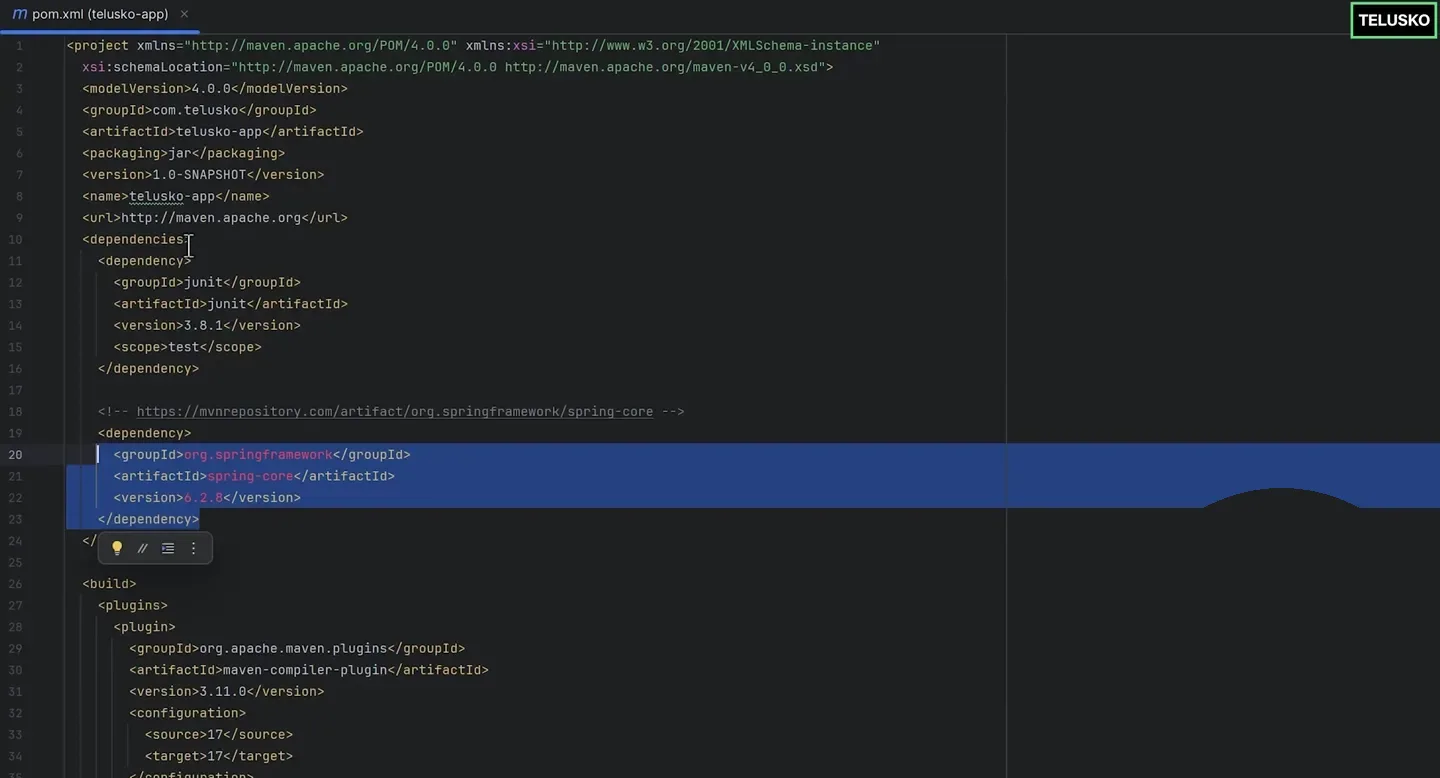
The spring-core dependency pasted inside <dependencies>, right after JUnit. (This is the archetype 1.0 POM. If you used archetype 1.5, your JUnit entries look different, and that is fine.)
The meaning of these lines is simply: "Maven, this project depends on spring-core 6.2.8, please get it for me." Save the file.
Spring 6 needs Java 17
Spring Framework 6 is compiled for Java 17. If your POM still compiles for Java 8, or your JDK is older than 17, the build fails as soon as your code uses Spring classes. Make sure your project targets Java 17 or newer, as set up in Maven Goals.
Step 3: build and watch the download
From the project folder:
mvn clean
mvn package
(or mvn clean package in one go). Near the top of the output you now see lines like:
Downloading from central: https://repo.maven.apache.org/maven2/org/springframework/spring-core/6.2.8/spring-core-6.2.8.pom
Downloaded from central: https://repo.maven.apache.org/maven2/org/springframework/spring-core/6.2.8/spring-core-6.2.8.jar (2.0 MB at ...)
...
[INFO] BUILD SUCCESS
Maven fetched the JAR from Maven Central and put it on the project's classpath. If you open the project in an IDE, you can now import org.springframework... classes and they compile. You did not download or copy anything yourself.
You can add as many dependencies as you need: Spring, Spring Security, Hibernate, JUnit, Kafka, Redis clients. Each one is another <dependency> block inside the same <dependencies> element.
Transitive dependencies: the ones you did not ask for
Libraries have their own dependencies. spring-core 6.2.x needs spring-jcl (Spring's logging bridge). You never declared it, but Maven reads spring-core's own POM, sees that requirement, and downloads it too. These are transitive dependencies.
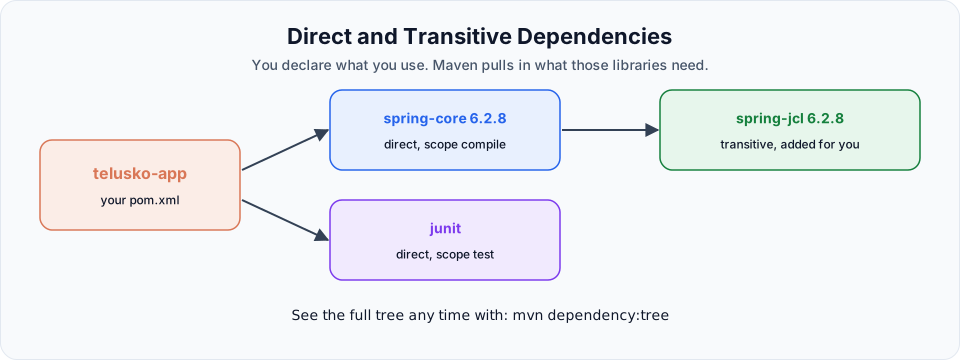
See the full tree at any time:
mvn dependency:tree[INFO] com.telusko:telusko-app:jar:1.0-SNAPSHOT
[INFO] +- junit:junit:jar:3.8.1:test
[INFO] \- org.springframework:spring-core:jar:6.2.8:compile
[INFO] \- org.springframework:spring-jcl:jar:6.2.8:compileThis command is your best friend when two libraries pull in different versions of the same JAR. When that happens Maven picks the version nearest to your project in the tree. If you need a specific version, declare it directly in your own POM, and that declaration wins.
Dependency scopes
The <scope> element controls where a dependency is available. If you leave it out, the scope is compile.
| Scope | Available when | Packaged in WAR / fat JAR? | Typical example |
|---|---|---|---|
compile (default) | Compiling, testing, running | Yes | Spring, Jackson |
test | Only compiling and running tests | No | JUnit, Mockito |
provided | Compiling and testing. The runtime environment supplies it | No | Servlet API (Tomcat already has it) |
runtime | Testing and running, not compiling | Yes | JDBC drivers such as MySQL Connector/J |
system | Like provided, but from a file path on your disk | No | Avoid. Legacy only |
import | Only for importing a BOM in <dependencyManagement> | Not applicable | Spring Boot or JUnit BOMs |
That is why JUnit has <scope>test</scope>: you need it to run tests, but it must never ship inside your production JAR.
Common problems
Try It Yourself
- Add
spring-core6.2.8 totelusko-app, runmvn clean package, and find theDownloading from centrallines for it. - Run
mvn dependency:treeand identify the transitive dependency spring-core brought in. - Add
com.mysql:mysql-connector-jwith<scope>runtime</scope>and runmvn dependency:treeagain. Note the scope shown at the end of the line. - Introduce a typo in the version (for example
6.2.88), build, and read the error. Fix it.
Official references
- Apache Maven: Introduction to the Dependency Mechanism
- Apache Maven: Dependency Plugin, dependency:tree
- Maven Central search
Written By: Shramik Masti
How is this guide?
Last updated on
Maven Web App
Generate a Java web application with the maven-archetype-webapp template, see how its structure and packaging differ from a JAR project, and build a deployable WAR file with mvn clean package.
Maven Repositories
Understand the local, central and remote Maven repositories, prove that Maven downloads a library only once by watching the build output, and explore the .m2 folder on your machine.