
Effective POM
Learn why a nearly empty pom.xml can still compile, test and package a project, what the Super POM and effective POM are, and how to view the effective POM in IntelliJ or with mvn help:effective-pom.
Here is a puzzle. Our pom.xml never mentions the compiler plugin's default version, the Surefire plugin, the JAR plugin, Maven Central's URL, or the fact that code lives in src/main/java. Yet Maven knows all of it. Where does that knowledge come from?
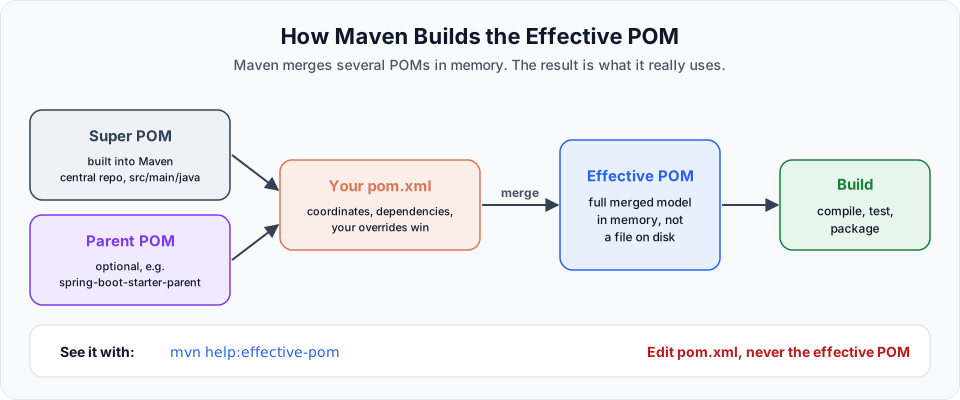
The answer: Maven never builds from your pom.xml alone. It combines your POM with built-in defaults, and the combined result is called the effective POM. That is the model Maven really uses to build your project.
Where the extra settings come from
| Layer | What it contributes |
|---|---|
| Super POM | Built into Maven itself. Every POM inherits from it automatically. It defines Maven Central as the repository, the standard folders (src/main/java, src/test/java, target), and default settings such as the output folder names |
| Default lifecycle bindings | Maven also knows which plugin (and which version) runs for each phase of a jar or war project: compiler, surefire, jar and so on. That is why those plugins show up even though you never declared them |
| Parent POM (optional) | If your POM has a <parent>, its settings are inherited too. Spring Boot projects use spring-boot-starter-parent |
| Your pom.xml | Your coordinates, dependencies and overrides. Where your POM sets something, your value wins |
| Active profiles and settings | Profiles activated from the command line or settings.xml can add or change values as well |
Maven merges all of these in memory. The result is long: a few lines of your POM become a few hundred lines of effective POM.
Two corrections to the video
The video calls the effective POM "a file that gets created" and also calls it "a super POM or parent POM". More precisely: the effective POM is computed in memory every time Maven runs. It is not saved anywhere unless you ask a tool to show or export it. And the Super POM is just one input to it, the built-in parent of every project. The effective POM is the final merged result.
View it in IntelliJ IDEA
Right click pom.xml (or anywhere in it), then choose Maven > Show Effective POM. IntelliJ opens a read-only file such as MavenApp-effective-pom.xml.
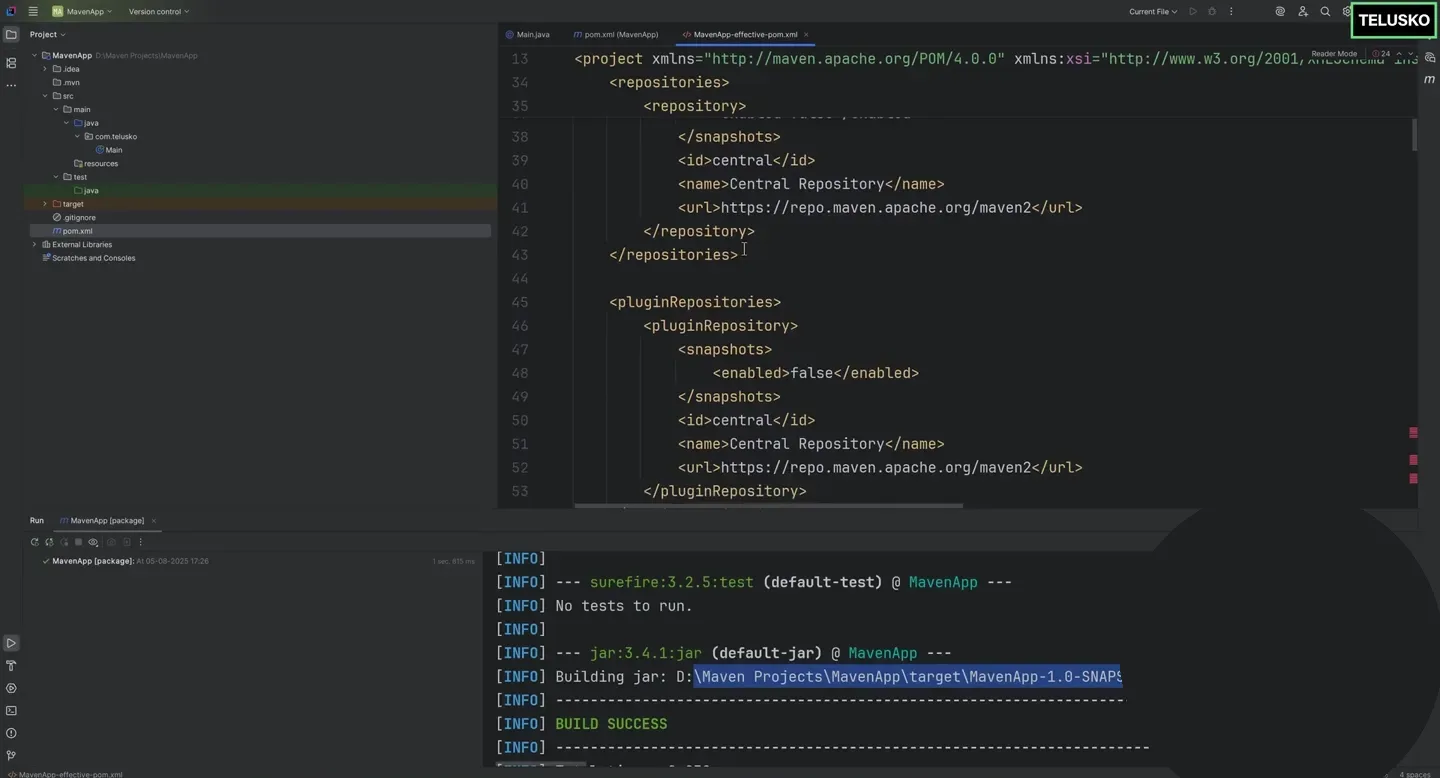
The effective POM in IntelliJ. The repositories and pluginRepositories entries pointing to Maven Central came from the Super POM, not from our pom.xml.
Scroll through it and you will find:
<repositories>and<pluginRepositories>pointing tohttps://repo.maven.apache.org/maven2<build>withsourceDirectory,outputDirectory(target/classes),testSourceDirectoryandfinalName(${artifactId}-${version})<plugins>with versions formaven-clean-plugin,maven-resources-plugin,maven-compiler-plugin,maven-surefire-plugin,maven-jar-plugin,maven-install-plugin,maven-deploy-pluginand more
Eclipse has the same view as a tab at the bottom of the POM editor, which you will see in Maven Project in Eclipse IDE.
View it from the terminal
No IDE needed. The Help plugin prints it:
mvn help:effective-pomUseful variations:
| Command | What it does |
|---|---|
mvn help:effective-pom | Print the effective POM to the console |
mvn help:effective-pom -Doutput=effective-pom.xml | Save it to a file so you can search it |
mvn help:effective-pom -Dverbose=true | Add a comment on each line showing which POM it came from. Very helpful for "where does this value come from?" questions |
Why this matters in real work
- Debugging. When a build uses a plugin version or setting you did not expect, the effective POM tells you the real value. With
-Dverbose=trueit also tells you who set it. - Pinning versions. Default plugin versions change between Maven releases. Teams that want identical builds everywhere declare plugin versions explicitly in their POM (or use the Maven Wrapper), and the effective POM shows whether that worked.
- Understanding Spring Boot. A Spring Boot POM looks short, but the parent brings in hundreds of managed dependency versions. The effective POM shows them all.
Edit pom.xml, never the effective POM
The effective POM is output, not input. Changes you make to the IntelliJ view or to an exported file do nothing. Make every change in pom.xml and look at the effective POM again.
Try It Yourself
- Run
mvn help:effective-pom -Doutput=effective-pom.xmlintelusko-appand count the lines compared with yourpom.xml. - Search the file for
maven-surefire-pluginand note the version Maven will use. - Change
maven.compiler.release(orsource/target) in your POM, regenerate the effective POM, and find your new value. - Run
mvn help:effective-pom -Dverbose=trueand find a line whose comment points to the Super POM.
Official references
- Apache Maven: Introduction to the POM (Super POM and effective POM)
- Apache Maven: The Super POM
- Apache Maven: help:effective-pom
Written By: Shramik Masti
How is this guide?
Last updated on
Maven in IntelliJ IDE
Create a Maven project in IntelliJ IDEA, find the same standard structure you built from the terminal, and run clean, compile, test and package from the Maven tool window.
Maven Project in Eclipse IDE
Create a Maven project from the quickstart archetype in Eclipse, explore Maven Dependencies and the POM editor tabs, add a dependency, and use Maven Update Project to keep Eclipse in sync.