
Maven POM.xml file
Read a pom.xml from top to bottom, understand the project root, coordinates, dependencies, build plugins and properties, and use ${property} placeholders to avoid repeating values.
Everything you want Maven to do for you, you tell it through one file: pom.xml. POM stands for Project Object Model. It is an XML file that describes the project (its name, version and packaging), what it depends on, and how it should be built. If you understand the POM, you understand Maven.
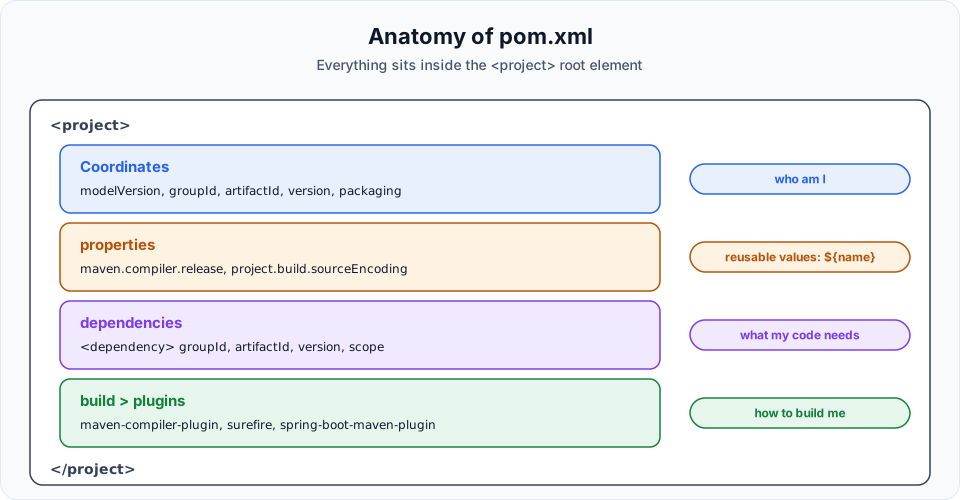
The full example
Here is the telusko-app POM as it looks after the previous lessons, with one Spring dependency and the compiler plugin configured through properties:
<project xmlns="http://maven.apache.org/POM/4.0.0"
         xmlns:xsi="http://www.w3.org/2001/XMLSchema-instance"
         xsi:schemaLocation="http://maven.apache.org/POM/4.0.0 https://maven.apache.org/xsd/maven-4.0.0.xsd">
  <modelVersion>4.0.0</modelVersion>

  <!-- Who am I -->
  <groupId>com.telusko</groupId>
  <artifactId>telusko-app</artifactId>
  <packaging>jar</packaging>
  <version>1.0-SNAPSHOT</version>
  <name>telusko-app</name>

  <!-- Reusable values -->
  <properties>
    <maven.compiler.source>17</maven.compiler.source>
    <maven.compiler.target>17</maven.compiler.target>
    <project.build.sourceEncoding>UTF-8</project.build.sourceEncoding>
  </properties>

  <!-- What my code needs -->
  <dependencies>
    <dependency>
      <groupId>junit</groupId>
      <artifactId>junit</artifactId>
      <version>3.8.1</version>
      <scope>test</scope>
    </dependency>
    <dependency>
      <groupId>org.springframework</groupId>
      <artifactId>spring-core</artifactId>
      <version>6.2.8</version>
    </dependency>
  </dependencies>

  <!-- How to build me -->
  <build>
    <plugins>
      <plugin>
        <groupId>org.apache.maven.plugins</groupId>
        <artifactId>maven-compiler-plugin</artifactId>
        <version>3.11.0</version>
        <configuration>
          <source>${maven.compiler.source}</source>
          <target>${maven.compiler.target}</target>
        </configuration>
      </plugin>
    </plugins>
  </build>
</project>
Now let us walk through it.
The project root
Everything sits inside <project>, the root element. The xmlns and xsi:schemaLocation attributes point to the POM's XML schema, which lets your IDE validate the file and autocomplete tags. You rarely touch them.
modelVersion
<modelVersion>4.0.0</modelVersion> is the version of the POM format itself. For Maven 2 and 3 it is always 4.0.0. It is mandatory, and you never change it.
Coordinates: who this project is
| Element | Value | Meaning |
|---|---|---|
groupId | com.telusko | Organisation, reverse domain name. Also the usual root package, for example com.telusko.webproject |
artifactId | telusko-app | Project name, used for the output file name |
packaging | jar | Output format. jar is the default, war for web apps, pom for parent projects |
version | 1.0-SNAPSHOT | Still in development. Change to a release like 1.0.0 when it is final |
name | telusko-app | A human friendly display name. Optional. The archetype copies the artifactId into it |
groupId, artifactId and version together are the coordinates (GAV). Together with modelVersion, they are the only elements a POM must have.
dependencies: what the code needs
Each <dependency> inside <dependencies> is one library Maven should fetch from the repository and put on the classpath, as you did in Maven Dependencies. Spring Boot, JUnit, Kafka clients: whatever your code imports from outside the JDK goes here. The optional <scope> says where the library is needed (test for JUnit).
build and plugins: how to build
<build> controls how the project is built. Inside it, <plugins> lists plugins and their configuration. Plugins do the real work in Maven: the compiler plugin compiles, the Surefire plugin runs tests, the JAR plugin packages. Maven already includes these with default settings (you will see where in Effective POM), so you only list a plugin when you want to change its version or configuration. Here we configure the compiler plugin to compile for Java 17.
The structure is always <build> then <plugins> then one <plugin> per plugin.
properties: define once, reuse everywhere
Hard coding 17 in the plugin works, but then every Java upgrade means hunting through the POM. <properties> lets you define a value once and refer to it anywhere with ${name}:
<properties>
  <maven.compiler.source>17</maven.compiler.source>
</properties>
...
<source>${maven.compiler.source}</source>
Change the property to 21 and every place that uses it follows.
Do not forget the dollar sign
In the video the placeholders are typed as {maven.compiler.source} without the $. Maven then passes the literal text {maven.compiler.source} to the compiler and the build fails with an "invalid source release" style error. The correct syntax is always ${maven.compiler.source}.
Two more things about these particular properties:
maven.compiler.sourceandmaven.compiler.targetare the user properties the compiler plugin reads by default. Defining them in<properties>is enough: you can delete the whole<configuration>block and the plugin still picks them up.- On JDK 9 and newer, the single property
maven.compiler.releaseis the modern choice. It replaces both and also stops you from accidentally using APIs newer than the target Java version:
<properties>
  <maven.compiler.release>17</maven.compiler.release>
</properties>
You can define your own properties too, for example <spring.version>6.2.8</spring.version>, and use ${spring.version} in several Spring dependencies so they always stay in step.
Other elements you will meet
| Element | Purpose | Where in this course |
|---|---|---|
<parent> | Inherit configuration from another POM | Spring Boot projects use spring-boot-starter-parent |
<dependencyManagement> | Fix versions centrally without adding the dependency | Spring Boot and JUnit BOMs |
<build><finalName> | Change the output file name | The webapp project |
<modules> | List sub-projects in a multi-module build | Beyond this course |
<repositories> | Extra repositories for this project | Usually set in settings.xml instead |
Try It Yourself
- Open your
telusko-app/pom.xmland label each block with one of: coordinates, properties, dependencies, build. - Move the Java version into
<properties>and reference it with${...}. Build withmvn clean compileto confirm it works. - Remove the
$from one placeholder on purpose, build, and read the error. Fix it. - Replace
sourceandtargetwith a singlemaven.compiler.releaseproperty, remove the<configuration>block, and build again. - Add a
<spring.version>property and use it for the spring-core version.
Official references
- Apache Maven: Introduction to the POM
- Apache Maven: POM Reference
- Apache Maven: Compiler Plugin, setting the release
Written By: Shramik Masti
How is this guide?
Last updated on
Maven Repositories
Understand the local, central and remote Maven repositories, prove that Maven downloads a library only once by watching the build output, and explore the .m2 folder on your machine.
Maven in IntelliJ IDE
Create a Maven project in IntelliJ IDEA, find the same standard structure you built from the terminal, and run clean, compile, test and package from the Maven tool window.