
Maven Repositories
Understand the local, central and remote Maven repositories, prove that Maven downloads a library only once by watching the build output, and explore the .m2 folder on your machine.
When you add a dependency to pom.xml, the JAR has to come from somewhere, and it has to be stored somewhere. Those places are repositories: storage locations for artifacts (JARs, WARs, POMs and plugins), organised by their coordinates. Maven works with three kinds.
| Repository | Where it lives | Who maintains it | What it holds |
|---|---|---|---|
| Local | A folder on your machine: ~/.m2/repository | Maven, automatically | A cache of everything you downloaded, plus what you install yourself |
| Central | https://repo.maven.apache.org/maven2 | The Maven community (hosted by Sonatype) | Millions of open source libraries and plugins |
| Remote (private) | A server inside your company, for example Nexus or JFrog Artifactory | Your company | Internal libraries, plus a cached copy of Central |
Officially, Maven calls every repository that is not on your machine "remote", so Central is technically a remote repository too. In everyday talk, as in this course, "remote" usually means a company's private repository.
How Maven finds a dependency
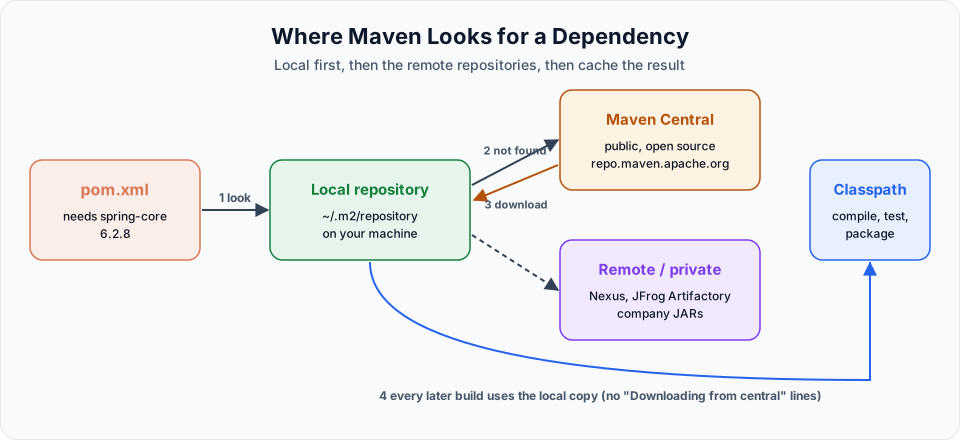
- You declare, for example,
spring-coreinpom.xml. - Maven checks the local repository first.
- If it is not there, Maven downloads it from Central (or from your company's repository if one is configured) into the local repository.
- From the local repository it goes onto your project's classpath.
- Next time, Maven finds it locally and does not download it again.
The local repository is per user, not per project. Once spring-core 6.2.8 is in ~/.m2, every project on your machine reuses that one copy.
Seeing it happen
On the Linux VM, the demo project already has the compiler plugin and spring-core in its POM. Watch the output carefully on each run.
First build after adding a dependency:
mvn packageThe output is full of download lines:
Downloading from central: https://repo.maven.apache.org/maven2/org/codehaus/plexus/plexus-compiler-api/2.13.0/...
Downloaded from central: https://repo.maven.apache.org/maven2/...
...
[INFO] BUILD SUCCESS
Second build, nothing changed in the POM:
mvn clean
mvn package
BUILD SUCCESS again, but no Downloading from central lines this time. Everything came from the local repository.
Add a new dependency (the demo adds spring-security-web 6.5.0 with vi pom.xml) and build again:
mvn clean packageThe download lines come back, but only for the new library and its transitive dependencies. Run it once more and they disappear again. That is the local repository cache at work.
Inside the local repository
The local repository is a hidden folder in your home directory.
cd ~
ls -la            # .m2 is hidden, -a shows it
cd ~/.m2/repository
ls -la
cd %USERPROFILE%\.m2\repository
dirThe folder is C:\Users\<your-name>\.m2\repository.
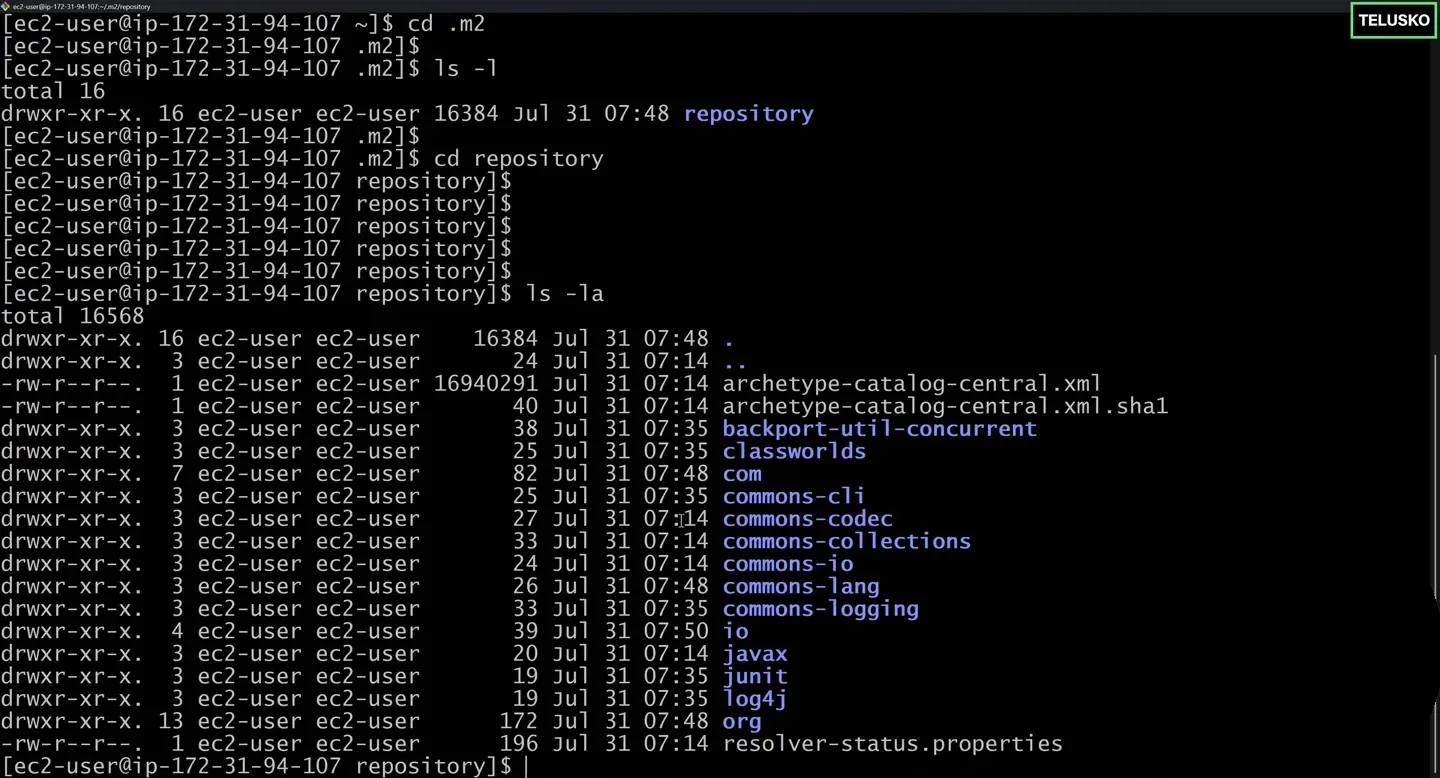
The local repository on the VM. Each top level folder is the first part of a groupId.
Artifacts are stored by their coordinates, with the dots of the groupId turned into folders:
~/.m2/repository/org/springframework/spring-core/6.2.8/
├── spring-core-6.2.8.jar
├── spring-core-6.2.8.pom
└── ... checksum and metadata files
That is the same layout as on repo.maven.apache.org, which is why Maven can treat both the same way.
Deleting .m2 is safe
Everything in ~/.m2/repository that came from Central can be downloaded again. If you suspect a corrupted download (strange invalid LOC header or zip file is empty errors), delete that artifact's folder, or the whole repository folder, and build again. Only things you installed yourself with mvn install would need to be rebuilt.
Remote repositories in companies
Large companies do not want every developer and every CI server downloading straight from the internet. They run a repository manager such as Sonatype Nexus or JFrog Artifactory, which:
- Hosts the company's own private libraries (shared code that must not be public)
- Proxies and caches Maven Central, so builds are faster and still work if the internet is slow
- Lets security teams block libraries with known vulnerabilities
To make Maven use it, you configure a mirror in ~/.m2/settings.xml (not in the project's POM), so every project on that machine uses it:
<settings>
  <mirrors>
    <mirror>
      <id>company-nexus</id>
      <name>Company Nexus</name>
      <url>https://nexus.example.com/repository/maven-public/</url>
      <mirrorOf>central</mirrorOf>
    </mirror>
  </mirrors>
</settings>
mirrorOf=central means "whenever you would go to Central, go here instead". Credentials for the server go in a <servers> section of the same file, never in pom.xml, because the POM is committed to Git. You publish your own artifacts to such a repository with mvn deploy, covered in the lifecycle lesson.
Try It Yourself
- Run
mvn clean packagetwice intelusko-appand compare the output. Point out which lines disappeared. - Find spring-core in your local repository and list the files in its version folder.
- Add a new dependency (for example
com.google.guava:guava), build, and find its folder in~/.m2/repository/com/google/guava. - Delete the
~/.m2/repository/org/springframework/spring-corefolder and build again. Watch Maven download it again. - Run
mvn -o package(offline mode) after a successful build and confirm it still works without contacting Central.
Official references
- Apache Maven: Introduction to Repositories
- Apache Maven: Settings reference (localRepository, mirrors, servers)
- Apache Maven: Using Mirrors for Repositories
Written By: Shramik Masti
How is this guide?
Last updated on
Maven Dependencies
Add a third party library such as spring-core to pom.xml, watch Maven download it from Maven Central, and learn dependency scopes, transitive dependencies and mvn dependency:tree.
Maven POM.xml file
Read a pom.xml from top to bottom, understand the project root, coordinates, dependencies, build plugins and properties, and use ${property} placeholders to avoid repeating values.