
Maven Web App
Generate a Java web application with the maven-archetype-webapp template, see how its structure and packaging differ from a JAR project, and build a deployable WAR file with mvn clean package.
So far our project produced a JAR, which is right for a standalone program. A classic Java web application is different: it has web pages, a deployment descriptor, and it runs inside a servlet container such as Apache Tomcat. That kind of application is packaged as a WAR file. Maven creates and builds it with the same commands you already know. Only the template changes.
Generate the web project
The command is the same as before, with two changes: a new artifactId and the webapp archetype instead of quickstart.
mvn archetype:generate -DgroupId=com.telusko -DartifactId=telusko-web-app -DarchetypeArtifactId=maven-archetype-webapp -DarchetypeVersion=1.5 -DinteractiveMode=false| Parameter | Value | What changed |
|---|---|---|
groupId | com.telusko | Same company |
artifactId | telusko-web-app | New project name, so the WAR will be telusko-web-app.war |
archetypeArtifactId | maven-archetype-webapp | Web template instead of quickstart |
archetypeVersion | 1.5 | The video uses 1.0. Both work. 1.5 is the current template version |
interactiveMode | false | No prompts |
Run it in the same parent folder as telusko-app (Windows) or in your home folder on the VM. In PowerShell, remember to quote each -D argument.
What is inside
telusko-web-app/
├── .mvn/                       <- small Maven config folder (template 1.5 only)
├── pom.xml
└── src/
    └── main/
        ├── resources/              <- config files (template 1.0 creates this)
        └── webapp/
            ├── index.jsp           <- a sample "Hello World!" page
            └── WEB-INF/
                └── web.xml         <- deployment descriptor
Compare it with the quickstart project:
| Quickstart project | Webapp project | |
|---|---|---|
| Main new folder | src/main/java | src/main/webapp |
| Sample file | App.java | index.jsp |
| Deployment descriptor | none | WEB-INF/web.xml |
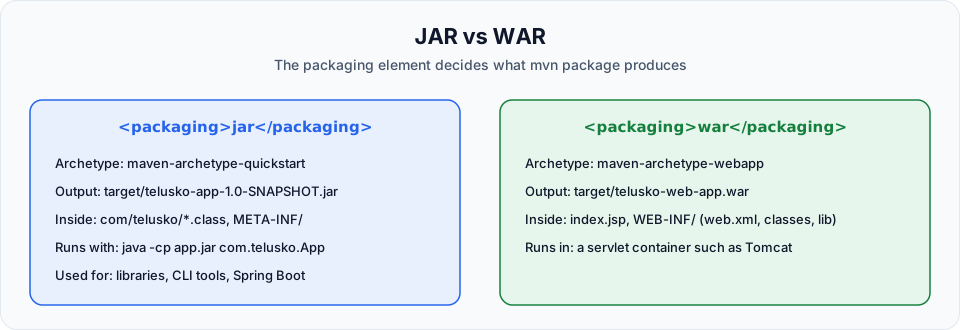
<packaging> in POM | jar (or omitted) | war |
| Build output | target/telusko-app-1.0-SNAPSHOT.jar | target/telusko-web-app.war |
The webapp template does not create src/main/java. When you write servlets or controllers, create src/main/java yourself and Maven will compile it automatically.
Open pom.xml. The important lines are:
<groupId>com.telusko</groupId>
<artifactId>telusko-web-app</artifactId>
<packaging>war</packaging>
<version>1.0-SNAPSHOT</version>
<name>telusko-web-app Maven Webapp</name>
...
<build>
  <finalName>telusko-web-app</finalName>
</build>
<packaging>war</packaging> tells Maven to use the WAR plugin during package. <finalName> overrides the default file name (artifactId-version), which is why the WAR is called telusko-web-app.war with no version in it. That is convenient, because Tomcat uses the WAR file name as the URL path (/telusko-web-app).
Build the WAR
cd into the project and run the goals exactly as before:
cd telusko-web-app
mvn clean package
clean package deletes any old target folder, compiles (if there is Java code), runs tests (if any), and packages the WAR. The first run downloads the WAR plugin, so expect some Downloading from central lines.
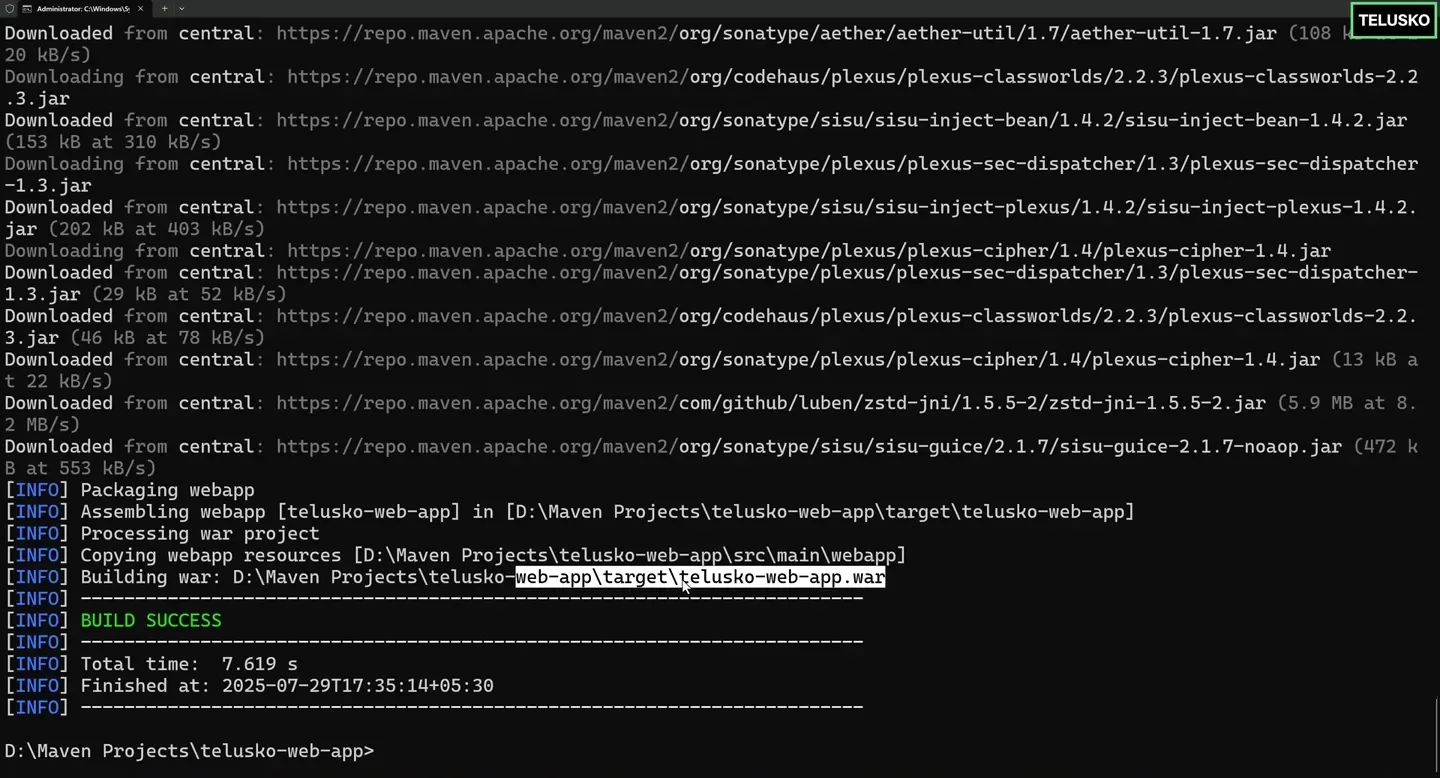
The end of the build on Windows: "Building war: ...\target\telusko-web-app.war" followed by BUILD SUCCESS.
Look inside target:
target/
├── telusko-web-app/           <- the exploded (unzipped) web app
│   ├── index.jsp
│   ├── META-INF/
│   └── WEB-INF/
│       ├── web.xml
│       └── classes/
└── telusko-web-app.war        <- the deployable archive
A WAR is just a ZIP file with a fixed layout. Compiled classes go to WEB-INF/classes and dependency JARs go to WEB-INF/lib. You can check with jar tf target/telusko-web-app.war.
Every time you change the code, run mvn clean package again to get a fresh WAR.
What happens to the WAR next?
The WAR does nothing on its own. You copy it into a servlet container's webapps folder (for example Tomcat's), and Tomcat unpacks and serves it at http://localhost:8080/telusko-web-app/. In the Docker course you package exactly this kind of WAR into a Tomcat image: Dockerizing A Maven Web Application.
javax or jakarta?
The webapp template's web.xml uses an old Servlet specification version. Tomcat 10 and newer use the jakarta.* namespace, so when you add real servlets, depend on the Jakarta Servlet API with provided scope and update web.xml to a current version. For the empty sample project, nothing needs to change.
Common problems
Try It Yourself
- Generate
telusko-web-appand compare itspom.xmlwith the one intelusko-app. List every difference. - Run
mvn clean packageand list the contents of the WAR withjar tf target/telusko-web-app.war. - Remove the
<finalName>line, rebuild, and note the new WAR file name. Put it back. - If you have Tomcat installed, copy the WAR into its
webappsfolder, start Tomcat and openhttp://localhost:8080/telusko-web-app/.
Official references
- Apache Maven: Webapp Archetype
- Apache Maven: WAR Plugin
- Apache Maven: Introduction to the Build Lifecycle (packaging bindings)
Written By: Shramik Masti
How is this guide?
Last updated on
Maven Goals
Set the Java version in pom.xml, then run mvn compile, mvn clean, mvn test, mvn package and mvn clean package, and see exactly what each one creates in the target folder.
Maven Dependencies
Add a third party library such as spring-core to pom.xml, watch Maven download it from Maven Central, and learn dependency scopes, transitive dependencies and mvn dependency:tree.