
Maven SpringBoot App Demo
Generate a Spring Boot web project with Maven from Spring Initializr, import it into Eclipse, add a controller, service and JSP page, fix the missing JSP dependency, and run it on an embedded Tomcat server.
Everything so far used small demo projects. Real Java backend work today mostly means Spring Boot, and Spring Boot projects are Maven projects too. In this lesson we build a small Spring Boot web application that greets you based on the time of day, and pay attention to where every file goes in the Maven structure. If you do not know Spring yet, that is fine: follow the Maven side and treat the Java code as given.
Step 1: generate the project with Spring Initializr
Open start.spring.io, the official Spring Initializr. IDEs such as IntelliJ IDEA and Spring Tool Suite have the same wizard built in, but the website works for everyone.
| Field | Value in the demo |
|---|---|
| Project | Maven |
| Language | Java |
| Spring Boot | 3.4.8 (the stable version at recording time) |
| Group | com.telusko |
| Artifact | SpringBootMavenApp |
| Packaging | Jar |
| Java | 17 |
| Dependencies | Spring Web |
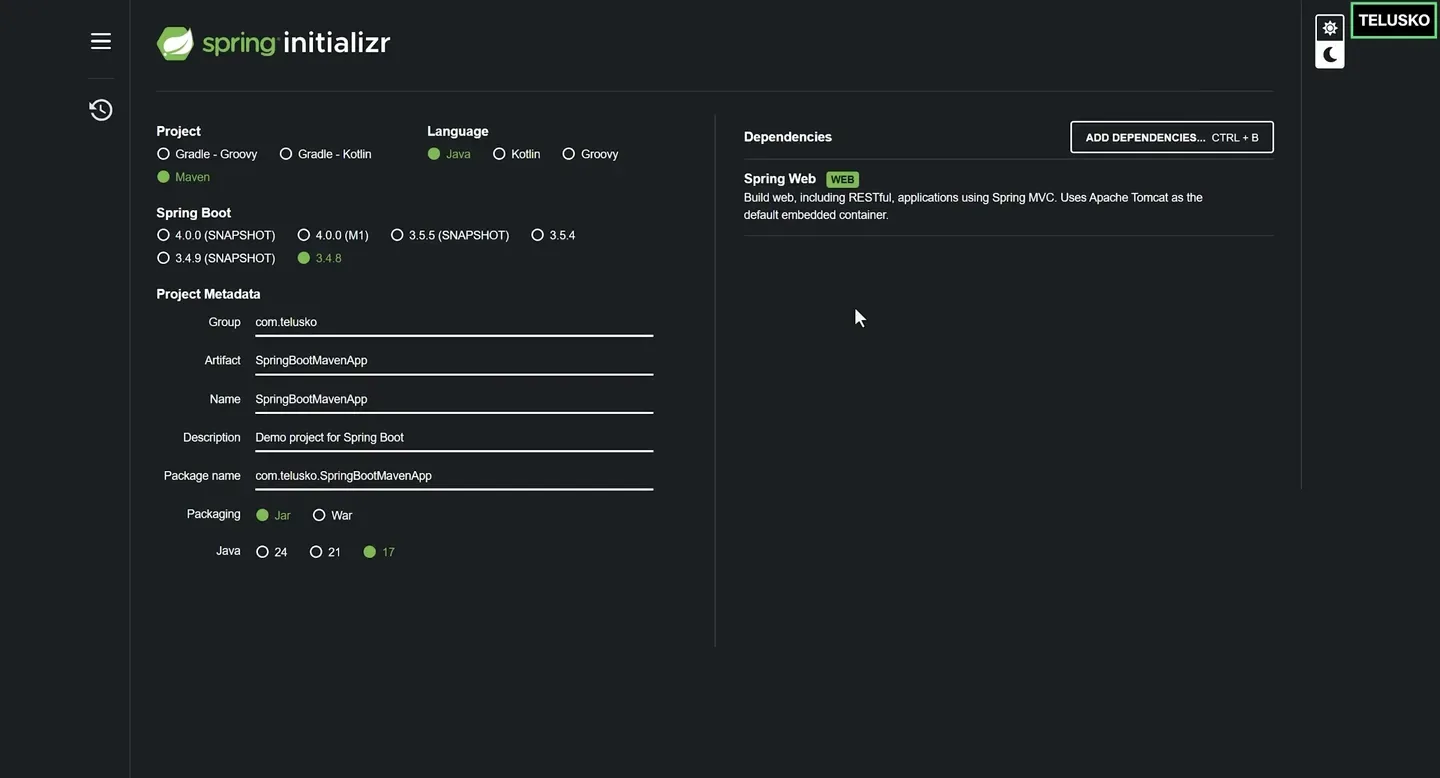
The Initializr settings used in the demo.
Newer Spring Boot versions
Spring Boot 4.x is the current line at the time of writing, and the 3.4 line no longer receives open source updates. Pick the newest stable (non SNAPSHOT, non M1) version Initializr offers. Boot 4 needs Java 17 or newer and Maven 3.6.3 or newer. Some starter names changed in Boot 4, so keep whatever dependencies Initializr generates. The Maven steps below do not change.
Click Generate. A ZIP downloads. Spring Web adds spring-boot-starter-web, which brings Spring MVC and an embedded Apache Tomcat server. JUnit and Spring Core come along automatically through the starters, so you do not add them yourself.
Step 2: import it into Eclipse
Extract the ZIP into your Eclipse workspace folder. Then in Eclipse choose File > Import... > Maven > Existing Maven Projects, click Next, browse to the extracted SpringBootMavenApp folder and click Finish. Eclipse reads pom.xml and downloads every dependency. The first import can take a few minutes.
Open Maven Dependencies: there are dozens of JARs (Spring, Jackson, Tomcat, logging) even though the POM lists only two starters. Those are transitive dependencies, managed for you.
Open pom.xml and notice three Spring Boot specific things:
<parent>
  <groupId>org.springframework.boot</groupId>
  <artifactId>spring-boot-starter-parent</artifactId>
  <version>3.4.8</version>
</parent>

<dependencies>
  <dependency>
    <groupId>org.springframework.boot</groupId>
    <artifactId>spring-boot-starter-web</artifactId>
  </dependency>
  <dependency>
    <groupId>org.springframework.boot</groupId>
    <artifactId>spring-boot-starter-test</artifactId>
    <scope>test</scope>
  </dependency>
</dependencies>

<build>
  <plugins>
    <plugin>
      <groupId>org.springframework.boot</groupId>
      <artifactId>spring-boot-maven-plugin</artifactId>
    </plugin>
  </plugins>
</build>| Part | Why it matters |
|---|---|
<parent> | Inherits sensible defaults: Java version handling, plugin configuration and the versions of hundreds of libraries. This is the effective POM idea from Effective POM in action |
Dependencies without <version> | The parent manages the versions, so all Spring libraries stay compatible |
spring-boot-maven-plugin | Repackages the JAR into an executable "fat" JAR with an embedded server, and adds the spring-boot:run goal |
The project also contains mvnw and mvnw.cmd: the Maven Wrapper. With it, anyone can build the project even without Maven installed, using exactly the Maven version the project expects.
Step 3: add the code
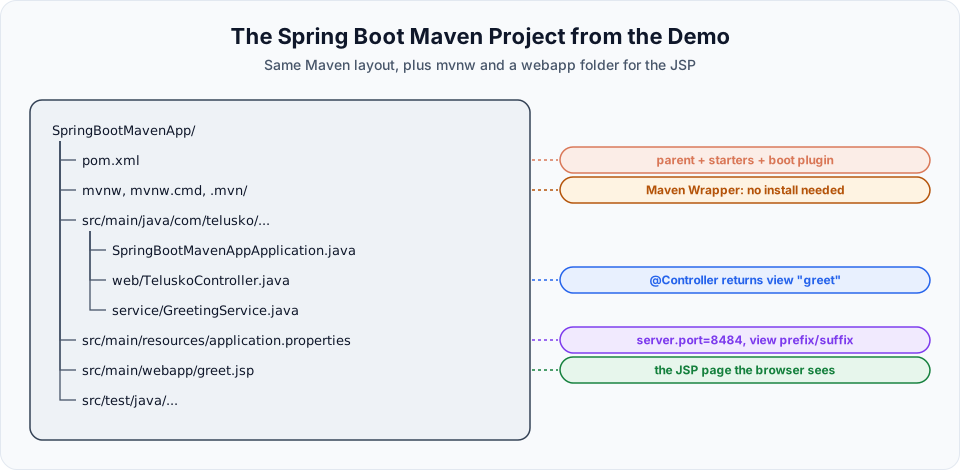
All Java code goes under src/main/java. The demo uses two extra packages next to the main class.
package com.telusko.SpringBootMavenApp.service;

public interface IGreetingService {
    String generateGreeting();
}package com.telusko.SpringBootMavenApp.service;
import java.time.LocalTime;
import org.springframework.stereotype.Service;
@Service
public class GreetingService implements IGreetingService {
@Override
public String generateGreeting() {
LocalTime time = LocalTime.now();
int hour = time.getHour();
if (hour < 12)
return "Good Morning";
else if (hour < 16)
return "Good Afternoon";
else if (hour < 20)
return "Good Evening";
else
return "Good Night";
}
}package com.telusko.SpringBootMavenApp.web;
import org.springframework.beans.factory.annotation.Autowired;
import org.springframework.stereotype.Controller;
import org.springframework.ui.Model;
import org.springframework.web.bind.annotation.GetMapping;
import com.telusko.SpringBootMavenApp.service.IGreetingService;
@Controller
public class TeluskoController {
@Autowired
private IGreetingService service;
@GetMapping("/greeting")
public String generateWish(Model model) {
String res = service.generateGreeting();
model.addAttribute("wish", res);
return "greet"; // name of the view: greet.jsp
}
}The controller handles GET /greeting, asks the service for a greeting, stores it as wish, and returns the view name greet.
Step 4: add the web page
Web pages for a JSP based app go in src/main/webapp. A WAR archetype creates that folder for you. A Spring Boot JAR project does not, so create it: right click src/main, New > Folder, name it webapp. Then add greet.jsp:
<%@ page language="java" contentType="text/html; charset=UTF-8" pageEncoding="UTF-8"%>
<!DOCTYPE html>
<html>
<head>
<meta charset="UTF-8">
<title>Telusko Learning</title>
</head>
<body>
  <h2 style="font-weight: bold; color: darkblue; font-family: sans-serif;">Telusko Learning</h2>
  <h1 style="color: #2c3e50; font-size: 36px; font-family: Arial, sans-serif;">Hey! ${wish}</h1>
</body>
</html>
${wish} prints the value the controller put in the model.
Step 5: configure application.properties
Configuration files go in src/main/resources. Open application.properties:
spring.application.name=SpringBootMavenApp
server.port=8484
spring.mvc.view.prefix=/
spring.mvc.view.suffix=.jsp| Property | Meaning |
|---|---|
server.port=8484 | Run the embedded Tomcat on port 8484 instead of the default 8080 |
spring.mvc.view.prefix=/ | Look for views at the root of the web folder (src/main/webapp) |
spring.mvc.view.suffix=.jsp | Add .jsp, so the view name greet becomes /greet.jsp |
Step 6: run it, and fix the first problem
Right click SpringBootMavenAppApplication.java and choose Run As > Java Application. The console shows Tomcat starting on port 8484. Open http://localhost:8484/greeting.
Instead of a page, the browser downloads a file. Embedded Tomcat does not include the JSP compiler (Jasper) by default, so it serves the JSP as a plain file. Stop the app and add the JSP engine to pom.xml:
<dependency>
  <groupId>org.apache.tomcat.embed</groupId>
  <artifactId>tomcat-embed-jasper</artifactId>
</dependency>
Correction: use tomcat-embed-jasper without a version
The video adds org.apache.tomcat:tomcat-jasper with a fixed version 10.1.16, while the startup log in the video shows the embedded Tomcat running a different version (10.1.19). Mixing Tomcat versions like this can cause hard to debug errors. The artifact meant for embedded Tomcat is org.apache.tomcat.embed:tomcat-embed-jasper, and leaving the version out lets the Spring Boot parent pick the exact version that matches its Tomcat.
Save, run Maven > Update Project..., start the application again and refresh the browser:
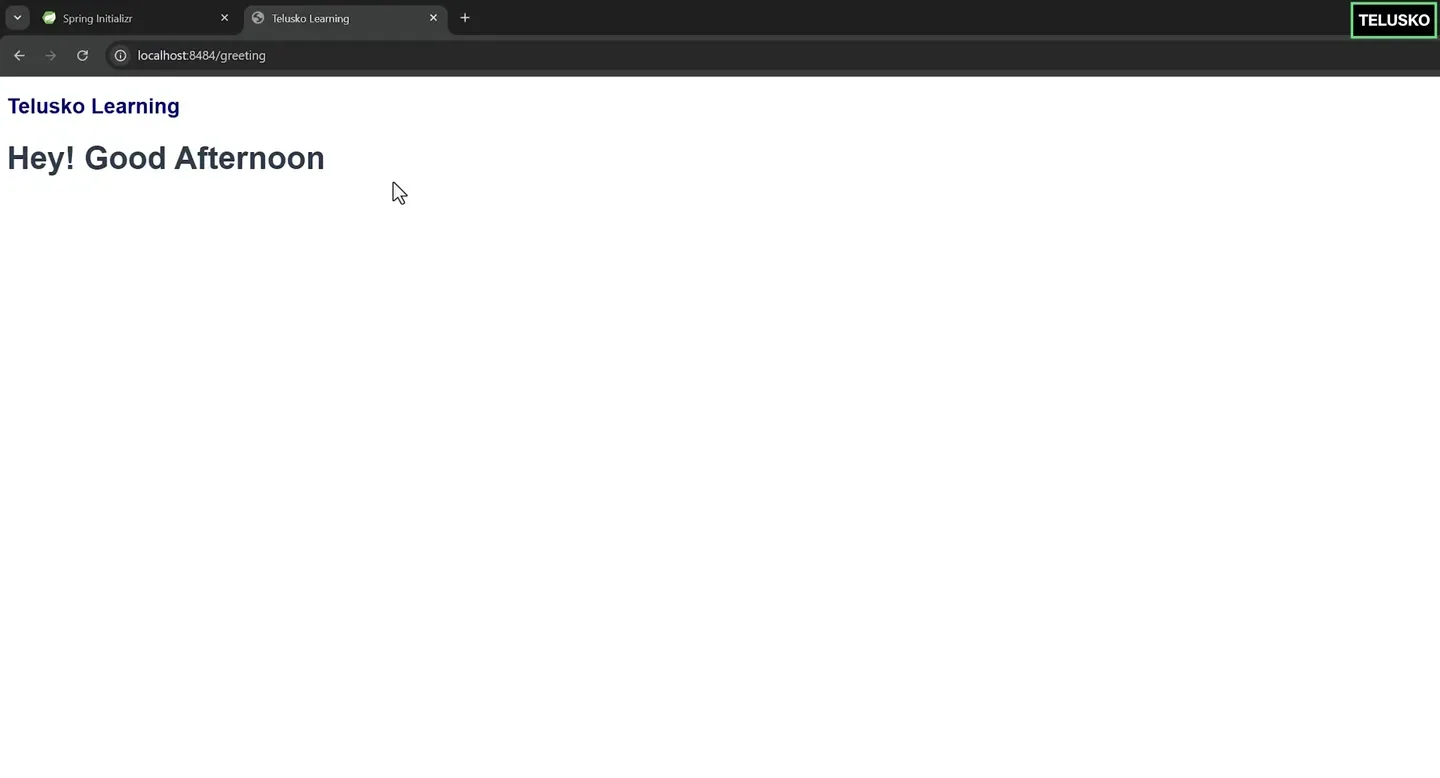
The finished app. The greeting changes with the time of day.
Running it with Maven instead of the IDE
Run As > Java Application compiles and starts the app inside Eclipse. The same thing from a terminal, using the wrapper in the project folder:
mvnw.cmd clean package
mvnw.cmd spring-boot:run
./mvnw clean package
./mvnw spring-boot:runclean package compiles, runs the tests and produces target/SpringBootMavenApp-0.0.1-SNAPSHOT.jar, an executable JAR you could start with java -jar. spring-boot:run starts the app directly from the project folder.
JSPs and executable JARs
Spring Boot's documentation advises avoiding JSPs where possible, because they have known limitations with embedded servers. In particular, JSPs are not supported inside an executable JAR: the app works from the IDE or with spring-boot:run, but java -jar on the packaged JAR cannot find greet.jsp. For a JSP app, use WAR packaging. For new projects, Thymeleaf templates in src/main/resources/templates work in a JAR without any of this.
Try It Yourself
- Generate the project from start.spring.io with Maven and Spring Web, import it, and run it.
- Reproduce the "file downloads instead of page" problem, then fix it with
tomcat-embed-jasper. - Change
server.portto 9090, restart, and open the new URL. - Run
./mvnw clean package(ormvnw.cmd) and look at the size of the JAR intarget. Runjar tfon it and findBOOT-INF/lib. - Run
mvn dependency:treeand find which starter brought intomcat-embed-core.
Official references
- Spring Initializr
- Spring Boot Maven Plugin documentation
- Spring Boot reference: Servlet web applications and JSP limitations
- Apache Maven: Maven Wrapper
Written By: Shramik Masti
How is this guide?
Last updated on
Maven Java Project Unit Testing
Write a small Calc class and a JUnit 5 test in a Maven project, add the JUnit dependency, run mvn test from Eclipse and the terminal, and read both a passing and a failing test report.
Maven WrapUp
A one page revision of the whole Maven course, covering build tool basics, installation, project creation, goals, dependencies, repositories, the POM, IDEs, the lifecycle, testing and Spring Boot.