
Maven Java Project Unit Testing
Write a small Calc class and a JUnit 5 test in a Maven project, add the JUnit dependency, run mvn test from Eclipse and the terminal, and read both a passing and a failing test report.
Maven's promise is that broken code does not get packaged. That promise depends on unit tests: small pieces of code that call your methods and check the results. If any test fails, mvn test and mvn package fail too. In this lesson we write one class and one test by hand, so you can see exactly where each file goes in the Maven structure and how Maven reacts when a test passes and when it fails.
Create a simple project in Eclipse
This time we skip the archetype. In Eclipse choose File > New > Maven Project, tick Create a simple project (skip archetype selection), click Next, and enter:
| Field | Value |
|---|---|
| Group Id | com.telusko |
| Artifact Id | JavaApp |
Click Finish. A simple project gives you all four standard folders and an almost empty POM:
JavaApp/
├── pom.xml
└── src/
    ├── main/java/          <- application code
    ├── main/resources/     <- application config
    ├── test/java/          <- unit tests
    └── test/resources/     <- test config
Any IDE works. In IntelliJ, a new Maven project gives you the same folders.
Write the class under test
Right click src/main/java, choose New > Package, name it com.telusko.sampleApp, then create a class Calc in it:
package com.telusko.sampleApp;

public class Calc {

    int divide(int num1, int num2) {
        return num1 / num2;
    }
}
Java package names are normally all lowercase (com.telusko.sampleapp). We keep sampleApp to match the video. It compiles either way.
Add JUnit 5 to the POM
The test will use JUnit 5 (JUnit Jupiter), the standard unit testing library for Java. It is not part of the JDK, so it is a dependency. On Maven Central (the video uses mvnrepository.com, category "Testing Frameworks & Tools"), find junit-jupiter-api and copy version 5.13.4. Add it inside <dependencies> with test scope, and set the Java version while you are in the POM:
<project xmlns="http://maven.apache.org/POM/4.0.0"
         xmlns:xsi="http://www.w3.org/2001/XMLSchema-instance"
         xsi:schemaLocation="http://maven.apache.org/POM/4.0.0 https://maven.apache.org/xsd/maven-4.0.0.xsd">
  <modelVersion>4.0.0</modelVersion>
  <groupId>com.telusko</groupId>
  <artifactId>JavaApp</artifactId>
  <version>0.0.1-SNAPSHOT</version>

  <properties>
    <maven.compiler.release>17</maven.compiler.release>
    <project.build.sourceEncoding>UTF-8</project.build.sourceEncoding>
  </properties>

  <dependencies>
    <dependency>
      <groupId>org.junit.jupiter</groupId>
      <artifactId>junit-jupiter-api</artifactId>
      <version>5.13.4</version>
      <scope>test</scope>
    </dependency>
  </dependencies>
</project>
Save, then right click the project and choose Maven > Update Project.... Under Maven Dependencies you now see junit-jupiter-api-5.13.4.jar plus its transitive dependencies (opentest4j, junit-platform-commons, apiguardian-api).
Where is the test engine?
junit-jupiter-api contains the annotations and assertions you write against. Running the tests also needs junit-jupiter-engine. Recent versions of the Surefire plugin notice the API and download the matching engine automatically, so the setup above works. Many teams prefer to declare org.junit.jupiter:junit-jupiter instead, a single dependency that brings the API, the engine and parameterized test support. JUnit 6 (6.1.x at the time of writing) is also available and needs Java 17 or newer. For a new project, either a recent JUnit 5 or JUnit 6 is a good choice; the test code in this lesson works unchanged with both.
Write the test
Tests mirror the main code. Create the same package com.telusko.sampleApp under src/test/java, and in it a class CalcTest:
package com.telusko.sampleApp;

import static org.junit.jupiter.api.Assertions.assertEquals;

import org.junit.jupiter.api.Test;

public class CalcTest {

    @Test
    void testCalc() {
        Calc calc = new Calc();                   // the class under test
        int actualResult = calc.divide(10, 5);    // what the code really does
        int expectedResult = 2;                   // what we expect

        assertEquals(expectedResult, actualResult);
    }
}| Piece | Meaning |
|---|---|
Same package as Calc | The test can call divide, which has package (default) access |
Class name ends in Test | Surefire only runs classes named Test*, *Test, *Tests or *TestCase by default. A class called CalcChecker would be silently skipped |
@Test | Marks the method as a test case. It comes from the JUnit library, which is why the import only works after adding the dependency |
assertEquals(expected, actual) | The assertion: compares the expected value with the actual result. Expected comes first |
Run the test
From Eclipse
Right click the project or the test class and choose Run As > Maven test. The console ends with:
Tests run: 1, Failures: 0, Errors: 0, Skipped: 0
[INFO] BUILD SUCCESS
You can also choose Run As > JUnit Test, which uses Eclipse's own runner and shows a green bar. Both are fine during development, but only the Maven run is what your CI server will do.
From the terminal
Open a terminal in the project folder (the one with pom.xml):
mvn clean
mvn test
test compiles the main code, compiles the tests and runs them. We do not need package here, because we only want to know whether the tests pass.
Make it fail on purpose
Change the expectation to a wrong value, save, and run mvn test again:
int expectedResult = 5; // wrong on purpose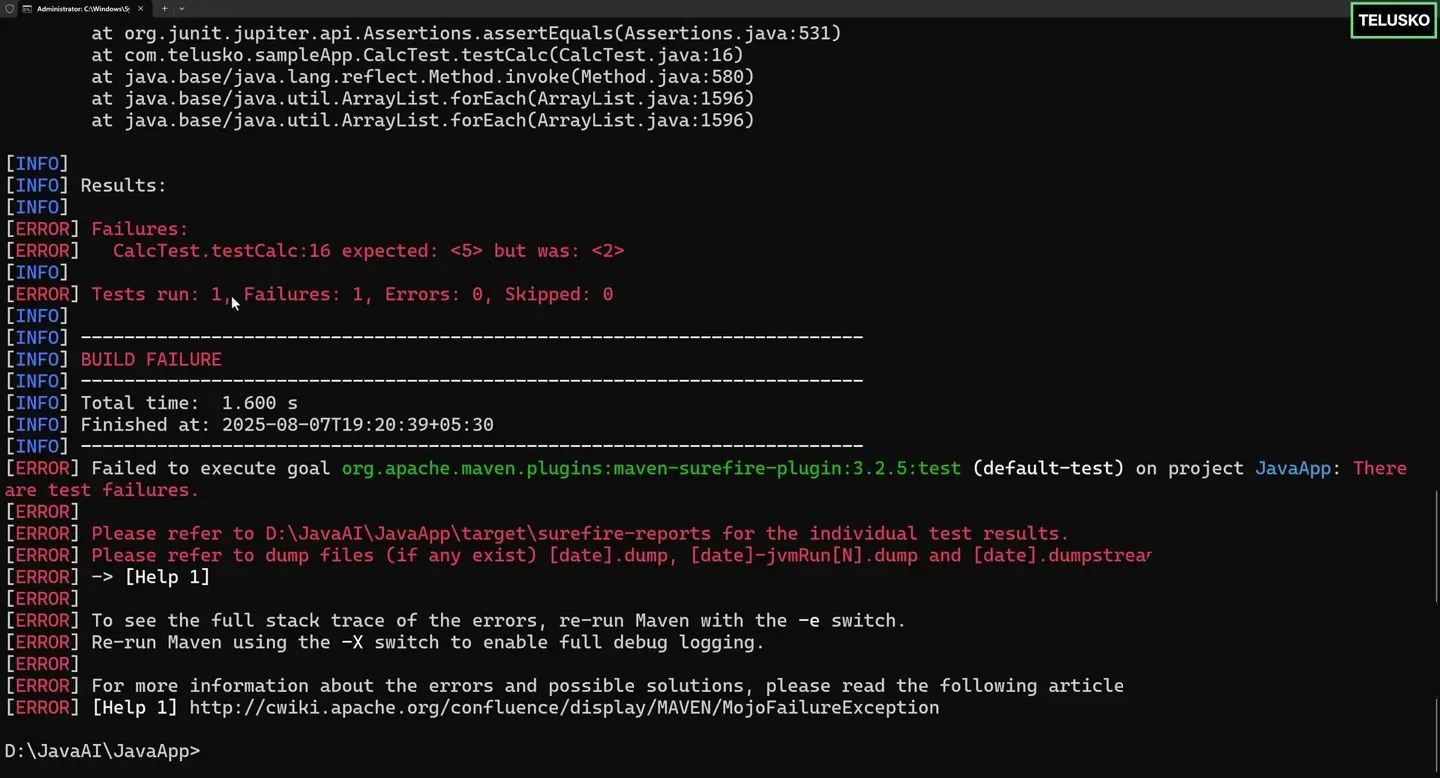
A failing test stops the build. Surefire reports which test failed, the expected and actual values, and where to find the detailed report.
Read the output from the Results section down:
| Line | What it tells you |
|---|---|
CalcTest.testCalc:16 expected: <5> but was: <2> | Which test failed, at which line, and why |
Tests run: 1, Failures: 1, Errors: 0, Skipped: 0 | A failure is a wrong assertion. An error is an unexpected exception |
BUILD FAILURE | The build stops. Nothing after test runs, so no JAR is produced |
Please refer to ...\target\surefire-reports | Detailed per class reports live here |
Fix the expectation back to 2, run mvn clean test again, and you get Failures: 0 and BUILD SUCCESS.
Handy test commands
| Command | What it does |
|---|---|
mvn test | Compile and run all tests |
mvn test -Dtest=CalcTest | Run only one test class |
mvn test -Dtest=CalcTest#testCalc | Run one test method |
mvn package -DskipTests | Compile tests but do not run them |
mvn package -Dmaven.test.skip=true | Do not even compile tests. Use rarely |
Tests run: 0 on an old Maven
Old Maven versions (such as 3.8.x from some Linux packages) bind Surefire 2.12.4, which does not understand JUnit 5. Your build says BUILD SUCCESS but Tests run: 0, which is dangerous. Either use a current Maven or declare maven-surefire-plugin version 3.x in <build><plugins>.
Try It Yourself
- Create
JavaAppwithCalcandCalcTest, and get a passingmvn testfrom the terminal. - Break the test, read the failure line, open the
.txtreport intarget/surefire-reports, then fix it. - Add a second test that checks dividing by zero throws an exception:
assertThrows(ArithmeticException.class, () -> calc.divide(10, 0)); - Rename
CalcTesttoCalcCheckerand runmvn test. Notice that no test runs. Rename it back. - Run
mvn packagewith the test still failing and confirm no JAR is created.
Official references
Written By: Shramik Masti
How is this guide?
Last updated on
Maven Build LifeCycle Summary
Learn Maven's three built-in lifecycles and the key phases of the default lifecycle, from validate through compile, test, package, verify, install and deploy, and what each one produces.
Maven SpringBoot App Demo
Generate a Spring Boot web project with Maven from Spring Initializr, import it into Eclipse, add a controller, service and JSP page, fix the missing JSP dependency, and run it on an embedded Tomcat server.