
Introduction
What Kubernetes is, the problem it solves, the core vocabulary from Pod to Helm chart, how desired state works, and how Kubernetes on EKS fits with Docker, Terraform, Jenkins and monitoring tools.
Containers solved packaging. A Docker image runs the same way on a laptop, a test server and production. But a container on its own is still just a process on one machine. If the machine dies, the container dies. If traffic doubles, nobody starts more copies. If you push a new image, someone has to stop the old containers and start the new ones, carefully, on every server.
Kubernetes takes over that work. You describe the state you want ("three copies of this image, reachable on port 80, using this configuration") and Kubernetes keeps the cluster in that state: it places containers on machines with room, replaces anything that fails, spreads traffic across healthy copies, and changes versions step by step when you ask it to.
What Kubernetes is
Kubernetes (often written K8s) is an open source container orchestration platform. Google open sourced it in 2014, based on more than a decade of running its own internal system, Borg. Today it is maintained by the Cloud Native Computing Foundation and is the standard way to run containers in production on every major cloud and in private data centres.
It is not a replacement for Docker. Docker (or any OCI tool) builds the images. Kubernetes runs them across a cluster of machines and keeps them running.
Desired state: the one idea behind everything
Almost everything in Kubernetes follows the same loop:
You write YAML (desired state)  ->  kubectl apply  ->  API server stores it in etcd
        ^                                                     |
        |                                                     v
  you change the YAML              controllers compare desired state with actual state
                                   and act until they match (create, delete, replace)
That loop is why a deleted pod comes back, why scaling is a one-line change, and why a rolling update happens without you touching individual containers. Once this idea clicks, every new object in the course is "another kind of desired state with its own controller".
Core vocabulary
| Term | Meaning | First covered in |
|---|---|---|
| Cluster | A control plane plus worker nodes that run your workloads | Architecture |
| Control plane | API server, etcd, scheduler, controller manager. On EKS, run by AWS | Architecture |
| Node | A machine (an EC2 instance on EKS) that runs pods | Architecture |
| kubectl | The command line client for every Kubernetes cluster | Installing the tools |
| Manifest | A YAML file describing objects: apiVersion, kind, metadata, spec | Manifest files |
| Pod | The smallest deployable unit: one or more containers sharing an IP | First pod |
| Service | A stable address and load balancer for a group of pods | Services |
| Namespace | A logical partition of one cluster | Namespaces |
| Label / selector | Key-value tags on objects, and queries that find them | Labels |
| ReplicaSet | Keeps N identical pods running | ReplicaSets |
| Deployment | Manages ReplicaSets for rolling updates and rollbacks | Deployments |
| DaemonSet | Runs one pod on every node | DaemonSets |
| StatefulSet | Runs pods with stable names and their own storage, for databases | StatefulSets |
| PersistentVolume / Claim | Storage that outlives pods, on EKS backed by EBS | PV and PVC |
| ConfigMap / Secret | Configuration and sensitive values kept outside the image | ConfigMaps and Secrets |
| HPA | HorizontalPodAutoscaler: adds and removes pods based on load | HPA |
| ResourceQuota | Limits on what a namespace may consume | ResourceQuota |
| Job / CronJob | Run work to completion, once or on a schedule | Jobs |
| Helm chart | A packaged, configurable set of manifests | Helm |
| Argo CD | GitOps tool that keeps the cluster in sync with Git | Argo CD |
| Prometheus / Grafana | Metrics collection and dashboards | Prometheus |
Why Amazon EKS
You can run Kubernetes on your laptop (minikube, kind), on your own servers (kubeadm), or as a managed service. This course uses Amazon Elastic Kubernetes Service (EKS):
- AWS runs and patches the control plane across multiple Availability Zones
- Worker nodes are ordinary EC2 instances in a managed node group
type: LoadBalancerServices create real AWS load balancers, and PersistentVolumes can be real EBS volumeseksctlcreates the whole setup with one command and deletes it with another
The manifests you write are standard Kubernetes and work on any conformant cluster. Only the cluster setup and a few integrations are EKS specific.
How Kubernetes fits with the rest of the bootcamp
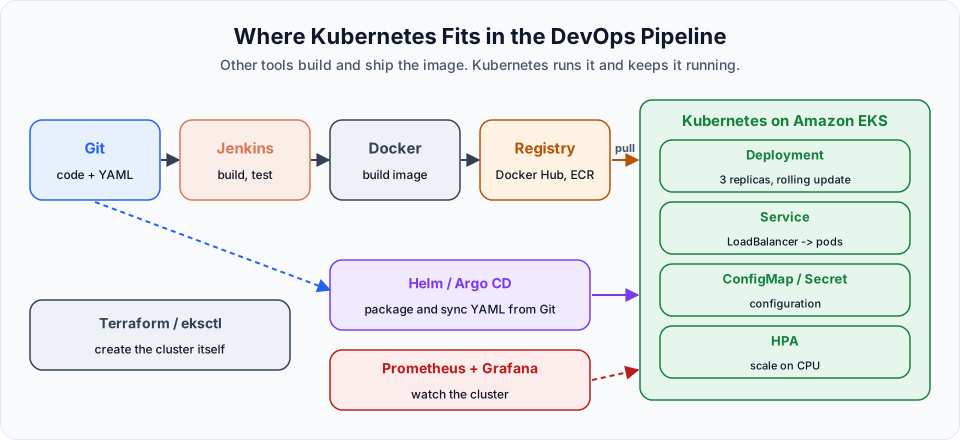
| Tool | Role around Kubernetes |
|---|---|
| Git | Stores application code and the Kubernetes YAML |
| Maven, Docker | Build the application and package it into an image |
| Docker Hub, Amazon ECR | Registries the cluster pulls images from |
| Terraform, eksctl | Create the cluster and its VPC, node groups and IAM roles |
| Jenkins | Runs the CI pipeline: build, test, push the image, update the manifest |
| Helm, Argo CD | Package the manifests and deploy them to the cluster from Git |
| Prometheus, Grafana | Watch the cluster and the applications running on it |
The final Jenkins project of the bootcamp ties these together into one pipeline that ends with a rollout on Kubernetes.
What Kubernetes does not do
Kubernetes is powerful, but it is not magic. It does not build your images, write your Dockerfiles, fix your application's bugs, back up your databases by itself, or make a badly designed app scale. It also adds real operational complexity. For a single small application, a VM with Docker Compose or a simpler service such as Amazon ECS may be the better choice. Kubernetes earns its place when you run many services, deploy often, and need scaling, self-healing and consistent tooling across environments.
Start with the foundations
The first section explains why orchestration exists and how the cluster is built. Do not skip the architecture lesson: almost every error message later in the course points to one of its components.
Official references
- Kubernetes documentation: Overview
- Kubernetes: Cluster Architecture
- Amazon EKS User Guide
- CNCF: Kubernetes
Written By: Shramik Masti
How is this guide?
Last updated on
Getting Started
A practical roadmap for learning Kubernetes on Amazon EKS, from your first cluster and pod to Deployments, storage, autoscaling, Helm, Argo CD, monitoring and blue-green releases.
Introduction
What this hands-on Kubernetes course covers, why we run every demo on Amazon EKS, and what you should have ready before creating your first cluster.