
Understanding Kubernetes Manifest YAML Files
Learn the four sections every Kubernetes manifest has (apiVersion, kind, metadata, spec), how to find the right values for each, and how manifests are submitted with kubectl.
In Kubernetes you rarely tell the cluster how to do something. You describe what you want, write it down in a file, and hand the file to the cluster. That file is called a manifest. Pods, Services, Deployments, ConfigMaps, Ingresses: almost every object you create in this course starts life as a manifest.
So before creating our first pod, it is worth spending ten minutes on the shape of these files. Once you know the shape, every new resource is just "a different kind with a different spec".
What a manifest is
A Kubernetes manifest is a YAML (or JSON) file that describes the desired state of one or more Kubernetes objects. You submit it with kubectl, the API server stores it, and the controllers work to make reality match it.
This style is called declarative. Compare:
| Imperative (a command) | Declarative (a manifest) |
|---|---|
| "Start a container from this image on that server" | "There should be a pod named webapp running this image" |
| You must know the current state | Kubernetes works out what to change |
| Hard to repeat and review | Store the file in Git, review it, apply it again anytime |
The four top-level fields
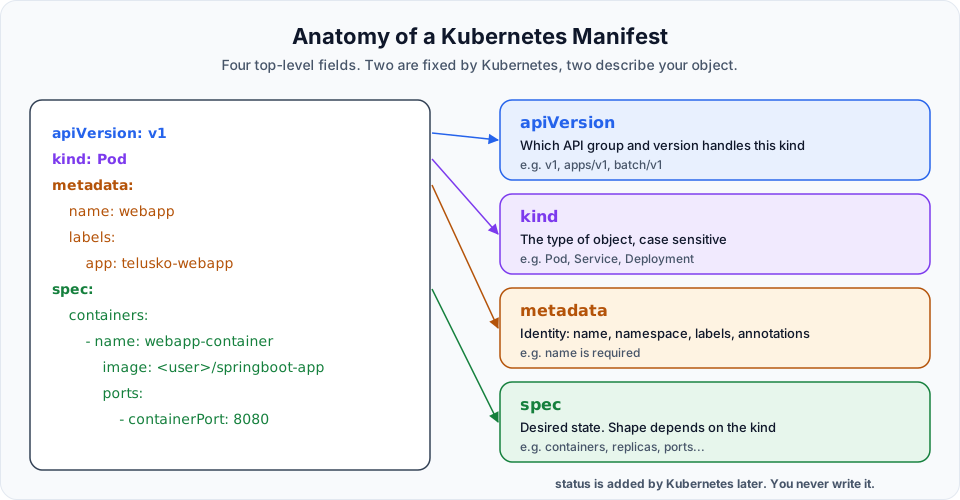
Every manifest has the same four sections.
1. apiVersion
apiVersion tells the API server which API group and version should handle the object. You do not invent this value. It is decided by the kind you are creating.
| kind | apiVersion |
|---|---|
| Pod, Service, Namespace, ConfigMap, Secret | v1 |
| Deployment, ReplicaSet, DaemonSet, StatefulSet | apps/v1 |
| Job, CronJob | batch/v1 |
| Ingress | networking.k8s.io/v1 |
| HorizontalPodAutoscaler | autoscaling/v2 |
v1 with no group means the original "core" API group. Names like apps/v1 mean group apps, version v1. Old tutorials sometimes show extensions/v1beta1 or apps/v1beta2 for Deployments; those were removed years ago and will be rejected by a current cluster.
You never need to memorise this table. Ask the cluster:
kubectl api-resources            # every kind, its short name and API group
kubectl explain pod              # shows KIND and VERSION at the top
2. kind
kind is the type of object you want: Pod, Service, Deployment and so on. It is case sensitive and uses PascalCase. Pod works, pod and POD do not. You cannot make up your own kind name (unless someone installed a custom resource, which is a later topic).
3. metadata
metadata is the identity of the object.
| Field | Purpose |
|---|---|
name | Required. Unique for that kind within a namespace. Lowercase letters, numbers and hyphens |
namespace | Which namespace the object lives in. Defaults to default. See Namespaces |
labels | Key-value pairs used to group and select objects. See Labels and Selectors |
annotations | Key-value notes for tools and humans, not used for selection |
4. spec
spec (specification) is where you describe the desired state. Its contents depend completely on the kind:
| kind | What goes in spec |
|---|---|
| Pod | containers: name, image, ports, environment, resources |
| Service | selector, ports, type |
| Deployment | replicas, selector, template (a pod template), strategy |
To see every field a kind accepts, use kubectl explain and walk down the tree:
kubectl explain pod.spec
kubectl explain pod.spec.containers
kubectl explain deployment.spec.strategy
And status, which you never write
After you submit an object, Kubernetes adds a fifth section, status, describing the current state (for a pod: its phase, IP, which node, container states). You read it with kubectl get ... -o yaml or kubectl describe, but you never put it in your manifest.
YAML rules that matter
Most first-day errors in Kubernetes are YAML errors, not Kubernetes errors. A few rules cover nearly all of them.
metadata:            # a map (key: value pairs) nested under metadata
  name: webapp       # two spaces of indentation means "child of metadata"
  labels:
    app: telusko-webapp
spec:
  containers:        # a list
    - name: webapp-container    # "- " starts a list item
image: nginx:1.29- Indent with spaces, never tabs. Two spaces per level is the convention.
- A child must be indented more than its parent. If
app:is at the same level aslabels:, Kubernetes sees it as a field ofmetadataand rejects it. - List items start with
-(dash and a space).-containerPortwithout the space is a different string, not a list item. key: valueneeds a space after the colon.- Several objects can go in one file, separated by a line with
---. We use that in Creating Pod and Service in One Manifest File.
Submitting a manifest
Once the file is written, you hand it to the cluster with one of two commands:
kubectl apply -f my-file.yaml     # create if missing, update if it exists
kubectl create -f my-file.yaml    # create only, error if it already exists
apply is what you will use almost all the time. The next lesson shows both in action and the exact error create gives.
Two habits worth building from day one:
kubectl apply -f my-file.yaml --dry-run=server   # ask the API server to validate without saving
kubectl diff -f my-file.yaml                      # show what would change on the live object
Try It Yourself
- Run
kubectl api-resourceson your cluster and find the apiVersion and short name for Pod, Service, Deployment, DaemonSet and Namespace. - Run
kubectl explain pod.spec.containers.portsand find out which field is required. - Write a manifest skeleton with the four sections for a Pod, from memory, without copying.
- Break your skeleton on purpose (change
Podtopod, remove a space after-) and runkubectl apply --dry-run=server -fon it. Read each error message.
Official references
- Kubernetes: Objects in Kubernetes
- Kubernetes: Declarative management of objects using configuration files
- kubectl explain reference
Written By: Shramik Masti
How is this guide?
Last updated on
Creating Your First EKS Cluster
Give the EKS home server an IAM role, create a two-node Amazon EKS cluster with one eksctl command, explore it with kubectl and the console, and delete it safely to avoid charges.
First Pod Creation in Kubernetes
Write your first Pod manifest, fix the real YAML errors that come up, inspect the pod with get, -o wide and describe, compare kubectl create with apply, and delete it.