
Creating Your First EKS Cluster
Give the EKS home server an IAM role, create a two-node Amazon EKS cluster with one eksctl command, explore it with kubectl and the console, and delete it safely to avoid charges.
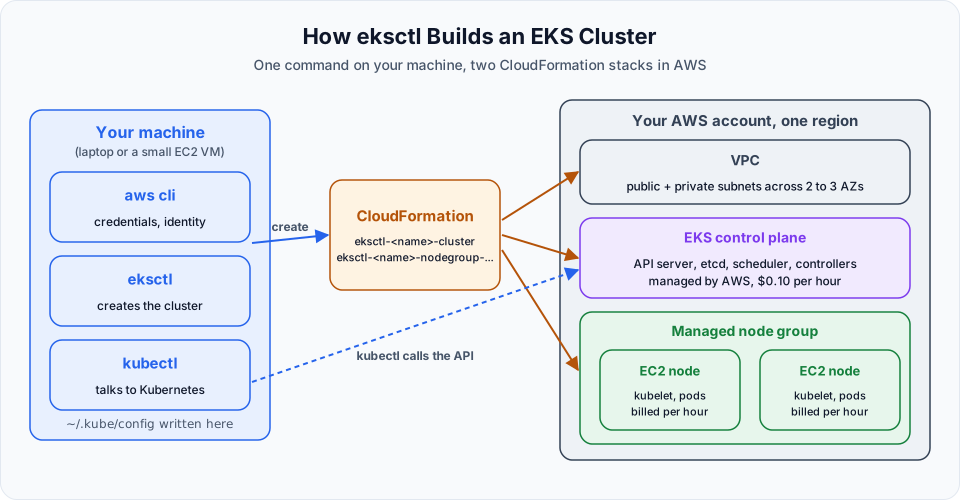
The tools are installed. Now one command will build an entire Kubernetes cluster on AWS: a VPC, subnets, security groups, IAM roles, the EKS control plane, a managed node group with two EC2 worker nodes, and the core add-ons. Doing that by hand in the console takes an hour and is easy to get wrong. With eksctl it takes one line and about 15 minutes of waiting.
Step 1: Give the EC2 instance permission to build a cluster
eksctl runs on the EKS home server, so that machine needs AWS permissions. The cleanest way is an IAM role attached to the instance.
Create the role
Open IAM, then Roles, then Create role. Choose AWS service as the trusted entity and EC2 as the use case. Click Next.
Attach permissions
For a personal learning account, attach AdministratorAccess. It is the simplest option and avoids permission errors halfway through cluster creation.
For anything beyond practice, never give an instance full admin. The eksctl documentation lists the minimum permissions it needs: full access to CloudFormation and EKS, plus limited access to EC2, EC2 Auto Scaling, IAM and Systems Manager. See Minimum IAM policies.
Name it
Name the role eks-telusko-learning and click Create role.
Attach it to the instance
Go to EC2, then Instances, select EKS-HOME-Server, then Actions, Security, Modify IAM role. Pick eks-telusko-learning and click Update IAM role.
About the EKS policies shown in the lecture
The lecture also attaches AmazonEKSClusterPolicy and AmazonEKS_CNI_Policy to this role. Those policies are meant for the cluster role and the node role, and eksctl creates both of those roles for you automatically. The EC2 instance that runs eksctl does not need them. What it needs is permission to create CloudFormation stacks, IAM roles, EC2 and VPC resources, and the EKS cluster.
SSH into the instance again (or stay connected, the role takes effect within a few seconds) and check which identity you are using:
aws sts get-caller-identityThe Arn should end with assumed-role/eks-telusko-learning/i-.... If it shows an IAM user instead, you still have access keys in ~/.aws/credentials from the previous lesson, and those take priority over the role.
Step 2: Create the cluster
This is the command from the lecture with two additions: --version, and --nodes 2, which is the default anyway but is written out so you can see it:
eksctl create cluster \
  --name telusko-learning \
  --region ap-south-1 \
  --version 1.36 \
  --node-type t3.small \
  --nodes 2 \
--zones ap-south-1a,ap-south-1b| Flag | Meaning |
|---|---|
--name telusko-learning | Cluster name. Letters, numbers and hyphens, starting with a letter |
--region ap-south-1 | AWS region (Mumbai). Defaults to your AWS CLI region if omitted |
--version 1.36 | Kubernetes version of the control plane and nodes. 1.37 is the newest on EKS (released there on 1 October 2026) and also fine if your eksctl version already supports it. See the callout below |
--node-type t3.small | EC2 instance type for the worker nodes. The default is m5.large, which costs much more |
--nodes 2 | Number of worker nodes. Two is the default, written here so it is visible |
--zones ap-south-1a,ap-south-1b | Availability Zones for the subnets. You need at least two |
Always pass --version
The lecture did not pass --version, so eksctl 0.227 picked its default, 1.34. EKS standard support for 1.34 ends on 2 December 2026. After that date a 1.34 cluster moves to extended support, which costs $0.60 per hour instead of $0.10. Pick a version that is in standard support today (1.34 to 1.37 as of October 2026, check the EKS version calendar) and keep kubectl within one minor version of it.
Make sure the instance type you choose is available in your account and region. In the EC2 Launch instance screen, open the instance type list and search for it. New or free plan accounts sometimes cannot launch every family.
Now wait. Creation takes 10 to 20 minutes. Do not close the terminal while it runs. In the lecture it took about 11 minutes. The output looks like this (shortened):
[i]  eksctl version 0.227.0
[i]  using region ap-south-1
[i]  subnets for ap-south-1a - public:192.168.0.0/19 private:192.168.64.0/19
[i]  subnets for ap-south-1b - public:192.168.32.0/19 private:192.168.96.0/19
[i]  nodegroup "ng-c3850e2a" will use "" [AmazonLinux2023/1.34]
[i]  using Kubernetes version 1.34
[i]  creating EKS cluster "telusko-learning" in "ap-south-1" region with managed nodes
[i]  will create 2 separate CloudFormation stacks for cluster itself and the initial managed nodegroup
[i]  building cluster stack "eksctl-telusko-learning-cluster"
[i]  waiting for CloudFormation stack "eksctl-telusko-learning-cluster"
...
[i]  waiting for CloudFormation stack "eksctl-telusko-learning-nodegroup-ng-c3850e2a"
[✔]  created 1 managed nodegroup(s) in cluster "telusko-learning"
[i]  successfully created addon: metrics-server
[i]  kubectl command should work with "/home/ubuntu/.kube/config", try 'kubectl get nodes'
[✔]  EKS cluster "telusko-learning" in "ap-south-1" region is ready
What eksctl did for you:
| Created | Details |
|---|---|
| 2 CloudFormation stacks | eksctl-telusko-learning-cluster and eksctl-telusko-learning-nodegroup-.... Everything else is inside these stacks |
| VPC | With a public and a private subnet in each zone, an internet gateway and a NAT gateway |
| IAM roles | A cluster role and a node role with the correct EKS policies |
| EKS control plane | API server, etcd, scheduler and controllers, managed by AWS |
| Managed node group | An Auto Scaling group of two t3.small EC2 instances running Amazon Linux 2023 |
| Add-ons | vpc-cni (pod networking), kube-proxy, coredns (DNS) and metrics-server |
| kubeconfig | Written to ~/.kube/config so kubectl can reach the new cluster |
Step 3: Talk to the cluster with kubectl
From now on, almost everything goes through kubectl.
kubectl get nodesNAME STATUS ROLES AGE VERSION
ip-192-168-46-134.ap-south-1.compute.internal Ready <none> 2m6s v1.34.8-eks-0de9cde
ip-192-168-8-177.ap-south-1.compute.internal Ready <none> 2m10s v1.34.8-eks-0de9cdeTwo worker nodes, both Ready. You do not see any control plane node because AWS runs the control plane outside your account.
kubectl get podsNo resources found in default namespace.Nothing deployed yet. That changes in a couple of lessons.
kubectl get svcNAME TYPE CLUSTER-IP EXTERNAL-IP PORT(S) AGE
kubernetes ClusterIP 10.100.0.1 <none> 443/TCP 7m54sThe kubernetes Service always exists. It is how pods inside the cluster reach the API server. We cover Services properly in Introduction to Kubernetes Services.
A few more commands worth running now:
kubectl cluster-info                 # API server endpoint
kubectl get pods -n kube-system      # system pods: coredns, kube-proxy, aws-node, metrics-server
kubectl config current-context       # which cluster kubectl is pointing at
Step 4: See it in the AWS console
Open Elastic Kubernetes Service, then Clusters. Your cluster is listed as Active, with its Kubernetes version and support period.
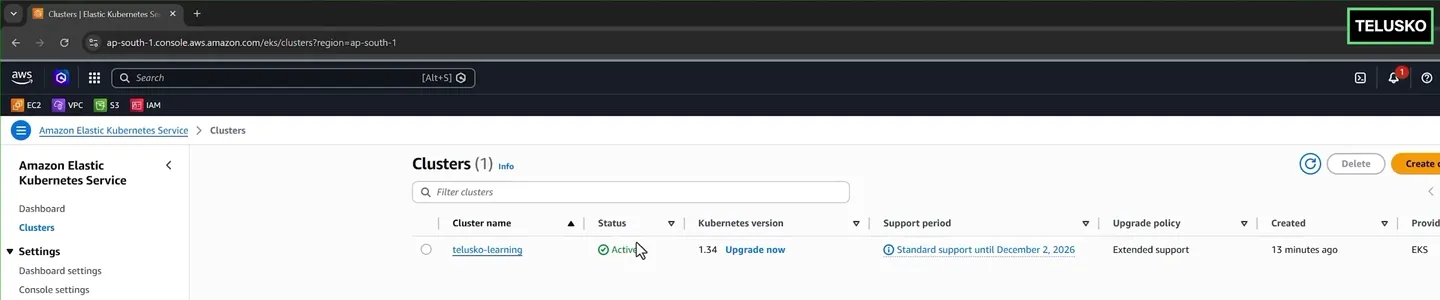
The cluster from the lecture. Note the support period column: this is where you see when the version leaves standard support.
Open EC2, then Instances. Next to your EKS-HOME-Server you will now see two t3.small instances named telusko-learning-ng-...-Node. You did not create them; the managed node group did. If you terminate one by hand, the Auto Scaling group simply launches a replacement.
Step 5: Delete the cluster when you stop practising
An idle cluster still costs money
An EKS cluster is not covered by the free tier. While it exists you pay for the control plane ($0.10 per hour, about $2.40 a day), two t3.small nodes, a NAT gateway, EBS volumes and any load balancers you create. Left running for a month, a "small" practice cluster easily reaches $100 to $200. Delete it whenever you take a break of more than a few hours.
eksctl delete cluster --name telusko-learning --region ap-south-1 --wait| Flag | Meaning |
|---|---|
--name, --region | Which cluster to delete |
--wait | Wait until CloudFormation finishes and report any error. Without it, eksctl only starts the deletion and returns |
eksctl deletes the node group stack, then the cluster stack, which removes the VPC, NAT gateway, roles and everything else it created. It takes 10 to 15 minutes.
Before deleting, remove anything you created that AWS bills separately, especially Services of type LoadBalancer (they create AWS load balancers) and PersistentVolumes backed by EBS. A leftover load balancer can block the VPC from being deleted and keeps charging you:
kubectl get svc -A | grep LoadBalancer      # delete these first
kubectl delete svc <name>
After deletion, check that nothing is left:
- CloudFormation: no stacks starting with
eksctl-telusko-learning - EC2: no node instances, no load balancers, no unattached EBS volumes
- VPC: no
eksctl-telusko-learning-cluster/VPC
If a stack shows DELETE_FAILED, open it, look at the Events tab for the resource that blocked it (usually a load balancer or a network interface), delete that resource, and delete the stack again.
Stop (do not terminate) the EKS home server when you are done for the day. Next time, start it, SSH in, and run the same eksctl create cluster command again. The tools are still installed.
Common errors
Try It Yourself
- Create the cluster with
--versionset to a version in standard support, and time how long it takes. - Run
kubectl get nodes -o wideand find each node's internal IP, OS image and container runtime. - Open CloudFormation and look at the Resources tab of the cluster stack. Count how many AWS resources eksctl created for you.
- Terminate one of the worker node EC2 instances from the console. Run
kubectl get nodesevery minute and watch the node group replace it. - Delete the cluster with
--wait, then confirm in CloudFormation, EC2 and VPC that nothing is left.
Official references
- eksctl: Creating and managing clusters
- eksctl: Minimum IAM policies
- Amazon EKS: Kubernetes version lifecycle
- Amazon EKS: Choose an optimal EC2 node instance type
- Amazon EKS pricing
Written By: Shramik Masti
How is this guide?
Last updated on
Installing kubectl, AWS CLI and eksctl for EKS
Compare the ways to get a Kubernetes cluster, launch an Ubuntu EC2 instance as your EKS host, and install the AWS CLI, kubectl and eksctl with a verified script.
Understanding Kubernetes Manifest YAML Files
Learn the four sections every Kubernetes manifest has (apiVersion, kind, metadata, spec), how to find the right values for each, and how manifests are submitted with kubectl.