
Introduction to Kubernetes Services
Understand why pod IP addresses are not a reliable way to reach an application, what a Kubernetes Service is, and when to use ClusterIP, NodePort or LoadBalancer.
Our pod is running. The Spring Boot app inside it listens on port 8080. So how does anyone actually use it? Can a user open a browser and type the pod's IP? Can another application in the cluster call it by IP?
Technically, from inside the cluster, yes. In practice, no. This lesson explains why, and introduces the object Kubernetes gives us to solve it: the Service.
Why not just use the pod IP?
Create the pod from the previous lesson again and look at its IP:
kubectl apply -f k8s-pod.yml
kubectl get pods -o wide
kubectl describe pod webapp | grep -i "^IP"
You get an address like 192.168.23.99. It works today. Here is why it is the wrong thing to depend on:
| Problem | What happens |
|---|---|
| Pods are temporary | A pod can crash, be deleted, or be evicted when a node is drained. Its replacement is a new pod with a new IP |
| Pods move | The replacement may land on a different worker node, in a different subnet |
| There are usually many pods | When you scale to 3 or 10 copies, each has its own IP. Who decides which one gets each request? |
| Pod IPs are private | On EKS they come from the VPC's private range. Nobody on the internet can reach them |
If a frontend hard-codes the backend pod's IP, the first time that pod is recreated, the frontend breaks. Spreading traffic over 10 pods by hand is not realistic either.
What a Service is
A Service is a Kubernetes object that gives a group of pods one stable address and load balances traffic across them.
- It gets a fixed virtual IP (the ClusterIP) and a DNS name, which do not change for the life of the Service
- It finds its pods using a label selector, for example
app: telusko-webapp - It keeps an up-to-date list of the IPs of matching, ready pods (called endpoints)
- When a pod is replaced, the list updates automatically. Clients never notice
Clients talk to the Service. The Service forwards to a healthy pod. That is the whole idea.
The default Service you already have
kubectl get svc # svc is the short name; "kubectl get service" is the sameNAME TYPE CLUSTER-IP EXTERNAL-IP PORT(S) AGE
kubernetes ClusterIP 10.100.0.1 <none> 443/TCP 20mThis kubernetes Service is created automatically with every cluster. Pods use it to reach the API server. Leave it alone.
The three Service types
You choose how the Service is exposed with spec.type. There are three you use day to day.
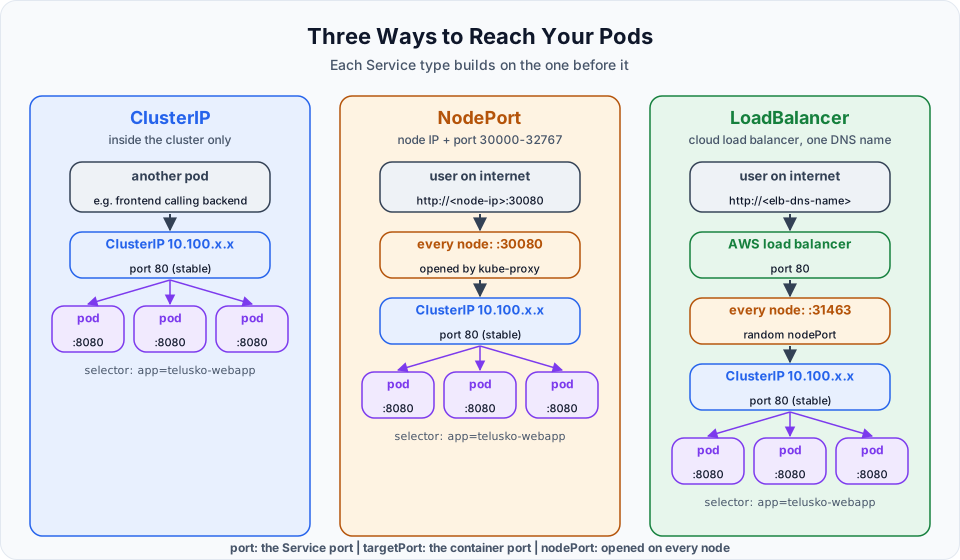
| Type | Reachable from | How you reach it | Typical use |
|---|---|---|---|
| ClusterIP (default) | Inside the cluster only | http://webapp-svc or the cluster IP | Backend APIs, databases, anything only other pods call |
| NodePort | Outside, via any node | http://<node-ip>:<30000-32767> | Quick tests, labs, or behind your own external load balancer |
| LoadBalancer | Outside, via a cloud load balancer | http://<load-balancer-dns-name> | Exposing an app to users on a cloud such as EKS |
Notice in the diagram that the types are layered. A NodePort Service also gets a ClusterIP. A LoadBalancer Service also gets a NodePort and a ClusterIP, and the cloud load balancer sends traffic to that node port.
There is also a fourth type, ExternalName, which simply returns a DNS alias to an outside name (for example a managed database endpoint). It does not proxy traffic and you will rarely need it in this course.
A correction on NodePort
It is often said that NodePort "sends all traffic to the one node where the pod runs". That is not how it works. A NodePort is opened on every node, and kube-proxy forwards from any node to a matching pod, even one on another node. The real limits of NodePort are that clients need to know node IPs (which change when nodes are replaced), the ports are in an unusual high range, the node security group must be opened, and there is no health-checked front door. The NodePort lesson shows this in practice.
What about Ingress?
For HTTP applications, production clusters often put an Ingress (or the newer Gateway API) in front of ClusterIP Services, so one load balancer can route /api to one Service and /shop to another. That builds on everything in this section, so make sure Services are clear first.
What is next
The next three lessons create each type against our webapp pod:
ClusterIP Service Explained
NodePort Service Explained
LoadBalancer Service Explained
Try It Yourself
- Create the
webapppod, note its IP, delete it, create it again, and compare the new IP. - Run
kubectl get svcandkubectl describe svc kubernetes. Find the endpoint IPs. What do they point to? - For each of these, decide which Service type you would use: a MySQL database used only by your Spring Boot app; a public shopping website; a test you want to open from your laptop for 10 minutes.
Official references
- Kubernetes: Service
- Kubernetes: Connecting Applications with Services
- Kubernetes: DNS for Services and Pods
Written By: Shramik Masti
How is this guide?
Last updated on
First Pod Creation in Kubernetes
Write your first Pod manifest, fix the real YAML errors that come up, inspect the pod with get, -o wide and describe, compare kubectl create with apply, and delete it.
ClusterIP Service Explained
Create a ClusterIP Service for the webapp pod, connect it with labels and selectors, map port to targetPort, and prove it works from inside the cluster.