
Labels and Selectors in Kubernetes
Learn how labels tag Kubernetes objects and how selectors find them, filter pods with kubectl -l, add labels on the fly, and see why Services, ReplicaSets and Deployments all depend on them.
Imagine a cluster running 300 pods. Someone asks: "show me only the frontend pods in the dev environment". Or a Service needs to know which of those 300 pods should receive its traffic. Pod names are random and IPs change, so neither can be used. Kubernetes answers both questions the same way, with labels and selectors.
We have already used them. The webapp pod had the label app: telusko-webapp, and every Service we created had selector: app: telusko-webapp. Before we reach ReplicaSets and Deployments, which rely on them even more, let us look at them properly.
Labels: tags on objects
A label is a key-value pair attached to a Kubernetes object, in metadata.labels. Think of it like a tag on a photo or a post: it does not change what the object is, it just makes it easy to find and group.
- An object can have many labels
- Many objects can share the same label
- Labels are meant for identifying and selecting. Kubernetes itself does not attach any meaning to
apporenv; the meaning is whatever your team agrees
Common keys teams use:
| Key | Example values | Answers the question |
|---|---|---|
app | telusko-webapp, payment | Which application is this? |
env | dev, test, prod | Which environment? |
tier | frontend, backend, db | Which layer? |
team | payments, platform | Who owns it? |
version | v1, v2 | Which release? |
Kubernetes also documents a set of recommended keys with a prefix, such as app.kubernetes.io/name and app.kubernetes.io/version, which tools like Helm use. Short keys like app are perfectly fine while learning.
Label rules: keys and values are up to 63 characters, start and end with a letter or number, and may contain -, _ and .. A key may have an optional DNS prefix such as app.kubernetes.io/.
Selectors: searches over labels
A selector is a search condition. It says "every object whose labels match this". Selectors appear in two places:
- In kubectl, with
-l(or--selector), so that you can filter what you see - Inside other objects, so that a Service, ReplicaSet, Deployment or DaemonSet knows which pods are "its" pods
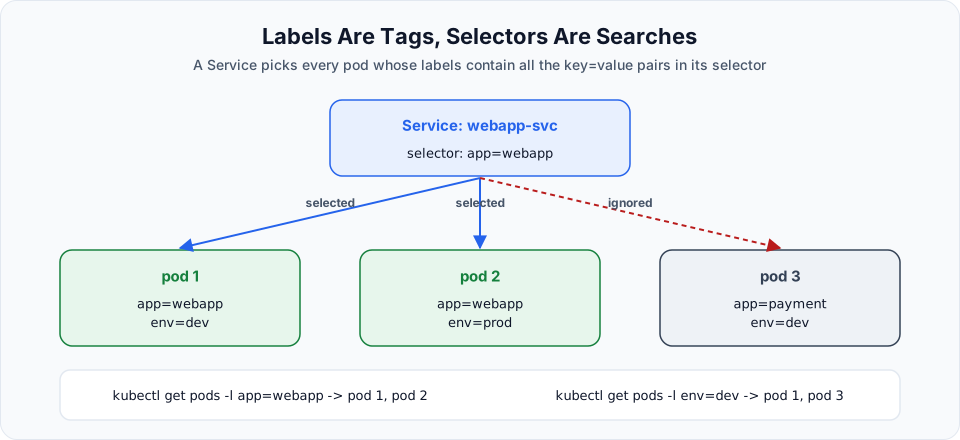
A pod matches a selector when it has all the key-value pairs in the selector. Extra labels on the pod do not matter. So pod 1 (app=webapp, env=dev) and pod 2 (app=webapp, env=prod) both match app=webapp, and pod 3 does not.
Hands-on: a pod with two labels
vi label.ymlapiVersion: v1
kind: Pod
metadata:
name: webapp
labels:
app: telusko-webapp
env: dev
spec:
containers:
- name: webapp-container
image: nginxkubectl apply -f label.yml
kubectl get podsShow the labels
kubectl get pods --show-labelsNAME READY STATUS RESTARTS AGE LABELS
webapp 1/1 Running 0 44s app=telusko-webapp,env=devFilter by label
kubectl get pods -l app=telusko-webapp
kubectl get pods -l env=dev
NAME READY STATUS RESTARTS AGE
webapp 1/1 Running 0 7m21sWith one pod the filter looks pointless. With hundreds of pods across teams, it is how you find anything.
More selector forms
kubectl -l understands two styles:
| Selector | Matches pods where |
|---|---|
-l app=telusko-webapp | app equals telusko-webapp |
-l env!=prod | env is not prod (or there is no env label) |
-l app=telusko-webapp,env=dev | Both conditions are true (comma means AND) |
-l 'env in (dev,test)' | env is dev or test |
-l 'env notin (prod)' | env is anything except prod |
-l team | The team label exists, any value |
-l '!team' | There is no team label |
The first three are equality-based, the rest are set-based. Quote set-based selectors so the shell does not misread the brackets.
You can also show labels as columns:
kubectl get pods -L app,envAdd, change and remove labels without editing YAML
kubectl label pod webapp team=platform           # add
kubectl label pod webapp env=test --overwrite    # change
kubectl label pod webapp team-                   # remove (note the trailing dash)
This is handy for experiments, but remember that the YAML file is the source of truth. The next kubectl apply of the file may reset what you changed by hand.
Where selectors are used inside Kubernetes
| Object | Selector field | What it selects |
|---|---|---|
| Service | spec.selector (plain map) | Pods that receive the traffic |
| ReplicaSet | spec.selector.matchLabels / matchExpressions | Pods it counts and keeps alive |
| Deployment | spec.selector.matchLabels | Pods belonging to the Deployment |
| DaemonSet | spec.selector.matchLabels | Pods it runs on each node |
| NetworkPolicy | podSelector | Pods the policy applies to |
ReplicaSets and Deployments use matchLabels, a slightly more structured form, and also accept set-based matchExpressions. You will write them in the next lessons.
A selector that matches too much
Selectors are powerful in both directions. If a Service selects only env=dev, it will happily send traffic to every dev pod, including your database. Use a combination that uniquely identifies the app, such as app plus tier, and keep labels consistent across your manifests.
Clean up
kubectl delete -f label.ymlIf you are finished for the day, delete the cluster: eksctl delete cluster --name telusko-learning --region ap-south-1 --wait.
Try It Yourself
- Create three pods:
pod1withapp=webapp,env=dev,pod2withapp=webapp,env=prod, andpod3withapp=payment,env=dev. Usekubectl run pod1 --image=nginx --labels=app=webapp,env=devto save typing. - Predict, then check, the output of
kubectl get pods -l app=webapp,-l env=dev,-l 'env in (dev,prod),app=payment'and-l env!=prod. - Create a ClusterIP Service with selector
app: webappand check its Endpoints. Which pod IPs appear? - Remove the
applabel frompod2withkubectl label pod pod2 app-and check the Service endpoints again.
Official references
Written By: Shramik Masti
How is this guide?
Last updated on
Namespaces in Kubernetes
Use namespaces to divide one cluster into isolated areas, create them with kubectl and YAML, deploy a pod into a namespace, query it with -n, and understand what deleting a namespace removes.
Maintaining Pod Availability with ReplicaSets
See why a bare pod gives no self-healing, write a ReplicaSet manifest with replicas, selector and template, and watch Kubernetes recreate a deleted pod automatically.