
Kubernetes Deployments: ReplicaSets, Scaling & Self-Healing
Create your first Deployment, see how it creates a ReplicaSet that creates the pods, and confirm self-healing and manual scaling still work, with get, scale and get events.
In a real project you almost never create bare pods, and you rarely create ReplicaSets yourself. When a team says "deploy the app to Kubernetes", they mean: write a Deployment. Everything you learned about ReplicaSets still applies, because a Deployment uses ReplicaSets under the hood. What it adds is the ability to change your application safely, which is the subject of the next lesson.
Pod, ReplicaSet, Deployment: who manages whom
A Deployment does not manage pods directly. Kubernetes uses a chain of owners:
Deployment --creates and manages--> ReplicaSet --creates and manages--> Pods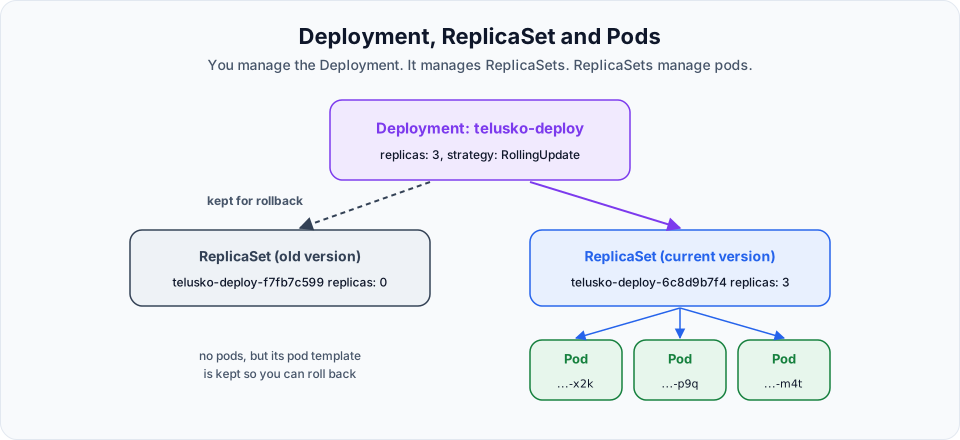
| Object | Responsibility |
|---|---|
| Deployment | Holds your desired state (image, replicas, update strategy). Creates a new ReplicaSet whenever the pod template changes, and moves pods from the old one to the new one gradually |
| ReplicaSet | Keeps exactly N pods of one specific template version running. Self-healing happens here |
| Pod | Runs the containers |
Right after you create a Deployment there is only one ReplicaSet. The second, scaled-to-zero ReplicaSet in the diagram appears after your first update, and it is what makes rollback possible.
| Feature | Pod | ReplicaSet | Deployment |
|---|---|---|---|
| Runs your containers | Yes | Yes | Yes |
| Self-healing | No | Yes | Yes |
| Manual scaling | No | Yes | Yes |
| Rolling updates | No | No | Yes |
| Rollback and revision history | No | No | Yes |
| Autoscaling with HPA (later in the course) | No | Technically | Yes, the standard setup |
Step 1: Write the Deployment
The manifest is almost identical to the ReplicaSet from the previous lessons. Only kind, the names and the labels change.
vi k8s-deploy.ymlapiVersion: apps/v1
kind: Deployment
metadata:
name: telusko-deploy
labels:
app: telusko-dp-webapp
spec:
replicas: 3
selector:
matchLabels:
app: telusko-dp-webapp
template:
metadata:
labels:
app: telusko-dp-webapp
spec:
containers:
- name: webapp-container
image: <your-dockerhub-username>/springboot-app:latest
ports:
- containerPort: 8080| Field | Meaning |
|---|---|
apiVersion: apps/v1 | Same API group as ReplicaSet. Very old tutorials show extensions/v1beta1, which was removed in Kubernetes 1.16 |
kind: Deployment | The only real change from the ReplicaSet file |
metadata.name: telusko-deploy | The Deployment name. ReplicaSets are named telusko-deploy-<hash>, pods telusko-deploy-<hash>-<random> |
spec.replicas: 3 | Desired pod count. Defaults to 1 if left out |
spec.selector.matchLabels | Which pods belong to this Deployment. Cannot be changed after creation |
spec.template | The pod template. Any change here (image, env, ports) triggers a new rollout |
The rule from ReplicaSets still holds: selector.matchLabels must match template.metadata.labels.
Step 2: Create it
Start from a clean namespace (kubectl get all should show only the kubernetes Service), then:
kubectl apply -f k8s-deploy.ymldeployment.apps/telusko-deploy createdkubectl get deploy # same as: kubectl get deploymentsNAME READY UP-TO-DATE AVAILABLE AGE
telusko-deploy 3/3 3 3 20s| Column | Meaning |
|---|---|
READY 3/3 | Ready pods / desired pods |
UP-TO-DATE | Pods already running the latest pod template |
AVAILABLE | Pods ready for at least minReadySeconds (0 by default), so able to serve users |
Now look one level down:
kubectl get rs
kubectl get pods
NAME DESIRED CURRENT READY AGE
telusko-deploy-f7fb7c599 3 3 3 3m57sWe never wrote kind: ReplicaSet, yet one exists. The Deployment created it. The suffix f7fb7c599 is a hash of the pod template, also stored on each pod as the label pod-template-hash. When the template changes, the hash changes, and that is how the Deployment tells versions apart.
-o wide adds containers, images and the selector:
kubectl get deploy -o wideNAME READY UP-TO-DATE AVAILABLE AGE CONTAINERS IMAGES SELECTOR
telusko-deploy 3/3 3 3 3m44s webapp-container <your-dockerhub-username>/springboot-app:latest app=telusko-dp-webappStep 3: Self-healing still works
kubectl delete pod <one-of-the-telusko-deploy-pods>
kubectl get pods
After a few seconds there are three pods again, one of them only seconds old. The ReplicaSet owned by the Deployment replaced it, exactly as in the ReplicaSet lesson.
Step 4: Scale out and in
kubectl scale deploy telusko-deploy --replicas=10
kubectl get pods
Ten pods. On two t3.small nodes this is near the pod limit, so if some stay Pending with Too many pods, use 8 instead.
kubectl scale deploy telusko-deploy --replicas=3
kubectl get pods
Back to three; the newest pods were removed and the oldest kept, following the ReplicaSet scale-down rules from the previous lesson.
You scale the Deployment, not the ReplicaSet. If you scale the ReplicaSet directly, the Deployment notices it no longer matches its own replicas and sets it back.
As with ReplicaSets, kubectl scale only changes the live object. Update replicas in k8s-deploy.yml if you want the change to last.
Step 5: See what happened with events
Every action you took left a trail of events:
kubectl get events --sort-by=.metadata.creationTimestampLAST SEEN TYPE REASON OBJECT MESSAGE
2m Normal ScalingReplicaSet deployment/telusko-deploy Scaled up replica set telusko-deploy-f7fb7c599 from 3 to 10
2m Normal SuccessfulCreate replicaset/telusko-deploy-f7fb7c599 Created pod: telusko-deploy-f7fb7c599-7xk2p
2m Normal Scheduled pod/telusko-deploy-f7fb7c599-7xk2p Successfully assigned default/... to ip-192-168-...
2m Normal Pulled pod/telusko-deploy-f7fb7c599-7xk2p Successfully pulled image ...
1m Normal Killing pod/telusko-deploy-f7fb7c599-9qwmz Stopping container webapp-container
...Read the OBJECT column from top to bottom and you can see the ownership chain in action: the Deployment scales the ReplicaSet, the ReplicaSet creates pods, the scheduler assigns them, the kubelet pulls and starts them. Events are one of the best troubleshooting tools in Kubernetes. They are kept for about an hour by default, so check them soon after a problem.
--sort-by matters: without it, events are not guaranteed to be in time order.
Clean up
Keep the Deployment if you continue straight to rolling updates. Otherwise:
kubectl delete -f k8s-deploy.yml
kubectl get rs,pods        # both gone: deleting the Deployment removes its ReplicaSets and pods
Deleting a single pod of a Deployment is pointless as a clean-up step, because it comes straight back. Delete the Deployment. If you are done for the day: eksctl delete cluster --name telusko-learning --region ap-south-1 --wait.
Try It Yourself
- Create
telusko-deployand draw the ownership chain using real names fromkubectl get deploy,rs,pods. - Run
kubectl get pods --show-labelsand find thepod-template-hashlabel. Compare it with the ReplicaSet name. - Try scaling the ReplicaSet directly with
kubectl scale rs <name> --replicas=5and watch what the Deployment does within a few seconds. - Scale to 10, then read
kubectl get events --sort-by=.metadata.creationTimestampand find theScalingReplicaSetevent. - Delete the Deployment and confirm the ReplicaSet and pods are gone too.
Official references
- Kubernetes: Deployments
- kubectl reference: scale
- kubectl reference: events (the newer
kubectl eventscommand, sorted by time by default)
Written By: Shramik Masti
How is this guide?
Last updated on
Scaling ReplicaSets & Limitations
Scale a ReplicaSet out and in with kubectl scale, watch pods being created and terminated, and understand why ReplicaSets cannot do rolling updates or rollbacks.
Rolling Updates & Rollbacks in Kubernetes Deployments
Expose a Deployment through a LoadBalancer, roll out a new image with zero downtime, watch the RollingUpdate strategy work, check rollout status and history, and roll back with one command.