
Kubernetes Storage Fundamentals: PV & PVC
Learn why data inside a pod disappears, and how PersistentVolumes, PersistentVolumeClaims and StorageClasses connect a pod to real storage such as an AWS EBS volume.
Your Spring Boot app lets users upload profile pictures and saves them under /app/uploads inside the container. Everything works until the pod is deleted, or crashes, or is moved to another node during an upgrade. The Deployment creates a fresh pod in seconds, but the uploads folder in the new container is empty.
That is not a bug. It is how pods are designed.
Pods are ephemeral
Ephemeral means temporary. A container's filesystem is created from the image when the container starts and is thrown away when the pod is removed. Self-healing gives you a new pod, not the old pod's files.
kubectl delete pod <pod-name>
kubectl get pods        # a new pod appears, with an empty filesystem
So anything worth keeping must be written somewhere that lives outside the pod's lifecycle.
Think of a laptop and an external hard disk. If you keep your important files on the external disk, a broken laptop is an inconvenience, not a disaster. Buy a new laptop, plug in the same disk, and the files are there. In Kubernetes, the pod is the laptop and the external disk is a volume that outlives the pod.
The three storage objects
| Object | Who creates it | What it is |
|---|---|---|
| PersistentVolume (PV) | Cluster admin, or a StorageClass automatically | A cluster-level object that represents a piece of real storage, for example one 20 GiB AWS EBS volume. Not tied to any namespace or pod |
| PersistentVolumeClaim (PVC) | The application team, in a namespace | A request for storage: "I need 20Gi that one node can read and write". Kubernetes binds it to a matching PV |
| StorageClass | Cluster admin | A recipe for creating PVs on demand: which driver, which disk type (gp3), which settings |
The key facts about a PV:
- It represents actual physical storage (an EBS volume, an EFS file system, an NFS share).
- It exists independently of pods. It is there even if no pod uses it, and it survives pod crashes and restarts.
- It is cluster-scoped, while a PVC lives in a namespace.
And about a PVC:
- It is a request: size, access mode and optionally a StorageClass.
- A pod never points at a PV directly. It points at a PVC, and the PVC is bound to a PV.
- Binding is one to one. One PVC binds to exactly one PV, and that PV is then reserved for it.
A PVC does not take a slice of a PV
The lecture describes a claim as asking for 10 GB "out of" a 20 GB PV. Binding does not split a volume. Kubernetes binds the claim to a whole PV that is at least as large as the request, so a 10Gi claim bound to a 20Gi PV gets the full 20Gi and no other claim can use that PV. Size your PVs and PVCs to match.
Why two objects instead of one? Separation of jobs. The person writing the pod YAML should not need to know the EBS volume ID, the Availability Zone or the driver. They ask for "20Gi, ReadWriteOnce". The admin (or a StorageClass) decides where that storage really comes from.
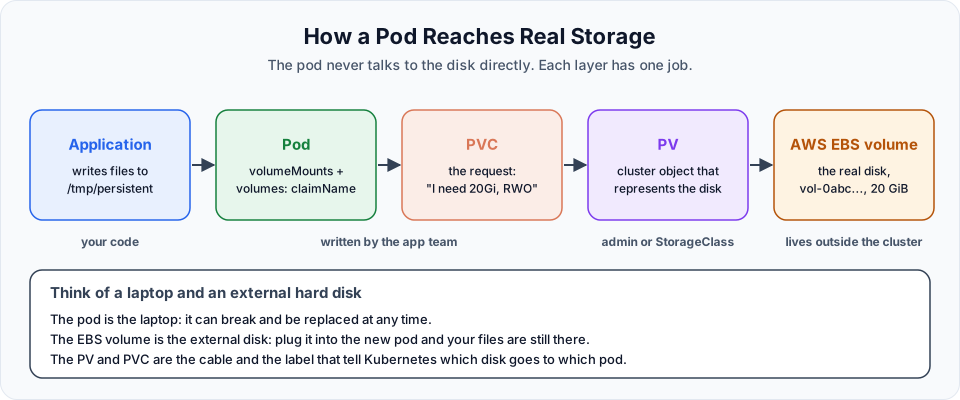
The control flow, from the application down:
Application -> Pod (volumeMount) -> PVC (the request) -> PV (the representation) -> AWS EBS volume (the real disk)Two ways to get a PV
| Static provisioning | Dynamic provisioning | |
|---|---|---|
| How | You create the EBS volume by hand, then write a PV that points at its volume ID | You write a StorageClass once. Every new PVC makes the driver create a fresh EBS volume and its PV |
| Good for | Reusing an existing disk, learning how the pieces fit | Almost everything in real clusters, and StatefulSets |
| In this course | PV and PVC: Hands-On | Creating StatefulSets with Persistent Storage |
We start with static provisioning because it shows every layer clearly. Then we let a StorageClass do the work.
Access modes
A PV and a PVC both declare how the storage can be mounted:
| Access mode | Short | Meaning | AWS EBS? |
|---|---|---|---|
ReadWriteOnce | RWO | Read-write by pods on one node at a time | Yes, the normal choice |
ReadOnlyMany | ROX | Read-only by many nodes | No |
ReadWriteMany | RWX | Read-write by many nodes | No (use Amazon EFS) |
ReadWriteOncePod | RWOP | Read-write by one pod only, in the whole cluster | Yes |
An EBS volume is a block device attached to one EC2 instance, and it lives in one Availability Zone. That is why EBS-backed volumes are ReadWriteOnce, and why a pod using one must run on a node in the same zone as the disk.
Reclaim policy: what happens to the disk later
When you delete a PVC, the PV it was bound to is released. The PV's persistentVolumeReclaimPolicy decides what happens next:
| Policy | Result |
|---|---|
Retain | The PV and the real disk stay. An admin must clean up or reuse them by hand. Safe for important data |
Delete | The PV and the EBS volume are deleted. This is the default for dynamically provisioned volumes |
Recycle | Deprecated. Do not use |
Storage costs money even when no pod uses it
An EBS volume is billed per GiB per month whether or not it is attached. With Retain, deleting the PVC leaves the volume in your AWS account. Always check EC2, Elastic Block Store, Volumes after a lab and delete volumes in the available state that you no longer need.
What we will build next
The practical part comes in three steps:
- Prepare the storage on AWS: create an EBS volume and install the Amazon EBS CSI driver so the cluster can use it.
- Create a PV and a PVC by hand, mount them into a pod, delete the pod and prove the files survive.
- Let a StatefulSet create the storage for each pod through a StorageClass.
Try It Yourself
- Run a pod with
kubectl run scratch --image=busybox -- sleep 3600, create a file withkubectl exec scratch -- touch /tmp/hello.txt, delete and recreate the pod, and check whether the file is still there. - Run
kubectl get storageclasson your EKS cluster. Is any class marked(default)? Note the provisioner names you see. - For each of these, choose an access mode and say why: a MySQL data directory, a folder of static images that many web pods read, a shared folder several pods write to.
- Explain to a friend in three sentences why a pod refers to a PVC and not to a PV.
Official references
Written By: Shramik Masti
How is this guide?
Last updated on
Stateful Applications & StatefulSets Explained
Understand the difference between stateless and stateful applications, see why a Deployment is the wrong tool for a database, and learn what a StatefulSet adds.
Preparing AWS EBS Storage for Kubernetes (EKS)
Create a gp3 EBS volume in the same Availability Zone as your nodes, connect an IAM OIDC provider to the cluster, and install the Amazon EBS CSI driver add-on with eksctl.