
Preparing AWS EBS Storage for Kubernetes (EKS)
Create a gp3 EBS volume in the same Availability Zone as your nodes, connect an IAM OIDC provider to the cluster, and install the Amazon EBS CSI driver add-on with eksctl.
Kubernetes knows what a PersistentVolume is, but it does not know how to talk to AWS. Creating an EBS volume, attaching it to the right EC2 worker node, formatting it and mounting it into a pod are all AWS-specific jobs. On EKS those jobs are done by a plug-in called the Amazon EBS CSI driver.
Before we write any PV or PVC YAML, we prepare two things:
- An EBS volume that will hold our data.
- The EBS CSI driver, with the IAM permissions it needs to call AWS on the cluster's behalf.
We use the telusko-learning cluster in ap-south-1 from Creating Your First EKS Cluster, and run commands from the EKS home server as before.
Step 1: Create the EBS volume
Open the EC2 console, and in the left menu choose Elastic Block Store, Volumes. You will already see a few volumes: those are the root disks of your worker nodes and of the home server. Leave them alone.
Click Create volume and fill in:
| Field | Value | Why |
|---|---|---|
| Volume type | General Purpose SSD (gp3) | Current general-purpose type. Cheaper than gp2 with a fixed 3000 IOPS baseline |
| Size | 20 GiB | Enough for the demo. You pay per GiB per month, so keep it small |
| IOPS / Throughput | 3000 / 125 (defaults) | The free baseline for gp3 |
| Availability Zone | ap-south-1a | Must be a zone where you have a worker node. An EBS volume can only attach to an instance in its own zone |
| Snapshot ID | Don't create volume from a snapshot | We start empty |
| Encryption | Optional for the lab, recommended in real use | Encrypted volumes need the driver to have KMS permissions if you use a custom key |
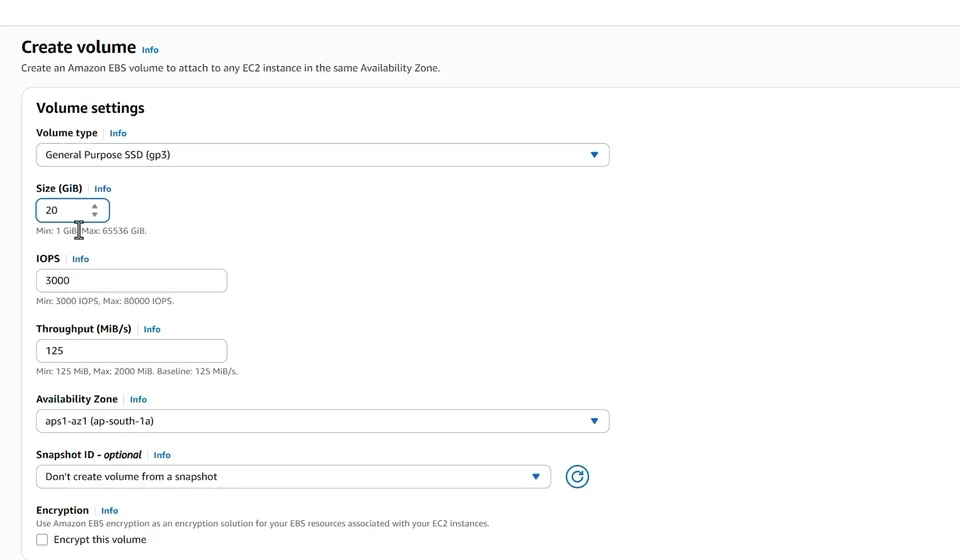
The Create volume form: gp3, 20 GiB, and the zone ap-south-1a, where one of our worker nodes runs.
Click Create volume. After a few seconds the volume state becomes Available (created, not attached to anything). Select it, edit the Name tag and call it Pods Vol, so you can find it again easily.
Open the volume and copy its Volume ID. It looks like vol-0001b896f60f42519. We will paste it into the PersistentVolume in the next lesson.
To check which zones your nodes are in, run this on the home server:
kubectl get nodes -L topology.kubernetes.io/zoneNAME STATUS ROLES AGE VERSION ZONE
ip-192-168-12-34.ap-south-1.compute.internal Ready <none> 2d v1.34.x-eks-xxxxxxx ap-south-1a
ip-192-168-45-67.ap-south-1.compute.internal Ready <none> 2d v1.34.x-eks-xxxxxxx ap-south-1bYou can also create the volume from the CLI:
aws ec2 create-volume \
  --availability-zone ap-south-1a \
  --size 20 \
  --volume-type gp3 \
  --tag-specifications 'ResourceType=volume,Tags=[{Key=Name,Value=Pods Vol}]' \
  --region ap-south-1
Step 2: What the EBS CSI driver does
CSI stands for Container Storage Interface, a standard API that lets any storage vendor write one plug-in for Kubernetes. The old built-in AWS EBS code inside Kubernetes (awsElasticBlockStore) has been removed, so on a current cluster the CSI driver is the only way to use EBS.
The driver can:
- Create EBS volumes automatically when a PVC asks for storage (dynamic provisioning)
- Attach volumes to the worker node where the pod is scheduled
- Format and mount them inside the pod
- Detach and delete them when they are no longer needed
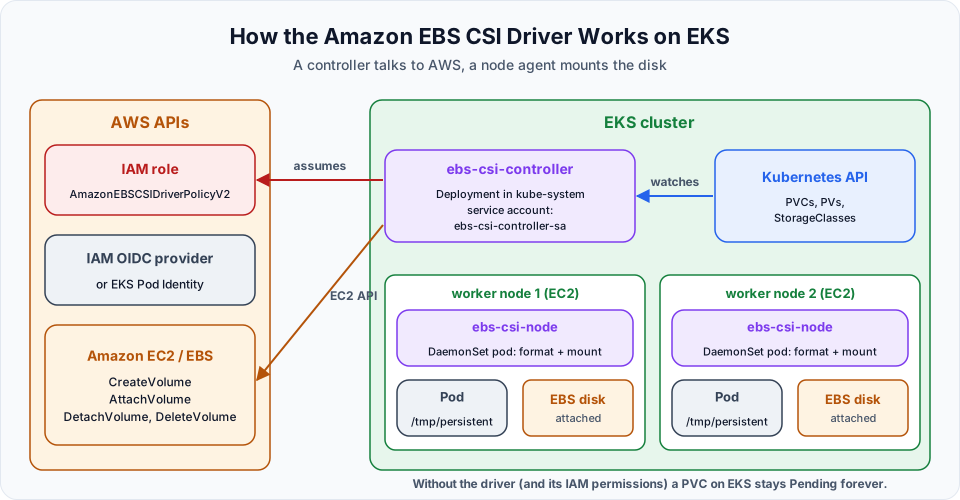
It runs as two parts: an ebs-csi-controller Deployment that calls the EC2 API, and an ebs-csi-node DaemonSet on every node that mounts the disks. The controller calls AWS, so it needs an IAM role. Without that role, PVCs fail with could not create volume in EC2: UnauthorizedOperation.
Step 3: Associate an IAM OIDC provider
The lecture gives the driver its IAM role through IAM Roles for Service Accounts (IRSA). IRSA needs the cluster's OpenID Connect (OIDC) issuer registered as an identity provider in IAM:
eksctl utils associate-iam-oidc-provider \
  --cluster telusko-learning \
  --region ap-south-1 \
  --approve
[ℹ] will create IAM Open ID Connect provider for cluster "telusko-learning" in "ap-south-1"
[✔] created IAM Open ID Connect provider for cluster "telusko-learning" in "ap-south-1"| Flag | Meaning |
|---|---|
--cluster | Your cluster name, exactly as you created it |
--region | Region of the cluster. Change it if you are not in Mumbai |
--approve | Actually make the change. Without it eksctl only prints the plan |
This lets IAM trust tokens issued by your cluster, so a Kubernetes service account (here ebs-csi-controller-sa) can assume an IAM role. You only need to do it once per cluster.
Step 4: Install the EBS CSI driver add-on
eksctl create addon \
  --name aws-ebs-csi-driver \
  --cluster telusko-learning \
  --region ap-south-1 \
--force| Flag | Meaning |
|---|---|
--name aws-ebs-csi-driver | The EKS managed add-on to install |
--cluster, --region | Which cluster |
--force | Overwrite any existing configuration if a self-managed copy of the driver is already there. Harmless on a fresh cluster |
Because the OIDC provider exists and we did not pass a role, eksctl creates an IAM role with the recommended policies for this add-on in a CloudFormation stack, then installs the add-on:
[ℹ]  Kubernetes version "1.34" in use by cluster "telusko-learning"
[!]  the recommended way to provide IAM permissions for "aws-ebs-csi-driver" addon is via pod identity associations; after addon creation is completed, run `eksctl utils migrate-to-pod-identity`
[ℹ]  creating role using recommended policies for "aws-ebs-csi-driver" addon
[ℹ]  deploying stack "eksctl-telusko-learning-addon-aws-ebs-csi-driver"
[ℹ]  waiting for CloudFormation stack "eksctl-telusko-learning-addon-aws-ebs-csi-driver"
[ℹ]  creating addon: aws-ebs-csi-driver
Wait a minute and check that the driver pods are running:
eksctl get addon --cluster telusko-learning --region ap-south-1
kubectl get pods -n kube-system -l app.kubernetes.io/name=aws-ebs-csi-driver
NAME READY STATUS RESTARTS AGE
ebs-csi-controller-7d5f8c9b8d-4kq2m 6/6 Running 0 70s
ebs-csi-controller-7d5f8c9b8d-xw9lp 6/6 Running 0 70s
ebs-csi-node-8jz6v 3/3 Running 0 70s
ebs-csi-node-tq4hn 3/3 Running 0 70sTwo controller pods, and one node pod per worker node. Also confirm the driver is registered:
kubectl get csidriverYou should see ebs.csi.aws.com. That is the driver name we will use in the PV.
IRSA or EKS Pod Identity?
The warning in the output is worth reading. AWS now recommends EKS Pod Identity for add-on permissions: roles no longer depend on a per-cluster OIDC provider and can be reused across clusters. The lecture's IRSA setup works fine. If you want to follow the current recommendation, you can either install the add-on with --auto-apply-pod-identity-associations instead of creating the OIDC provider, or convert later with:
eksctl utils migrate-to-pod-identity --cluster telusko-learning --region ap-south-1 --approveBoth install the eks-pod-identity-agent add-on where needed. The AWS managed policy for the driver is now AmazonEBSCSIDriverPolicyV2.
Common problems
| Symptom | Likely cause | Fix |
|---|---|---|
eksctl create addon warns that policies are ignored | No OIDC provider and no Pod Identity | Run Step 3, or use --auto-apply-pod-identity-associations |
Driver pods CrashLoopBackOff with AccessDenied | Role missing or wrong trust policy | eksctl delete addon --name aws-ebs-csi-driver --cluster telusko-learning and create it again |
PVC stays Pending, event says UnauthorizedOperation | The controller has no EC2 permissions | Check the role attached to ebs-csi-controller-sa |
Pod stuck ContainerCreating with a volume node affinity conflict | Volume and pod are in different zones | Run the pod on a node in the volume's zone (next lesson) |
Cost and cleanup
The add-on itself is free. The EBS volume costs a small amount for every GiB-month, even while it sits unattached. Keep the Pods Vol volume for the next lesson. When you finish the section, delete it in EC2, Volumes (it must show Available, not In-use), or:
aws ec2 delete-volume --volume-id vol-0001b896f60f42519 --region ap-south-1Deleting the cluster with eksctl delete cluster removes the add-on and the IAM role that eksctl created for it. It does not delete EBS volumes you created by hand.
Try It Yourself
- Create a 10 GiB gp3 volume in
ap-south-1bfrom the CLI and find it in the console. Then delete it. - Run
kubectl get ds,deploy -n kube-systemand identify which objects belong to the EBS CSI driver. - Run
kubectl describe sa ebs-csi-controller-sa -n kube-systemand find the annotation that links it to an IAM role. - Run
eksctl utils migrate-to-pod-identity --cluster telusko-learning --region ap-south-1without--approveand read the plan it prints.
Official references
- Amazon EKS: Use Kubernetes volume storage with Amazon EBS
- eksctl: Addons
- eksctl: EKS Pod Identity Associations
- Kubernetes: Volumes (CSI)
Written By: Shramik Masti
How is this guide?
Last updated on
Kubernetes Storage Fundamentals: PV & PVC
Learn why data inside a pod disappears, and how PersistentVolumes, PersistentVolumeClaims and StorageClasses connect a pod to real storage such as an AWS EBS volume.
Persistent Volumes (PV) and Persistent Volume Claims (PVC): Hands-On
Write a PersistentVolume for an existing EBS volume, claim it with a PVC, mount it into a Deployment, then delete the pod and prove the files survive.