
Helm: Kubernetes Package Manager
Understand why Helm exists, what charts, repositories and releases are, install Helm on the EKS home server, and learn the core commands to install, upgrade, roll back and uninstall applications.
Up to now, everything in this course came from YAML we wrote ourselves. That is the right way to learn. But suppose you want to run Prometheus, Grafana or Argo CD in your cluster. Each of them needs dozens of objects: Deployments, StatefulSets, Services, ConfigMaps, Secrets, ServiceAccounts, Roles, RoleBindings, CustomResourceDefinitions, PVCs. Writing and maintaining all of that by hand, and upgrading it later, would be a full-time job.
On Linux you never install Git by downloading its files and dependencies yourself. You run apt install git on Ubuntu, or dnf install git on Amazon Linux and Red Hat. The package manager knows what to fetch and how to set it up.
Helm is the package manager for Kubernetes. It installs, upgrades, configures and uninstalls applications in your cluster with a few commands.
Three words to know
| Term | Meaning | Linux comparison |
|---|---|---|
| Chart | A package: a set of Kubernetes manifest templates plus default configuration values, everything needed to deploy one application | A .deb or .rpm package |
| Repository | A web location where charts are published, for example https://argoproj.github.io/argo-helm | An apt or dnf repository |
| Release | One installed copy of a chart in your cluster, with a name. You can install the same chart twice under two release names | An installed package |
You find charts on Artifact Hub, the community catalogue. Search for "argo-cd", "prometheus" or "grafana" and you get the repository URL and the install command. Prefer charts from the project's own organisation, marked as official or verified publisher, and sorted by stars.
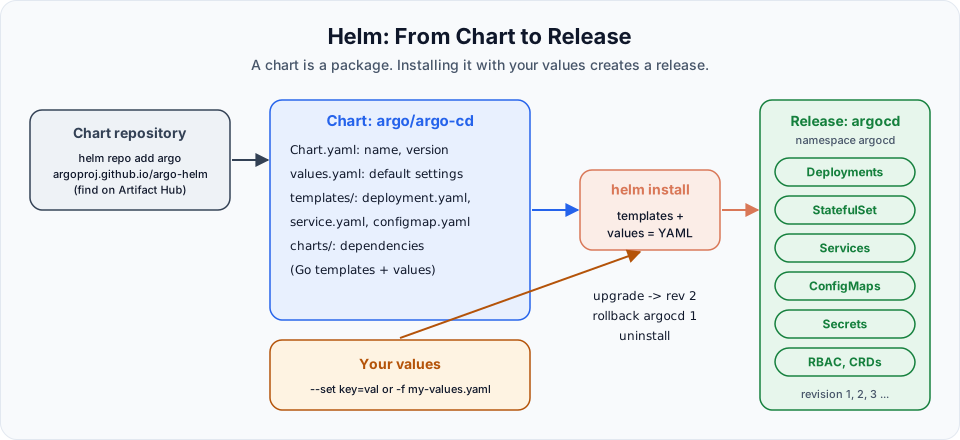
Inside a chart
mychart/
├── Chart.yaml          # name, version, appVersion, description
├── values.yaml         # default settings, all of them overridable
├── templates/          # Kubernetes YAML with {{ placeholders }}
│   ├── deployment.yaml
│   ├── service.yaml
│   └── _helpers.tpl
└── charts/             # other charts this one depends on
A template looks like ordinary YAML with placeholders:
spec:
  replicas: {{ .Values.replicaCount }}
  template:
    spec:
      containers:
        - name: {{ .Chart.Name }}
          image: "{{ .Values.image.repository }}:{{ .Values.image.tag }}"
helm install fills the placeholders from values.yaml and from anything you pass with --set or -f my-values.yaml, then sends the resulting YAML to the cluster. That is why one chart can serve dev, test and production: only the values change.
Install Helm on the EKS home server
Helm is a single binary on the machine where you run kubectl. It talks to the cluster using the same kubeconfig. Nothing is installed inside the cluster for Helm itself.
The lecture uses the official install script:
curl -fsSL -o get_helm.sh https://raw.githubusercontent.com/helm/helm/main/scripts/get-helm-3
chmod 700 get_helm.sh
./get_helm.sh
helm version
Downloading https://get.helm.sh/helm-v3.21.3-linux-amd64.tar.gz
Verifying checksum... Done.
Preparing to install helm into /usr/local/bin
helm installed into /usr/local/bin/helm
version.BuildInfo{Version:"v3.21.3", ...}| Step | Why |
|---|---|
curl -fsSL -o get_helm.sh <url> | Download the script. -f fails on HTTP errors, -s is silent, -S still shows errors, -L follows redirects |
chmod 700 get_helm.sh | Make it executable, for your user only |
./get_helm.sh | Detects your OS and CPU, downloads the right release, checks its checksum, and puts helm in /usr/local/bin |
helm version | Confirms the install |
Helm 4 is the current major version
The lecture installs Helm 3 with the get-helm-3 script. Helm 4 was released in November 2025 and is now the current version. Helm 3 receives only security fixes, which end in February 2027. For a new setup, use the Helm 4 script:
curl -fsSL -o get_helm.sh https://raw.githubusercontent.com/helm/helm/main/scripts/get-helm-4
chmod 700 get_helm.sh
./get_helm.sh
Every command in this course works the same in Helm 3 and Helm 4. Charts written for Helm 3 (chart apiVersion: v2) install with Helm 4 too.
The commands you will use
| Command | What it does |
|---|---|
helm repo add argo https://argoproj.github.io/argo-helm | Register a repository under a short name |
helm repo update | Download the latest chart lists from all repositories |
helm search repo argo | Search charts in the repositories you added |
helm show values argo/argo-cd | Print every setting the chart supports, with defaults |
helm install <release> <chart> -n <ns> --create-namespace | Install a chart as a named release |
helm list -A | List releases in all namespaces |
helm status <release> -n <ns> | Show a release's state and its notes again |
helm upgrade <release> <chart> -n <ns> -f values.yaml | Apply a new chart version or new values. Creates a new revision |
helm history <release> -n <ns> | List the revisions |
helm rollback <release> <revision> -n <ns> | Go back to an earlier revision |
helm uninstall <release> -n <ns> | Remove everything the release created |
helm template <release> <chart> | Render the YAML locally without installing, good for reviewing |
A quick practice run with your own chart
You do not need a repository to try Helm. helm create generates a working sample chart that deploys nginx:
helm create telusko-chart
ls telusko-chart
helm install telusko-web ./telusko-chart
helm list
kubectl get deploy,svc,pods
Change a value during an upgrade, then look at the history and roll back:
helm upgrade telusko-web ./telusko-chart --set replicaCount=3
kubectl get pods                       # 3 pods now
helm history telusko-web
helm rollback telusko-web 1
kubectl get pods                       # back to 1 pod
helm uninstall telusko-web
helm upgrade --install installs if the release does not exist yet and upgrades if it does. Pipelines use it so the same command works on the first and every later deployment.
Charts can create paid AWS resources
Many charts create Services of type LoadBalancer or PVCs. On EKS those become real AWS load balancers and EBS volumes. Read helm show values before installing, and after helm uninstall check EC2, Load Balancers and EC2, Volumes. PVCs created by a StatefulSet in a chart are often not deleted by helm uninstall.
In the next lesson we use Helm for real: installing Argo CD with two commands instead of hundreds of lines of YAML.
Try It Yourself
- Install Helm and run
helm version. Which major version did you get? - Add the Argo repository, run
helm repo update, andhelm search repo argo. How many charts does the project publish? - Run
helm show values argo/argo-cd | lessand find the setting that controls the type of theargocd-serverService. - Create
telusko-chart, changereplicaCountto 2 in itsvalues.yaml, and usehelm templateto see the rendered Deployment before installing it. - Install it, upgrade it twice with different values, and roll back to revision 2. Check with
helm history.
Official references
Written By: Shramik Masti
How is this guide?
Last updated on
Kubernetes CronJobs: Schedule Tasks Automatically
Schedule recurring tasks with a CronJob, understand the CronJob to Job to Pod chain, write cron expressions, set a time zone, and control history and overlapping runs.
Argo CD: Continuous Deployment for Kubernetes
Install Argo CD on EKS with Helm, open its UI, create an Application that tracks a Git repository, and watch a commit change the cluster with no kubectl apply.