
Kubernetes Jobs: Non-Parallel & Parallel Jobs
Run one-off tasks to completion with Kubernetes Jobs, control how many pods run and how many must succeed with completions and parallelism, and handle retries and cleanup.
Everything we deployed so far was meant to run forever: web apps, REST APIs, databases. If such a pod stops, Kubernetes brings it back, because users depend on it.
Some work is different. Take a database backup, process a batch of uploaded files, run a data migration script, send a report. The task starts, finishes, and then there is nothing left to do. Running it in a Deployment makes no sense: when the container exits, the Deployment would restart it again and again.
For this Kubernetes has the Job. A Job creates one or more pods to perform a task and makes sure that a required number of them finish successfully. Then the Job is marked complete and no new pods are started.
| Deployment | Job | |
|---|---|---|
| Purpose | Keep an app running all the time | Run a task until it succeeds |
| When a container exits successfully | Restarted (it was supposed to keep running) | Counted as a completion |
| When a container fails | Restarted | Retried, up to backoffLimit times |
| End state | Never ends | Complete or Failed |
| Typical use | Web apps, APIs | Backups, migrations, batch processing |
The two settings that matter
| Field | Meaning | Default |
|---|---|---|
completions | How many pods must finish successfully before the Job is complete | 1 |
parallelism | How many pods may run at the same time | 1 |
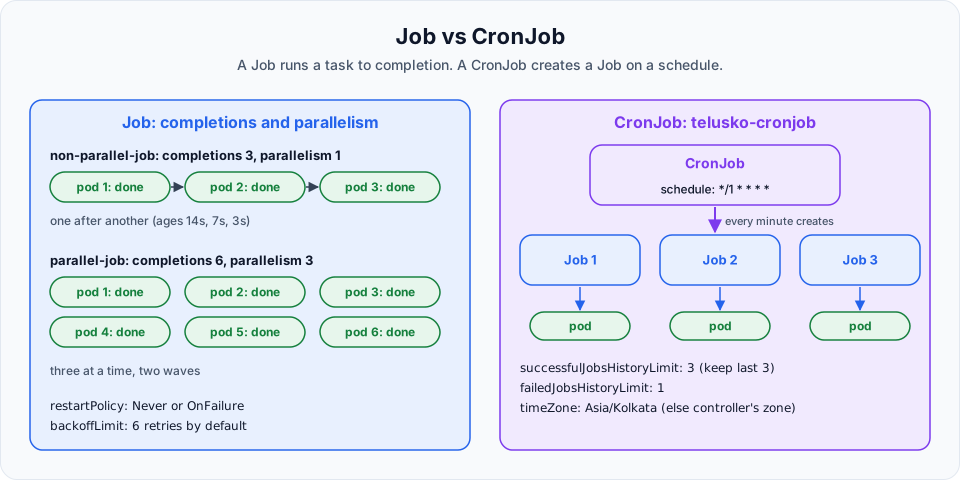
With parallelism: 1, the pods run one after another: a non-parallel Job. With a higher parallelism, several pods work at the same time: a parallel Job. It is the same kind: Job in both cases. Only these two numbers differ.
Step 1: A non-parallel Job
vi non-parallel-job.ymlapiVersion: batch/v1
kind: Job
metadata:
name: non-parallel-job
spec:
completions: 3
parallelism: 1
template:
spec:
restartPolicy: Never
containers:
- name: busybox-container
image: busybox
command:
- sh
- -c
- echo "Hello From Telusko"| Field | Meaning |
|---|---|
apiVersion: batch/v1, kind: Job | Jobs and CronJobs live in the batch API group, which is for run-to-completion work |
completions: 3 | The Job is complete after 3 pods succeed |
parallelism: 1 | Only 1 pod at a time, so the 3 pods run one by one |
template | The pod template, like in a Deployment |
restartPolicy: Never | If the container fails, do not restart it in the same pod. The Job controller creates a new pod instead. A Job allows only Never or OnFailure (restart the container in the same pod). Always, the default for normal pods, is not allowed |
command | Run sh -c 'echo ...' and exit. Exit code 0 means success |
kubectl apply -f non-parallel-job.yml
kubectl get pods
NAME READY STATUS RESTARTS AGE
non-parallel-job-pl78l 0/1 Completed 0 7s
non-parallel-job-tgfsn 0/1 Completed 0 14s
non-parallel-job-w66l9 0/1 Completed 0 3sLook at the ages: 14s, 7s, 3s. The pods were created one after another, each starting only after the previous one finished. Compare that with a Deployment with 3 replicas, where all pods have the same age.
The status is Completed, and READY is 0/1 because the container has exited. That is normal for a Job.
kubectl get jobNAME STATUS COMPLETIONS DURATION AGE
non-parallel-job Complete 3/3 17s 98sRead the output of all its pods:
kubectl logs -l job-name=non-parallel-jobHello From Telusko
Hello From Telusko
Hello From TeluskoEvery pod created by a Job gets the label job-name=<job>, which makes this kind of query easy. kubectl logs job/non-parallel-job shows the logs of one of its pods.
Step 2: A parallel Job
kubectl delete job non-parallel-job
vi parallel-job.ymlapiVersion: batch/v1
kind: Job
metadata:
name: parallel-job
spec:
completions: 6
parallelism: 3
template:
spec:
restartPolicy: Never
containers:
- name: busybox-container
image: busybox
command:
- sh
- -c
- echo "Hello From Telusko"Deleting a Job also deletes its pods.
kubectl apply -f parallel-job.yml
kubectl get job
kubectl get pods
NAME STATUS COMPLETIONS DURATION AGE
parallel-job Running 3/6 9s 9sSix pods in total, three at a time. In get pods you see two groups of three pods, each group with nearly the same age. That is two waves of three parallel pods.
Real uses of parallel Jobs are things like processing many files or messages, where several workers can take items from a shared queue. If each pod should handle a specific piece of work (file 0, file 1, file 2), use completionMode: Indexed: each pod then gets its index in the JOB_COMPLETION_INDEX environment variable.
Failures and retries
A Job keeps trying when pods fail, but not forever:
| Field | Meaning | Default |
|---|---|---|
backoffLimit | Number of retries before the whole Job is marked Failed. Retries wait longer each time (10s, 20s, 40s ... up to 6 minutes) | 6 |
activeDeadlineSeconds | Maximum total run time of the Job. When reached, all its pods are stopped and the Job fails | none |
ttlSecondsAfterFinished | Delete the Job (and its pods) automatically this many seconds after it finishes | none, the Job stays |
Try a failing Job to see this. Change the command to exit 1 and set backoffLimit: 2. kubectl get pods shows three pods in Error, and kubectl describe job ends with BackoffLimitExceeded.
Clean up finished Jobs
Finished Jobs and their Completed pods stay in the cluster until you delete them, so you can read their logs. On a busy cluster they pile up. Add ttlSecondsAfterFinished: 300 to have Kubernetes remove each Job five minutes after it finishes.
Clean up
kubectl delete -f parallel-job.yml
kubectl get jobs,pods
Try It Yourself
- Create a Job with
completions: 5andparallelism: 2. Predict how many waves you will see, then check the pod ages. - Make a Job that always fails (
exit 1) withbackoffLimit: 2andrestartPolicy: Never. Count the pods it creates and read the Job's events. - Change the same Job to
restartPolicy: OnFailure. What changes inkubectl get pods: more pods, or more restarts? - Add
ttlSecondsAfterFinished: 60tonon-parallel-job.yml, apply it, and checkkubectl get jobstwo minutes later. - Write a Job with
completionMode: Indexed,completions: 3, and a command that printsProcessing part $JOB_COMPLETION_INDEX.
Official references
- Kubernetes: Jobs
- Kubernetes: Running Automated Tasks with a CronJob
- Kubernetes: Automatic Cleanup for Finished Jobs
Written By: Shramik Masti
How is this guide?
Last updated on
Kubernetes ResourceQuota
Limit how many pods and how much CPU and memory a namespace can use with a ResourceQuota, see pods rejected when the budget is exceeded, and fix the Deployment to fit.
Kubernetes CronJobs: Schedule Tasks Automatically
Schedule recurring tasks with a CronJob, understand the CronJob to Job to Pod chain, write cron expressions, set a time zone, and control history and overlapping runs.