
Kubernetes ResourceQuota
Limit how many pods and how much CPU and memory a namespace can use with a ResourceQuota, see pods rejected when the budget is exceeded, and fix the Deployment to fit.
One EKS cluster is often shared by several teams. The dev team works in a dev namespace, testers in testing, the AI team in ai-team. Namespaces keep their objects apart, as you saw in Namespaces in Kubernetes. But namespaces alone do not stop one team from creating a hundred pods that take all the CPU and memory, while the other teams' pods sit in Pending.
A ResourceQuota fixes that. It is a policy object that limits how much a namespace can consume in total. Think of it as a fixed budget per namespace.
With a ResourceQuota you can cap things like:
| Kind of limit | Example keys |
|---|---|
| Compute | requests.cpu, requests.memory, limits.cpu, limits.memory |
| Object counts | pods, services, services.loadbalancers, configmaps, secrets, persistentvolumeclaims, count/deployments.apps |
| Storage | requests.storage, <storageclass>.storageclass.storage.k8s.io/requests.storage |
The API server checks the quota when an object is created. If creating it would push the namespace over the limit, the request is rejected with a forbidden: exceeded quota error.
Step 1: Create a namespace and switch to it
kubectl create namespace dev
kubectl get namespace
Instead of adding -n dev to every command, make dev the default namespace of your current kubectl context:
kubectl config set-context --current --namespace=dev
kubectl get pods
No resources found in dev namespace.The message now says dev namespace, so every command runs there until you switch back. kubectl config view --minify | grep namespace shows the current one at any time.
Step 2: The ResourceQuota
vi dev-quota.ymlapiVersion: v1
kind: ResourceQuota
metadata:
name: dev-quota
namespace: dev
spec:
hard:
pods: "5"
limits.cpu: "1"
limits.memory: 1Gi| Field | Meaning |
|---|---|
kind: ResourceQuota, apiVersion: v1 | Core API object |
metadata.namespace: dev | A quota applies to exactly one namespace |
hard.pods: "5" | At most 5 pods (that are not finished) in dev |
hard.limits.cpu: "1" | The sum of CPU limits of all pods in dev may not exceed 1 CPU (1000m) |
hard.limits.memory: 1Gi | The sum of memory limits may not exceed 1 GiB |
kubectl apply -f dev-quota.yml
kubectl get quota
NAME REQUEST LIMIT AGE
dev-quota pods: 0/5 limits.cpu: 0/1, limits.memory: 0/1Gi 17sused / hard for each item. Nothing is used yet.
Step 3: A Deployment that does not fit
vi rq-deploy.ymlapiVersion: apps/v1
kind: Deployment
metadata:
name: product-deployment
labels:
app: telusko
spec:
replicas: 3
selector:
matchLabels:
app: telusko
template:
metadata:
labels:
app: telusko
spec:
containers:
- name: cont1
image: <your-dockerhub-username>/springboot-app:latest
resources:
limits:
cpu: "1"
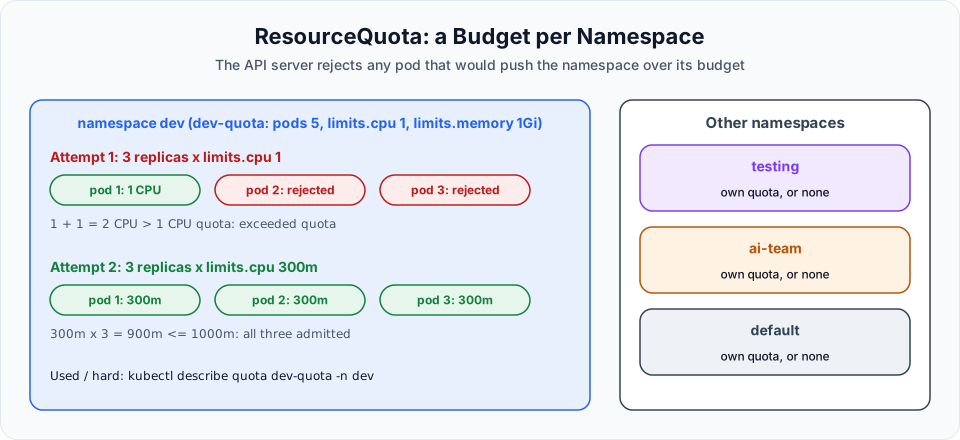
memory: 512Miresources.limits is the maximum a container may use. The container is throttled above its CPU limit and killed (OOMKilled) above its memory limit. Here each pod may use up to 1 CPU, and we want 3 pods: 3 CPU in total, against a quota of 1 CPU.
kubectl apply -f rq-deploy.yml
kubectl get pods
NAME READY STATUS RESTARTS AGE
product-deployment-574dbfdbc8-jq7cv 1/1 Running 0 6sOnly one pod. The Deployment asked for 3, but the second pod would have made the total 2 CPU. The pods were never created, so get pods does not show them as Pending. The rejection is recorded on the ReplicaSet:
kubectl get deploy product-deployment
kubectl describe rs -l app=telusko
Warning FailedCreate ... Error creating: pods "product-deployment-574dbfdbc8-xxxxx" is forbidden: exceeded quota: dev-quota, requested: limits.cpu=1, used: limits.cpu=1, limited: limits.cpu=1When pods are missing and there is no obvious error, always check the ReplicaSet events. This is where quota problems show up.
Step 4: Make it fit
Change each pod's limits to 300m CPU and 300Mi memory:
          resources:
            limits:
              cpu: "300m"
              memory: 300Mi
3 x 300m = 900m, under 1000m. 3 x 300Mi = 900Mi, under 1Gi.
In the lecture, applying the change with kubectl apply only showed configured, and the 3 pods did not appear. The reason is the rolling update: the old pod still holds 1 CPU of the quota, so the new 300m pod would make the total 1.3 CPU and is rejected, and the old pod is never removed. The rollout is stuck. Delete and recreate:
kubectl delete -f rq-deploy.yml
kubectl apply -f rq-deploy.yml
kubectl get pods
NAME READY STATUS RESTARTS AGE
product-deployment-bd96945-7v26p 1/1 Running 0 12s
product-deployment-bd96945-grxlr 1/1 Running 0 12s
product-deployment-bd96945-ljv4z 1/1 Running 0 12skubectl describe quota dev-quotaResource Used Hard
-------- ---- ----
limits.cpu 900m 1
limits.memory 900Mi 1Gi
pods 3 5Three pods, 900m of 1 CPU used. A fourth pod with the same limits would be rejected (900m + 300m = 1200m), even though the pod count (4 of 5) would still be allowed. Every limit in the quota must be satisfied.
Things that catch people out
Pods without limits are rejected
Once a quota limits limits.cpu or limits.memory, every new pod in that namespace must declare those limits. A pod without them fails with must specify limits.cpu. The same applies to requests.*. Either add resources to every container, or create a LimitRange in the namespace, which fills in default requests and limits for containers that do not set them.
- Requests vs limits.
requests.cpuin a quota caps what pods reserve (what the scheduler uses).limits.cpucaps the maximum they may burst to. Many teams quota both. When a container sets only limits, Kubernetes uses the same value as its request. - Quotas do not touch running pods. Lowering a quota below current usage does not evict anything. It only blocks new objects.
- Quotas are not capacity. You can give namespaces quotas that add up to more than the cluster has. The quota is a ceiling, not a reservation.
- HPA and quotas. An HPA trying to scale past the quota simply gets rejected pods. Check quotas when an autoscaler stops short of
maxReplicas. - Count AWS resources.
services.loadbalancers: "1"is a cheap way to stop a namespace from creating many paid AWS load balancers.
Clean up and switch back
kubectl delete -f rq-deploy.yml
kubectl delete -f dev-quota.yml
kubectl config set-context --current --namespace=default
kubectl delete namespace dev          # optional, removes everything left in dev
Switching back matters. If you forget, later commands in this course run in dev and you will wonder where your pods went.
Try It Yourself
- Add
services.loadbalancers: "0"todev-quota, then try to create a LoadBalancer Service indev. Read the error. - Create a pod without any
resourcesindevwhile the quota is active. What error do you get? - Add a LimitRange to
devwith default limits of200mCPU and256Mimemory, then create the same pod again and runkubectl describe podto see the limits it received. - Scale
product-deploymentto 5 with the 300m limits. How many pods run, and which quota item stops the rest?
Official references
- Kubernetes: Resource Quotas
- Kubernetes: Limit Ranges
- Kubernetes: Resource Management for Pods and Containers
Written By: Shramik Masti
How is this guide?
Last updated on
Auto Scaling in Kubernetes with Horizontal Pod Autoscaler (HPA)
Check the Metrics Server, set CPU requests on a Deployment, create an HPA with kubectl autoscale and with autoscaling/v2 YAML, generate load, and watch pods scale out and back in.
Kubernetes Jobs: Non-Parallel & Parallel Jobs
Run one-off tasks to completion with Kubernetes Jobs, control how many pods run and how many must succeed with completions and parallelism, and handle retries and cleanup.