
Environment Variables, ConfigMaps & Secrets in Kubernetes
Pass configuration to pods at runtime with environment variables, ConfigMaps and Secrets, see why base64 is not encryption, and learn the YAML way to inject them.
Every real application needs settings: a database host, a username, a password, an API URL, a log level, a feature flag. You could bake them into the Docker image, but then you need a new image for dev, test and production, and every password ends up inside an image anyone can pull.
The better rule: build one image, and give it its configuration at runtime. Kubernetes has three tools for that:
| Tool | Use it for |
|---|---|
| Environment variables | One or two simple values, set directly on the container |
| ConfigMap | Many non-sensitive settings kept together in one object |
| Secret | Sensitive values: passwords, tokens, API keys, certificates |
We use a MariaDB database for the demo, because it refuses to start until you give it configuration. That makes it easy to see whether our settings arrived.
Step 1: A pod that needs configuration
You can create a Deployment straight from the command line, without a YAML file:
kubectl create deploy mydb --image=mariadb
kubectl get pods
NAME READY STATUS RESTARTS AGE
mydb-5fcf4f6fbb-bjvpg 0/1 ContainerCreating 0 9s
...
mydb-5fcf4f6fbb-bjvpg 0/1 Error 1 (6s ago) 16sIt starts and then fails. The logs tell you why:
kubectl logs mydb-5fcf4f6fbb-bjvpg[ERROR] [Entrypoint]: Database is uninitialized and password option is not specified
You need to specify one of MARIADB_ROOT_PASSWORD, MARIADB_ROOT_PASSWORD_HASH, MARIADB_ALLOW_EMPTY_ROOT_PASSWORD and MARIADB_RANDOM_ROOT_PASSWORDThe image needs an environment variable. After a few restarts the status becomes CrashLoopBackOff, which you met in Kubernetes Pod Statuses.
Step 2: Plain environment variables
kubectl set env deploy/mydb MARIADB_ROOT_PASSWORD=root123
kubectl get pods
NAME READY STATUS RESTARTS AGE
mydb-7c9d8f6b5d-q2wxz 1/1 Running 0 5sWe did not redeploy anything by hand. kubectl set env changed the Deployment's pod template, and any change to the template triggers a rolling update: a new pod with the variable was created and the broken one removed.
This is quick, but it does not scale. Ten settings means ten flags, and the password is now in your shell history and in the Deployment spec in plain text. Configuration also belongs in files you can review, not in commands you have to remember.
Step 3: ConfigMaps for many settings
A ConfigMap stores configuration as key-value pairs. Pods read them when they start. It is meant for non-sensitive data: hostnames, ports, application names, log levels, feature flags.
Create a file with the settings, one KEY=value per line:
vi varsMARIADB_ROOT_PASSWORD=root123
MARIADB_USER=adminThe lecture puts the root password into a ConfigMap only to show how ConfigMaps work. Do not do that in a real project. Passwords go into Secrets (Step 4).
Create a ConfigMap from it:
kubectl create configmap dbvars --from-env-file=vars
kubectl get cm
kubectl describe cm dbvars
NAME DATA AGE
dbvars 2 5s
kube-root-ca.crt 1 51mcm is the short name for configmap. kube-root-ca.crt exists in every namespace: Kubernetes puts the cluster's CA certificate there so pods can trust the API server. describe shows both keys with their values in plain text.
| Way to create a ConfigMap | Example |
|---|---|
| From an env file (one key per line) | --from-env-file=vars |
| From literals | --from-literal=LOG_LEVEL=debug --from-literal=PORT=8080 |
| From a whole file (key = file name, value = file content) | --from-file=application.properties |
| From YAML | kubectl apply -f configmap.yml |
Now use it. Delete the old Deployment and create a fresh one that fails the same way:
kubectl delete deploy mydb
kubectl create deploy newdb --image=mariadb
kubectl set env deploy/newdb --from=configmap/dbvars
kubectl get pods
--from=configmap/dbvars copies every key of the ConfigMap into the container as an environment variable. The pod restarts with both variables and runs.
If you see deployments.apps "mydb" not found, check the name: the second Deployment is newdb.
Step 4: Secrets for sensitive data
A Secret also stores key-value pairs, but it is meant for confidential data: passwords, tokens, API keys, TLS certificates, private keys. Kubernetes treats Secrets more carefully: describe hides the values, they can be limited with RBAC separately from ConfigMaps, and when they are mounted into pods they are kept in memory (tmpfs), not written to the node's disk.
Clean the namespace and create a Secret from the same file:
kubectl delete deploy newdb
kubectl create secret generic my-secret --from-env-file=vars
kubectl get secret
NAME TYPE DATA AGE
my-secret Opaque 2 6sgeneric creates a Secret of type Opaque: arbitrary user data that Kubernetes does not interpret. Other types exist for specific uses, such as kubernetes.io/tls (kubectl create secret tls) and kubernetes.io/dockerconfigjson (kubectl create secret docker-registry) for pulling private images.
Use it the same way:
kubectl create deploy newdb --image=mariadb
kubectl set env deploy/newdb --from=secret/my-secret
kubectl get pods
Why did the pod look fine for a moment?
In the lecture the new newdb pod showed Running even before set env was run. A brand new pod is Running for a few seconds until MariaDB checks its variables and exits, and then it goes to Error. A Deployment created with kubectl create deploy does not read any ConfigMap or Secret by itself. Only set env (or env/envFrom in YAML) connects them.
Base64 is not encryption
kubectl describe secret my-secretData
====
MARIADB_ROOT_PASSWORD: 7 bytes
MARIADB_USER: 5 bytesdescribe shows only sizes. But look at the object itself:
kubectl get secret my-secret -o yamlapiVersion: v1
data:
MARIADB_ROOT_PASSWORD: cm9vdDEyMw==
MARIADB_USER: YWRtaW4=
kind: Secret
metadata:
name: my-secret
namespace: default
type: OpaqueThose values look scrambled, but they are only base64 encoded. Anyone can reverse it:
echo -n "cm9vdDEyMw==" | base64 --decoderoot123What actually protects a Secret
Base64 exists so that binary data (certificates, keys) can be stored as text. It gives no security. Anyone who can run kubectl get secret in that namespace can read every password. What protects Secrets:
- RBAC: give
get/liston Secrets only to the people and service accounts that need them. - Encryption at rest: on EKS clusters running Kubernetes 1.28 or later, all Kubernetes API data, Secrets included, is envelope encrypted with AWS KMS by default before it is stored in etcd.
- Keep Secrets out of Git: never commit a Secret YAML with real values. Use AWS Secrets Manager with the Secrets Store CSI driver or External Secrets Operator, or Sealed Secrets, for GitOps setups.
The YAML way (what you will use in real projects)
The kubectl set env commands are good for learning. In real projects the Deployment YAML says where each value comes from. The ConfigMap and the Secret can also be YAML:
apiVersion: v1
kind: ConfigMap
metadata:
  name: dbvars
data:
  MARIADB_USER: admin
  MARIADB_DATABASE: telusko
---
apiVersion: v1
kind: Secret
metadata:
  name: my-secret
type: Opaque
stringData:
  MARIADB_ROOT_PASSWORD: root123      # demo only, never commit real values
  MARIADB_PASSWORD: admin123
stringData lets you write plain values. The API server base64 encodes them into data for you.
apiVersion: apps/v1
kind: Deployment
metadata:
  name: newdb
spec:
  replicas: 1
  selector:
    matchLabels:
      app: newdb
  template:
    metadata:
      labels:
        app: newdb
    spec:
      containers:
        - name: mariadb
          image: mariadb:11.4
          envFrom:
            - configMapRef:
                name: dbvars          # every key becomes an env variable
          env:
            - name: MARIADB_ROOT_PASSWORD
              valueFrom:
                secretKeyRef:
                  name: my-secret
                  key: MARIADB_ROOT_PASSWORD
            - name: MARIADB_PASSWORD
              valueFrom:
                secretKeyRef:
                  name: my-secret
key: MARIADB_PASSWORD| Field | Meaning |
|---|---|
envFrom.configMapRef | Import all keys of the ConfigMap as variables |
env.valueFrom.secretKeyRef | Import one key of a Secret as one variable. Safer: the container gets only what it needs |
env.valueFrom.configMapKeyRef | Same idea for a single ConfigMap key |
envFrom.secretRef | Import all keys of a Secret |
You can also mount a ConfigMap or Secret as files, which suits whole config files like application.properties or TLS certificates:
          volumeMounts:
            - name: config
              mountPath: /etc/config
              readOnly: true
      volumes:
        - name: config
          configMap:
            name: dbvars          # or: secret: { secretName: my-secret }
Each key becomes a file under /etc/config.
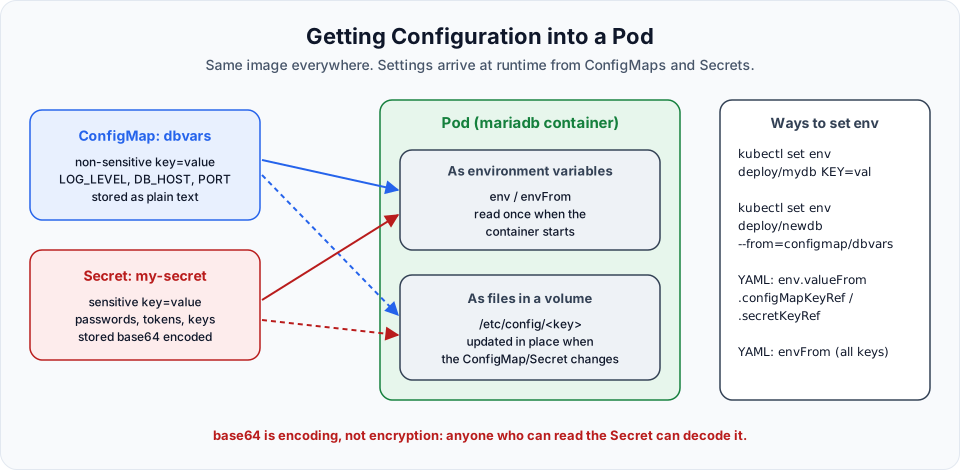
| Environment variables | Mounted files | |
|---|---|---|
| When values are read | Once, when the container starts | The app reads files whenever it wants |
| After you change the ConfigMap or Secret | Nothing changes until the pod restarts (kubectl rollout restart deploy/newdb) | Files are updated automatically after a short delay (not for subPath mounts) |
| Good for | Simple settings, 12-factor apps | Config files, certificates, values that rotate |
A few more things worth knowing:
- ConfigMaps and Secrets are namespaced. A pod can only use those in its own namespace.
- Each one is limited to 1 MiB.
- If a pod refers to a ConfigMap or Secret that does not exist, it stays in
CreateContainerConfigErroruntil you create it. - Mark config as
immutable: trueif it should never change. It protects against accidental edits and reduces load on the API server.
Clean up
The lecture uses kubectl delete all --all. That removes Deployments and pods, but not ConfigMaps or Secrets, which are not part of all. Delete them explicitly:
kubectl delete deploy newdb
kubectl delete configmap dbvars
kubectl delete secret my-secret
Try It Yourself
- Create a ConfigMap with
--from-literal=APP_COLOR=blue, inject it withenvFrom, and check the value withkubectl exec <pod> -- env | grep APP_COLOR. Change the ConfigMap and check again. What do you need to do to see the new value? - Mount the same ConfigMap as a volume, change it, and watch the file with
kubectl exec <pod> -- cat /etc/config/APP_COLORfor a minute. - Create a Secret with
stringData, then read it back withkubectl get secret -o jsonpath='{.data.MARIADB_PASSWORD}' | base64 --decode. - Reference a Secret that does not exist in a Deployment. Which pod status do you see, and what does
kubectl describe podsay? - Rewrite the MySQL StatefulSet from the StatefulSet lesson so that
MYSQL_ROOT_PASSWORDcomes from a Secret.
Official references
- Kubernetes: ConfigMaps
- Kubernetes: Secrets
- Kubernetes: Good practices for Kubernetes Secrets
- Amazon EKS: Default envelope encryption for all Kubernetes API data
Written By: Shramik Masti
How is this guide?
Last updated on
Creating StatefulSets with Persistent Storage on Amazon EKS
Run MySQL as a StatefulSet on EKS with a headless Service and volumeClaimTemplates, watch EBS volumes get created dynamically, and prove that pods keep their name and data.
Kubernetes Autoscaling Introduction
Understand what autoscaling is, the difference between horizontal and vertical scaling, the autoscalers Kubernetes and EKS offer, and why the Metrics Server must be running first.