
Kubernetes Pod Statuses
Understand the pod STATUS values you see in kubectl (ContainerCreating, Running, ErrImagePull, ImagePullBackOff, CrashLoopBackOff, Error), how they relate to pod phases, and the logs and describe routine for fixing them.
Up to now almost every kubectl get pods said Running, sometimes ContainerCreating. Real clusters are less polite. Sooner or later you will see ImagePullBackOff on a Friday evening, or a pod stuck in CrashLoopBackOff with a restart count of 47. Reading that STATUS column correctly, and knowing the next two commands to run, is one of the most valuable troubleshooting skills in Kubernetes. Interviewers ask about it all the time.
STATUS column vs pod phase
First, a distinction that the lecture skips but that makes everything clearer.
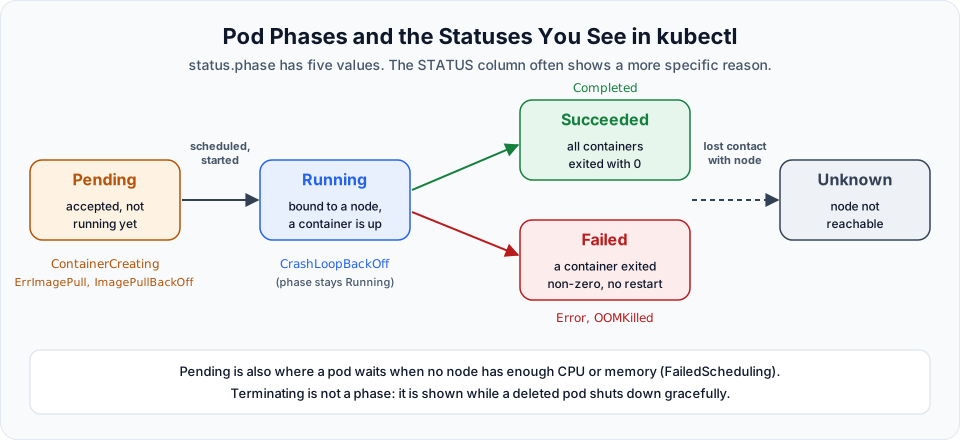
Every pod has a phase in status.phase, and there are only five possible values:
| Phase | Meaning |
|---|---|
Pending | Accepted by the cluster, but not all containers are running yet. Includes waiting for scheduling and pulling images |
Running | Bound to a node, all containers created, at least one running (or restarting) |
Succeeded | All containers exited with code 0 and will not restart. Typical for Jobs |
Failed | All containers have stopped and at least one failed, and it will not be restarted |
Unknown | The control plane cannot get the pod's state, usually because the node is unreachable |
The STATUS column in kubectl get pods is friendlier and more specific. When a container is waiting or terminated, kubectl shows the reason instead of the phase. That is why you see ContainerCreating, ImagePullBackOff or CrashLoopBackOff, which are not phases at all. For example, a pod in CrashLoopBackOff is still in the Running phase, and one in ImagePullBackOff is Pending.
kubectl get pod <name> -o jsonpath='{.status.phase}{"\n"}' # the real phaseThe statuses you will meet
| STATUS | Problem? | What it means |
|---|---|---|
Pending | Maybe | Waiting to be scheduled. If it stays, no node fits (CPU, memory, pod limit, taints) |
ContainerCreating | No, if brief | Scheduled. The kubelet is pulling the image, setting up networking and volumes, starting the container |
Running | No | At least one container is running. Check READY too: 0/1 Running means it runs but is not ready |
ErrImagePull | Yes | The first attempt to pull the image failed |
ImagePullBackOff | Yes | Pulling keeps failing, so Kubernetes waits longer between retries |
CrashLoopBackOff | Yes | The container starts, then exits, again and again. Kubernetes waits longer before each restart |
Error | Yes | A container exited with a non-zero code |
OOMKilled | Yes | The container used more memory than its limit and was killed |
Completed | No | The container finished successfully (exit code 0). Normal for Jobs |
Terminating | No, if brief | The pod was deleted and is shutting down gracefully (30 seconds by default) |
ContainerCreating and Running: the healthy path
Apply the Deployment from the Deployments lesson and check immediately:
kubectl apply -f k8s-deploy.yml
kubectl get pods
Run get pods quickly enough and you see ContainerCreating. During this time the kubelet on the chosen node is:
- Pulling the container image (the slow part for big images)
- Creating the container through containerd
- Setting up the pod's network (on EKS the VPC CNI assigns a VPC IP)
- Mounting volumes, then starting the container
A few seconds later the status becomes Running. Nothing to fix.
ImagePullBackOff: the image cannot be pulled
Break the image on purpose. Delete everything, then add a typo to the tag in k8s-deploy.yml:
image: <your-dockerhub-username>/springboot-app:latestsskubectl delete -f k8s-deploy.yml
kubectl apply -f k8s-deploy.yml
kubectl get podsNAME READY STATUS RESTARTS AGE
telusko-deploy-7c9d8f6b5d-4kx2p 0/1 ErrImagePull 0 8s
telusko-deploy-7c9d8f6b5d-9qwmz 0/1 ImagePullBackOff 0 8sThe status alternates between ErrImagePull (an attempt just failed) and ImagePullBackOff (waiting before the next attempt). The waiting time grows each time, up to five minutes.
Common causes:
| Cause | How to recognise it in the events |
|---|---|
| Typo in the image name or tag | manifest unknown or not found |
| Image does not exist (never pushed) | Same as above |
| Private image without credentials | pull access denied or unauthorized. Add an imagePullSecrets entry, or on EKS give the node role access to your ECR repository |
| Registry rate limit | toomanyrequests from Docker Hub |
| Node has no internet route | Timeouts. Check NAT gateway and subnet routes |
CrashLoopBackOff: the app keeps dying
The image pulled fine and the container started, but the process inside exited. With the default restartPolicy: Always, the kubelet restarts it. If it keeps exiting, the kubelet waits a little longer before each restart: 10s, 20s, 40s and so on, capped at 5 minutes. While it is waiting, the status shows CrashLoopBackOff and RESTARTS keeps going up. If the container then runs fine for 10 minutes, the timer resets.
Common causes:
- A bug or unhandled exception at startup
- Missing or wrong environment variables or config
- Cannot connect to a database or another dependency, and the app exits instead of retrying
- Wrong
commandorargs, so the process ends immediately (like busybox without a loop) - Failing liveness probe, so the kubelet kills the container
- Not enough memory: look for
OOMKilledas the last state
You can reproduce it easily: in the busybox container from Running Multiple Containers in a Single Pod, replace the while loop with a single echo hello. The container prints once, exits, and enters the crash loop.
Error
Error means a container terminated with a non-zero exit code. You usually see it briefly between crash loop restarts, or permanently on pods whose restartPolicy is Never or OnFailure (for example Jobs). When you scale a Deployment down, terminating pods can also briefly show Error or Completed depending on how the application handles the stop signal.
The troubleshooting routine
Whatever the status, the next steps are the same two commands. This is the answer an interviewer wants to hear.
See the status
kubectl get pods
kubectl get pods -o wide        # which node, which IP
Read the application's logs
kubectl logs <pod-name>
kubectl logs <pod-name> --previous     # logs of the last crashed run, essential for CrashLoopBackOff
kubectl logs <pod-name> -c <container> # in multi-container pods
For ImagePullBackOff there are no application logs, because the container never started. kubectl tells you so:
Error from server (BadRequest): container "webapp-container" in pod "telusko-deploy-7c9d8f6b5d-4kx2p" is waiting to start: trying and failing to pull imageDescribe the pod and read the events
kubectl describe pod <pod-name>Look at State, Last State (with Reason and Exit Code), Restart Count, and above all the Events at the bottom:
Events:
  Type     Reason     From      Message
  ----     ------     ----      -------
  Normal   Scheduled  default-scheduler  Successfully assigned default/telusko-deploy-... to ip-192-168-...
  Normal   Pulling    kubelet   Pulling image "<your-dockerhub-username>/springboot-app:latestss"
  Warning  Failed     kubelet   Failed to pull image "...:latestss": ... not found
  Warning  Failed     kubelet   Error: ErrImagePull
  Normal   BackOff    kubelet   Back-off pulling image "...:latestss"
  Warning  Failed     kubelet   Error: ImagePullBackOff
The Failed line names the root cause.
Fix the cause, then apply again
Correct the image tag, the config or the code, and kubectl apply -f the fixed file. A Deployment rolls out new pods and the broken ones go away.
Two more commands that help:
kubectl get events --sort-by=.metadata.creationTimestamp     # everything that happened recently
kubectl get pod <pod-name> -o yaml                           # full status, including containerStatuses
Exit codes in Last State are a strong hint: 0 finished normally, 1 application error, 137 killed (often OOMKilled or a failed liveness probe), 139 segmentation fault, 143 stopped with SIGTERM.
Clean up
Fix the image tag back to latest in k8s-deploy.yml (so the file is usable later), then:
kubectl delete -f k8s-deploy.ymlThe next section moves on to stateful applications and storage. You can create the cluster again with the same eksctl create cluster command when you start it. Before you take a break, delete this one so it stops billing:
eksctl delete cluster --name telusko-learning --region ap-south-1 --waitTry It Yourself
- Deploy with a wrong image tag and find the exact error message in the events.
- Create a pod running
busyboxwithcommand: ["sh", "-c", "echo starting; exit 1"]. Watch it go throughErrorandCrashLoopBackOff, and read its output withkubectl logs --previous. - Check the phase of that crashing pod with
-o jsonpath='{.status.phase}'. Is itFailedorRunning? Why? - Ask for 30 replicas of
telusko-deployon your two-node cluster. Find a pod stuck inPendingand read itsFailedSchedulingevent. - Write down, from memory, your three-step routine for a pod in
CrashLoopBackOff.
Official references
- Kubernetes: Pod Lifecycle
- Kubernetes: Debug Pods
- Kubernetes: Images (image pull policy and private registries)
Written By: Shramik Masti
How is this guide?
Last updated on
Running Pods on Every Node: DaemonSets
Learn why a Deployment cannot guarantee a pod on every node, create a DaemonSet that runs one pod per worker node, and see the DaemonSets EKS already runs for networking and kube-proxy.
Stateful Applications & StatefulSets Explained
Understand the difference between stateless and stateful applications, see why a Deployment is the wrong tool for a database, and learn what a StatefulSet adds.