
Kubernetes Architecture Explained
Learn the parts of a Kubernetes cluster, what the API server, etcd, scheduler, controller manager, kubelet, kube-proxy and container runtime do, and follow a pod from kubectl to a running container.
When you run a command like kubectl apply -f pod.yaml, a container starts on some machine a few seconds later. Nobody logged in to that machine. Nobody chose it by hand. Understanding who did that work, and how, is the single most useful thing you can learn before touching a real cluster. Every error message you meet later (Pending, ImagePullBackOff, FailedScheduling) points at one of the components on this page.
The cluster: control plane plus worker nodes
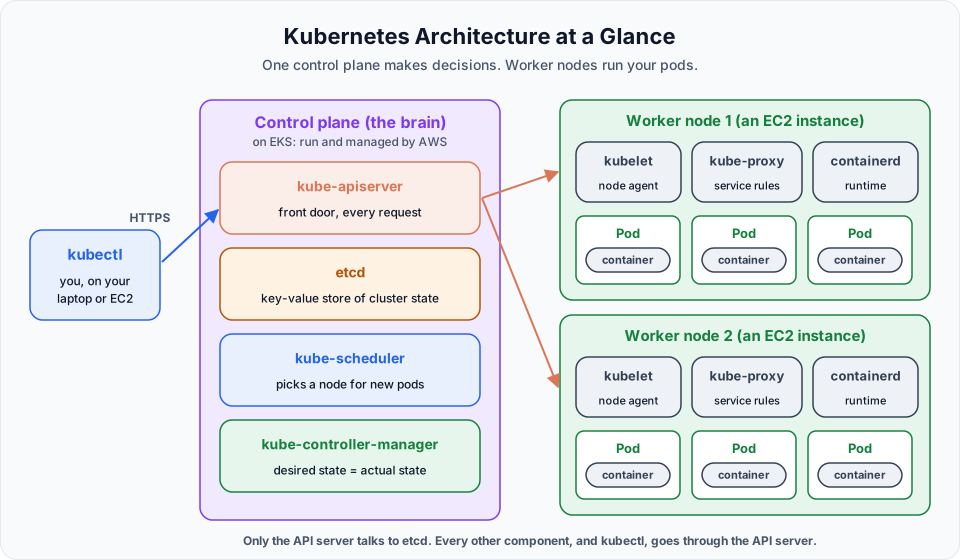
A cluster is a group of machines (called nodes) that work together to run your applications. Every cluster has two kinds of parts:
| Part | Role | Analogy |
|---|---|---|
| Control plane | Makes decisions: stores the desired state, chooses where pods run, notices problems | The brain, or the head office |
| Worker nodes | Actually run your application containers | The hands, or the branch offices |
A cluster can have one worker node or thousands. In this course our EKS cluster starts with two.
How we will talk to the cluster
In our setup, you never log in to the control plane or the worker nodes. Instead:
- We create one small EC2 instance as our EKS host (some people call it a jump box or admin box).
- On it we install the AWS CLI, eksctl and kubectl.
- eksctl creates the EKS cluster for us on AWS.
- kubectl is the command line tool we use for everything after that: create pods, list them, delete them, read logs.
kubectl is only a client. It turns your command into an HTTPS call to the cluster's API server. That is why the same kubectl works against EKS, a laptop cluster, or any other Kubernetes.
The Pod, before anything else
You will hear the word pod in every sentence from now on, so let us define it now.
A Pod is the smallest unit you can deploy in Kubernetes. It is a wrapper around one or more containers that share the same network address and can share storage. Kubernetes never schedules a bare container; it always schedules a pod, and the containers live inside it.
- Most pods run exactly one main container: one pod for the Spring Boot app, a separate pod for MySQL, another for the Node.js frontend.
- A pod can hold a few tightly coupled containers, for example an app plus a log shipper. We cover that in Running Multiple Containers in a Single Pod.
Because of this, Kubernetes people say "scale to 5 pods" rather than "start 5 more servers" or "run 5 containers".
Control plane components
kube-apiserver
The API server is the front door of the cluster. Every request goes through it: kubectl commands, the scheduler, the controllers, the kubelets on every node. It authenticates the caller, checks they are allowed to do what they ask, validates the YAML, and then saves the object.
Think of it as the receptionist: nobody walks past reception straight into the office.
etcd
etcd is a consistent, highly available key-value database. It holds the entire state of the cluster: every pod, Service, Deployment, Secret, node, and the configuration you submitted. If etcd is lost without a backup, the cluster forgets everything it was running.
Only the API server reads and writes etcd directly. Every other component asks the API server.
kube-scheduler
The scheduler watches for pods that do not yet have a node assigned. For each one it filters out nodes that cannot run it (not enough CPU or memory, wrong labels, taints) and then scores the rest to pick the best fit. It writes its decision back to the API server.
The scheduler only decides. It does not start anything itself.
kube-controller-manager
The controller manager runs many small control loops called controllers. Each one compares the desired state (what you asked for) with the actual state (what is running) and acts to close the gap.
Example: you ask for 3 copies of a pod. One crashes and only 2 are running. The ReplicaSet controller notices 2 is not 3 and creates a new pod. The scheduler places it, the kubelet starts it, and you are back to 3 without lifting a finger. This loop is where Kubernetes self-healing comes from, and you will watch it happen in the ReplicaSets lesson.
cloud-controller-manager
There is one more control plane component worth knowing on a cloud. The cloud-controller-manager talks to the cloud provider's API. On AWS it is what creates a load balancer when you ask for a Service of type LoadBalancer, and what notices when an EC2 node disappears.
Worker node components
Every worker node runs the same three pieces of software, plus your pods.
| Component | What it does |
|---|---|
| kubelet | The node agent. It watches the API server for pods assigned to its node, asks the container runtime to start them, runs health checks, and reports pod and node status back |
| kube-proxy | Maintains network rules (iptables or IPVS) on the node so that traffic sent to a Service reaches one of its pods |
| Container runtime | The software that actually pulls images and runs containers. EKS nodes use containerd |
| Pods | Your application containers, wrapped in pods |
Think of the kubelet as the local manager of the node: the control plane decides, the kubelet makes it happen on its machine.
Container runtime, not Docker Engine
Older tutorials say the worker node runs "Docker". Since Kubernetes 1.24 the kubelet talks to a CRI-compatible runtime such as containerd instead. Images you build with Docker run without any change.
The official picture
The Kubernetes documentation draws the same architecture like this. Notice c-c-m (cloud-controller-manager) talking to the cloud provider API, and that every arrow from a node goes to api, never to etcd.

Image: kubernetes.io, CC BY 4.0. Source: Kubernetes Components.
Following one pod from kubectl to a running container
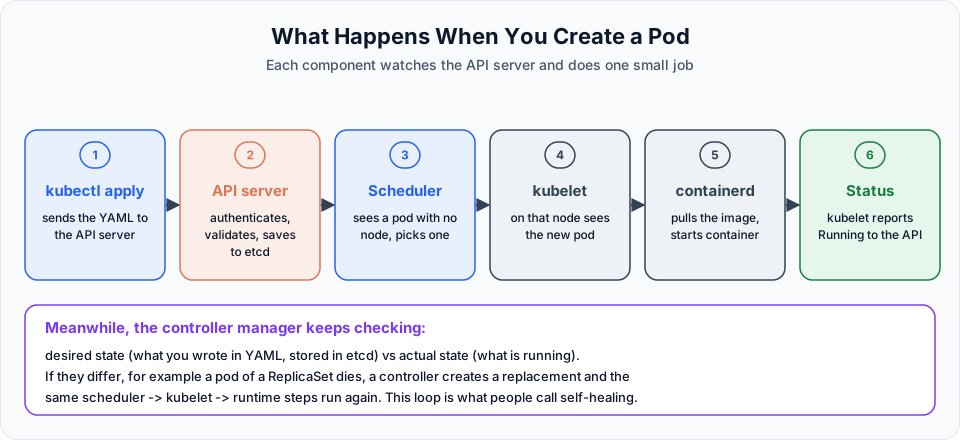
Now put it all together. Here is what happens when you create a pod.
You submit the manifest
kubectl apply -f pod.yaml sends the pod definition to the API server over HTTPS.
The API server records the desired state
It authenticates you, validates the YAML, and saves the pod object in etcd. At this point the pod exists but has no node. kubectl get pods shows it as Pending.
The scheduler picks a node
It notices an unscheduled pod, checks which nodes have enough CPU and memory, and binds the pod to the best one.
The kubelet on that node takes over
It sees a pod assigned to its node and tells containerd to pull the image and start the container.
Status flows back
The kubelet reports the container is up. The pod status becomes Running. kube-proxy updates network rules if a Service selects this pod.
Controllers keep watching
From now on, if the pod belongs to a ReplicaSet or Deployment and it dies, the controller manager creates a replacement and the same steps repeat.
What is different on Amazon EKS
On EKS, AWS runs the whole control plane for you. The API server and etcd run on AWS-managed machines across multiple Availability Zones. You never see them as EC2 instances, you cannot SSH into them, and you do not patch or back them up. You pay a flat hourly fee for this.
| Part | Self-managed (kubeadm) | Amazon EKS |
|---|---|---|
| API server, etcd, scheduler, controllers | You install, patch, back up | Managed by AWS |
| Worker nodes | Your servers | EC2 instances in your account (managed node group) |
| Container runtime | You install | containerd, preinstalled on the EKS AMI |
| Cost | Your servers | $0.10 per cluster hour plus EC2 nodes |
So when this course says "the control plane does X", on EKS that happens inside AWS, and you only see the result through kubectl.
Summary
| Component | Lives on | One-line job |
|---|---|---|
| kube-apiserver | Control plane | Entry point for every request |
| etcd | Control plane | Stores all cluster data |
| kube-scheduler | Control plane | Decides which node runs a new pod |
| kube-controller-manager | Control plane | Keeps actual state equal to desired state |
| cloud-controller-manager | Control plane | Talks to AWS (load balancers, nodes) |
| kubelet | Every worker node | Starts and watches pods on its node |
| kube-proxy | Every worker node | Network rules for Services |
| containerd | Every worker node | Pulls images and runs containers |
| Pod | Worker nodes | Smallest deployable unit, wraps containers |
Try It Yourself
- Without looking, draw the cluster on paper: control plane with four components, two worker nodes with three components each. Then compare with the diagram.
- For each of these problems, name the component most likely responsible: a pod stays
Pendingforever; a Service sends no traffic to a pod; a new image is never pulled; all cluster data is gone. - Explain to yourself why the scheduler does not need to log in to a worker node to start a pod.
- After you create your cluster in the next section, run
kubectl get pods -n kube-systemand match what you see (coredns,kube-proxy,aws-node) to this lesson. Note that you will not find the API server or etcd there, because AWS runs them.
Official references
Written By: Shramik Masti
How is this guide?
Last updated on
What is Kubernetes Why Do We Need It
Understand what container orchestration means, the problems that appear once you run hundreds of containers, and how Kubernetes and Docker work together instead of competing.
Installing kubectl, AWS CLI and eksctl for EKS
Compare the ways to get a Kubernetes cluster, launch an Ubuntu EC2 instance as your EKS host, and install the AWS CLI, kubectl and eksctl with a verified script.