
What is Kubernetes Why Do We Need It
Understand what container orchestration means, the problems that appear once you run hundreds of containers, and how Kubernetes and Docker work together instead of competing.
Running one Docker container is easy. You type docker run, the app starts, and if it crashes you start it again. Running two or three is still fine. Now picture a real company: 300 microservice containers spread over 40 servers, traffic that doubles every evening, and a release every day. Suddenly simple questions have no easy answer.
- A container crashed at 2 AM. Who restarts it?
- Traffic just tripled. Which servers have spare CPU for 20 more copies?
- A container moved to a different server. How do other services still find it?
- We need to update all 300 containers to a new version. How do we do it without downtime, and how do we undo it if it goes wrong?
Answering these by hand, or with a pile of shell scripts, does not scale. This is the problem container orchestration solves, and Kubernetes is the tool almost everyone uses for it.
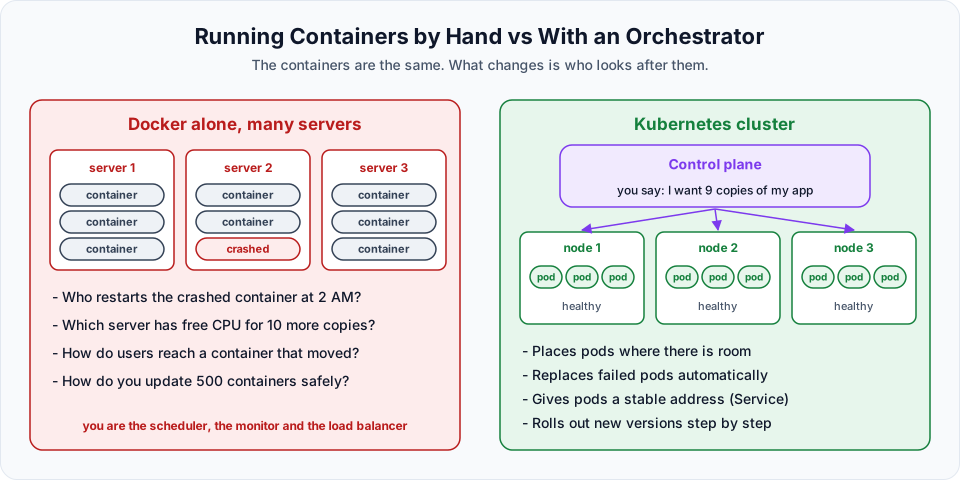
What Kubernetes is
Kubernetes is an open source platform for deploying, scaling and managing containerised applications. You tell it what you want ("run 3 copies of this image, keep them reachable on port 80") and it keeps working to make the cluster match that description.
A few facts worth knowing:
| Fact | Detail |
|---|---|
| Short name | K8s: the K, the 8 letters in between ("ubernete"), and the s |
| Origin | Designed at Google, based on their internal system Borg, open sourced in 2014 |
| Maintained by | The Cloud Native Computing Foundation (CNCF), part of the Linux Foundation, with thousands of contributors |
| Written in | Go |
| Licence | Apache 2.0, free to use |
| Prerequisite for learning it | Docker or a similar container tool. Kubernetes runs containers, so you must understand images and containers first |
What "managing containers" actually means
Kubernetes looks after a container for its whole life:
- Create and start containers from your image on a machine that has room for them
- Stop and delete them when you scale down or remove the app
- Monitor them with health checks
- Recover them: if a container crashes or a whole server dies, Kubernetes starts a replacement somewhere else. This is called self-healing
- Scale them: change "3 copies" to "10 copies" and Kubernetes does the rest
- Update them: roll out a new image version a few copies at a time, and roll back if needed
- Connect them: give a group of containers one stable name and IP, and load balance across them
You will see each of these in action during the course.
How we got here
Bare servers / VMs           Containers (Docker)            Orchestration (Kubernetes)
-------------------          -------------------            --------------------------
Install the app by hand  ->  Package app + dependencies ->  Run and manage thousands of
on each server               into one portable image        containers across many servers
"works on my machine"        same image runs anywhere       desired state, self-healing
First we deployed applications directly onto servers or virtual machines. Docker then let us package the app with everything it needs into a container. Once a company has hundreds or thousands of containers, something has to manage them. That is Kubernetes.
Docker vs Kubernetes
People often ask "should I learn Docker or Kubernetes?" The question is a bit like asking "should I learn to drive or learn traffic rules?" They do different jobs.
| Docker | Kubernetes | |
|---|---|---|
| Category | Containerisation tool | Container orchestration platform |
| Main job | Build images and run containers | Decide where containers run and keep them healthy |
| Scope | Usually one machine | A cluster of many machines |
| Typical command | docker build, docker run | kubectl apply, kubectl get pods |
| Handles crashes | Only basic restart policies on one host | Reschedules work onto healthy machines automatically |
| Scaling | You start more containers yourself | Change a number, Kubernetes does it |
In a real project they work together. Developers use Docker to build an image and push it to a registry such as Docker Hub or Amazon ECR. Kubernetes pulls that image and runs it across the cluster.
Kubernetes does not run Docker Engine any more
Kubernetes removed its built-in Docker Engine support (dockershim) in version 1.24. Nodes now use a container runtime such as containerd directly, which is what EKS uses. Your Docker-built images still work perfectly, because Docker images follow the standard OCI image format that containerd understands. You only lose the ability to run docker ps on a node to see Kubernetes containers.
When you do not need Kubernetes
Kubernetes adds real complexity. A single small app with a few users runs perfectly well on one VM with Docker Compose, or on a simpler managed service such as AWS App Runner or Amazon ECS. Kubernetes pays off when you have many services, need automatic scaling and healing, deploy often, or want the same platform across clouds.
Try It Yourself
- Write down, in your own words, three problems that appear when you run 100 containers by hand. Compare them with the list at the top of this page.
- Explain the difference between Docker and Kubernetes to a friend in two sentences.
- Open the Kubernetes overview page and read the section "Why you need Kubernetes and what it can do". Which items in that list did this lesson already mention, and which ones (for example storage orchestration or secret management) are new to you?
Official references
Written By: Shramik Masti
How is this guide?
Last updated on
Introduction
What this hands-on Kubernetes course covers, why we run every demo on Amazon EKS, and what you should have ready before creating your first cluster.
Kubernetes Architecture Explained
Learn the parts of a Kubernetes cluster, what the API server, etcd, scheduler, controller manager, kubelet, kube-proxy and container runtime do, and follow a pod from kubectl to a running container.