
Getting Started
Learn LangChain4j step by step, from calling an LLM with the plain OpenAI Java SDK to ChatModel, AI Services, chat memory, tools, embeddings and a complete RAG pipeline, with OpenAI and local Ollama models.
Welcome to the LangChain4j Docs.
Most Java developers meet AI the same way. There is an application that already works, and now it needs one more feature: a chatbot, a summary, a search that understands meaning. The model lives behind an API, and somebody has to write the code that talks to it.
LangChain4j is a Java library that makes this code short. These docs do not start with it, though. They follow the LangChain4j course by Navin Reddy at Telusko, and the course makes one deliberate choice: first call the model with the plain OpenAI Java SDK, feel what is repetitive and what is locked to one vendor, and only then bring in the library that removes those problems.
Every page here follows one lecture of that course, with the code, the output and the mistakes made along the way.
The path we follow
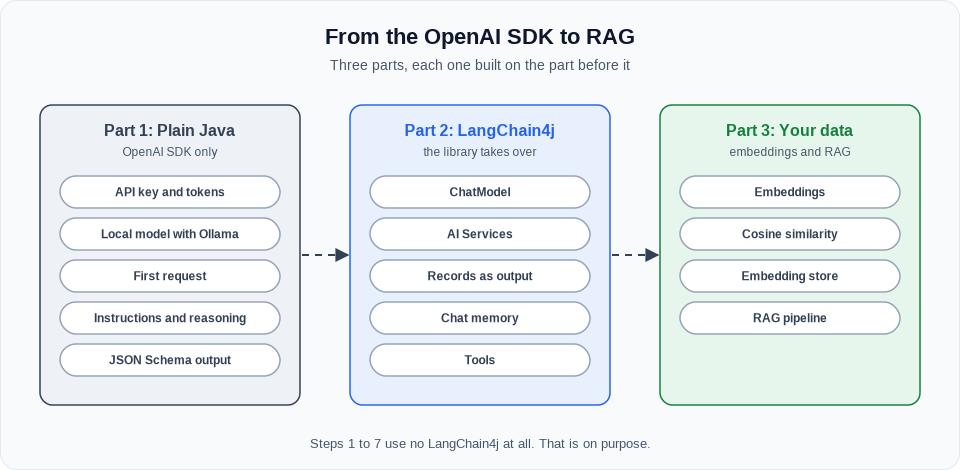
Part 1: LLM APIs in plain Java
| Step | Page | What you do |
|---|---|---|
| 1 | Introduction to LangChain4j | See what the library is and why the course does not start with it |
| 2 | OpenAI API Key and Models | Create a key, add credit and learn what a token is |
| 3 | Running Local Models with Ollama | Install Ollama and run a model on your own machine |
| 4 | First Java Project with the OpenAI SDK | Create a Maven project and get the first answer from a model |
| 5 | Using Ollama from Java | Read only the text from a response and point the same code at Ollama |
| 6 | Instructions and Reasoning Effort | Set a system message and control how much the model thinks |
| 7 | Structured Output with JSON Schema | Make the model answer in JSON that follows your schema |
Part 2: LangChain4j essentials
| Step | Page | What you do |
|---|---|---|
| 8 | ChatModel | Replace the SDK code with one interface that works for every provider |
| 9 | AI Services | Write an interface and let LangChain4j implement it |
| 10 | Structured Output with Records | Get a Java record back from the model |
| 11 | Chain of Thought | Ask for the steps and not only the final answer |
| 12 | Chat Memory | Make a chat remember what was said before |
| 13 | Tools and AI Agents | Let the model call your Java methods |
Part 3: Embeddings and RAG
| Step | Page | What you do |
|---|---|---|
| 14 | Why RAG and What Are Embeddings | Understand the problem RAG solves and what an embedding is |
| 15 | Embeddings and Cosine Similarity | Turn sentences into vectors and compare them |
| 16 | Embedding Stores | Store vectors and search them by meaning |
| 17 | Building a RAG Pipeline | Answer questions from your own documents |
The first seven steps contain no LangChain4j code at all, and that is on purpose. When you reach step 8 you will know exactly which lines the library is saving you from.
What we build
One small Maven project named lc4j, with a single class, App.java. Each lecture changes that class a little. There is no web framework and no database, so nothing hides the code that talks to the model.
The complete source code is on GitHub:
Source code for the course
One standalone Maven project per lecture, ready to open in VS Code
Official LangChain4j documentation
Tutorials and integration guides from the LangChain4j project
The source code, lesson by lesson
The repository does not contain one project that grows. It contains one folder per lecture, and each folder is a complete Maven project that shows App.java exactly as it looks at the end of that lecture. You can open any folder by itself. You do not have to go through them in order.
| Step | Lesson | Folder in the repository |
|---|---|---|
| 4 | First Java Project with the OpenAI SDK | LC4JCode_Le_Java_Project_with_OpenAI_in_VS_Code |
| 5 | Using Ollama from Java | LC4JCode_Le_with_Ollama |
| 6 | Instructions and Reasoning Effort | LC4JCode_Le_Reasoning_Effort_and_Instructions |
| 7 | Structured Output with JSON Schema | LC4JCode_Le_Structured_Output_for_Json |
| 8 | ChatModel | LC4JCode_Le_Langchain4j_ChatModel |
| 9 | AI Services | LC4JCode_Le_Langchain4j_AiServices |
| 10 | Structured Output with Records | LC4JCode_Le_Langchain4j_Structured_Output |
| 11 | Chain of Thought | LC4JCode_Le_Chain_of_Thoughts |
| 12 | Chat Memory | LC4JCode_Le_Chat_Memory |
| 13 | Tools and AI Agents | LC4JCode_Le_Tools_and_AI_Agents_1, LC4JCode_Le_Tools_and_AI_Agents_2 |
| 15 | Embeddings and Cosine Similarity | LC4JCode_Le_Embedding_Demo_and_Cosine_Similarity_Part_1 |
| 16 | Embedding Stores | LC4JCode_Le_VectorStore_or_EmbeddingStore |
| 17 | Building a RAG Pipeline | LC4JCode_Le_RAG |
Steps 1 to 3 and step 14 are setup and theory, so they have no folder. Every lesson page links to its own folder at the top.
Every folder has the same four parts:
LC4JCode_Le_<Lecture_Name>/
├── pom.xml                 the dependencies for that lesson
├── .env                    a placeholder for your OpenAI API key
├── .vscode/
│   └── launch.json         loads .env when you run from VS Code
└── src/main/java/com/telusko/
    └── App.java            the code of the lesson
Running a lesson from the repository
Get the code
git clone https://github.com/telusko-aliens/LangChain4j-course.gitOpen one lesson folder
Open the folder of a single lesson in VS Code, for example LC4JCode_Le_Langchain4j_ChatModel, and not the whole repository. The run configuration in .vscode/launch.json belongs to that one project. Wait until the Maven import has finished.
Choose OpenAI or Ollama
Most App.java files contain two blocks, one for OpenAI and one for Ollama, with one of them commented out. Which one is active is simply how the lecture ended, so it differs from folder to folder. Uncomment the block you want and comment out the other.
For OpenAI, open .env in that folder and replace the placeholder with your key. For Ollama, pull the models once:
ollama pull gemma4:e4b
ollama pull nomic-embed-text
The second model is only needed for the embedding and RAG lessons. Some folders name gemma4:12b, the larger model the lecturer switched to. Change the name to a model you have.
Run App.java
Use the Run link above the main method.
The .env file in the repository is tracked by Git
In your own project, .env belongs in .gitignore. In the course repository it is committed on purpose, with a placeholder in it, so that every folder runs after one edit. That means Git will see your real key as a change. If you fork the repository or push your copy anywhere, do not commit that file.
What you need
You should be comfortable with:
- Core Java: classes, interfaces, records, lists and lambdas
- Running a Maven project in an IDE
To run the code yourself:
| Requirement | Used for | Notes |
|---|---|---|
| JDK 25 | Everything | The project's pom.xml sets maven.compiler.release to 25. The libraries themselves work on older versions too |
| Maven | Building the project | Comes with most IDEs |
| VS Code with the Extension Pack for Java, or any Java IDE | Writing and running the code | The course uses VS Code. IntelliJ IDEA works the same way |
| An OpenAI API key | The OpenAI option in every lesson | API usage is paid. The course says a few dollars of credit is enough for all lessons |
| Ollama | The local option in every lesson | Free. Needs a machine that can run a small model |
You do not need both OpenAI and Ollama. Almost every lesson shows the same code for both, and you can follow the whole course with only one of them.
Which option should you pick?
OpenAI gives faster and more reliable answers and costs a little money. Ollama costs nothing and keeps everything on your machine, but small local models are slower and make more mistakes. If you can, set up both. Seeing the same Java code work against two very different servers is one of the main lessons of this course.
Keep your API key out of Git
The OpenAI key goes into a .env file, and .env goes into .gitignore before the first commit. A key that reaches a public repository, a screenshot or a screen recording must be treated as stolen: delete it in the OpenAI dashboard and create a new one.
The libraries
Four dependencies do all the work. Their names are easy to mix up, so here is who does what:
| Dependency | Version in the course | Role |
|---|---|---|
com.openai:openai-java | 4.91.0 | The official OpenAI SDK. Used alone in steps 4 to 7 |
dev.langchain4j:langchain4j | 1.22.0 | The main LangChain4j module: AI Services, chat memory, tools, document splitters, the in-memory embedding store |
dev.langchain4j:langchain4j-open-ai | 1.22.0 | Connects LangChain4j to OpenAI chat and embedding models |
dev.langchain4j:langchain4j-ollama | 1.22.0 | Connects LangChain4j to models served by Ollama |
All 14 lecture projects were compiled for these docs against exactly these versions. Newer versions exist. Use the ones above while you learn, so that your code matches the pages, and move to the latest release when you start your own project.
How to learn from these docs
Type the code
Create the project and write App.java yourself. The repository is there to compare against when something does not work.
Run every version
Most lessons change one thing and run again. Do the same. The difference between two runs is where the understanding comes from.
Make the mistakes too
The course runs into real errors: a missing API key, a wrong import, a tool that is not a tool, a model that refuses a request. Each page shows the error message, the cause and the fix.
Expect different words
A model does not give the same answer twice. Your output will have the same meaning as the output on these pages, with different wording.
Check the official docs for what is current
Models, prices and library versions change quickly. Where something differs from the course, the page says so in a note. The official documentation linked at the end of each page is the source of truth.
What you will be able to do
By the end, you will be able to:
- Explain what a token, a system message, a reasoning effort and a structured output are
- Call OpenAI and Ollama models from plain Java with the OpenAI SDK
- Use
ChatModelso that your code does not depend on one provider - Build AI Services with
@SystemMessage, records as return types and chat memory - Give a model tools with
@Tooland explain every step of a tool call - Create embeddings, compare them and search them in an embedding store
- Build a RAG pipeline that answers from your own documents
Ready?
Start with Introduction to LangChain4j.
Happy Learning! 🚀
Written By: Shramik Masti
How is this guide?
Last updated on