
Structured Output with JSON Schema
Understand why applications need JSON from a model and not free text, describe the expected shape with a JSON Schema, and request structured output through the Responses API with the OpenAI Java SDK.
Ask a question, get an answer. That is enough for a chatbot, where a person reads the reply.
Most of the time, though, the reader is not a person. It is your own code. And code cannot work with a nicely written paragraph.
Source code: the finished project for this lesson is in the folder LC4JCode_Le_Structured_Output_for_Json of the course repository.
Why text is not enough
Think of an online shop. A chat window where a customer asks about an order is the easy case: text in, text out.
Now add a second feature. On the "new product" page, a button should let the model create a product: a name, a description, an image and a price. Those four values have to fill four fields on the page, and later four columns in a database.
An application passes data between its layers, from the browser to the backend and from the backend to the database, and in most systems that data travels as JSON. So the model's answer has to be JSON as well. A paragraph that mentions a name and a price somewhere is of no use to the backend.
Asking nicely is a game of chance
The obvious idea is to ask for it: "Give me a product with four fields and return JSON." The lecture goes through what can happen:
| What you hope for | What you may get |
|---|---|
| JSON | Plain text anyway |
| JSON | JSON wrapped in extra text, or in a Markdown code block |
| JSON with your property names | Correct JSON with other names. Your backend expects desc and cost, the model writes description and price |
You can improve the odds by listing the property names in the prompt. It will work most of the time. But "most of the time" means that some day a request fails in production because the model wrote one word differently.
With an LLM you sometimes have to be lucky. Structured output is how you stop depending on luck.
The idea: send a schema with the request
Structured output means that you send, together with your question, a formal description of the answer you expect. That description is a JSON Schema. The model then has to produce JSON that matches it.
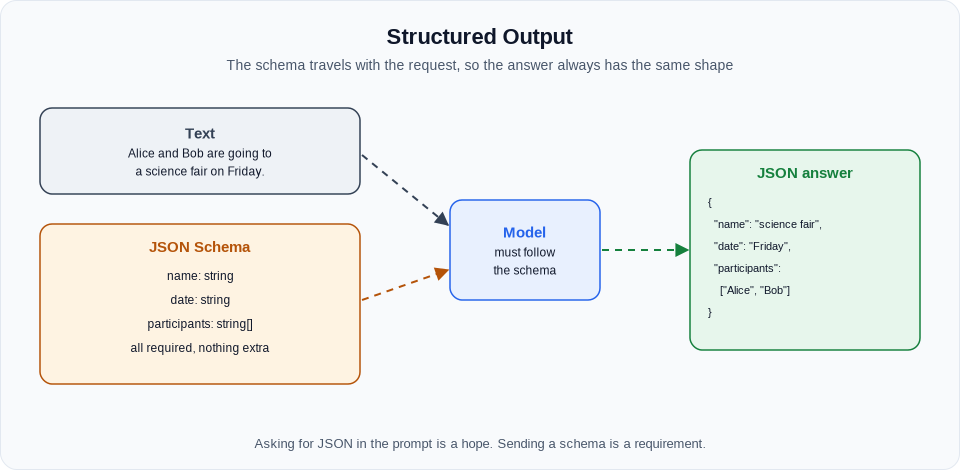
The example in the lecture extracts an event from a sentence:
Alice and Bob are going to a science fair on Friday.
We want three things from it: the name of the event, the date and the list of participants.
Step 1: Describe the shape
A JSON Schema is itself JSON. In Java, the lecture writes it as nested maps:
Map<String, Object> schema = Map.of(
        "type", "object",
        "properties", Map.of(
                "name", Map.of("type", "string"),
                "date", Map.of("type", "string"),
                "participants", Map.of("type", "array", "items", Map.of("type", "string"))),
        "required", List.of("name", "date", "participants"),
        "additionalProperties", false);
This is the same thing as the following JSON, which is easier to read:
{
  "type": "object",
  "properties": {
    "name": { "type": "string" },
    "date": { "type": "string" },
    "participants": { "type": "array", "items": { "type": "string" } }
  },
  "required": ["name", "date", "participants"],
  "additionalProperties": false
}| Key | Meaning |
|---|---|
type: object | The answer is one JSON object |
properties | The fields it may contain, each with its own type |
participants | An array whose items are strings |
required | These fields must be present |
additionalProperties: false | No other fields are allowed |
Step 2: Send the messages and the schema
The request changes in two places. The input becomes a list of messages, and a new text section carries the schema.
package com.telusko;

import java.util.List;
import java.util.Map;

import com.openai.client.OpenAIClient;
import com.openai.client.okhttp.OpenAIOkHttpClient;
import com.openai.core.JsonValue;
import com.openai.models.responses.EasyInputMessage;
import com.openai.models.responses.Response;
import com.openai.models.responses.ResponseCreateParams;
import com.openai.models.responses.ResponseFormatTextJsonSchemaConfig;
import com.openai.models.responses.ResponseInputItem;
import com.openai.models.responses.ResponseTextConfig;

public class App {

    public static void main(String[] args) {
        OpenAIClient client = OpenAIOkHttpClient.fromEnv();
        String model = "gpt-6-sol";
        // String model = "gemma4:e4b";

        // OpenAIClient client = OpenAIOkHttpClient.builder()
        //         .baseUrl("http://localhost:11434/v1")
        //         .apiKey("ollama")
        //         .build();

        Map<String, Object> schema = Map.of(
                "type", "object",
                "properties", Map.of(
                        "name", Map.of("type", "string"),
                        "date", Map.of("type", "string"),
                        "participants", Map.of("type", "array", "items", Map.of("type", "string"))),
                "required", List.of("name", "date", "participants"),
                "additionalProperties", false);

        ResponseCreateParams params = ResponseCreateParams.builder()
            .model(model)
            .inputOfResponse(
                    List.of(
                            ResponseInputItem.ofEasyInputMessage(
                                    EasyInputMessage.builder()
                                            .role(EasyInputMessage.Role.SYSTEM)
                                            .content("Extract the event information.")
                                            .build()),
                            ResponseInputItem.ofEasyInputMessage(
                                    EasyInputMessage.builder()
                                            .role(EasyInputMessage.Role.USER)
                                            .content("Alice and Bob are going to a science fair on Friday.")
                                            .build())))
            .text(
                    ResponseTextConfig.builder()
                            .format(
                                    ResponseFormatTextJsonSchemaConfig.builder()
                                            .name("event")
                                            .strict(true)
                                            .schema(
                                                    JsonValue.from(schema)
                                                            .convert(ResponseFormatTextJsonSchemaConfig.Schema.class))
                                            .build())
                            .build())
            .build();

        Response response = client.responses().create(params);

        response.output().stream()
                .flatMap(item -> item.message().stream())
                .flatMap(message -> message.content().stream())
                .flatMap(content -> content.outputText().stream())
                .forEach(outputText -> System.out.println(outputText.text()));
    }
}
The simple .input(...), the .instructions(...) and the .reasoning(...) lines from the previous lesson are removed to keep the example focused.
The messages
On the previous page the system message went into .instructions(...) and the user message into .input(...). Here both are sent as a list of messages, each with a role:
| Role | Content | Same idea as |
|---|---|---|
SYSTEM | "Extract the event information." | .instructions(...) |
USER | "Alice and Bob are going to a science fair on Friday." | .input(...) |
This is another way to write the same thing. A list of messages becomes necessary when a request carries more than one user message, for example a whole conversation.
The format
| Call | Meaning |
|---|---|
.text(...) | Settings for the text the model produces |
.format(...) | The format of that text. Here: JSON that follows a schema |
.name("event") | A name for this schema |
.strict(true) | The output must follow the schema exactly |
.schema(...) | The schema itself. JsonValue.from(schema).convert(...) turns our map into the type the SDK expects |
Step 3: Run it with OpenAI
The answer is no longer a sentence. It is one JSON object with exactly the three fields from the schema: the name science fair, the date Friday and the participants Alice and Bob.
The model did not add a greeting, an explanation or a code block around it. Every property has the name we chose. That is the difference between asking for JSON and requiring it.
Step 4: Run it with Ollama
Switch to the Ollama block. In the lecture, the first attempt with gemma4:e4b prints this:
*   **People:** Alice, Bob
*   **Event:** Science fair
*   **Time:** Friday
The information is correct. The format is a Markdown list, which is exactly what we were trying to get away from.
The lecturer then tries the larger gemma4:12b. It takes a long time to load and returns proper JSON. He goes back to gemma4:e4b, runs it again, and this time it works too:
{
  "date": "Friday",
  "participants": ["Alice", "Bob"],
  "name": "science fair"
}
The lecture does not find out why the first attempt failed. The practical advice it ends with is to have the model loaded before you send the request.
Checked for these docs
The same program was run for these docs against local Ollama with gemma4:e4b. It returned a valid JSON object with participants, date and name on the first attempt. If you get free text from a local model, run the request again, make sure your Ollama installation is up to date, and try a larger model if the problem stays.
The order of the fields can differ
The schema lists name first, and the output starts with date. A JSON object has no defined order, so this is not an error. Your code should read fields by name and never by position.
What we have, and what is still missing
We have a reliable JSON string. That is a big step. Look at what it took:
- A schema written as nested maps, where a typing mistake in a key is found only at run time.
- About twenty lines of builders to attach two messages and one schema.
- A result that is still a
String. To use it, you would create a Java class or record with the same three fields and convert the JSON into it with a library such as Jackson.
So the shape of the data would be described twice: once in the schema map and once in the Java class. Change one and forget the other, and the program breaks.
The SDK can also build the schema from a class
The OpenAI Java SDK has a shorter route that derives the JSON Schema from a Java class, so you do not write the map by hand. It is described in the "Structured outputs with JSON schemas" section of the SDK's README. The course shows the manual version on purpose, so that you see what a schema is. And either way, this code works with the OpenAI SDK only.
This is the last lesson with the plain SDK. You now know how to call a model, give it a role, control its reasoning and get JSON from it. You also have a list of things that were harder than they should be. The next section starts with that list.
Mistakes and fixes
| Problem | Cause | Fix |
|---|---|---|
A compile error on JsonValue | The import is missing. It comes from com.openai.core | Add import com.openai.core.JsonValue; |
A compile error that code cannot be found | The old .input(...) line from the previous lesson was left in the builder, and its code variable no longer exists | Remove the old line. In the lecture it is removed one step later than the rest |
| The model returns text or Markdown | The schema was not applied. Seen once in the lecture with a small local model | Run again with the model loaded, or use a larger model |
| The API rejects the schema | With strict(true), OpenAI expects every property to be listed in required and additionalProperties to be false | Keep both, as in the example |
Try It Yourself
- Run the example and confirm that the output contains only the three fields.
- Change the sentence to one with three people and a full date. Check the
participantsarray. - Add a field
locationof type string topropertiesand torequired. Run it with a sentence that names a place, then with one that does not. What does the model put there? - Remove the whole
.text(...)section and ask for JSON in the system message only. Run it several times and compare the results. - Rename
participantstopeoplein the schema and confirm that the output follows the new name. - Run the same request with a local model. Do you get valid JSON on the first attempt?
- Write a record
Event(String name, String date, List<String> participants)and think about how you would turn the printed JSON into it. You will see the short way in Structured Output with Records.
Official references
- OpenAI: structured outputs
- OpenAI Java SDK on GitHub
- JSON Schema: getting started
- Ollama: OpenAI compatibility
- Source code for this lesson
Written By: Shramik Masti
How is this guide?
Last updated on
Instructions and Reasoning Effort
Give a model a role with a system message through instructions, understand system, user and AI messages, and control how long a reasoning model thinks with the reasoning effort setting.
ChatModel
Add LangChain4j to the project and replace the OpenAI SDK code with the ChatModel interface, so the same two lines of Java work with OpenAI, Ollama and any other provider.