
Instructions and Reasoning Effort
Give a model a role with a system message through instructions, understand system, user and AI messages, and control how long a reasoning model thinks with the reasoning effort setting.
So far we have sent the model one thing: the question. Two more settings change the answer a lot, and almost every model supports them in some form.
- Instructions tell the model who it is and how it should behave.
- Reasoning effort tells a reasoning model how much thinking a question deserves.
Both are added to the same request we already have.
Source code: the finished project for this lesson is in the folder LC4JCode_Le_Reasoning_Effort_and_Instructions of the course repository.
The problem with putting everything in the question
If you have read anything about prompt engineering, you know the advice to give the model a role. "Explain LLM" gets a better answer when it becomes "You are an expert AI trainer. Explain LLM."
You could let the user type that role as part of the question. There are two reasons not to:
- Users will not do it. They ask their question and nothing more.
- Users should not be the ones who decide it. Whatever arrives in the question is under the user's control, and a user can try to steer the model somewhere you do not want.
The role belongs to you, the developer. It should travel separately from the user's text.
Three kinds of messages
That separation has names. You will see them in every SDK and framework:
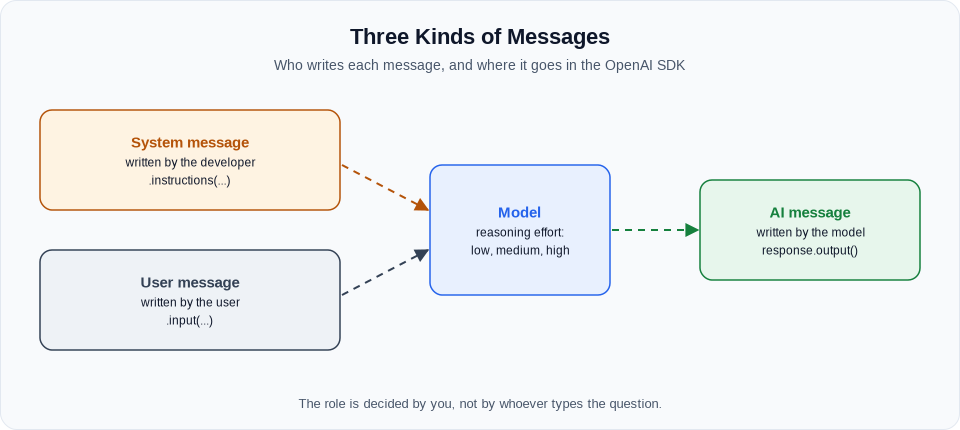
| Message | Who writes it | In the OpenAI SDK |
|---|---|---|
| System message | The developer. It sets the role, tone and rules | .instructions(...) |
| User message | The user. It is the question | .input(...) |
| AI message | The model. It is the answer | What you read from response.output() |
Step 1: Add instructions
A polite instruction such as "You are a helpful assistant" changes very little, so it is a poor way to see the effect. The lecture picks something you cannot miss:
ResponseCreateParams params = ResponseCreateParams.builder()
    .instructions("talk like you are a 5 year old kid")
    .input("in 2 lines explain llm")
    .model(model)
    .build();
Step 2: Keep the model name in a variable
We keep switching between OpenAI and Ollama, and each switch touches the client and the model name. A small tidy-up makes that easier: put the model name in a String, and keep both blocks in the file with one of them commented out.
OpenAIClient client = OpenAIOkHttpClient.fromEnv();
String model = "gpt-6-sol";
// String model = "gemma4:e4b";

// OpenAIClient client = OpenAIOkHttpClient.builder()
//         .baseUrl("http://localhost:11434/v1")
//         .apiKey("ollama")
//         .build();
Note that the request now says .model(model), the variable, and not .model("model") in quotes. The second version would ask for a model that is literally named "model".
Step 3: Run it with both models
With OpenAI:
An LLM is a computer helper that learns from lots of words in books and websites.
It uses what it learned to guess which words should come next and answer you!
Switch the comments and run it with Gemma. The first run takes a while, because the model has to be loaded. In the lecture the answer describes an LLM as a smart computer brain that reads tons of books, talks back to you and makes up silly stories.
Same question as before, completely different voice. The user typed nothing about children. The instruction did that.
What the five-year-old got right
The childish answer contains a sentence worth taking seriously: the model guesses which words should come next.
That is what a language model does. Given "My favourite colour is", it works out which word is most likely to follow, adds it, and repeats. Everything it writes is produced this way.
Two consequences follow, and the lecture is direct about both:
- A model does not give you a guaranteed correct answer. It gives you a likely one.
- When the likely continuation is wrong, the model says it anyway, with the same confidence. This is called hallucination.
Modern models are trained well enough that the likely answer is usually a good one. "Usually" is the important word, and it is the reason for much of what comes later in this course: structured output, tools and RAG are all ways to make a model's answers more dependable.
Step 4: Add a reasoning effort
Many current models think before they answer. You have seen it twice already: the ...done thinking. line in the Ollama chat, and the encrypted reasoning item in the OpenAI response.
Thinking takes time, and with hosted models it costs output tokens. For "explain LLM in two lines" there is not much to think about. You can tell the model so:
ResponseCreateParams params = ResponseCreateParams.builder()
    .model(model)
    .input("in 2 lines explain llm")
    .instructions("talk like you are a 5 year old kid")
    .reasoning(Reasoning.builder().effort(ReasoningEffort.LOW).build())
    .build();
It needs two more imports:
import com.openai.models.Reasoning;
import com.openai.models.ReasoningEffort;
The editor's autocomplete shows the values that this SDK version knows:
| Value | Meaning |
|---|---|
NONE | Do not reason |
MINIMAL | As little as possible |
LOW | A little. Good for simple questions |
MEDIUM | A balanced amount |
HIGH | Think carefully. Slower and more expensive |
XHIGH, MAX | Even more |
These values belong to OpenAI
This list comes from the OpenAI SDK. Other providers have their own names and levels, and not every model accepts every value. A model that does not support a level answers with an error or ignores the setting.
Run with LOW, then change it to HIGH and run again:
.reasoning(Reasoning.builder().effort(ReasoningEffort.HIGH).build())The answer is about the same. The waiting time is not. With LOW it comes back quickly. With HIGH the model spends noticeably longer on a question that did not need it.
Step 5: Use high effort where it helps
High effort is for problems that need real thought, such as finding a bug. The lecture adds a few lines of Python as a Java text block and asks the model to find the error:
package com.telusko;

import com.openai.client.OpenAIClient;
import com.openai.client.okhttp.OpenAIOkHttpClient;
import com.openai.models.Reasoning;
import com.openai.models.ReasoningEffort;
import com.openai.models.responses.Response;
import com.openai.models.responses.ResponseCreateParams;

public class App {

    public static void main(String[] args) {
        OpenAIClient client = OpenAIOkHttpClient.fromEnv();
        String model = "gpt-6-sol";
        // String model = "gemma4:e4b";

        // OpenAIClient client = OpenAIOkHttpClient.builder()
        //         .baseUrl("http://localhost:11434/v1")
        //         .apiKey("ollama")
        //         .build();

        String code = """
            def display_name(user):
                return user.profile.name

            print(display_name(None))
            """;

        ResponseCreateParams params = ResponseCreateParams.builder()
            .model(model)
            .input("find the error in the following code:\n" + code)
            .instructions("you are a senior software engineer, please find the error in the code and provide a solution")
            .reasoning(Reasoning.builder().effort(ReasoningEffort.HIGH).build())
            .build();

        Response response = client.responses().create(params);

        response.output().stream()
                .flatMap(item -> item.message().stream())
                .flatMap(message -> message.content().stream())
                .flatMap(content -> content.outputText().stream())
                .forEach(outputText -> System.out.println(outputText.text()));
    }
}
The three parts of the request each have their own job now:
| Part | Content |
|---|---|
| Instructions | The role: a senior software engineer who finds the error and gives a solution |
| Input | The task and the data: "find the error" plus the code |
| Reasoning | How hard to think: HIGH |
The Python function receives None and tries to read .profile from it. The model finds exactly that. It names the cause, an AttributeError because None has no attribute profile, and proposes to handle the missing user before the profile is accessed.
This snippet is small enough that LOW would find the bug too, and the lecturer says so. The point is the habit: simple question, low effort. Hard problem, high effort.
The same request with Gemma
Switch to the Ollama block and run it again. It takes longer, and the local model also arrives at the AttributeError and adds a check for None.
The lecturer is not sure at this point whether Gemma supports the reasoning setting. Ollama's documentation lists reasoning among the fields that its OpenAI-compatible Responses endpoint accepts. What effect a given level has is decided by the model you run.
Checked for these docs
The final program of this lesson was run for these docs against local Ollama with gemma4:e4b. It identified the AttributeError on None and suggested a guard clause that checks for a missing user first.
Mistakes made in the lecture
1. The model name in quotes. After introducing the model variable, it is easy to leave .model("model") behind. Use the variable.
2. A red line under .reasoning(...), and the real cause. When the reasoning line is first typed, the editor marks it as an error. The lecturer reorders the builder calls, putting .model(...) first, and assumes the order was the problem.
The order of builder calls does not matter in Java. Look at the imports on screen at that moment and the real cause is visible. The editor's quick fix had imported a different class that is also called Reasoning:
import com.openai.models.responses.ResponseConfigurationUpdateItemParam.Reasoning; // wrongThe class that .reasoning(...) expects is this one:
import com.openai.models.Reasoning; // correctThe finished code in the repository uses the correct import. If you see a type error on that line, check the import first.
3. The first Ollama run seems to hang. The model was not loaded yet. The lecturer runs it again once it is in memory. Loading a model before you need it avoids the wait.
Try It Yourself
- Run "in 2 lines explain llm" without instructions, then with the five-year-old instruction. Compare the two answers.
- Write three different instructions for the same question, for example a pirate, a doctor and a news reader, and run each.
- Put a role inside
.input(...)that contradicts your.instructions(...). Which one does the model follow? - Run the simple question with
LOWand withHIGHand time both. - Run the debugging example with
LOW. Does it still find the bug? - Replace the Python snippet with a small buggy function of your own and see what the model says.
- Break the
Reasoningimport on purpose with the wrong class from mistake 2, read the compiler error, and fix it.
Official references
- OpenAI: text generation and instructions
- OpenAI: reasoning models
- OpenAI Java SDK on GitHub
- Ollama: OpenAI compatibility
- Source code for this lesson
Written By: Shramik Masti
How is this guide?
Last updated on
Using Ollama from Java
Extract only the answer text from a Responses API result, then point the same OpenAI SDK code at a local Ollama model by changing the base URL, the API key and the model name.
Structured Output with JSON Schema
Understand why applications need JSON from a model and not free text, describe the expected shape with a JSON Schema, and request structured output through the Responses API with the OpenAI Java SDK.