
Introduction to LangChain4j
What LangChain4j is, where it sits between a Java application and an LLM, what it offers, and why this course starts with plain Java before using the library.
If you have looked at AI development at all, you have heard of LangChain. It is a well-known framework in the Python world for building applications and agents on top of large language models.
For Java there is LangChain4j. The "4j" ending is familiar from Log4j and other Java tools, and it leads many people to think LangChain4j is LangChain translated to Java. It is not. The name and some ideas come from there, but it is a separate library with its own design, its own API and its own releases.
Not a port of LangChain
The official documentation says this directly: despite the name, LangChain4j is not a Java port of LangChain. It is written for Java from the ground up, around things Java developers already use: interfaces, annotations, POJOs, type safety and dependency injection.
The problem it solves
Not every application needs to be built from AI agents. Most of the time you already have a normal application, and you want to add one AI feature to it.
To do that, your application has to talk to a model. The model is reached through an API, and every provider has its own API, its own request format and its own SDK. Something has to sit between your code and those APIs.
That "something in between" is what LangChain4j is.
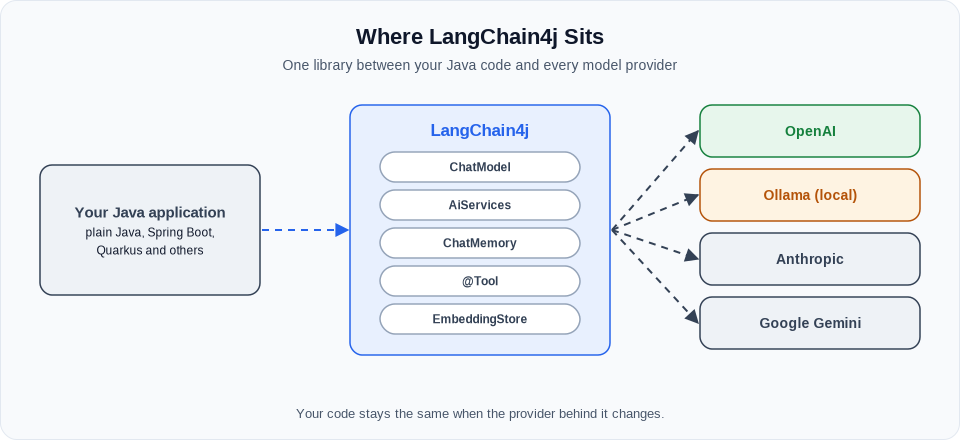
Your code talks to LangChain4j. LangChain4j talks to OpenAI, Anthropic, Google, a local Ollama server and many others. The Java code you write stays almost the same when the provider behind it changes.
What LangChain4j offers
The official introduction lists what the library gives you. These are the parts this course uses:
| Feature | What it means | Where we use it |
|---|---|---|
| Unified API for 20+ LLM providers | One Java interface for OpenAI, Ollama, Anthropic, Gemini and more | ChatModel |
| AI Services | You write an interface, the library implements it | AI Services |
| Output parsing for Java types | The model's answer arrives as a record or a POJO | Structured Output with Records |
| Chat memory | The conversation history is kept and sent for you | Chat Memory |
| Tools (function calling) | The model can ask your code to run a Java method | Tools and AI Agents |
| 20+ embedding models and 30+ embedding stores | Turn text into vectors and search them | Embedding Stores |
| RAG | Answer questions from your own documents | Building a RAG Pipeline |
The same list also contains streaming responses, image models, prompt templates, agents and more. Those are outside this course.
It is tailored for Java
LangChain4j is a library, not a platform. You add it as a Maven or Gradle dependency. It works in a plain Java program with a main method, which is how this course uses it, and it has integrations for Spring Boot, Quarkus, Helidon and Micronaut when you need them.
Two levels of abstraction
The library can be used at two levels, and the course visits both:
| Level | What you work with | Trade-off |
|---|---|---|
| Low level | ChatModel, EmbeddingModel, EmbeddingStore and the message classes | Full control, more code to write |
| High level | AI Services | Very little code, behaviour is declared with annotations |
One setting you will see everywhere: temperature
While walking through the documentation, the lecture stops at model parameters. The one worth knowing from the start is temperature.
| Temperature | Effect |
|---|---|
| Close to 0 | The model picks the most likely words. Answers are more predictable and more repeatable |
| Higher, up to 2 for OpenAI models | The model takes more chances. Answers are more varied and more "creative" |
Not every model accepts every value, and some reasoning models do not let you change it at all. Check the documentation of the model you use.
The catch: abstraction and lock-in
A library like LangChain4j gives you an abstraction layer. That is good. You do not have to remember every detail of every provider's API.
It also has a cost. Code that is written against LangChain4j depends on LangChain4j. If you later want to try Spring AI, or the plain SDK, or something that does not exist yet, you have work to do. People usually talk about vendor lock-in for cloud providers. The same thing happens with frameworks.
There is a second, quieter cost. If the library does everything for you from the first day, you never learn what it is doing. Then the first error message that comes from underneath the library makes no sense.
So the course makes a decision:
Learn each idea first in plain Java, with the provider's own SDK. Then use the library that hides it.
That is why the next six pages contain no LangChain4j code. We will:
- Get an OpenAI API key and install a local model with Ollama.
- Create a small Maven project.
- Call the model with the official OpenAI Java SDK.
- Add a system message, a reasoning level and a JSON output, all by hand.
After that, when LangChain4j turns thirty lines into three, you will know which thirty lines those were.
About copy and paste in this course
The lecturer says it openly: a lot of the code in this course is pasted, not typed, and in daily work much of it comes from a coding assistant. That is fine. What you need to bring yourself is an understanding of what each line does, because that is what lets you notice when generated code is wrong.
Try It Yourself
- Open docs.langchain4j.dev and read the introduction page. Find the feature list and compare it with the table above.
- On the same site, open the list of supported language models. Check whether the providers you would like to use are there.
- Find the note that says LangChain4j is not a port of LangChain, and read the reasons it gives.
- Write down, in your own words, one advantage and one risk of using an abstraction layer. Keep the note. You can check it against your experience at the end of the course.
Official references
- LangChain4j: introduction
- LangChain4j: get started
- LangChain4j: chat and language models
- LangChain4j: model parameters
- LangChain4j on GitHub
Written By: Shramik Masti
How is this guide?
Last updated on
Getting Started
Learn LangChain4j step by step, from calling an LLM with the plain OpenAI Java SDK to ChatModel, AI Services, chat memory, tools, embeddings and a complete RAG pipeline, with OpenAI and local Ollama models.
OpenAI API Key and Models
Find the OpenAI API platform, add credit, create an API key, understand tokens and model tiers, and locate the official Java SDK dependency you will use in the first project.