
Embedding Stores
Store embeddings together with their text in LangChain4j's InMemoryEmbeddingStore, search them by meaning with EmbeddingSearchRequest, and understand maxResults, minScore and what the match score really measures.
On the previous page we embedded three sentences and compared them by hand, one pair at a time. It was a good way to see how embeddings behave.
It is not how a real system can work. A company has thousands of sentences, paragraphs and tables, spread over PDFs, text files and spreadsheets. They cannot live in variables, and nobody writes the comparisons one by one. The embeddings have to be stored, and the store has to do the searching.
Source code: the finished project for this lesson is in the folder LC4JCode_Le_VectorStore_or_EmbeddingStore of the course repository.
A database for embeddings
A normal database, SQL or NoSQL, finds rows by matching values. That is the keyword search we already ruled out.
What we need is a database that stores embeddings and can answer one particular question: which of the stored embeddings are closest to this one? Such a database is called a vector database, or vector store.
LangChain4j uses its own name for the same thing: EmbeddingStore. The two words mean the same in this course. EmbeddingStore is an interface, in the same spirit as ChatModel and EmbeddingModel, and there are many implementations:
| Kind | Example | When to use it |
|---|---|---|
| In memory | InMemoryEmbeddingStore | Learning, demos and tests. Used in this course |
| A real vector database | pgvector, Qdrant and many others | Production |
The in-memory store keeps everything in RAM. It needs no setup, and it is gone when the program ends. For a demo that is exactly what we want.
About pgvector
The lecture recommends pgvector for production and describes it as coming from the Postgres side. To be exact: pgvector is an open-source extension for PostgreSQL that adds a vector type and similarity search to an ordinary Postgres database. LangChain4j supports it through its own module with the class PgVectorEmbeddingStore. Because your code depends on the EmbeddingStore interface, moving from the in-memory store to pgvector changes the line that creates the store, and not the code that uses it.
The whole flow
There are two phases, and they happen at different times.
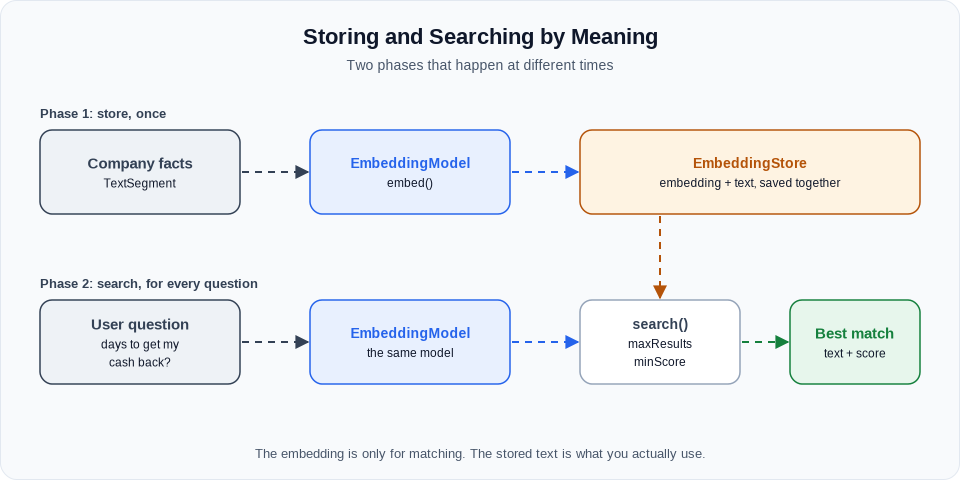
Phase 1: storing. Done once, before anybody asks anything.
| Step | What happens |
|---|---|
| 1 | Take a piece of text, here one company fact |
| 2 | Turn it into an embedding with the embedding model |
| 3 | Save the embedding and the text in the store |
Phase 2: searching. Done for every question.
| Step | What happens |
|---|---|
| 4 | Take the user's question |
| 5 | Turn it into an embedding with the same embedding model |
| 6 | Ask the store for the stored embeddings nearest to it |
| 7 | Read the text that belongs to the best matches |
The text from step 7 is what will be handed to the chat model on the next page. On this page there is still no chat model at all.
Why the text is stored next to the embedding
If the store already holds the embedding, why keep the text as well?
Because an embedding is not a way to get the text back. The lecture compares it to hashing: you go from the text to the numbers, and you do not go from the numbers to the text. The embedding exists only for matching. Once a match is found, what you actually need is the original sentence, so it has to be saved alongside.
In LangChain4j the text is wrapped in a TextSegment. A segment is a piece of a document. When your source is a long document, you do not store it as one block. You store it in pieces, and each piece is a segment. The next page uses the word chunk for the same thing.
Step 1: Create the store
Keep the embedding model from the previous lesson and remove the code below it.
// 1. Create Vector Store (Swap with PgVectorEmbeddingStore / Qdrant in production)
EmbeddingStore<TextSegment> vectorStore = new InMemoryEmbeddingStore<>();
The type parameter <TextSegment> says what is stored together with each embedding.
Step 2: Store some facts
There is no ready-made method for "embed this text and store it" at this low level, so the lecture writes a small helper. It is our own method, not part of LangChain4j:
static void saveFact(EmbeddingStore<TextSegment> store, EmbeddingModel model, String text) {
    TextSegment segment = TextSegment.from(text);
    Embedding vector = model.embed(segment).content();
    store.add(vector, segment);
}| Line | What it does |
|---|---|
TextSegment.from(text) | Wraps the string in a segment |
model.embed(segment).content() | Creates the embedding for it |
store.add(vector, segment) | Saves the pair: the numbers and the text |
It goes outside main, as a second method of the class. Then store three facts:
// 2. Store 3 private company facts as (Embedding, TextSegment) pairs
saveFact(vectorStore, embeddingModel, "At Telusko, customers can request a full refund within 19 days of course purchase.");
saveFact(vectorStore, embeddingModel, "Full-time employees receive 42 days of paid Alien Leave every year.");
saveFact(vectorStore, embeddingModel, "Our Pune studio records courses using Canon EOS R6 Mark II cameras.");
These values are invented for the demo, as the lecturer points out, and that is what makes them good test data. No model can know that the refund period is 19 days. If that number shows up in an answer later, it can only have come from our store.
Real sources would be PDFs or spreadsheets. Those need one more step, a parser that extracts the text first. The idea stays the same.
Step 3: Build a search request
The question first becomes an embedding, like everything else:
// 3. Search by meaning ("cash back" matches "refund" with ZERO shared keywords!)
Embedding queryVector = embeddingModel.embed("How many days do I have to get my cash back?").content();
We could now loop over the three facts and call CosineSimilarity.between ourselves. We do not have to. The store has a search:
EmbeddingSearchRequest searchRequest = EmbeddingSearchRequest.builder()
    .queryEmbedding(queryVector)
    .maxResults(1)
    .minScore(0.6)
.build();| Setting | Meaning | Default |
|---|---|---|
queryEmbedding | What to search for | Required |
maxResults | How many matches to return at most, best first | 3 |
minScore | Matches with a lower score are left out | 0 |
Both limits have a purpose. A search by similarity always finds something, because some stored text is always the nearest one, even when nothing in the store is relevant. maxResults keeps the answer short. minScore lets you say "better nothing than something unrelated".
Step 4: Search and read the matches
EmbeddingSearchResult<TextSegment> result = vectorStore.search(searchRequest);

for (EmbeddingMatch<TextSegment> match : result.matches()) {
    System.out.println("Match Score : " + match.score());
    System.out.println("Found Fact  : " + match.embedded().text());
}| Call | Returns |
|---|---|
vectorStore.search(searchRequest) | The result of the search |
result.matches() | The list of matches, best first |
match.score() | How relevant this match is |
match.embedded().text() | The stored text. This is why we saved the segment |
Step 5: Run it
With Ollama and nomic-embed-text:
Match Score : 0.8504293067340016
Found Fact  : At Telusko, customers can request a full refund within 19 days of course purchase.
With OpenAI and text-embedding-3-small:
Match Score : 0.723372511072953
Found Fact  : At Telusko, customers can request a full refund within 19 days of course purchase.
The question says "cash back". The fact says "refund". The store found it anyway, with both models. Out of three facts it picked the right one, and no line of our code mentions refunds.
Step 6: Ask about something that is not there
Now a question the store cannot answer. None of the three facts mentions a microphone:
Embedding queryVector = embeddingModel.embed("which mic we use in our recordings?").content();With OpenAI:
Match Score : 0.6968979670103632
Found Fact  : Our Pune studio records courses using Canon EOS R6 Mark II cameras.
The store returns the camera fact. It is the nearest thing it has: "recordings" in the question and "records courses" in the fact are close in meaning. But it does not answer the question. If this text were passed to a chat model, the model could easily reply that the microphone is a Canon EOS R6.
This is a wrong match that looks like a right one, and it is the most important thing to understand about similarity search. Nearest does not mean relevant.
The lecture fixes it by raising the threshold:
.minScore(0.7)Run again, and nothing is printed. 0.6969 is below 0.7, the match is filtered out, and the list of matches is empty. An empty result is the correct result here.
The complete program
package com.telusko;

import dev.langchain4j.data.embedding.Embedding;
import dev.langchain4j.data.segment.TextSegment;
import dev.langchain4j.model.embedding.EmbeddingModel;
import dev.langchain4j.model.openai.OpenAiEmbeddingModel;
import dev.langchain4j.store.embedding.EmbeddingMatch;
import dev.langchain4j.store.embedding.EmbeddingSearchRequest;
import dev.langchain4j.store.embedding.EmbeddingSearchResult;
import dev.langchain4j.store.embedding.EmbeddingStore;
import dev.langchain4j.store.embedding.inmemory.InMemoryEmbeddingStore;

public class App {

    public static void main(String[] args) {

        EmbeddingModel embeddingModel = OpenAiEmbeddingModel.builder()
                .apiKey(System.getenv("OPENAI_API_KEY"))
                .modelName("text-embedding-3-small")
                .build();

        // EmbeddingModel embeddingModel = OllamaEmbeddingModel.builder()
        //         .baseUrl("http://localhost:11434")
        //         .modelName("nomic-embed-text")
        //         .build();

        // 1. Create Vector Store (Swap with PgVectorEmbeddingStore / Qdrant in production)
        EmbeddingStore<TextSegment> vectorStore = new InMemoryEmbeddingStore<>();

        // 2. Store 3 private company facts as (Embedding, TextSegment) pairs
        saveFact(vectorStore, embeddingModel, "At Telusko, customers can request a full refund within 19 days of course purchase.");
        saveFact(vectorStore, embeddingModel, "Full-time employees receive 42 days of paid Alien Leave every year.");
        saveFact(vectorStore, embeddingModel, "Our Pune studio records courses using Canon EOS R6 Mark II cameras.");

        // 3. Search by meaning ("cash back" matches "refund" with ZERO shared keywords!)
        Embedding queryVector = embeddingModel.embed("which mic we use in our recordings?").content();

        EmbeddingSearchRequest searchRequest = EmbeddingSearchRequest.builder()
            .queryEmbedding(queryVector)
            .maxResults(1)
            .minScore(0.7)
            .build();

        EmbeddingSearchResult<TextSegment> result = vectorStore.search(searchRequest);

        for (EmbeddingMatch<TextSegment> match : result.matches()) {
            System.out.println("Match Score : " + match.score());
            System.out.println("Found Fact  : " + match.embedded().text());
        }
    }

    static void saveFact(EmbeddingStore<TextSegment> store, EmbeddingModel model, String text) {
        TextSegment segment = TextSegment.from(text);
        Embedding vector = model.embed(segment).content();
        store.add(vector, segment);
    }
}
What the match score really is
There is a detail here that the lecture does not go into, and it changes how you should read every number on this page.
On the previous page, CosineSimilarity.between gave 0.47 for a related pair with the OpenAI model. On this page, the same model gives 0.72 for a related pair. The second number is not a cosine similarity.
InMemoryEmbeddingStore calculates the cosine similarity and then converts it to a relevance score between 0 and 1:
score = (cosine similarity + 1) / 2This was checked for these docs in two ways: in the source code of LangChain4j 1.22.0, and by running both calculations on the same embeddings with nomic-embed-text.
| Question against stored fact | Cosine similarity | Score from the store |
|---|---|---|
| Cash back question and the refund fact | 0.7005 | 0.8503 |
| Cash back question and the leave fact | 0.5230 | 0.7615 |
| Cash back question and the camera fact | 0.3564 | 0.6782 |
The consequence matters for minScore:
minScore | Corresponds to a cosine similarity of |
|---|---|
| 0.5 | 0.0, no similarity at all |
| 0.6 | 0.2 |
| 0.7 | 0.4 |
| 0.8 | 0.6 |
Look at the table of scores again with that in mind. With this local model, all three facts score above 0.6 for the cash back question, including the two that have nothing to do with it. A minScore of 0.6 filters out nothing here. The search still returns the right fact only because maxResults(1) keeps the best one.
A threshold is tied to one model
In the lecture, raising minScore to 0.7 removes the wrong match for the microphone question, with the OpenAI model, where it scored 0.697. The same question was run for these docs with nomic-embed-text. There the camera fact scores 0.800, so a threshold of 0.7 lets it through. A value that works for one embedding model does not carry over to another. Print the scores for a set of real questions, some that your documents can answer and some that they cannot, and choose the threshold from what you see.
Additions beyond the lecture
The in-memory store can be saved to a file. It is lost when the program ends, but it does not have to be rebuilt every time. InMemoryEmbeddingStore has serializeToFile(...) to write its content to disk and InMemoryEmbeddingStore.fromFile(...) to load it again. That saves you from embedding the same documents on every start, which costs time and, with a hosted model, money. Both methods were tried for these docs.
The question and the facts must use the same embedding model. saveFact and the query both use the one embeddingModel variable, so this is guaranteed here. In a real system, storing and searching often happen in different programs, and it becomes your job to keep them on the same model. If you change the embedding model, every stored embedding has to be created again.
Mistakes made in the lecture
1. The wrong Embedding import. When saveFact is added, the editor's quick fix imports an Embedding class from the OpenAI SDK. The one that EmbeddingStore works with is dev.langchain4j.data.embedding.Embedding.
2. Not knowing which model is active. The lecturer announces a run with OpenAI and notices a moment later that the Ollama block is the one that is not commented out. With two blocks in a file this happens to everyone. It matters more here than before, because the scores of the two models cannot be compared. Check which block is active before you interpret a number.
3. Calling a helper before it exists. The three saveFact lines are written first and show errors until the method is added. That is only the order of typing, not a real problem.
Try It Yourself
- Run the program with the cash back question and note the score for your model.
- Change
maxResultsto 3 andminScoreto 0. Print all matches and compare the three scores. - For one match, also calculate
CosineSimilarity.between(queryVector, ...)on the same pair and confirm the formula(cosine + 1) / 2. - Ask the microphone question. Which fact comes back, and with what score?
- Find the lowest
minScoreat which the microphone question returns nothing while the cash back question still finds the refund fact. Is there such a value for your model? - Add a fourth fact about the microphone, for example "We record audio with a Shure SM7B microphone.", and ask again.
- Add ten more facts about different topics and ask five questions. Count how often the top match is the right one.
- Save the store with
serializeToFileand load it in a second run without embedding the facts again.
Official references
- LangChain4j: RAG, embedding store
- LangChain4j: supported embedding stores
- LangChain4j: PGVector embedding store
- pgvector on GitHub
- Source code for this lesson
Written By: Shramik Masti
How is this guide?
Last updated on
Embeddings and Cosine Similarity
Create embeddings in Java with LangChain4j's EmbeddingModel for OpenAI and Ollama, inspect the vectors, and compare sentences by meaning with CosineSimilarity.
Building a RAG Pipeline
Build a complete Retrieval-Augmented Generation pipeline with LangChain4j, splitting a document into chunks, ingesting them into an embedding store, retrieving the relevant ones for a question and letting an AI Service answer from them.