
Chat Memory
Prove that a model forgets everything between two requests, then give an AI Service a memory with MessageWindowChatMemory and understand what is stored, what is sent and why the window has a limit.
A model can read your question, think about it and write an answer. In the picture the lecture uses, it has ears, a brain and a mouth.
It is missing something people take for granted: memory. A person remembers what you said a minute ago. A model does not. In technical terms it is stateless: every request is the first request it has ever seen.
That sounds wrong if you have used ChatGPT, Claude or Gemini. Those clearly remember the conversation. They do, and this page shows how. First we have to see the problem with our own eyes.
Source code: the finished project for this lesson is in the folder LC4JCode_Le_Chat_Memory of the course repository.
Step 1: A plain chat loop
Clear out the maths code from the previous page. We go back to a simple assistant that returns a String, this time without a system message:
interface Assistant {
    String chat(String userMessage);
}
So far every program asked one question and ended. A conversation needs a loop that reads from the keyboard:
Assistant assistant = AiServices.builder(Assistant.class)
        .chatModel(model)
        .build();

Scanner scanner = new Scanner(System.in);
System.out.println("Chat started! Type 'exit' to stop.");

while (true) {
    System.out.print("\nYou: ");
    String userInput = scanner.nextLine();
    if ("exit".equalsIgnoreCase(userInput)) break;

    String reply = assistant.chat(userInput);
    System.out.println("AI: " + reply);
}
Nothing here is LangChain4j except the one call to assistant.chat. The program reads a line, sends it to the assistant, prints the reply and repeats until you type exit.
Step 2: Prove that it forgets
Run it with the local Gemma model and introduce yourself:
Chat started! Type 'exit' to stop.

You: who are you? my name is navin
The model says that it is Gemma 4, a large language model developed by Google DeepMind, and greets Navin by name. So far it looks like a conversation. Now ask the obvious follow-up:
You: what is my name?
AI: I do not know your name. I am an AI and do not have access to personal information about you unless you tell me.

If you'd like me to know it, please feel free to tell me!
It used the name one message ago. Now it has never heard it.
Nothing is broken. Look at what the second request contained: the four words "what is my name?" and nothing else. The first question and its answer were never sent again, so for the model they do not exist.
Checked for these docs
This program was run for these docs with gemma4:e4b, with the same two messages. Without memory, the second reply was "I do not know your name." With the one-line change in the next step, it was "Based on what you told me, your name is Navin."
Whose job is it to remember?
Not the model's. It is the application's job.
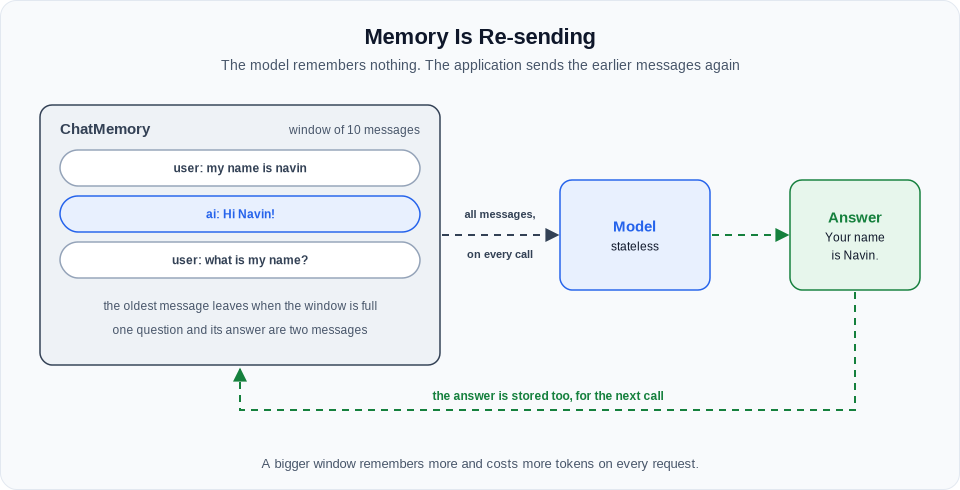
This is how every chat product works. The application keeps the conversation, and with every new question it sends the earlier messages again. The model reads the whole conversation each time and answers the last message. It looks like memory. It is re-reading.
You could do this by hand with a list: add each question, add each answer, send the list every time. LangChain4j has a component that does exactly that, called ChatMemory.
Step 3: Add chat memory
One line in the builder:
Assistant assistant = AiServices.builder(Assistant.class)
        .chatModel(model)
        .chatMemory(MessageWindowChatMemory.withMaxMessages(10))
        .build();
The complete program:
package com.telusko;

import java.util.Scanner;

import dev.langchain4j.memory.chat.MessageWindowChatMemory;
import dev.langchain4j.model.chat.ChatModel;
import dev.langchain4j.model.ollama.OllamaChatModel;
import dev.langchain4j.service.AiServices;

public class App {

    interface Assistant {
        String chat(String userMessage);
    }

    public static void main(String[] args) {
        // === OPTION A: OpenAI Cloud (gpt-6-sol) ===
        // ChatModel model = OpenAiChatModel.builder()
        //         .apiKey(System.getenv("OPENAI_API_KEY"))
        //         .modelName("gpt-6-sol")
        //         .build();

        // === OPTION B: Local Ollama (Uncomment for gemma4:e4b or gemma4:12b) ===
        ChatModel model = OllamaChatModel.builder()
                .baseUrl("http://localhost:11434")
                .modelName("gemma4:e4b") // or "gemma4:12b"
                .build();

        Assistant assistant = AiServices.builder(Assistant.class)
                .chatModel(model)
                .chatMemory(MessageWindowChatMemory.withMaxMessages(10))
                .build();

        Scanner scanner = new Scanner(System.in);
        System.out.println("Chat started! Type 'exit' to stop.");

        while (true) {
            System.out.print("\nYou: ");
            String userInput = scanner.nextLine();
            if ("exit".equalsIgnoreCase(userInput)) break;

            // Look how clean the loop is now: no manual List management!
            String reply = assistant.chat(userInput);
            System.out.println("AI: " + reply);
        }
    }
}
The loop did not change. There is no list in our code and no code that adds to one. The AI Service takes care of it.
Step 4: Run it again
Type exit to stop the old program and start the new one. The lecture uses OpenAI for this run:
Chat started! Type 'exit' to stop.

You: who are you? my name is navin
AI: Hi Navin! I?m ChatGPT, an AI assistant. What can I help you with?

You: what is my name?
AI: Your name is Navin.
Then the same with Gemma, to show that this is not an OpenAI feature. The lecturer types "my name is navin", the model greets him, and to "what is my name?" it now answers with Navin.
The lecturer makes a point of running both. In the first half of the lesson the failure was shown with Gemma and the success with OpenAI, which could look like a trick. It is not. Memory lives in your application, so it works the same with every model.
What happens on each call
| Moment | What the AI Service does |
|---|---|
You call assistant.chat("who are you? my name is navin") | Stores your message in memory, then sends everything in memory to the model |
| The model answers | Stores the AI message in memory and returns its text to you |
You call assistant.chat("what is my name?") | Stores this message too, then sends all three messages to the model |
| The model answers | It can see the first message in what it received, so it knows the name |
The model is exactly as forgetful as before. The request is what changed.
Why the limit of 10?
withMaxMessages(10) keeps the 10 most recent messages. Why not 100, or a million?
Because every message in memory is sent again with every request, and you pay for it every time. The first question costs a few tokens. The fiftieth question costs those few tokens plus the forty-nine questions and answers before it. Imagine someone chatting for hours and reaching 5000 messages. Each new question would drag the whole history behind it.
There are three costs, and they grow together:
| Cost | Why it grows |
|---|---|
| Money | Input tokens are billed on every request |
| Speed | More text to read means slower answers |
| The context window | Every model has a maximum amount of text it can take in at once. A conversation that grows without a limit eventually does not fit |
So the memory is a sliding window. When a new message arrives and the window is full, the oldest message is dropped.
Two details that are easy to get wrong:
- The limit counts messages, not exchanges. A question and its answer are two messages. A window of 10 holds about five back-and-forth turns.
- A message that leaves the window is gone for the model. If you told it your name in the first message and that message has been dropped, it can no longer look it up. That is a trade-off you choose by setting the number.
The lecture leaves you with an experiment: keep chatting beyond the window and see whether the model can still recall the name from the start.
Additions beyond the lecture
The lecture uses the simplest form of memory. These points from the official documentation are worth knowing before you build something real.
Messages have different lengths. A window counted in messages does not control cost precisely, because one message can be a word and another a full page. LangChain4j also has TokenWindowChatMemory, which limits the window by tokens. The documentation describes MessageWindowChatMemory as mostly useful for fast prototyping.
The system message is protected. If your AI Service has a @SystemMessage, it is kept in memory and is never pushed out of the window by newer messages.
This memory lives in RAM. Stop the program and the conversation is gone. To keep it across restarts, LangChain4j lets you plug in a ChatMemoryStore that saves messages in a database or a file.
One memory means one conversation. The code above creates a single memory object, and every call uses it. That is right for one person at a keyboard. In a web application with many users, they would all share one conversation and see traces of each other's messages. For that case there is a memory per user or per conversation:
interface Assistant {
    String chat(@MemoryId int memoryId, @UserMessage String message);
}

Assistant assistant = AiServices.builder(Assistant.class)
        .chatModel(model)
        .chatMemoryProvider(memoryId -> MessageWindowChatMemory.withMaxMessages(10))
        .build();
Each different memoryId gets its own window.
Memory is not history. The documentation separates the two. History is everything that was said, complete and unchanged, which is what a user sees when scrolling back. Memory is what is shown to the model so that it can behave as if it remembers. LangChain4j provides memory. If you need the full history, you store it yourself.
Mistakes made in the lecture
1. A typo in the class name. After adding the memory line the program does not compile. The cause turns out to be an extra letter typed by mistake in the line that builds the assistant. One wrong character in a class name gives an error that looks much bigger than the mistake. Read the first error line and look at the exact position it names.
2. Fighting the editor's suggestions. While rewriting the file, autocomplete keeps proposing MathTutor from the previous lesson. The lecturer's comment is that typing would have been faster. Suggestions are based on what is in the file. Delete the old code first.
3. Forgetting to stop the running program. A chat loop keeps running until you type exit. If you start a new run while the old one is waiting for input, you may be typing into the wrong program.
Try It Yourself
- Run the loop without memory. Tell the model your name and then ask for it.
- Add the
chatMemoryline and repeat the same two messages. - Set the window to
withMaxMessages(4). Tell the model your name and your city, then ask about other things for several turns, and then ask for your name. Find the turn at which it is lost. - Add a
@SystemMessagesuch as "Answer in one short sentence" and check that it still applies after many turns. - Create two assistants with two separate memory objects. Tell the first one your name and ask the second one for it.
- Create one memory object in a variable, pass it to the builder, and after a few turns print
memory.messages()to see what is stored. - Stop the program and start it again. Ask for your name. Explain the result.
Official references
- LangChain4j: chat memory
- LangChain4j: AI Services, chat memory section
- LangChain4j: chat memory stores
- Source code for this lesson
Written By: Shramik Masti
How is this guide?
Last updated on
Chain of Thought
Ask a model for the steps that lead to an answer and not only the answer, by returning nested Java records from an AI Service, and see why the order of the fields matters.
Tools and AI Agents
Give a model the ability to act by exposing Java methods as tools with @Tool, follow the full tool calling loop, see why the description matters, and fix the OpenAI error that appears when tools meet a reasoning model.