
ChatModel
Add LangChain4j to the project and replace the OpenAI SDK code with the ChatModel interface, so the same two lines of Java work with OpenAI, Ollama and any other provider.
In the first part of this course we talked to models with the OpenAI Java SDK, and it worked. We got plain answers, role-based answers and JSON.
It also left us with a list of things that were harder than they should be. That list is the reason LangChain4j exists, so let us write it down before we fix it.
Source code: the finished project for this lesson is in the folder LC4JCode_Le_Langchain4j_ChatModel of the course repository.
Four problems with the code so far
| # | Problem | Where you saw it |
|---|---|---|
| 1 | Vendor lock-in in the code. Every line uses OpenAIClient and OpenAI's own classes. Moving to another provider means rewriting code, not changing a setting | Every lesson in part 1 |
| 2 | A fake API key. A local model needs no key, yet we had to pass the word "ollama" to satisfy the client | Using Ollama from Java |
| 3 | Plumbing to read one string. Five lines of flatMap to get the answer text out of the response | The same lesson |
| 4 | Structured output by hand. A schema as nested maps, twenty lines of builders, and at the end still a JSON string that has to be converted into an object | Structured Output with JSON Schema |
Developers like configuration changes and dislike code changes. An abstraction layer turns the first kind of problem into the second. This page solves problems 1 to 3. The next two pages solve problem 4.
Step 1: Add the dependencies
We keep the same project and the same App.java. Only the code inside changes.
Open pom.xml. So far it contains the OpenAI SDK. Add three LangChain4j dependencies below it:
<dependency>
    <groupId>com.openai</groupId>
    <artifactId>openai-java</artifactId>
    <version>4.91.0</version>
</dependency>

<!-- 1. LangChain4j Core (AiServices, ChatMemory, @Tool) -->
<dependency>
    <groupId>dev.langchain4j</groupId>
    <artifactId>langchain4j</artifactId>
    <version>1.22.0</version>
</dependency>

<!-- 2. OpenAI Model Adapter (gpt-6-sol / gpt-6-astra) -->
<dependency>
    <groupId>dev.langchain4j</groupId>
    <artifactId>langchain4j-open-ai</artifactId>
    <version>1.22.0</version>
</dependency>

<!-- 3. Native Ollama Adapter (gemma4:e4b / gemma4:12b) -->
<dependency>
    <groupId>dev.langchain4j</groupId>
    <artifactId>langchain4j-ollama</artifactId>
    <version>1.22.0</version>
</dependency>| Dependency | What it gives you | Needed when |
|---|---|---|
langchain4j | The main module: AI Services, chat memory, tools and more | Always |
langchain4j-open-ai | The classes that connect LangChain4j to OpenAI | You use OpenAI models |
langchain4j-ollama | The classes that connect LangChain4j to Ollama | You use local models. It is optional otherwise |
This is how LangChain4j is organised in general. One main module holds the shared ideas, and one small module per provider knows how to talk to that provider. You add only the providers you use.
The old openai-java dependency is no longer used by the code on this page. The lecture leaves it in the file for reference. You can remove it.
Check for the current version
1.22.0 is the version used in the course, and all code on these pages was compiled against it. Newer versions are released regularly. Keep the three LangChain4j dependencies on the same version.
Step 2: Create a ChatModel
Replace the whole content of App.java:
package com.telusko;

import dev.langchain4j.model.chat.ChatModel;
import dev.langchain4j.model.openai.OpenAiChatModel;

public class App {

    public static void main(String[] args) {
        // === OPTION A: OpenAI Cloud (gpt-6-sol) ===
        ChatModel model = OpenAiChatModel.builder()
                .apiKey(System.getenv("OPENAI_API_KEY"))
                .modelName("gpt-6-sol")
                .build();

        // === OPTION B: Local Ollama (Uncomment for gemma4:e4b or gemma4:12b) ===
        // ChatModel model = OllamaChatModel.builder()
        //         .baseUrl("http://localhost:11434")
        //         .modelName("gemma4:e4b") // or "gemma4:12b"
        //         .build();

        String response = model.chat("Write a poem about the beauty of nature.");
        System.out.println(response);
    }
}
Compare it with what we had:
| Before, with the OpenAI SDK | Now, with LangChain4j |
|---|---|
OpenAIClient client = OpenAIOkHttpClient.fromEnv() | ChatModel model = OpenAiChatModel.builder()...build() |
ResponseCreateParams.builder().input(...).model(...).build() | Not needed for a simple question |
client.responses().create(params) | model.chat("...") |
Five lines of flatMap to find the text | The return value is the text |
Two details:
- The API key still comes from the environment, now read explicitly with
System.getenv("OPENAI_API_KEY"). The.envfile andlaunch.jsonfrom the first project keep doing their job. model.chat(...)takes aStringand returns aString. No indexes, noOptional, no stream.
The lecturer asks, half joking, why we started with the SDK at all when this is so simple. The answer is the one from the introduction: now you know what model.chat does for you. And if you move to another framework one day, what you learned with the SDK moves with you.
Step 3: Run it
SLF4J(W): No SLF4J providers were found.
SLF4J(W): Defaulting to no-operation (NOP) logger implementation
SLF4J(W): See https://www.slf4j.org/codes.html#noProviders for further details.
After these three lines the poem appears, a few short verses about a fox, clouds at dusk and crickets in spring. Yours will be a different poem.
The SLF4J lines are not an error
LangChain4j writes its log messages through SLF4J, a common logging interface for Java. Our small project contains no logging library, so SLF4J reports that it has nowhere to send messages and carries on. Your program is not affected. The warning disappears when you add a logging implementation, for example the slf4j-simple artifact, to pom.xml.
Step 4: Switch to Ollama
Comment out option A, uncomment option B and add one import:
package com.telusko;

import dev.langchain4j.model.chat.ChatModel;
import dev.langchain4j.model.ollama.OllamaChatModel;

public class App {

    public static void main(String[] args) {
        // === OPTION A: OpenAI Cloud (gpt-6-sol) ===
        // ChatModel model = OpenAiChatModel.builder()
        //         .apiKey(System.getenv("OPENAI_API_KEY"))
        //         .modelName("gpt-6-sol")
        //         .build();

        // === OPTION B: Local Ollama (Uncomment for gemma4:e4b or gemma4:12b) ===
        ChatModel model = OllamaChatModel.builder()
                .baseUrl("http://localhost:11434")
                .modelName("gemma4:e4b") // or "gemma4:12b"
                .build();

        String response = model.chat("Write a poem about the beauty of nature.");
        System.out.println(response);
    }
}
Look at what is different from the SDK version of the Ollama code:
| OpenAI SDK pointed at Ollama | LangChain4j's Ollama module | |
|---|---|---|
| Class | OpenAIClient, a name that no longer fits | OllamaChatModel |
| Base URL | http://localhost:11434/v1 | http://localhost:11434 |
| API key | The fake value "ollama" | None |
There is no /v1 and no key, because this module does not go through the OpenAI imitation. It speaks Ollama's own API directly. Problem 2 from the list is gone.
And the two lines that do the work have not changed at all:
String response = model.chat("Write a poem about the beauty of nature.");
System.out.println(response);
In the lecture this run takes long. The model has to be loaded first, the smaller model seems stuck, the lecturer changes to gemma4:12b, and a poem is a long answer for a local model to write. His own conclusion at the end: a simple question would have been the better test.
Checked for these docs
The Ollama version of this program was run for these docs with gemma4:e4b and the prompt "Say this is a test". It printed This is a test. in a few seconds once the model was loaded.
Why this works: ChatModel is an interface
Look at the type of the variable. In both versions it is ChatModel. Only the right-hand side changes.
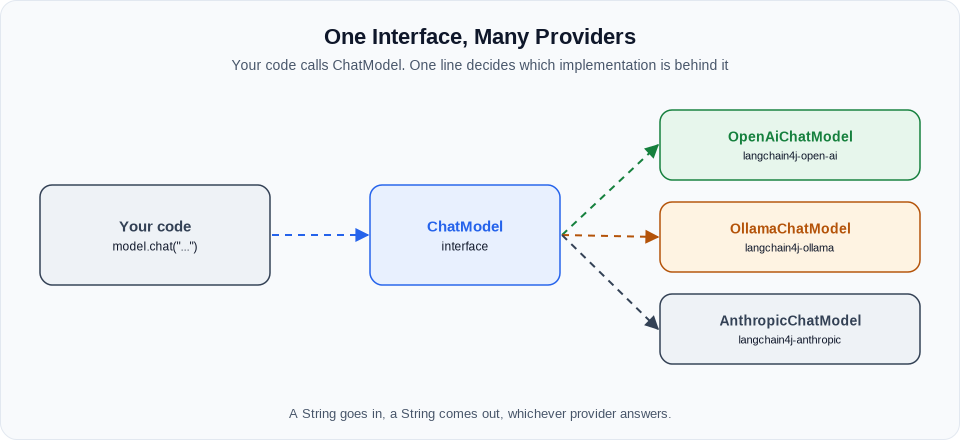
ChatModel is an interface in LangChain4j's core. Each provider module contains a class that implements it:
| Implementation | Module |
|---|---|
OpenAiChatModel | langchain4j-open-ai |
OllamaChatModel | langchain4j-ollama |
AnthropicChatModel | langchain4j-anthropic |
| ...and one for every other supported provider |
This is ordinary Java, the same idea as coding against List and not against ArrayList. Everything in your application that needs a model asks for a ChatModel. Exactly one place decides which implementation is created.
In a plain main method, that one place is a builder call. In a framework such as Spring Boot, it is configuration: the framework creates the ChatModel from properties and injects it wherever it is needed. Changing the provider then means changing a dependency and a few properties. That is problem 1 solved.
OpenAiChatModel uses the Chat Completions API
In part 1 we called OpenAI's Responses API. OpenAiChatModel talks to the older Chat Completions API. For plain questions you will not notice any difference. It matters once tools are involved, and it causes a real error in Tools and AI Agents, where LangChain4j's OpenAiResponsesChatModel is the fix.
Words that appear in the dependency comment
The comment on the first dependency lists three things: AiServices, ChatMemory and @Tool. They are the next lessons. The lecture previews one of them here, because it explains a limit of what we just built.
Ask a model "Who is Navin Reddy?" and it answers. Ask next "Where does he stay?" and it has no idea who "he" is.
Models are stateless, in the same way HTTP is. Every request is new to them. If you want a conversation, your application has to keep the earlier questions and answers and send them again with each new question. Doing that with a list of your own works, and it has a cost: the history grows, and every request pays for all of it in tokens. This is also why coding assistants ask you to clear the context from time to time.
LangChain4j has a ready-made component for this, covered in Chat Memory.
What ChatModel does not solve
model.chat takes a string and returns a string. That is its strength and its limit:
- Where does a system message go?
- How do we get a Java object back, and not text?
- Where would memory or tools be attached?
ChatModel has more detailed methods for these, at the low level of the library. The comfortable answer is one level up, and it is the subject of the next page: AI Services.
Mistakes and fixes
| Problem | Cause | Fix |
|---|---|---|
OllamaChatModel cannot be resolved | The import is missing, or langchain4j-ollama is not in pom.xml | Add import dev.langchain4j.model.ollama.OllamaChatModel; and check the dependency |
The editor imports a ChatModel from com.openai.models | The OpenAI SDK has a class with the same name, and it is still on the classpath | Use dev.langchain4j.model.chat.ChatModel. Removing the openai-java dependency avoids the confusion |
AuthenticationException with "You didn't provide an API key" | OPENAI_API_KEY is not set, so System.getenv returns null. The model object is still created, and the error appears on the first chat call | Run through launch.json, or set the variable in your terminal |
ModelNotFoundException with "model ... not found" | The name in .modelName(...) is not a model you have pulled | Copy the exact name from ollama list |
java.net.ConnectException | Ollama is not running, or the base URL is wrong | Start Ollama and check the address |
| The Ollama run takes very long | The model is being loaded, or the prompt asks for a long answer | Load the model first with ollama run, and test with a short question |
Three SLF4J(W) lines before the output | No logging library in the project | Ignore them, or add a logging implementation |
Try It Yourself
- Add the three dependencies and run option A with a short question.
- Switch to option B. Change only the lines that create the model and confirm that
model.chatneeds no change. - Move the question into a method
static String ask(ChatModel model, String question)and call it once with an OpenAI model and once with an Ollama model. - Open the
ChatModelinterface in your IDE and look at the otherchatmethods it declares. - Ask "Who is the author of Java?" and then, in a second
model.chatcall, "When was he born?". Read the second answer and explain it. - Add
.temperature(0.0)to the Ollama builder, run the same question three times, then try a higher value and compare. - Add
slf4j-simpletopom.xmland watch the SLF4J warning go away.
Official references
- LangChain4j: get started
- LangChain4j: chat and language models
- LangChain4j: OpenAI integration
- LangChain4j: Ollama integration
- LangChain4j: supported language models
- Source code for this lesson
Written By: Shramik Masti
How is this guide?
Last updated on
Structured Output with JSON Schema
Understand why applications need JSON from a model and not free text, describe the expected shape with a JSON Schema, and request structured output through the Responses API with the OpenAI Java SDK.
AI Services
Define a plain Java interface, add a system message with an annotation, and let LangChain4j's AiServices create the implementation that talks to the model for you.