
Tools and AI Agents
Give a model the ability to act by exposing Java methods as tools with @Tool, follow the full tool calling loop, see why the description matters, and fix the OpenAI error that appears when tools meet a reasoning model.
The model is the brain. On the previous page we gave it a memory. It can now listen, think, answer and remember.
It still cannot do anything. And doing things is what everybody means today when they say "AI agent".
Source code: this lesson has two folders in the course repository, LC4JCode_Le_Tools_and_AI_Agents_1 and LC4JCode_Le_Tools_and_AI_Agents_2. The first is the agent before it has tools, the second is the finished program.
From answering to acting
Take a small example from the lecture. You want to start making videos and need a basic setup: a microphone, a ring light, maybe a tripod. You have a budget.
A chat model can suggest products for that budget. That is advice, and you still do all the work: open the shop, search, compare, add to cart, check out, pay.
An agent would do those steps. You say what you want and how much you can spend, and it searches the shop, fills the cart and places the order. Letting software spend your money is risky, and the lecture says so. The point of the example is the difference between text and action.
A brain alone cannot act. It needs hands. For a model, the hands are called tools.
And a tool is nothing mysterious:
A tool is a method.
In Java, as in any language, you put behaviour into methods. A tool is a method that the model is allowed to ask for.
Why the model needs your code
A second example shows why this is necessary and not just convenient. A shop has a chat window, and a customer types: "Where is my order?"
The model cannot know. The order is a row in the shop's database, on the shop's servers. The model was trained long before that order existed. If it answers anyway, it invents something, perhaps "Your order has been delivered", and now you have a customer looking for a parcel that is still in a warehouse.
So the facts have to come from the shop's own system. Here is how they get to the model.
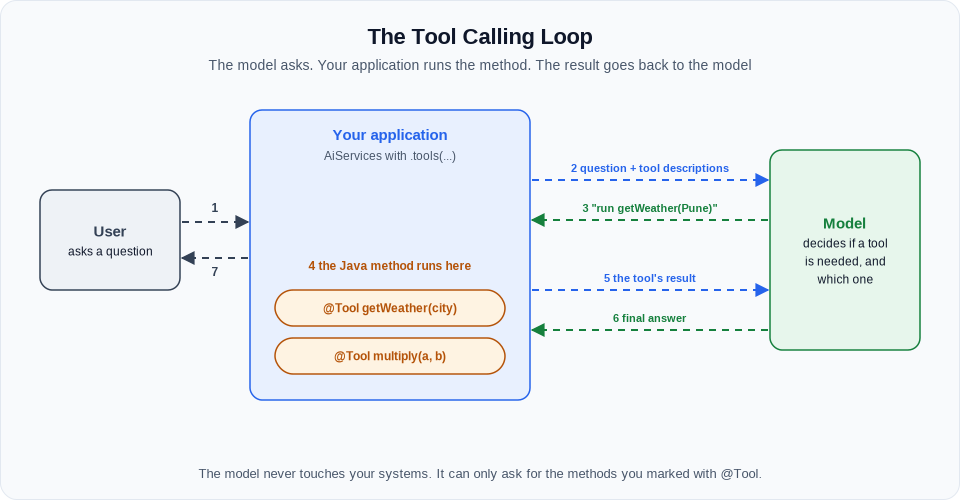
| Step | From | To | What is sent |
|---|---|---|---|
| 1 | User | Application | "Where is my order?" |
| 2 | Application | Model | The question, plus a list of the tools the application offers |
| 3 | Model | Application | Not an answer. A request: "run the order-status tool for this user" |
| 4 | Application | Its own code | The real method runs. A real query goes to the real database |
| 5 | Application | Model | The result of the method |
| 6 | Model | Application | A proper sentence for the customer |
| 7 | Application | User | "Great news, your order will be delivered today." |
Three things in this table are easy to get wrong:
- The model never touches your database. It only asks. Your application decides whether to run the method, and runs it with its own code and its own permissions.
- The result goes back to the model, not to the user. The raw result is something like a status code and an order number. The user wants a sentence. The raw data may also contain fields that the user should not see at all.
- There can be several rounds. The model may first ask whether this is a valid user, get the answer, and only then ask for the order status. The loop continues until the model has what it needs.
Step 1: An agent without tools
Start with what we have. The interface is renamed to Agent, and its system message mentions tools:
interface Agent {
    @SystemMessage("You are a helpful AI agent. Use your available tools whenever needed.")
    String chat(String userMessage);
}
Agent is only a name here. An interface does not become an agent by being called one. It becomes one when it has tools.
The question combines two things:
Agent agent = AiServices.builder(Agent.class)
        .chatModel(model)
        .chatMemory(MessageWindowChatMemory.withMaxMessages(10))
        .build();

String answer = agent.chat("What is the weather in Pune right now, and what is 4582 * 9123?");
System.out.println("\nAI Agent Final Answer: " + answer);
Imagine the question coming from a user and not from a string in the code. Run it with OpenAI:
AI Agent Final Answer: I can?t check Pune?s weather in real time from here.

**4582 ? 9123 = 41,801,586.**
Half an answer. The model can multiply, so it does. The weather is live information that it does not have, and it says so honestly. A weaker model might have guessed a temperature.
Weather is the "Hello World" of agents, the first example in almost every tutorial. Do not read too much into the topic. The same lesson applies to an order database, a payment system or any external API.
Step 2: Write the methods
Tools are methods, and methods live in a class:
// 1. Give the AI "Hands" by annotating normal Java methods with @Tool
static class SmartTools {

    // @Tool("Gets the current weather temperature for a given city")
    String getWeather(String city) {
        System.out.println(">>> [JAVA TOOL EXECUTED] Fetching live weather for: " + city);
        return "The weather in " + city + " is 28°C and sunny.";
    }

    // @Tool("Calculates the exact product of two large numbers")
    long multiply(long a, long b) {
        System.out.println(">>> [JAVA TOOL EXECUTED] Multiplying " + a + " * " + b);
        return a * b;
    }
}| Method | What it does |
|---|---|
getWeather | Returns the weather for a city. A real version would call a weather API. Here the value is fixed, so that we can concentrate on the mechanism |
multiply | Multiplies two numbers. The model can do this itself. We include it to see whether the model uses a tool when one is offered |
Each method prints a line when it runs. That line is our proof. If >>> [JAVA TOOL EXECUTED] appears in the output, our Java code really ran.
For now both annotations are commented out, on purpose. These are plain methods.
Step 3: Pass the class to the agent
Agent agent = AiServices.builder(Agent.class)
        .chatModel(model)
        .chatMemory(MessageWindowChatMemory.withMaxMessages(10))
        .tools(new SmartTools())
        .build();
Run it:
Exception in thread "main" dev.langchain4j.service.IllegalConfigurationException: Object 'com.telusko.App$SmartTools' does not have any methods annotated with @Tool
	at dev.langchain4j.service.IllegalConfigurationException.illegalConfiguration(IllegalConfigurationException.java:18)
	at dev.langchain4j.service.tool.ToolService.findTools(ToolService.java:281)
	at dev.langchain4j.service.tool.ToolService.tools(ToolService.java:168)
	at dev.langchain4j.service.AiServices.tools(AiServices.java:518)
	at dev.langchain4j.service.AiServices.tools(AiServices.java:505)
	at com.telusko.App.main(App.java:52)
The message says it all. We handed over an object as a collection of tools, and it contains none. A method is not a tool until it is marked as one. This is a safety feature. The model can only ever ask for the methods you have explicitly offered.
Step 4: Turn one method into a tool
Uncomment the annotation on getWeather only, and add the import:
import dev.langchain4j.agent.tool.Tool;@Tool("Gets the current weather temperature for a given city")
String getWeather(String city) {
System.out.println(">>> [JAVA TOOL EXECUTED] Fetching live weather for: " + city);
return "The weather in " + city + " is 28°C and sunny.";
}The lecture runs this with the local Gemma model first. The reason becomes clear in Step 6.
>>> [JAVA TOOL EXECUTED] Fetching live weather for: Pune
AI Agent Final Answer: The weather in Pune right now is 28°C and sunny.
As for the multiplication, 4582 * 9123 is **42,000,386**.There is a lot to learn from these four lines.
The method ran. The first line is printed by our own println. The model asked for the tool, and LangChain4j called the Java method.
The model chose the argument. Nobody passed "Pune" to getWeather in our code. The model read the question, found the city and supplied it.
The result went through the model. Our method returns "The weather in Pune is 28°C and sunny." The final answer says "The weather in Pune right now is 28°C and sunny." Two words were added. That small difference is the proof that the tool's result was sent back to the model, and that the model wrote the final sentence. Steps 5 and 6 of the table above really happen.
The multiplication is wrong. Check it: 4582 × 9123 is 41,801,586. The local model answered 42,000,386. Nothing announced the mistake. It looks exactly as confident as a correct number.
A language model is not a calculator
A model produces the digits that look most likely. For large numbers that is often close and not exact. In Step 1 the larger hosted model got this product right. Here the small local model got it wrong. The same check was run for these docs with gemma4:e4b and gave 41,804,686, a different wrong number. This is the real reason the multiply tool exists: when a result must be exact, it should come from code and not from a guess.
Step 5: How does the model find the tool?
The model picked getWeather for a question about weather. How did it know? The lecture finds out by breaking things, one at a time.
Experiment 1: a useless description.
@Tool("this does nothing")
String getWeather(String city) {The tool is still called. The method name says "get weather", and that is enough.
Experiment 2: a useless description and a useless name.
@Tool("this does nothing")
String something(String abc) {AI Agent Final Answer: I cannot provide real-time weather updates, as I do not have access to live data. To find out the current weather in Pune, please check a reliable weather website or app.Now the tool is ignored, and there is no >>> [JAVA TOOL EXECUTED] line. The method body has not changed. It still contains the word "weather" and still returns the weather. That did not help.
The conclusion:
| What the model receives for each tool | What it does not receive |
|---|---|
| The name | The body of the method |
| The description | Any other code |
| The parameters |
The body is never sent, and that is how it should be. You want to expose what a tool does, not how it does it. But it means that the name and the description are the model's only way to understand a tool. Write them for the model as carefully as you would write documentation for a colleague.
According to the official documentation, the tool's name is the method name unless you set another one in the annotation, and the text in @Tool("...") is the description.
Restore the original name and description before you continue.
Step 6: The error with OpenAI
Now switch back to the OpenAI block and run the same program:
Caused by: dev.langchain4j.exception.HttpException: {
"error": {
"message": "Function tools with reasoning_effort are not supported for gpt-6-sol in /v1/chat/completions. To use function tools, use /v1/responses or set reasoning_effort to 'none'.",
"type": "invalid_request_error",
"param": "reasoning_effort",
"code": null
}
}This is why the lecture tested with Gemma first. Read the message slowly, because it explains itself:
OpenAiChatModelsends requests to/v1/chat/completions. That is the older Chat Completions API, mentioned at the end of the ChatModel page.gpt-6-solis a reasoning model.- For this model, OpenAI does not allow tools together with reasoning on that older API.
The message also names both ways out:
| Fix | How |
|---|---|
| Use the Responses API | Replace OpenAiChatModel with OpenAiResponsesChatModel |
| Switch reasoning off | Keep OpenAiChatModel and add .reasoningEffort("none") to its builder |
In the lecture, a coding assistant is asked for the fix and chooses the first one:
import dev.langchain4j.model.openai.OpenAiResponsesChatModel;ChatModel model = OpenAiResponsesChatModel.builder()
.apiKey(System.getenv("OPENAI_API_KEY"))
.modelName("gpt-6-sol")
.build();The variable is still a ChatModel. Only the implementation changed, which is the interface from the ChatModel page paying off again. Nothing else in the program is touched.
OpenAiResponsesChatModel is marked experimental
The LangChain4j documentation describes its Responses API support as experimental and says it may change in future releases. It works for this lesson, and it is the fix the course uses. For a production project, read the current state in the OpenAI integration guide. Both fixes in the table were compiled against LangChain4j 1.22.0 for these docs.
Run again. The weather tool is executed and the answer is complete. But only one >>> [JAVA TOOL EXECUTED] line appears. The multiplication is still done by the model itself, because multiply is still not a tool.
Step 7: Enable the second tool
Uncomment the second annotation. The complete program:
package com.telusko;
import dev.langchain4j.agent.tool.Tool;
import dev.langchain4j.memory.chat.MessageWindowChatMemory;
import dev.langchain4j.model.chat.ChatModel;
import dev.langchain4j.model.openai.OpenAiResponsesChatModel;
import dev.langchain4j.service.AiServices;
import dev.langchain4j.service.SystemMessage;
public class App {
// 1. Give the AI "Hands" by annotating normal Java methods with @Tool
static class SmartTools {
@Tool("Gets the current weather temperature for a given city")
String getWeather(String city) {
    System.out.println(">>> [JAVA TOOL EXECUTED] Fetching live weather for: " + city);
    return "The weather in " + city + " is 28°C and sunny.";
}
@Tool("Calculates the exact product of two large numbers")
long multiply(long a, long b) {
System.out.println(">>> [JAVA TOOL EXECUTED] Multiplying " + a + " * " + b);
return a * b;
}
}
interface Agent {
@SystemMessage("You are a helpful AI agent. Use your available tools whenever needed.")
String chat(String userMessage);
}
public static void main(String[] args) {
// === OPTION A: OpenAI Cloud (gpt-6-sol) ===
ChatModel model = OpenAiResponsesChatModel.builder()
        .apiKey(System.getenv("OPENAI_API_KEY"))
        .modelName("gpt-6-sol")
        .build();
// === OPTION B: Local Ollama (Uncomment for gemma4:e4b or gemma4:12b) ===
// ChatModel model = OllamaChatModel.builder()
// .baseUrl("http://localhost:11434")
// .modelName("gemma4:e4b") // or "gemma4:12b"
// .build();
Agent agent = AiServices.builder(Agent.class)
.chatModel(model)
.chatMemory(MessageWindowChatMemory.withMaxMessages(10))
.tools(new SmartTools())
.build();
String answer = agent.chat("What is the weather in Pune right now, and what is 4582 * 9123?");
System.out.println("\nAI Agent Final Answer: " + answer);
}
}>>> [JAVA TOOL EXECUTED] Fetching live weather for: Pune
>>> [JAVA TOOL EXECUTED] Multiplying 4582 * 9123
AI Agent Final Answer: It?s currently **28°C and sunny** in Pune. **4582 ? 9123 = 41,801,586.**Two tools, two lines of proof, one answer. The model split a single question into two tasks, chose the right tool for each, supplied the arguments and combined both results into one reply.
The product is exact now, and it is exact for a good reason: Java calculated it.
Checked for these docs
The complete program was run for these docs with the Ollama option and gemma4:e4b. Both tool lines were printed and the answer contained 41,801,586. The earlier steps were reproduced as well: the IllegalConfigurationException without annotations, one tool call with one annotation, and no tool call with the meaningless name and description.
What LangChain4j did for you
Compare the loop from the top of the page with the code you wrote. You wrote two methods and one .tools(...) line. LangChain4j did the rest:
| Part of the loop | Who does it |
|---|---|
Describe each @Tool method to the model: name, description, parameters | LangChain4j, on every request |
| Decide whether a tool is needed, which one, and with which arguments | The model |
| Find the Java method and call it with those arguments | LangChain4j |
| Send the return value back to the model | LangChain4j |
| Repeat if the model asks for another tool | LangChain4j |
| Write the final answer | The model |
One call to agent.chat(...) can therefore mean several requests to the model. That is worth remembering when you look at your token usage.
Additions beyond the lecture
Parameter names can be invisible to the model. This one is easy to miss. The tool description that LangChain4j built for this exact project was printed for these docs, and the parameters were named like this:
getWeather  ->  arg0
multiply    ->  arg0, arg1
Not city, a and b. By default the Java compiler does not keep parameter names in the compiled class, so LangChain4j can only see generic names. The official documentation describes this. The example still works, because the description says "for a given city". With several parameters of the same type, a model could mix them up.
There are two fixes, and both were tested for these docs. Tell Maven to keep the names:
<properties>
    <maven.compiler.release>25</maven.compiler.release>
    <maven.compiler.parameters>true</maven.compiler.parameters>
    <project.build.sourceEncoding>UTF-8</project.build.sourceEncoding>
</properties>
Or describe a parameter with @P, which is good practice in any case:
import dev.langchain4j.agent.tool.P;

@Tool("Gets the current weather temperature for a given city")
String getWeather(@P("Name of the city, for example Pune") String city) {
Frameworks such as Spring Boot and Quarkus keep parameter names by default, so this mainly concerns plain projects like ours.
Not every model supports tools. The documentation states this clearly, and small local models in particular vary. In the Ollama model library, look for the "tools" tag before you build on a model.
A tool is real code with real effects. getWeather only reads. A tool that cancels an order, sends an email or pays for something acts in the real world, and the model decides when to call it and with which arguments. Treat those arguments like any input from outside: validate them, check permissions inside the tool, and for actions that cannot be undone, ask the user to confirm first.
What an agent is. After this page you can give a short and honest definition. An agent is a model, plus tools it can call, plus a loop that keeps going until the task is done. Memory is often added. Everything else that is called "agentic" is built from these parts.
Mistakes made in the lecture
1. Passing a tools object with no tools in it. IllegalConfigurationException: ... does not have any methods annotated with @Tool. At least one method needs the annotation. This one is done on purpose, to show that methods are not tools by default.
2. Running with OpenAI and getting the reasoning error. OpenAiChatModel together with tools and a reasoning model fails on the Chat Completions API. Use OpenAiResponsesChatModel or set the reasoning effort to none.
3. Forgetting to restore the experiment. After the something(String abc) experiment, the name, the parameter and the description all have to be changed back. Miss one and the tool is silently ignored. There is no error, only an answer without a tool call.
4. Looking only at the final answer. The run in Step 4 looks fine until you check the product. Our println lines are a simple way to see which tools ran. Keep something like that in every tool while you develop.
Try It Yourself
- Run the agent without any tools and read what it says about the weather.
- Pass
new SmartTools()with both annotations commented out and read the exception. - Enable only
getWeather. Check which tool lines are printed, and check the product with a calculator. - Repeat the two experiments from Step 5. At which point does the model stop finding the tool?
- Enable both tools and confirm that the product is now exact.
- Ask only "What is 12 * 3?". Does the model call
multiplyfor an easy calculation? Then change the system message to "Always use the multiply tool for any multiplication" and try again. - Add a third tool,
String getCurrentDate(), that returnsjava.time.LocalDate.now().toString(). Ask "What is today's date and what is the weather in Mumbai?". - Ask "Compare the weather in Pune and Delhi". Count how many times
getWeatherruns. - Add
maven.compiler.parameterstopom.xmlor@Pto the parameters, as described above.
Official references
- LangChain4j: tools (function calling)
- LangChain4j: AI Services, tools section
- LangChain4j: OpenAI integration and the Responses API
- OpenAI: function calling
- Source code for part 1 of this lesson
- Source code for part 2 of this lesson
Written By: Shramik Masti
How is this guide?
Last updated on
Chat Memory
Prove that a model forgets everything between two requests, then give an AI Service a memory with MessageWindowChatMemory and understand what is stored, what is sent and why the window has a limit.
Why RAG and What Are Embeddings
Understand why a model needs your documents to answer questions about your business, why keyword search cannot find them, and how embeddings turn the meaning of a sentence into numbers that can be compared.