
Structured Output with Records
Return a Java record from an AI Service method and let LangChain4j ask the model for JSON and convert it into the record, replacing the manual JSON Schema code from the OpenAI SDK lesson.
Remember what structured output with the OpenAI SDK looked like. A schema written as nested maps. About twenty lines of builders. And at the end, a JSON string that still had to be turned into a Java object.
It was problem number 4 on the list at the start of the ChatModel page. With AI Services in place, it takes one record and one changed return type.
Source code: the finished project for this lesson is in the folder LC4JCode_Le_Langchain4j_Structured_Output of the course repository.
The goal
The same task as before, with a new sentence:
Navin and Kiran going for science fair on 12th Nov
From it we want the name of the event, the date and the participants. This time not as JSON text, but as a Java object we can call methods on.
Step 1: Describe the data as a record
record Event(String name, String date, List<String> participants) {}Compare this one line with the schema from the SDK lesson:
| JSON Schema, written by hand | Java record |
|---|---|
"name" of type string | String name |
"date" of type string | String date |
"participants", an array of string | List<String> participants |
It is the same description. The difference is that this one is ordinary Java. The compiler checks it, the IDE completes it, and there is only one place where the shape of the data is defined.
Step 2: Return the record from the interface
An assistant that chats is the wrong picture for this job. The service extracts events, so the interface gets a name that says so:
interface EventExtractor {
    @SystemMessage("Extract the event information")
    Event extractEvent(String text);
}
Three things changed compared with the Assistant from the previous page:
| Part | Before | Now |
|---|---|---|
| Interface name | Assistant | EventExtractor |
| Method name | chat | extractEvent |
| Return type | String | Event |
The return type is the whole trick. On the previous page we saw that an AI Service converts the model's answer to whatever type the method returns. Declare a record, and you get a record.
The names are free. The parameter can be called text, userMessage or anything else. Choose names that describe what the method does in your application.
Step 3: Build and call it
package com.telusko;

import java.util.List;

import dev.langchain4j.model.chat.ChatModel;
import dev.langchain4j.model.openai.OpenAiChatModel;
import dev.langchain4j.service.AiServices;
import dev.langchain4j.service.SystemMessage;

public class App {

    record Event(String name, String date, List<String> participants) {}

    interface EventExtractor {
        @SystemMessage("Extract the event information")
        Event extractEvent(String text);
    }

    public static void main(String[] args) {
        // === OPTION A: OpenAI Cloud (gpt-6-sol) ===
        ChatModel model = OpenAiChatModel.builder()
                .apiKey(System.getenv("OPENAI_API_KEY"))
                .modelName("gpt-6-sol")
                .build();

        // === OPTION B: Local Ollama (Uncomment for gemma4:e4b or gemma4:12b) ===
        // ChatModel model = OllamaChatModel.builder()
        //         .baseUrl("http://localhost:11434")
        //         .modelName("gemma4:e4b") // or "gemma4:12b"
        //         .build();

        EventExtractor eventExtractor = AiServices.builder(EventExtractor.class)
                .chatModel(model)
                .build();

        Event event = eventExtractor.extractEvent("Navin and Kiran going for science fair on 12th Nov");
        System.out.println("Event Name: " + event.name());
        System.out.println("Event Date: " + event.date());
        System.out.println("Event Participants: " + event.participants());
    }
}
The builder is the same as before, with EventExtractor.class in place of Assistant.class.
Printing the record directly, with System.out.println(event), also works and shows all fields at once. The lecture prints each field separately to make a point: event is a real object. You call event.name() on it, and event.participants() is a real List<String> that you can loop over.
Step 4: Run it
Event Name: Science fair
Event Date: 12th Nov
Event Participants: [Navin, Kiran]
No schema map, no builders for messages and formats, no JSON parsing. The whole of the earlier lesson is now a record and a return type.
Checked for these docs
The same program was run for these docs with a local gemma4:e4b model through OllamaChatModel. It printed Science Fair, 12th Nov and [Navin, Kiran]. Only the capital letter in "Fair" was different.
What happens behind the scenes
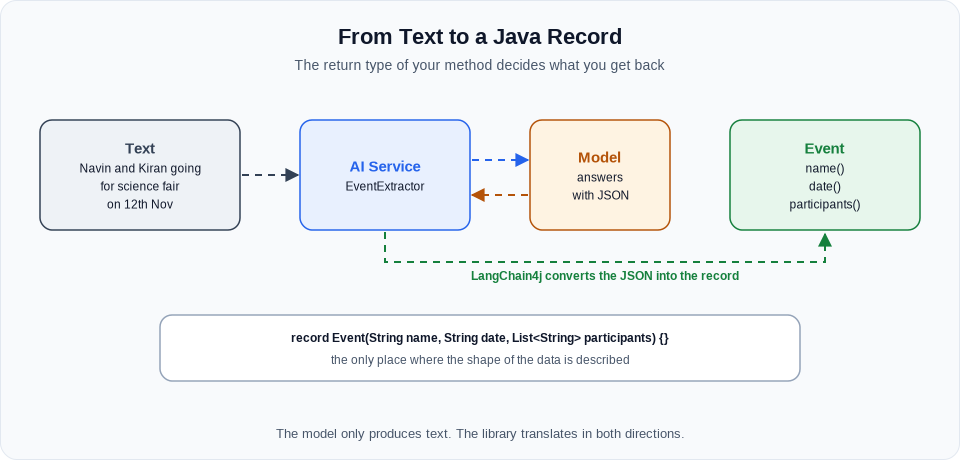
| Step | Who | What |
|---|---|---|
| 1 | AI Service | Sees that the method returns Event and works out which fields the record has |
| 2 | AI Service | Sends the system message and your text to the model, together with a request to answer as JSON with exactly those fields |
| 3 | Model | Answers with JSON |
| 4 | AI Service | Converts the JSON into an Event object. LangChain4j uses the Jackson library for this |
| 5 | Your code | Receives the record |
The model still only produces text. It has no idea what a Java record is. LangChain4j translates in both directions: from your record to a description the model understands, and from the model's JSON back to your record.
Two ways LangChain4j can ask for JSON
Step 2 can happen in two ways, and it is worth knowing which one this code uses. The official documentation describes both:
| Method | How it works | Reliability |
|---|---|---|
| Prompting | LangChain4j adds instructions to the end of your message that describe the JSON it wants. The model is asked, in words, to follow them | This is the default. The documentation calls it quite unreliable, because the model can still answer in another format |
| JSON Schema | LangChain4j generates a real JSON Schema from the record and sends it through the provider's structured output feature, like we did by hand with the SDK | Much stronger. It has to be switched on |
The code in this lesson does not switch anything on, so it uses prompting. With a simple record like this one that works, as the output shows.
Switching on the JSON Schema method
The stronger method is enabled on the model. When you do that, also mark the fields that must be present as required:
import static dev.langchain4j.model.chat.Capability.RESPONSE_FORMAT_JSON_SCHEMA;

import com.fasterxml.jackson.annotation.JsonProperty;record Event(
@JsonProperty(required = true) String name,
@JsonProperty(required = true) String date,
@JsonProperty(required = true) List<String> participants) {}ChatModel model = OpenAiChatModel.builder()
.apiKey(System.getenv("OPENAI_API_KEY"))
.modelName("gpt-6-sol")
.supportedCapabilities(RESPONSE_FORMAT_JSON_SCHEMA)
.strictJsonSchema(true)
.build();For Ollama, the same .supportedCapabilities(RESPONSE_FORMAT_JSON_SCHEMA) line goes on the OllamaChatModel builder. The interface and the rest of the program stay as they are.
Why the required annotations matter. With the JSON Schema method, LangChain4j treats every field as optional unless you say otherwise. The documentation gives the reason: a model that is forced to fill a field it has no information for tends to invent a value. The other side of that choice is that a model is allowed to leave an optional field out, even when the information is in the text.
This was tested for these docs with a local gemma4:e4b model and the sentence from this lesson, three runs each:
| Setup | Result |
|---|---|
| Prompting, the default used in the lecture | name, date and participants filled correctly in all three runs |
| JSON Schema enabled, fields left optional | participants filled, but name=null and date=null in all three runs |
JSON Schema enabled, fields marked required | All three fields filled correctly in all three runs |
So enabling the schema without marking fields as required made the result worse with this small model, and enabling it with required fields gave a complete record every time. Other models can behave differently. Test with the model you will use.
This part goes beyond the lecture
The lecture does not enable the JSON Schema capability, and its example works without it. The capability, strictJsonSchema and @JsonProperty(required = true) are from the official structured outputs guide. The code was compiled against LangChain4j 1.22.0 and run for these docs.
Helping the model fill the record
A record tells the model the names and types of the fields, nothing more. If a name is not clear enough, add a description to the field:
import dev.langchain4j.model.output.structured.Description;record Event(
@Description("name of the event") String name,
@Description("date of the event as written in the text") String date,
@Description("first names of the people taking part") List<String> participants) {}A correct shape is not a correct answer
Give the extractor a sentence that contains no event at all, such as "The weather is nice today". It still returns an Event, because that is the return type. In the test runs for these docs, the result was either empty, with null fields and an empty list, or contained made-up values such as a participant called "People in general".
Structured output guarantees the shape of the data. It does not guarantee that the content is true or even present. A field the model leaves out arrives as null, or as 0 or false for primitive types. Check the values before you use them.
The pattern to remember
Every AI Service that returns data follows the same three steps:
- Write a record for what you want back.
- Write an interface with a method that returns that record.
- Give the interface to
AiServices.builder(...)together with a model.
The next page uses exactly this pattern for something more interesting than extraction.
Mistakes and fixes
| Problem | Cause | Fix |
|---|---|---|
The method still returns a String with JSON in it | The return type of the interface method was not changed | Return the record type, here Event |
A field of the record is null | The text did not contain that information, or the model did not find it | Check for null. Improve the system message or add @Description |
| An exception while the answer is converted | The model answered with something that is not the expected JSON. This can happen with the prompting method and a small model | Enable the JSON Schema capability, or use a stronger model |
List cannot be resolved | The import is missing | Add import java.util.List; |
Try It Yourself
- Write the
Eventrecord and theEventExtractorinterface and run the example. - Replace the three print statements with
System.out.println(event)and look at the result. - Add a field
String locationto the record. Run it with a sentence that names a place, then with one that does not. What is the value in the second case? - Change
String datetojava.time.LocalDate dateand use a sentence with a complete date. Does the conversion work? - Write a new record
Person(String name, int age, String city)and an interfacePersonExtractor. Extract a person from a sentence of your own. - Enable
RESPONSE_FORMAT_JSON_SCHEMAon the model and run the example again. - Give the extractor a text that contains no event at all, for example "The weather is nice today". Read what comes back and decide how your code should handle it.
Official references
- LangChain4j: structured outputs
- LangChain4j: AI Services
- LangChain4j: OpenAI integration
- Source code for this lesson
Written By: Shramik Masti
How is this guide?
Last updated on
AI Services
Define a plain Java interface, add a system message with an annotation, and let LangChain4j's AiServices create the implementation that talks to the model for you.
Chain of Thought
Ask a model for the steps that lead to an answer and not only the answer, by returning nested Java records from an AI Service, and see why the order of the fields matters.