
AI Services
Define a plain Java interface, add a system message with an annotation, and let LangChain4j's AiServices create the implementation that talks to the model for you.
ChatModel made the code short: a string goes in, a string comes out. That simplicity is also where it stops helping.
| What we want | Why model.chat(String) is not enough |
|---|---|
| A system message, kept apart from the user's text | There is only one string. You would have to glue the role and the question together |
| A Java object as the result | The method returns a String |
| Chat memory | You would manage the list of messages yourself |
| Tools | You would handle every tool request by hand |
ChatModel can do all of this through its lower-level methods, and you would be writing the same code as with the SDK again. Then why use a library?
LangChain4j's answer is a higher level called AI Services. And it starts with something very ordinary: an interface.
Source code: the finished project for this lesson is in the folder LC4JCode_Le_Langchain4j_AiServices of the course repository.
Step 1: Write an interface
interface Assistant {
    @SystemMessage("Talk like a 5 years old.")
    String chat(String userMessage);
}
That is all of it. Our own name, Assistant. One method, with a name we chose. The method takes the user's message and returns the model's answer.
The annotation above the method is the system message. On the instructions page it was a builder call, .instructions(...). Here it is a line of metadata on the method. The role and the question are separate again, without any extra code.
Step 2: Who implements it?
Every Java developer knows what comes after an interface: a class that implements it. Somebody has to write the code that takes the string, builds a request with a system message and a user message, calls the model and returns the text.
You do not write that class.
If you have used Spring Data JPA, you have seen this idea before. With plain JDBC you write the code for every query. With Spring Data JPA you declare a repository interface, and the framework creates an object that implements it at run time. You never see the class. You just use the object.
LangChain4j does the same for AI. You declare what you want as an interface. The library creates an object that implements it. The official documentation makes this exact comparison, to Spring Data JPA and to Retrofit.
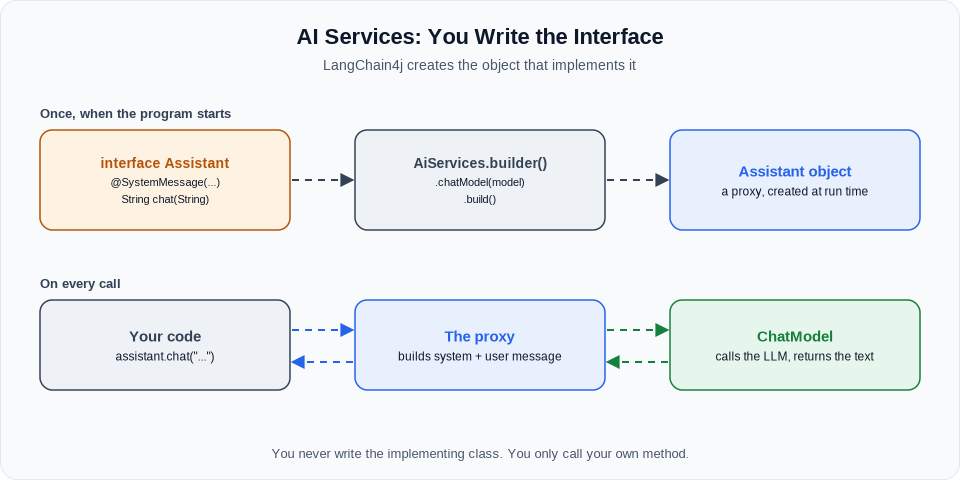
Step 3: Build the service
The class that creates the object is AiServices:
Assistant assistant = AiServices.builder(Assistant.class)
        .chatModel(model)
.build();| Call | Meaning |
|---|---|
AiServices.builder(Assistant.class) | "Create an implementation of this interface" |
.chatModel(model) | The model it should use. This is the ChatModel from the previous page |
.build() | Returns the finished object |
The builder is also where memory, tools and document retrieval are attached later. Everything in the remaining lessons is one more line in this builder.
Step 4: Use it
The complete program:
package com.telusko;

import dev.langchain4j.model.chat.ChatModel;
import dev.langchain4j.model.openai.OpenAiChatModel;
import dev.langchain4j.service.AiServices;
import dev.langchain4j.service.SystemMessage;

public class App {

    interface Assistant {
        @SystemMessage("Talk like a 5 years old.")
        String chat(String userMessage);
    }

    public static void main(String[] args) {
        // === OPTION A: OpenAI Cloud (gpt-6-sol) ===
        ChatModel model = OpenAiChatModel.builder()
                .apiKey(System.getenv("OPENAI_API_KEY"))
                .modelName("gpt-6-sol")
                .build();

        // === OPTION B: Local Ollama (Uncomment for gemma4:e4b or gemma4:12b) ===
        // ChatModel model = OllamaChatModel.builder()
        //         .baseUrl("http://localhost:11434")
        //         .modelName("gemma4:e4b") // or "gemma4:12b"
        //         .build();

        Assistant assistant = AiServices.builder(Assistant.class)
                .chatModel(model)
                .build();

        String response = assistant.chat("meaning of life in single word");
        System.out.println(response);
    }
}
The interface is declared inside App to keep everything in one file. In a real project it would be a file of its own.
Notice the last two lines of main. We no longer call the model. We call our own method, assistant.chat(...). If the method in the interface were named question, this line would say assistant.question(...). Your code now reads like your application and not like an API client.
Run it:
Love.The lecture runs it a second time to see whether the answer changes. It prints Love. again, and the lecturer wonders aloud whether it is hard-coded. It is not. For a short, common question like this one, the most likely answer is simply very stable.
Step 5: Change the system message
To see that the annotation is really being used, change only its text:
interface Assistant {
    @SystemMessage("Talk like a doctor")
    String chat(String userMessage);
}Purpose.Same question, same model, same Java code in main. One annotation changed, and the answer changed with it.
Checked for these docs
The doctor version was run for these docs with a local gemma4:e4b model. It also stayed in character, with a thoughtful and measured tone, and chose the word "Connection". The small model was much more talkative than the hosted one and wrapped its one word in several sentences.
What happens when you call the method
The object you get from AiServices is a proxy: an object created at run time that implements your interface. When you call assistant.chat("..."), the proxy does the work you would otherwise write yourself:
| Step | What the proxy does |
|---|---|
| 1 | Reads the @SystemMessage annotation and creates a system message from its text |
| 2 | Turns the method argument into a user message |
| 3 | Sends both to the ChatModel |
| 4 | Receives the AI message |
| 5 | Converts it to the return type of your method, here a String, and returns it |
Step 5 is the one to remember. The proxy looks at the return type of your method and converts the model's answer to it. A String is the simplest case. On the next page the return type becomes a record, and the same mechanism gives you a Java object.
Additions beyond the lecture
A shorter way to create a simple service. When an AI Service needs nothing except a model, the official documentation uses a one-line form:
Assistant assistant = AiServices.create(Assistant.class, model);It is equivalent to the builder with only .chatModel(model). The course uses the builder from the start because every later lesson adds more to it.
Where the annotation can go. @SystemMessage can be placed on a method, as here, or on the interface itself. On the interface it applies to all methods. If both are present, the one on the method wins.
There are two things called SystemMessage. This one trips up many people, because the editor offers both in its import suggestions:
| Import | What it is | Use it for |
|---|---|---|
dev.langchain4j.service.SystemMessage | An annotation | AI Service interfaces. This is the one you need here |
dev.langchain4j.data.message.SystemMessage | A class that represents a message | Low-level code that builds messages by hand |
With the wrong import, @SystemMessage(...) does not compile, because a normal class cannot be used as an annotation.
In a framework you do not call AiServices yourself. With the Spring Boot or Quarkus integration, the interface is turned into a bean for you, and you inject the Assistant where you need it. The interface stays exactly the same.
Mistakes made in the lecture
1. Importing from the wrong package. While typing, the editor's suggestion picks a class with the right name from the wrong module, and the lecturer corrects it. With LangChain4j this happens often, because the OpenAI SDK, if it is still in pom.xml, and LangChain4j itself contain classes with the same names. The imports that this program needs are the four at the top of the complete file above.
2. Expecting a different answer on every run. A model does not have to change its answer. Identical input often gives an identical, or nearly identical, output.
Try It Yourself
- Write the
Assistantinterface and build it withAiServices. Run it with the system message of your choice. - Rename the method from
chattoaskand fix the call. Confirm that nothing else has to change. - Remove the
@SystemMessageannotation and compare the answer. - Move the annotation from the method to the interface and confirm that it still works.
- Add a second method to the interface with a different system message, for example a translator, and call both.
- Replace the builder with
AiServices.create(Assistant.class, model)and run again. - Import the wrong
SystemMessageon purpose, read the compiler error, and fix it. - Switch the model to Ollama. Which lines did you have to touch?
Official references
- LangChain4j: AI Services
- LangChain4j: chat and language models
- LangChain4j: Spring Boot integration
- Source code for this lesson
Written By: Shramik Masti
How is this guide?
Last updated on
ChatModel
Add LangChain4j to the project and replace the OpenAI SDK code with the ChatModel interface, so the same two lines of Java work with OpenAI, Ollama and any other provider.
Structured Output with Records
Return a Java record from an AI Service method and let LangChain4j ask the model for JSON and convert it into the record, replacing the manual JSON Schema code from the OpenAI SDK lesson.