
Using Ollama from Java
Extract only the answer text from a Responses API result, then point the same OpenAI SDK code at a local Ollama model by changing the base URL, the API key and the model name.
The first project ended with a working request and an ugly result. response.output() printed everything the server sent back: ids, types, status fields, an encrypted block of reasoning, and somewhere in the middle, one sentence of actual answer.
This page does two things. First it gets that one sentence out. Then it sends the same request to the local model in Ollama, and you will see how little has to change.
Source code: the finished project for this lesson is in the folder LC4JCode_Le_with_Ollama of the course repository.
Two names you will hear from now on
The lecture introduces two terms while looking at the output:
| Term | Meaning |
|---|---|
| User message | What you send to the model. Here it is the text in .input(...) |
| AI message, also called assistant message | What the model sends back. In the raw output it is the item with role=assistant |
A third kind, the system message, arrives on the next page.
Step 1: Pick one item from the list
response.output() is a list. The simplest idea is to take one element and ask it for its message:
System.out.println(response.output().get(0).message());Optional.emptyNothing. Try the next index:
System.out.println(response.output().get(1).message());Optional[ResponseOutputMessage{id=msg_05659b1cccc82f02006ade016afee487d1aa23ac3f79e7783c, content=[Content{outputText=ResponseOutputText{annotations=[], text=Telusko is a programming education platform and YouTube channel founded by **Navin Reddy**. It offers tutorials on Java, Python, web development, and other software-development topics., type=output_text, logprobs=[], additionalProperties={}}}], role=assistant, status=completed, type=message, phase=final_answer, additionalProperties={}}]Now the message is there, without the reasoning block.
Why was index 0 empty? You saw the reason at the end of the previous page. With a reasoning model the list has two items:
| Index | Item | .message() returns |
|---|---|---|
| 0 | The reasoning item | Optional.empty, because this item is not a message |
| 1 | The message item | The message |
Every item in the list can be one of several kinds. That is why .message() returns an Optional: it holds a value only if the item really is a message.
Do not depend on the index
Index 1 is correct for this model and this request. A model that does not reason returns the message at index 0. A request that uses tools returns more items. Code with a fixed index breaks as soon as the model or the request changes. The lecturer says the same: it works here, and there is a better way.
Step 2: Walk through the list with a stream
The better way is the one the OpenAI documentation itself uses. It does not care how many items there are or in which position the message is:
response.output().stream()
        .flatMap(item -> item.message().stream())
        .flatMap(message -> message.content().stream())
        .flatMap(content -> content.outputText().stream())
        .forEach(outputText -> System.out.println(outputText.text()));
Each line goes one level deeper into the structure you saw in the raw output:
| Step | From | To |
|---|---|---|
response.output().stream() | The response | Every output item |
item.message().stream() | An item | Its message, if it is one. An empty Optional becomes an empty stream, so reasoning items simply disappear |
message.content().stream() | A message | Its content parts |
content.outputText().stream() | A content part | Its text part, if it is text |
outputText.text() | A text part | The plain string |
flatMap together with Optional.stream() is what makes this safe. Anything that is not a message, or not text, is skipped without an if statement.
Change the question at the same time, so that the model also tells us what it is:
ResponseCreateParams params = ResponseCreateParams.builder()
    .input("in 1 line explain llm, which model are you?")
    .model("gpt-6-sol")
    .build();
An LLM is an AI trained to understand and generate text; I?m ChatGPT, but I don?t have a more specific model name available here.One clean line. The model explains an LLM, and it says it is ChatGPT without knowing its exact model name. A model does not reliably know its own name or version. It only knows what its training and its instructions tell it.
Why the question marks in I?m and don?t
The model answered with a typographic apostrophe. The Windows terminal in the lecture is not using UTF-8, so it prints a ? for that character. Nothing is wrong with the answer or with your code. You will see the same in other outputs in this course, for example for the degree sign.
Step 3: Point the client at Ollama
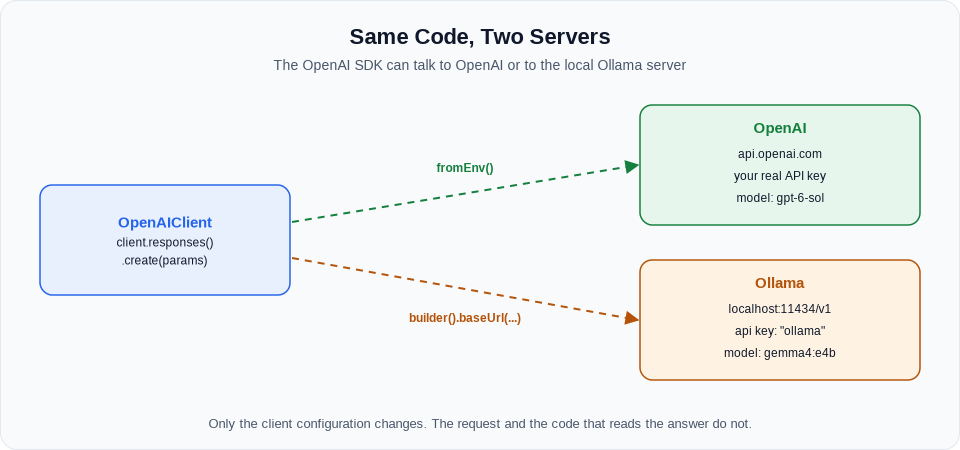
Now replace the hosted model with the local one. Three things change, and all three are configuration.
First check the exact name of your local model:
ollama listThen change the client and the model name:
package com.telusko;

import com.openai.client.OpenAIClient;
import com.openai.client.okhttp.OpenAIOkHttpClient;
import com.openai.models.ChatModel;
import com.openai.models.responses.Response;
import com.openai.models.responses.ResponseCreateParams;

public class App {

    public static void main(String[] args) {
        // OpenAIClient client = OpenAIOkHttpClient.fromEnv();

        OpenAIClient client = OpenAIOkHttpClient.builder()
                .baseUrl("http://localhost:11434/v1")
                .apiKey("ollama")
                .build();

        ResponseCreateParams params = ResponseCreateParams.builder()
            .input("in 1 line explain llm, which model are you?")
            .model("gemma4:e4b")
            .build();

        Response response = client.responses().create(params);

        // System.out.println(response.output().get(1).message());
        response.output().stream()
                .flatMap(item -> item.message().stream())
                .flatMap(message -> message.content().stream())
                .flatMap(content -> content.outputText().stream())
                .forEach(outputText -> System.out.println(outputText.text()));
    }
}| Setting | OpenAI | Ollama |
|---|---|---|
| How the client is created | fromEnv() | builder() with explicit values |
| Base URL | The default, OpenAI's servers | http://localhost:11434/v1 |
| API key | Your real key, from the environment | The text "ollama" |
| Model | gpt-6-sol | gemma4:e4b, the name from ollama list |
Everything after the client, the request, the call and the stream that reads the answer, is unchanged.
Why this works
Ollama has its own API, and next to it an API that imitates OpenAI's. That second one lives under /v1 on the local server. The OpenAI SDK sends the same HTTP request it always sends. It just sends it to another address, and Ollama understands it.
Why there is an API key at all
A local server does not need a key. The SDK does. You saw on the previous page that the client refuses to be created without a credential. So we give it one.
Ollama's documentation describes the value as required but ignored. "ollama" is the convention. Any other text works just as well.
Step 4: Run it
LLMs are sophisticated AI models trained on massive datasets to understand, generate, and predict human language; I am Gemma 4.The answer now comes from your own machine. If you watch the GPU while it runs, you see the load go up for a few seconds.
Two things you will notice:
- The first request is slow. Ollama has to load the model into memory before it can answer. The lecture waits for this several times. Later requests are quicker while the model stays loaded.
- No money is spent. The OpenAI dashboard does not move.
Checked for these docs
This exact program was run for these docs against a local Ollama server with gemma4:e4b. It answered in one line and named itself as Gemma 4, as in the lecture. The wording was different, which is normal.
Which one should you use for the rest of the course?
The lecturer mostly stays with OpenAI from here on. The reason is practical: he is recording video on the same machine, and a local model competes with the recording for the GPU.
You do not have that problem. Use whichever you prefer. Every lesson that follows shows both.
| OpenAI | Ollama | |
|---|---|---|
| Cost | Per token | Free |
| Speed | Fast | Depends on your hardware |
| Quality of answers | High | Lower for small models |
| Data | Sent to OpenAI | Stays on your machine |
| Needs | Internet and credit | A capable machine |
Mistakes and fixes
| Problem | Cause | Fix |
|---|---|---|
Optional.empty is printed | The item at that index is not a message. With a reasoning model, index 0 is the reasoning item | Use the stream from Step 2 |
| A connection error when using Ollama | Ollama is not running | Start Ollama and check with ollama list |
| An error that the model was not found | The name in .model(...) does not match a local model | Copy the name from ollama list, including the part after the colon |
| The request seems to hang | The model is being loaded | Wait. In the lecture, simply running again after the model is loaded helps |
A compile error that client is already defined | Both client lines are active | Keep one and comment out the other |
| The request goes to OpenAI and not to Ollama | The fromEnv() line is the active one | Comment it out and use the builder() version |
What is still not good
The stream in Step 2 works, and it is five lines of plumbing for one string. We also have a fake API key in our code and a class called OpenAIClient that talks to a model that has nothing to do with OpenAI.
None of that is wrong. It is the price of using one provider's SDK for everything. Remember these three points. They are the first items on the list of problems that LangChain4j solves in ChatModel.
Try It Yourself
- Print
response.output().get(0).message()andget(1).message()with your hosted model. Which index holds the message? - Replace the print with the stream and confirm that you get one clean line.
- Print
response.output().size()for two different models and compare. - Switch the client to Ollama and run the same question. Time the first run and the second run.
- Change the API key from
"ollama"to any other word and confirm that the request still works. - Write a wrong model name on purpose and read the error.
- Stop Ollama, run the program and read the error. Start it again afterwards.
Official references
- Ollama: OpenAI compatibility
- OpenAI Java SDK on GitHub
- OpenAI: Responses API reference
- Source code for this lesson
Written By: Shramik Masti
How is this guide?
Last updated on
First Java Project with the OpenAI SDK
Create a Maven project in VS Code, add the OpenAI Java SDK, load the API key from a .env file through launch.json, and send your first request to a model with the Responses API.
Instructions and Reasoning Effort
Give a model a role with a system message through instructions, understand system, user and AI messages, and control how long a reasoning model thinks with the reasoning effort setting.