
OpenAI API Key and Models
Find the OpenAI API platform, add credit, create an API key, understand tokens and model tiers, and locate the official Java SDK dependency you will use in the first project.
To call a model from Java you need a model to call. There are two ways to get one:
| Option | Where the model runs | What it costs |
|---|---|---|
| Hosted model | On the provider's servers: OpenAI, Anthropic, Google and others | You pay for what you use |
| Local model | On your own machine, with a tool like Ollama | No usage fee. You need hardware that can run it |
This page sets up the hosted option with OpenAI. The next page sets up the local one. If you plan to use only local models, read this page anyway. Tokens and model tiers apply to every provider.
Why OpenAI in this course
The lecturer says he personally uses other providers more. OpenAI is chosen here for a practical reason: Ollama offers an OpenAI-compatible API. Code written with the OpenAI SDK can therefore be pointed at a local model with a very small change, which you will do in Using Ollama from Java.
Step 1: Find the API platform, not ChatGPT
Search for "OpenAI" and you will most likely land on ChatGPT. ChatGPT is a finished application. You can ask it questions, but your Java code cannot use it.
What you need is the API platform. Search for "OpenAI API" and open the API platform, or go to platform.openai.com directly. Sign in or create an account.
Step 2: Add credit
The API is billed separately from a ChatGPT subscription. A paid ChatGPT plan does not include API usage.
Open billing and add a small amount of credit. You can create a key without credit, but requests made with it are refused.
How much do you need? The course gives this estimate:
| Situation | Estimated cost |
|---|---|
| Only following the lessons | One or two dollars |
| Following the lessons and experimenting on your own | Around five dollars |
Start with the smallest amount and add more only if you run out. Text requests like the ones in this course are cheap. Image and audio features are where the cost rises quickly.
The home page of the platform shows your credit balance, the month's spend and the number of requests, so you can watch the effect of every lesson.
Step 3: Understand what you pay for: tokens
You are not billed per request. You are billed per token.
A token is a piece of text. Many common words are one token. Words the model does not know as a whole are split into several pieces.
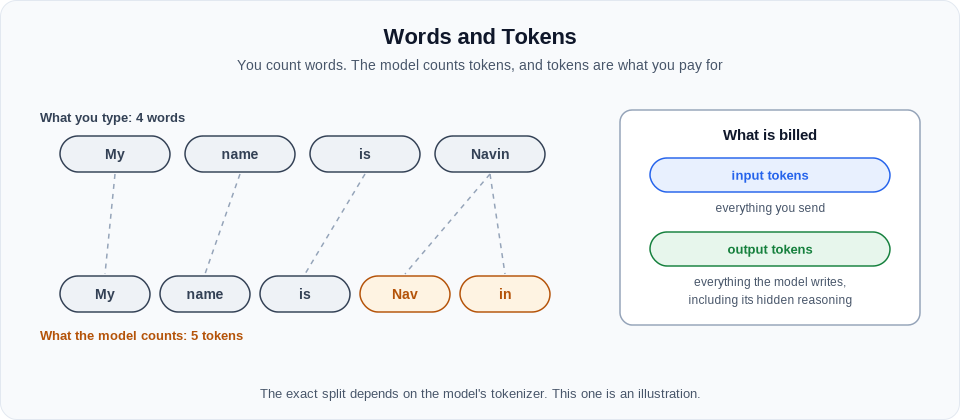
The lecture uses the sentence "My name is Navin". For you it has four words. A model may know "My", "name" and "is" as whole tokens, and split the less common name into two, such as "Nav" and "in". That makes five tokens for four words.
This split is an illustration
The exact pieces depend on the model's tokenizer, so a real model may split this sentence differently. The idea is what matters: the number of tokens is usually a bit higher than the number of words, and unusual words cost more than common ones.
Tokens are counted in two directions, and both are charged:
| Kind | What it contains |
|---|---|
| Input tokens | Everything you send: your question, the instructions, any documents and any earlier messages |
| Output tokens | Everything the model generates |
One detail is easy to miss. With reasoning models, the model "thinks" before it answers, and that thinking is generated text too. Those reasoning tokens are billed as output tokens even though you never see them. You will control this in Instructions and Reasoning Effort.
Step 4: Choose a model tier
Every provider offers several models at different prices. At the time the course was recorded, the OpenAI platform recommended these three:
| Model | How OpenAI described it | When to use it |
|---|---|---|
| GPT-6 Astra | Most capable model, built for the hardest end-to-end work | Planning and problems that are really complex |
| GPT-6.1 Sol | High-performance model for complex tasks where time and cost matter | Everyday work. This is the tier the course uses |
| GPT-6 Luna | Most efficient model for focused, high-volume tasks | Simple tasks where you want the lowest cost |
In the code, the course uses the model id gpt-6-sol.
The same three-level idea exists everywhere, with different names:
| Level | Idea |
|---|---|
| Top | The strongest model. Slowest and most expensive. For planning and hard problems |
| Middle | Good at almost everything. The sensible default |
| Small | Fast and cheap. For simple, repeated tasks |
Model names go out of date
The names above are a snapshot of one day. By the time you read this, there may be newer models, and older ones may be retired. Open the models page of the platform, pick the current mid-level model and use its id wherever these pages say gpt-6-sol. Everything else in the code stays the same.
Step 5: Create an API key
In the left menu of the platform, open API Keys.
- Click the button that creates a new key.
- Give it a name that tells you what it is for, for example
langchain4j-course. - Confirm with Create secret key.
- Copy the key from the pop-up and save it somewhere safe.
The key is shown only once. If you close the pop-up without copying it, you cannot see it again. That is not a disaster: delete that key and create a new one. Creating keys is free. Only the tokens you use cost money.
It is a good habit to create one key per project, as the lecturer does. If a key leaks, you delete that one key and nothing else stops working.
Treat the key like a password
Anyone who has your key can spend your credit. Do not paste it into source code, do not commit it to Git, and do not show it in screenshots or screen recordings. If a key has been visible to anyone else, delete it in the dashboard and create a new one.
Step 6: Find the Java SDK
OpenAI publishes official SDKs for several languages: JavaScript, Python, .NET, Java, Go and Ruby, plus a command line tool. Open the libraries page of the OpenAI developer docs and select Java.
Two things on that page matter for the next lessons.
The Maven dependency:
<dependency>
  <groupId>com.openai</groupId>
  <artifactId>openai-java</artifactId>
  <version>4.91.0</version>
</dependency>
There is a Gradle version of the same dependency if your project uses Gradle. 4.91.0 is the version shown in the course. Newer versions are published often.
A first code sample, which uses the Responses API:
OpenAIClient client = OpenAIOkHttpClient.fromEnv();

ResponseCreateParams params = ResponseCreateParams.builder()
        .input("Say this is a test")
        .model("gpt-6-astra")
        .build();

Response response = client.responses().create(params);
Do not copy it yet. We build the project around it on the page after next. For now, notice two things:
fromEnv()means the client reads the API key from an environment variable namedOPENAI_API_KEY. The key is never written in the code.- The request goes to the Responses API. This is OpenAI's current API for generating text. The older one is called Chat Completions. It still works and many libraries still use it. That difference will come back and cause a real error in Tools and AI Agents.
OpenAI also has its own agent SDK
OpenAI offers an Agents SDK, so you can build agents without LangChain4j. The trade-off is the one from the introduction: code written with a provider's own agent SDK works with that provider only.
Checklist before you continue
- You are signed in to the OpenAI API platform.
- Your account has some credit.
- You have created an API key and saved it in a safe place.
- You know which model id you are going to use.
Try It Yourself
- Sign in to the API platform and find your credit balance on the home page.
- Open the models page. Write down the id of the current mid-level model and the price of its input and output tokens.
- Create a key named after this course. Then create a second key, delete it, and confirm that it disappears from the list.
- Open the Java section of the libraries page and compare the dependency version shown there with
4.91.0. - Type a sentence with an unusual word, such as your own name, into OpenAI's tokenizer tool and see how it is split.
Official references
- OpenAI: developer quickstart
- OpenAI: models
- OpenAI: pricing
- OpenAI: libraries
- OpenAI Java SDK on GitHub
Written By: Shramik Masti
How is this guide?
Last updated on
Introduction to LangChain4j
What LangChain4j is, where it sits between a Java application and an LLM, what it offers, and why this course starts with plain Java before using the library.
Running Local Models with Ollama
Install Ollama, choose a model that fits your hardware, download it with ollama pull, chat with it in the terminal with ollama run, and understand the local server your Java code will call.