
Separating CI and CD into Independent Jenkins Pipelines
Split the all-in-one pipeline into a CI pipeline that builds and pushes a tagged image and a CD pipeline that deploys a given tag, with CI triggering CD automatically.
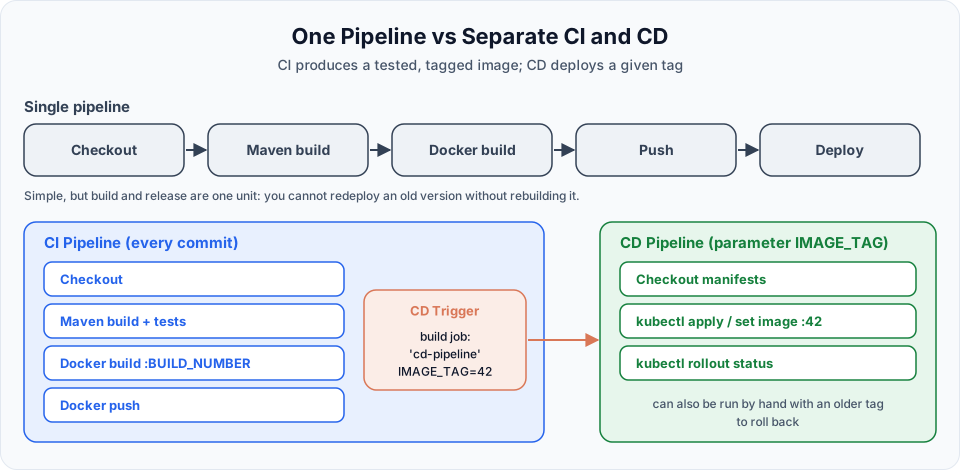
Everything we built so far lives in one pipeline: clone, build, image, push, deploy. For a small project that is perfectly fine. As projects and teams grow, one big pipeline starts to hurt:
- You cannot redeploy last week's version without rebuilding it from old code.
- A change to the deployment steps means editing the same job that builds the code.
- Audits get harder: "who deployed what, and when?" is mixed in with hundreds of build logs.
- Often different people own building (developers) and releasing (platform or operations team).
The usual answer is to split the work. CI (continuous integration) takes code and produces a tested, versioned artifact, here a Docker image. CD (continuous delivery or deployment) takes a version of that artifact and puts it into an environment. The two are separate Jenkins jobs, and CI starts CD automatically when it succeeds.
What the lecture builds
The video creates two Pipeline jobs:
| Job | Description in the video | Stages |
|---|---|---|
CI Pipeline | "CI pipeline from git to docker image" | git clone, maven build, Build Docker Image, CD Trigger |
CD Pipeline | "deploying into Kubernetes cluster on AWS" | git clone, k8s - deployment |
The CD Trigger stage was generated with the Snippet Generator: Pipeline Syntax > build: Build a job, Project to Build CD Pipeline, Wait for completion and Propagate errors ticked. It produced:
build 'CD Pipeline'Running only CI Pipeline started CD Pipeline by itself a few seconds later:
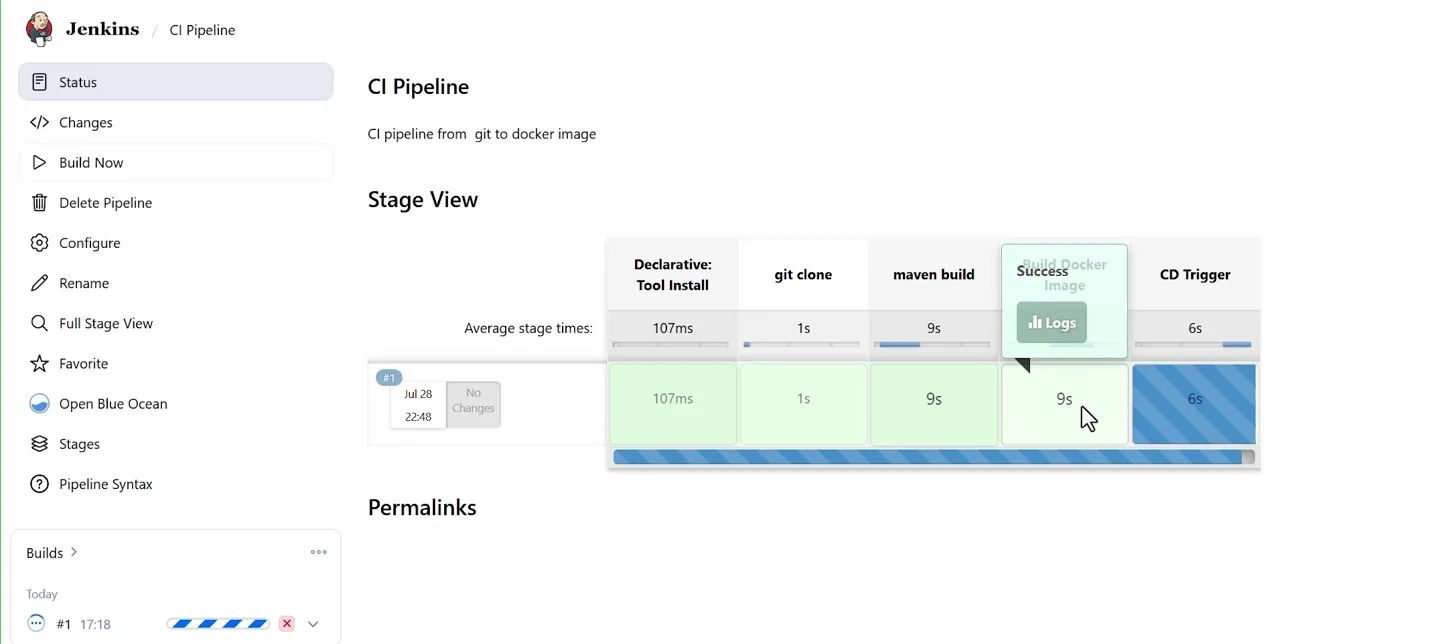
The CD Trigger stage stays blue (running) while it waits for the CD Pipeline to finish, because Wait for completion was ticked.
The gap in that version
Look closely at what the two jobs pass to each other: nothing. In the lecture's CI pipeline the image is built on the Jenkins server only, never pushed. The CD pipeline then applies k8s-deployment.yaml, which says image: haidertelusko/my-web-app:latest. The cluster pulls latest from Docker Hub, which is still the image pushed by the previous lesson's pipeline. So the new code never reaches the cluster, and because the manifest did not change, kubectl apply reports unchanged anyway.
Two fixes make the split work properly:
- CI must push the image, with a unique tag. The cluster can only run images it can pull from a registry.
- CI must tell CD which tag to deploy, through a build parameter.
Step 1: the CD pipeline
Create the CD job first, because the CI job needs to point at it. Use a name without spaces, for example cd-pipeline. Spaces work, but they turn into %20 in URLs and are easy to mistype in build job:.
pipeline {
    agent any

    parameters {
        string(name: 'IMAGE_TAG', defaultValue: '', description: 'Image tag to deploy, for example 42')
    }

    environment {
        IMAGE_NAME = 'your-dockerhub-username/my-web-app'
    }

    stages {
        stage('Validate') {
            steps {
                script {
                    if (!params.IMAGE_TAG?.trim()) {
                        error('IMAGE_TAG is empty. Start this job from the CI pipeline or enter a tag.')
                    }
                }
            }
        }

        stage('git clone') {
            steps {
                git branch: 'main', url: 'https://github.com/<your-github-user>/WebAppMaven.git'
            }
        }

        stage('k8s - deployment') {
            steps {
                sh 'sed -i "s|image: .*|image: $IMAGE_NAME:$IMAGE_TAG|" k8s-deployment.yaml'
                sh 'grep "image:" k8s-deployment.yaml'
                sh 'kubectl apply -f k8s-deployment.yaml'
                sh 'kubectl rollout status deployment/web-app-deployment --timeout=180s'
            }
        }
    }

    post {
        success {
            echo "Deployed ${IMAGE_NAME}:${params.IMAGE_TAG}"
        }
        failure {
            echo "Deployment of ${params.IMAGE_TAG} failed. The previous version is still serving traffic."
        }
    }
}| Part | Meaning |
|---|---|
parameters { string(...) } | Makes this a parameterised job, as in Jenkins Build Parameters. The value is available as params.IMAGE_TAG, and also as the environment variable $IMAGE_TAG inside sh |
Validate stage | Stops early with a clear message if someone runs the job without a tag |
git clone | The CD job still needs the repository, but only for k8s-deployment.yaml. The lecture explains this is the only reason for the clone |
sed + kubectl apply | Deploy exactly the tag that was passed in (see the previous lesson for why the image line must change) |
rollout status | The CD job is green only when the new pods are really running |
post { success / failure } | Messages at the end of the log. A real team would send a Slack message or email here, as in Configuring Email Notifications in Jenkins |
The lecture's CD job also had tools { maven 'maven' }. As the instructor says, it is not needed: this job never runs Maven.
Run the CD job once by hand
Jenkins only learns about the parameters block after the job has run once. Save the job and click Build Now once; it will stop at Validate. After that, the job shows Build with Parameters, and the CI job can pass IMAGE_TAG to it.
Step 2: the CI pipeline
pipeline {
    agent any

    parameters {
        booleanParam(name: 'DEPLOY', defaultValue: true, description: 'Trigger the CD pipeline after a successful build')
    }

    environment {
        DOCKERHUB_USER = 'your-dockerhub-username'
        IMAGE_NAME     = "${DOCKERHUB_USER}/my-web-app"
        IMAGE_TAG      = "${BUILD_NUMBER}"
    }

    tools {
        maven 'maven'
    }

    stages {
        stage('git clone') {
            steps {
                git branch: 'main', url: 'https://github.com/<your-github-user>/WebAppMaven.git'
            }
        }

        stage('maven build') {
            steps {
                sh 'mvn clean package'
            }
        }

        stage('Build Docker Image') {
            steps {
                sh 'docker build -t $IMAGE_NAME:$IMAGE_TAG -t $IMAGE_NAME:latest .'
            }
        }

        stage('Docker Push') {
            steps {
                withCredentials([usernamePassword(credentialsId: 'dockerhub-creds',
                                                  usernameVariable: 'DOCKER_USER',
                                                  passwordVariable: 'DOCKER_PASS')]) {
                    sh '''
                        echo "$DOCKER_PASS" | docker login -u "$DOCKER_USER" --password-stdin
                        docker push $IMAGE_NAME:$IMAGE_TAG
                        docker push $IMAGE_NAME:latest
                    '''
                }
            }
        }

        stage('CD Trigger') {
            when {
                expression { return params.DEPLOY }
            }
            steps {
                build job: 'cd-pipeline',
                      parameters: [string(name: 'IMAGE_TAG', value: env.IMAGE_TAG)],
                      wait: true,
                      propagate: true
            }
        }
    }

    post {
        always {
            sh 'docker logout || true'
            sh 'docker rmi $IMAGE_NAME:$IMAGE_TAG $IMAGE_NAME:latest || true'
        }
    }
}| Part | Meaning |
|---|---|
Docker Push | Added compared with the lecture. Without it the cluster cannot get the new image |
build job: 'cd-pipeline' | Starts the downstream job. Must match the job name exactly (use the full path, such as folder/cd-pipeline, if it is inside a folder) |
parameters: [string(name: 'IMAGE_TAG', value: env.IMAGE_TAG)] | Passes this build's tag. The name must match the parameter defined in the CD job |
wait: true | The CI build waits for the CD build to finish. This is the Snippet Generator's Wait for completion, and it is the default |
propagate: true | If CD fails, the CI build is marked failed too. With false, CI stays green and you would have to check CD separately |
when { expression { return params.DEPLOY } } | Skip the trigger when someone runs CI with DEPLOY unticked, for example to test a build without touching the cluster. Skipped stages show as grey in the stage view |
Run ci-pipeline. The sequence is:
- CI clones, builds, tests, builds
my-web-app:<n>and pushes it. - The CD Trigger stage starts
cd-pipelinewithIMAGE_TAG=<n>and waits. - CD validates, clones the manifest, sets the image to
<n>, applies it and waits for the rollout. - CD finishes, and CI finishes with the same result.
On the dashboard, open cd-pipeline: its build says Started by upstream project "ci-pipeline" build number n. That line is your audit trail, from deployment back to the exact CI build and commit.
Rolling back with the CD job
Here is the real benefit of the split. Suppose build 15 has a bug and 14 was fine. You do not need to revert code and wait for a full build. Open cd-pipeline, click Build with Parameters, enter 14, and run it. The CD job deploys the image that CI already built and pushed for build 14, in under a minute.
That only works because every build has its own tag on Docker Hub. With latest alone, version 14 would already be gone.
When to keep one pipeline
Splitting is not always better. For a personal project or a single small service, one pipeline is easier to read and maintain. Split when you need to redeploy old versions, promote the same image through several environments (dev, then staging, then production, each with its own CD job or stage), restrict who can deploy, or audit deployments separately from builds.
Common errors
Clean up
Do not leave the cluster running
When you are done, delete the application objects (this deletes the AWS load balancer), then the cluster, then stop both EC2 instances:
kubectl delete -f k8s-deployment.yaml
eksctl delete cluster --name telusko-learning --region ap-south-1 --wait
Check EC2 > Load Balancers, EC2 > Instances and CloudFormation to confirm nothing is left. Deactivate the Docker Hub access token if you will not use this Jenkins server again.
Try It Yourself
- Create
cd-pipelineandci-pipelineas above and confirm that one click on CI deploys a new version. - Find the "Started by upstream project" line in the CD build and follow it back to the CI build.
- Deploy an older tag by running
cd-pipelinewith Build with Parameters, and watch the rollout withkubectl get pods -w. - Make the CD job fail (enter a tag that does not exist) and see how
propagateaffects the CI result. Trypropagate: falseonce. - Run CI with
DEPLOYunticked and confirm the CD Trigger stage is skipped.
What you built across the bootcamp
Take a moment to look at what this last pipeline actually does. A git push starts a chain that touches almost every course in the bootcamp:
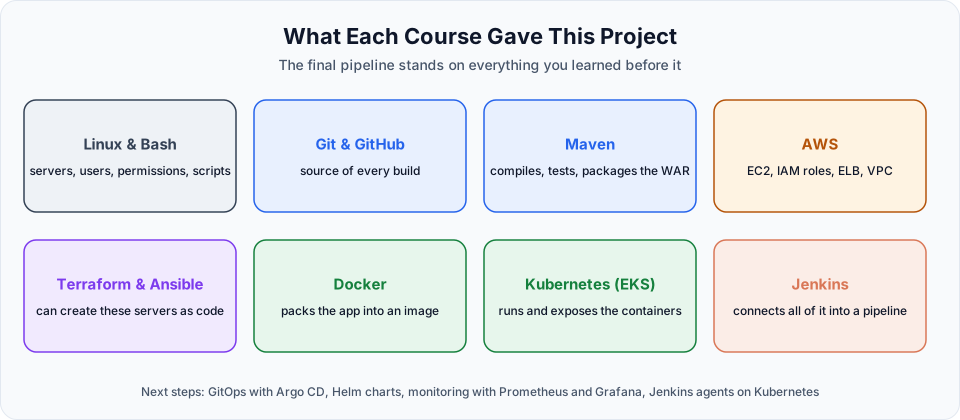
- Linux and Bash: every server here is Ubuntu, and you fixed users, groups, permissions and file ownership along the way (the
jenkinsuser, thedockergroup,chmod 600on the kubeconfig). - Git and GitHub: the repository is the single source of truth for code, Dockerfile and manifests.
- Maven: compiled, tested and packaged the WAR in the CI stage.
- AWS: EC2 instances, an IAM role instead of access keys, a load balancer and a VPC created for the cluster.
- Terraform and Ansible: we clicked through the console to create these servers, but you now know how to create and configure exactly the same EC2 instances as code.
- Docker: turned the WAR into an image, tagged per build and stored on Docker Hub.
- Kubernetes on EKS: ran two replicas, exposed them through a LoadBalancer Service and rolled out new versions without downtime.
- Jenkins: tied all of it together, with credentials, parameters and upstream and downstream jobs.
That is the everyday work of a DevOps engineer, end to end. From here, good next steps are GitOps with Argo CD (the cluster pulls changes from Git instead of Jenkins pushing them), packaging manifests with Helm, and monitoring the running app with Prometheus.
To see how all the pieces fit together again, or to revisit any course, go back to the DevOps Bootcamp roadmap. And remember the habit from day one: delete the cluster when you stop practising.
Official references
- Jenkins: Pipeline Build Step (build job)
- Jenkins: Pipeline Syntax (parameters, when, post)
- Kubernetes: kubectl rollout status
Written By: Shramik Masti
How is this guide?
Last updated on