
Configuring Jenkins to Connect with Amazon EKS
Give the jenkins user a kubeconfig for the EKS cluster, attach an IAM role to the Jenkins server, and understand exactly how kubectl in a pipeline proves who it is to EKS.
The cluster is running, and kubectl works on the EKS home server. But a pipeline does not run there. It runs on the Jenkins server, as the Linux user jenkins, and that user knows nothing about the cluster yet. If a pipeline ran kubectl get nodes right now, it would fail with "The connection to the server localhost:8080 was refused".
Two things are missing:
- Where is the cluster? kubectl reads that from a kubeconfig file in the home directory of the user running it.
- Who are you? EKS only lets in IAM identities it has been told about.
We fix the first by giving the jenkins user a kubeconfig, and the second by giving the Jenkins server an IAM role the cluster already trusts.
Where the jenkins user keeps its files
The jenkins user's home directory is not /home/jenkins. It is the Jenkins home, /var/lib/jenkins. You can confirm it:
getent passwd jenkinsjenkins:x:111:113:Jenkins,,,:/var/lib/jenkins:/bin/bashSo kubectl, when run by Jenkins, looks for its kubeconfig at /var/lib/jenkins/.kube/config.
Step 1: copy the kubeconfig (the way shown in the lecture)
On the EKS home server, print the kubeconfig that eksctl wrote:
cat ~/.kube/configCopy the whole output, from apiVersion: v1 to the last line.
On the Jenkins server, create the folder, give it to the jenkins user, and create the file:
sudo mkdir -p /var/lib/jenkins/.kube
sudo chown jenkins:jenkins /var/lib/jenkins/.kube
sudo vi /var/lib/jenkins/.kube/config
Press i, paste, press Esc, type :wq. Then fix the owner and permissions of the file:
sudo chown jenkins:jenkins /var/lib/jenkins/.kube/config
sudo chmod 600 /var/lib/jenkins/.kube/config| Command | Why |
|---|---|
mkdir -p | Creates .kube, and does not complain if it already exists |
chown jenkins:jenkins | The file was created by root through sudo. Without this, the jenkins user cannot read it |
chmod 600 | Only the owner can read or write it. The file tells anyone who reads it where your cluster is, and tools such as Helm warn when a kubeconfig is readable by others |
What is inside that file
It helps to look at what you pasted. An eksctl kubeconfig has three parts (shortened here):
apiVersion: v1
clusters:
- cluster:
    certificate-authority-data: LS0tLS1CRUdJTi...   # the cluster's CA certificate
    server: https://ABC123.gr7.ap-south-1.eks.amazonaws.com
  name: telusko-learning.ap-south-1.eksctl.io
contexts:
- context:
    cluster: telusko-learning.ap-south-1.eksctl.io
    user: i-0abc123@telusko-learning.ap-south-1.eksctl.io
  name: i-0abc123@telusko-learning.ap-south-1.eksctl.io
current-context: i-0abc123@telusko-learning.ap-south-1.eksctl.io
kind: Config
users:
- name: i-0abc123@telusko-learning.ap-south-1.eksctl.io
  user:
    exec:
      apiVersion: client.authentication.k8s.io/v1beta1
      command: aws
      args: ["eks", "get-token", "--output", "json",
             "--cluster-name", "telusko-learning", "--region", "ap-south-1"]
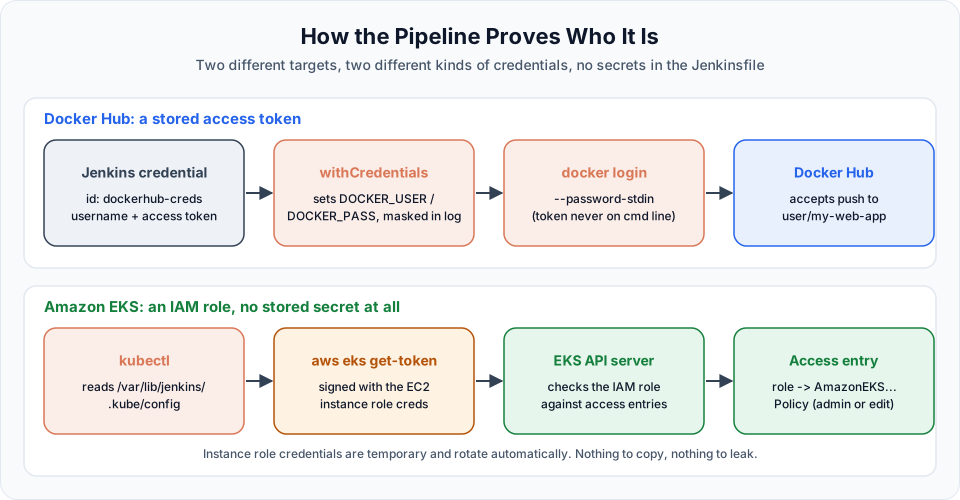
Notice there is no password or token in the file. The users section only says "to log in, run aws eks get-token". Every time kubectl talks to the cluster, it runs that AWS CLI command, which creates a short-lived token signed with whatever AWS credentials the current Linux user has. That is why the Jenkins server needed the AWS CLI in the first lesson of this section, and why the next step is about AWS credentials.
A cleaner alternative: let the AWS CLI write the file
Copying by hand works, but it is easy to miss a line, and you must repeat it every time you recreate the cluster. Once Step 2 below is done, the Jenkins server can generate its own kubeconfig:
sudo -u jenkins aws eks update-kubeconfig --region ap-south-1 --name telusko-learningRunning it with sudo -u jenkins writes the file straight into /var/lib/jenkins/.kube/config with the right owner. It needs only the eks:DescribeCluster permission. Use this whenever you recreate the cluster after a break.
Step 2: give the Jenkins server an AWS identity
aws eks get-token needs AWS credentials. In the video, the role created for the EKS home server, eks-telusko-learning, is attached to the Jenkins server as well:
- EC2 > Instances, select the Jenkins server.
- Actions > Security > Modify IAM role.
- Choose
eks-telusko-learningand click Update IAM role.
No aws configure, no access keys. The AWS CLI on the instance picks up temporary credentials for the role from the instance metadata service automatically. Check it as the jenkins user:
sudo -u jenkins aws sts get-caller-identityThe Arn should look like arn:aws:sts::<account-id>:assumed-role/eks-telusko-learning/i-0abc....
Why this is enough to get into the cluster
Being able to call AWS is not the same as being allowed into Kubernetes. EKS decides who can use the Kubernetes API with access entries: each entry maps one IAM user or role to Kubernetes permissions.
When eksctl created the cluster, it ran as the eks-telusko-learning role, and by default EKS gives the identity that creates a cluster an access entry with the AmazonEKSClusterAdminPolicy. The Jenkins server now uses the same role, so EKS sees the same principal and lets it in as cluster admin. You can see that entry in the console under EKS > Clusters > telusko-learning > Access.
Step 3: test it
As the jenkins user on the server:
sudo -u jenkins kubectl get nodesAnd from Jenkins itself, with a throwaway pipeline:
pipeline {
    agent any
    stages {
        stage('Who am I') {
            steps {
                sh 'aws sts get-caller-identity'
            }
        }
        stage('Talk to EKS') {
            steps {
                sh 'kubectl get nodes'
                sh 'kubectl get svc'
            }
        }
    }
}
If both stages are green and the console shows your two nodes, Jenkins can deploy to EKS.
Doing it properly: a separate role for Jenkins
Sharing the admin role is quick for learning, but it means a compromised Jenkins job can do anything in your AWS account and anything in the cluster. In a real setup, give Jenkins its own identity with only what it needs.
1. An IAM role for the Jenkins server (for example jenkins-eks-deployer), trusted by EC2, with a small IAM policy. To run update-kubeconfig and get-token, Jenkins needs only:
{
  "Version": "2012-10-17",
  "Statement": [
    {
      "Effect": "Allow",
      "Action": "eks:DescribeCluster",
      "Resource": "arn:aws:eks:ap-south-1:<account-id>:cluster/telusko-learning"
    }
  ]
}
2. An access entry that gives that role Kubernetes permissions. Run these from the EKS home server (the cluster admin):
aws eks create-access-entry \
  --cluster-name telusko-learning \
  --principal-arn arn:aws:iam::<account-id>:role/jenkins-eks-deployer \
  --type STANDARD

aws eks associate-access-policy \
  --cluster-name telusko-learning \
  --principal-arn arn:aws:iam::<account-id>:role/jenkins-eks-deployer \
  --policy-arn arn:aws:eks::aws:cluster-access-policy/AmazonEKSEditPolicy \
--access-scope type=namespace,namespaces=default| Part | Meaning |
|---|---|
--principal-arn | The role ARN (arn:aws:iam::...:role/...), not the sts ... assumed-role ARN that get-caller-identity prints |
--type STANDARD | A normal user or role, not a node |
AmazonEKSEditPolicy | Create, update and delete most namespaced objects (Deployments, Services, ConfigMaps). Similar to the Kubernetes edit ClusterRole |
type=namespace,namespaces=default | Only in the default namespace. Use type=cluster for every namespace |
Check the result with aws eks list-associated-access-policies --cluster-name telusko-learning --principal-arn <role-arn>.
Access entries vs the aws-auth ConfigMap
Many older tutorials grant access by editing the aws-auth ConfigMap in the kube-system namespace (eksctl create iamidentitymapping does this). That method is legacy. Clusters created by eksctl use the API_AND_CONFIG_MAP authentication mode, so both work, but AWS recommends access entries: they are managed with the EKS API, show up in CloudTrail, and a typo cannot lock everyone out of the cluster the way a broken ConfigMap can.
Common errors
Try It Yourself
- Set up
/var/lib/jenkins/.kube/configby copying, then delete it and recreate it withupdate-kubeconfig. Compare the two files. - Run the "EKS connection test" pipeline and confirm both stages pass.
- Detach the IAM role from the Jenkins server, run the pipeline again and read the error. Attach the role again.
- Create a
jenkins-eks-deployerrole with an access entry scoped to thedefaultnamespace, and confirmkubectl get pods -n kube-systemis now forbidden whilekubectl get podsworks.
Official references
- Amazon EKS: Connect kubectl to an EKS cluster by creating a kubeconfig file
- Amazon EKS: Grant IAM users access to Kubernetes with access entries
- Amazon EKS: Associate access policies with access entries
- eksctl: EKS access entries
Written By: Shramik Masti
How is this guide?
Last updated on
Creating Your First EKS Cluster
Attach an IAM role to the EKS home server, create the telusko-learning EKS cluster with one eksctl command, check it with kubectl, and delete it safely when you stop practising.
Build & Push Docker Images Using Jenkins Pipeline
Write a pipeline that clones a Java web app, builds the WAR with Maven, builds a Docker image, and pushes it to Docker Hub using a Jenkins credential and an access token.