
CI CD Pipeline with Jenkins, Docker & Kubernetes
Build the real end-to-end pipeline where the Dockerfile and Kubernetes manifest live in Git with the code, and every build rolls out a uniquely tagged image to Amazon EKS.
The previous pipeline worked, but it carried the Dockerfile and the Kubernetes YAML inside the Jenkinsfile. Every time a developer wanted to change the base image or the number of replicas, someone had to edit the Jenkins job. That does not scale past one person.
In a real team the split is clear. Developers keep the code, the Dockerfile and the Kubernetes manifest together in the Git repository. The pipeline only runs them: clone, build, package, push, deploy. That is what we build now.
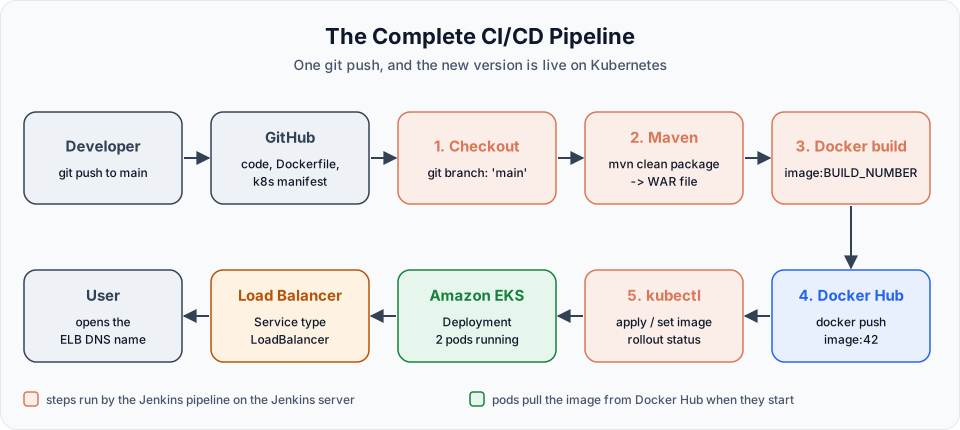
The repository
The lecture uses Haider7214/WebAppMaven. Fork it to your own GitHub account so you can change it later.
WebAppMaven/
├── src/                     application code (Spring Boot, packaged as a WAR)
├── pom.xml                  Maven build: artifactId WebAppProject1, version 0.0.1
├── Dockerfile               how to build the image
└── k8s-deployment.yaml      Deployment + Service for Kubernetes
The Dockerfile in the repo (the maintainer label is shortened here; it is only metadata):
FROM tomcat:10.1-jdk17-temurin
LABEL maintainer="Telusko"
RUN rm -rf /usr/local/tomcat/webapps/*
COPY target/WebAppProject1-0.0.1.war /usr/local/tomcat/webapps/ROOT.war
EXPOSE 8080
RUN rm -rf /usr/local/tomcat/webapps/* removes anything Tomcat ships in its webapps folder, so our WAR is the only application, deployed at / as ROOT.war. The base image is pinned to Tomcat 10.1 on Java 17, which matches the Spring Boot 3 project.
The manifest holds both objects in one file, separated by ---:
apiVersion: apps/v1
kind: Deployment
metadata:
  name: web-app-deployment
spec:
  replicas: 2
  selector:
    matchLabels:
      app: web-app
  template:
    metadata:
      labels:
        app: web-app
    spec:
      containers:
      - name: web-container
        image: haidertelusko/my-web-app:latest
        ports:
        - containerPort: 8080
---
apiVersion: v1
kind: Service
metadata:
  name: web-app-service
spec:
  type: LoadBalancer
  selector:
    app: web-app
  ports:
  - protocol: TCP
    port: 80
    targetPort: 8080
Two replicas of the app, exposed through an AWS load balancer on port 80. Same objects as in the previous lesson, now owned by the repository.
The pipeline
Create a new Pipeline job, cicd-java-project, with a short description. Before running it, confirm the Docker Hub credential exists under Manage Jenkins > Credentials (the dockerhub-creds credential from Build & Push Docker Images Using Jenkins Pipeline).
The lecture also deleted the Deployment, Service and load balancer from the previous lesson, so this pipeline starts from a clean cluster:
kubectl delete svc web-app-service
kubectl delete deployment web-app-deploymentpipeline {
agent any
environment {
DOCKERHUB_USER = 'your-dockerhub-username'
IMAGE_NAME = "${DOCKERHUB_USER}/my-web-app"
IMAGE_TAG = "${BUILD_NUMBER}"
}
tools {
maven 'maven'
}
stages {
stage('git clone') {
steps {
git branch: 'main', url: 'https://github.com/<your-github-user>/WebAppMaven.git'
}
}
stage('maven build') {
steps {
sh 'mvn clean package'
}
}
stage('Build Docker Image') {
steps {
// Uses the Dockerfile from the repository
sh 'docker build -t $IMAGE_NAME:$IMAGE_TAG -t $IMAGE_NAME:latest .'
}
}
stage('Docker Push') {
steps {
withCredentials([usernamePassword(credentialsId: 'dockerhub-creds',
usernameVariable: 'DOCKER_USER',
passwordVariable: 'DOCKER_PASS')]) {
sh '''
echo "$DOCKER_PASS" | docker login -u "$DOCKER_USER" --password-stdin
docker push $IMAGE_NAME:$IMAGE_TAG
docker push $IMAGE_NAME:latest
'''
}
}
}
stage('k8s - deployment') {
steps {
// Point the manifest at the image this build just pushed
sh 'sed -i "s|image: .*|image: $IMAGE_NAME:$IMAGE_TAG|" k8s-deployment.yaml'
sh 'grep "image:" k8s-deployment.yaml'
sh 'kubectl apply -f k8s-deployment.yaml'
sh 'kubectl rollout status deployment/web-app-deployment --timeout=180s'
}
}
}
post {
success {
sh 'kubectl get svc web-app-service'
}
always {
sh 'docker logout || true'
sh 'docker rmi $IMAGE_NAME:$IMAGE_TAG $IMAGE_NAME:latest || true'
}
}
}Compared with the earlier pipeline, the Build Docker Image stage shrinks to a single docker build line, and the deploy stage to a single kubectl apply. All the "what" lives in Git; Jenkins only does the "how".
Why we edit the image line before applying
The lecture's deploy stage is just:
sh 'kubectl apply -f k8s-deployment.yaml'On the first run that works perfectly. On the second run it quietly does nothing useful. The manifest still says image: haidertelusko/my-web-app:latest, exactly like last time. kubectl apply compares it with what is running, finds no difference, and reports deployment.apps/web-app-deployment unchanged. The pods keep running the old code, even though Docker Hub has a newer latest. The pipeline is green and nothing was deployed.
The fix is to give Kubernetes a different image reference each time. The sed command rewrites the image: line in the workspace copy of the manifest (never in Git) to your-user/my-web-app:<build number>:
| Part | Meaning |
|---|---|
sed -i | Edit the file in place |
s|image: .*|image: ...| | Replace any image: line with the new value. | is used as the separator because the image name contains / |
$IMAGE_NAME:$IMAGE_TAG | Expanded by the shell, for example your-user/my-web-app:12 |
grep "image:" | Prints the result into the console log, so you can see which image was deployed |
This also replaces the instructor's Docker Hub user with yours, so you do not deploy someone else's image by accident. The manifest has only one container, so one image: line; with several containers you would use a more specific pattern, or a tool such as Kustomize or Helm.
Another common way is to leave the manifest alone and change only the image of the running Deployment:
kubectl set image deployment/web-app-deployment web-container=$IMAGE_NAME:$IMAGE_TAGweb-container is the container name from the manifest. This is handy for a quick update, but if you also kubectl apply the original manifest later, it switches the image back to :latest. Keeping the file and the cluster in agreement, as the sed approach does, avoids that surprise.
What happens during the rollout
When the image changes, the Deployment does a rolling update: it creates a new ReplicaSet for the new pod template, starts new pods, waits until they are ready, and only then removes old ones. Users keep getting answers the whole time.
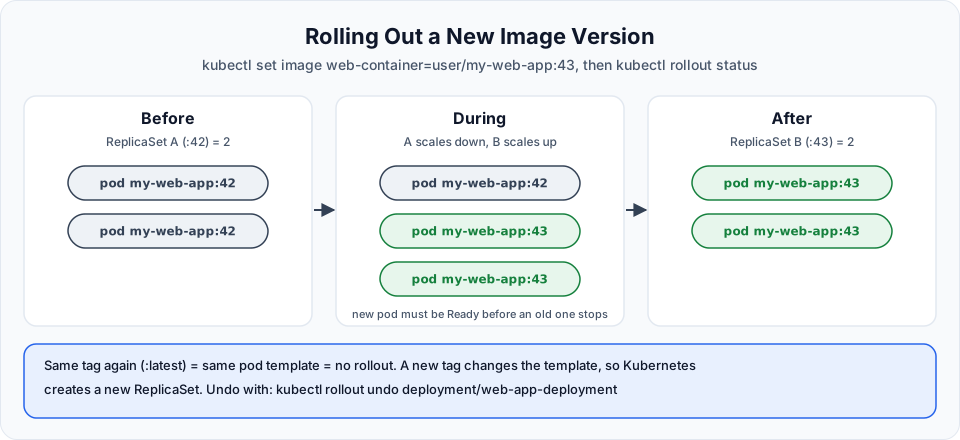
kubectl rollout status makes Jenkins wait for this to finish. If the new pods crash or cannot pull the image, the stage fails after 180 seconds and the build turns red, while the old pods keep serving traffic. To go back by hand:
kubectl rollout history deployment/web-app-deployment
kubectl rollout undo deployment/web-app-deployment
Rolling Updates and Rollbacks in Kubernetes Deployments covers maxSurge, maxUnavailable and rollbacks in detail.
Run it and check
Click Build Now. Tool install, clone, Maven, Docker build, push and deploy run one after another, in about a minute. Then:
- Docker Hub:
my-web-appshows a push "less than a minute ago", with a tag for this build number andlatest. - Cluster: from the EKS home server run
kubectl get all. You see two running pods, the Deployment, its ReplicaSet, andweb-app-servicewith a load balancer DNS name inEXTERNAL-IP. - Browser: open
http://<EXTERNAL-IP>. The first time, give the new load balancer a minute or two. The DNS name is also shown in EC2 > Load Balancers.
Now make a small change to index.jsp in your fork, push it, and run the pipeline again. Watch kubectl get pods -w in another terminal: two new pods appear with a new hash in their names, become ready, and the old ones terminate. Refresh the browser and your change is live.
From here to fully automatic
Two small steps make this a real CI/CD pipeline. Both were covered earlier in the course:
- Trigger on every push: enable GitHub hook trigger for GITScm polling in the job and add a webhook in the GitHub repository, as in Jenkins Build Triggers. Now a
git pushdeploys without anyone clicking anything. - Keep the pipeline in Git too: save the pipeline above as a file named
Jenkinsfilein the root of the repository, and change the job's Definition to Pipeline script from SCM. Then the pipeline itself is reviewed and versioned like the rest of the code. With this setup Jenkins checks out the repository by itself, so you can drop thegit clonestage.
Common errors
Clean up
Delete in this order when you finish
kubectl delete -f k8s-deployment.yaml(removes the Deployment and the Service, which deletes the AWS load balancer).- Confirm in EC2 > Load Balancers that it is gone.
eksctl delete cluster --name telusko-learning --region ap-south-1 --waitfrom the EKS home server.- Stop the Jenkins server and the EKS home server.
A forgotten cluster with a load balancer costs several dollars a day.
Try It Yourself
- Fork WebAppMaven, point the pipeline at your fork, and run it twice. Confirm the second run deploys new pods (new names) instead of reporting
unchanged. - Remove the
sedline, changeindex.jsp, push, and run the pipeline. Notice the page does not change. Put thesedline back. - Change
replicasto 3 in the manifest in Git, push, and run. No change to Jenkins should be needed. - Push a change that breaks the build (for example a failing test). Confirm the pipeline stops at Maven and the running app is untouched.
- Move the pipeline into a
Jenkinsfilein your fork and switch the job to Pipeline script from SCM.
Official references
- Kubernetes: Deployments, updating a Deployment
- Kubernetes: kubectl set image
- Kubernetes: kubectl rollout status
- Jenkins: Using a Jenkinsfile
Written By: Shramik Masti
How is this guide?
Last updated on
Deploying Docker Applications to Amazon EKS
Add a Deploy to Kubernetes stage that writes a Deployment and a LoadBalancer Service, applies them to EKS from Jenkins, and open the running application through the AWS load balancer.
Separating CI and CD into Independent Jenkins Pipelines
Split the all-in-one pipeline into a CI pipeline that builds and pushes a tagged image and a CD pipeline that deploys a given tag, with CI triggering CD automatically.