
Jenkins Build Parameters: Parameterized Jobs
Make one Jenkins job behave differently on each run by adding string and choice parameters, use them as environment variables in shell steps, and avoid common quoting mistakes.
Every job we have built so far does exactly the same thing on every run. That is fine until you need small variations. Deploy to dev today, to testing tomorrow, to production on Friday. Build branch main now, branch feature-login later. Creating a separate job for every variation quickly becomes a mess of near-identical copies.
Build parameters solve this. A parameterized job asks the user for input before the build starts, and the values become environment variables inside the build. Shell steps, batch steps, Maven goals and pipelines can all read them.
Where parameters show up
Once a job has parameters, the Build Now button is replaced by Build with Parameters. Clicking it opens a small form with the default values filled in. You can keep them or change them, then click Build.
Parameter types
In the job configuration, under General, tick This project is parameterized and click Add Parameter. The suggested plugins give you these types:
| Type | What the user sees | Typical use |
|---|---|---|
| String Parameter | A one-line text box with a default value | Branch name, version number, a name |
| Multi-line String Parameter | A text area | A list of hosts, release notes |
| Boolean Parameter | A checkbox | "Skip tests?", "Run smoke tests?" |
| Choice Parameter | A drop-down list, first entry is the default | Environment: Dev, Testing, Production |
| Credentials Parameter | A drop-down of stored Jenkins credentials | Choosing which account to deploy with |
| File Parameter | A file upload | A config file for one build |
| Password Parameter | A masked text box | Avoid it. Use stored credentials instead |
| Run Parameter | A picker of builds from another job | "Deploy build #42 of the build job" |
Do not pass secrets as parameters
Parameter values are saved with each build and can be seen by anyone who can view the build. Even the Password Parameter is stored with the build and is not a safe place for real secrets. Keep passwords and tokens in Manage Jenkins > Credentials and bind them into the build with Use secret text(s) or file(s) (Credentials Binding plugin), which also masks them in the console.
Demo: a parameterized job
Create the job
+ New Item, name build-param-job, Freestyle project, description Build parameter job demonstration.
Add the parameters
Tick This project is parameterized and add:
| Type | Name | Default / choices | Description |
|---|---|---|---|
| String Parameter | FirstName | Harsh | name of the job runner |
| String Parameter | LastName | Rawal | last name of job owner |
| Choice Parameter | Gender | Male, Female, Others (one per line) | |
| Choice Parameter | ENV | Dev, Testing, Pre-Production, Production (one per line) | target environment |
For a choice parameter, each option goes on its own line, and the first line is the default. Put the safest option (Dev) first, never Production.
Use them in a shell step
Add build step > Execute shell:
echo "I am $FirstName $LastName and I am $Gender"
echo "I am a developer learning DevOps"
echo "Deploying app into $ENV"

if [ "$ENV" = "Production" ]; then
  echo "You're deploying your app into production"
else
  echo "Deploying app to $ENV Environment"
fi
Parameter names are case-sensitive: $ENV works, $env does not.
Build with parameters
Save, then click Build with Parameters.
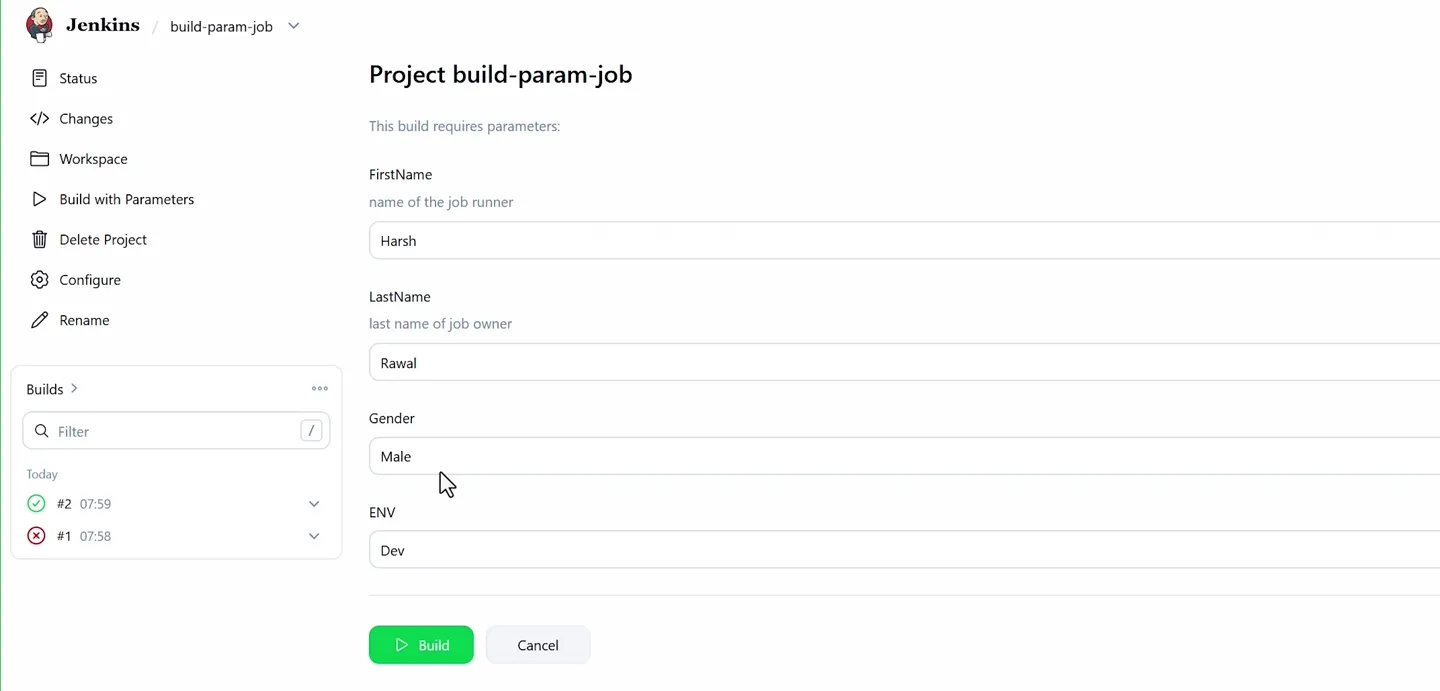
The form Jenkins shows before the build starts, pre-filled with the default values.
Change a value if you like, then click Build.
The console output with the defaults:
+ echo I am Harsh Rawal and I am Male
I am Harsh Rawal and I am Male
+ echo I am a developer learning DevOps
I am a developer learning DevOps
+ echo Deploying app into Dev
Deploying app into Dev
+ [ Dev = Production ]
+ echo Deploying app to Dev Environment
Deploying app to Dev Environment
Finished: SUCCESS
Look at the + [ Dev = Production ] line. Thanks to sh -x, you can see the parameter value already substituted into the test, which makes debugging conditions easy. Run it again with ENV=Production and the other branch prints.
Every build also gets a Parameters page in its left menu showing exactly which values that run used. That is useful when someone asks "which environment did build #7 deploy to?"
The quoting mistake from the video
The first build in the video failed with:
/tmp/jenkins8116133558168063344.sh: 4: Syntax error: Unterminated quoted string
Build step 'Execute shell' marked build as failure
Finished: FAILURE
The cause was a stray extra quote at the end of the first line: echo "I am $FirstName $LastName and I am $Gender"". The shell saw an opened string that never closed. When you see "Unterminated quoted string", count the " characters on the line number the error gives you (here line 4 of the generated script).
Two good habits for shell steps:
- Always wrap variables in double quotes inside tests:
[ "$ENV" = "Production" ]. Without quotes, an empty value or a value with spaces (likePre Production) breaks the test. - Remember the script runs with
sh -e, so any failing command ends the build. Test risky lines on the server first.
How Jenkins passes the values
Jenkins exports every parameter as an environment variable with the same name, alongside built-in ones like BUILD_NUMBER, JOB_NAME and WORKSPACE. That means parameters work in places other than shell steps too:
- In Invoke top-level Maven targets, goals can use them:
clean package -Denv=${ENV}. - In a branch specifier:
*/${BRANCH}with a String parameterBRANCHlets you build any branch. - In pipelines (Section 5), parameters are declared in the
Jenkinsfileand read asparams.ENV.
Parameters and triggers together
A build started by a trigger (timer, poll, webhook) cannot ask anyone for input, so it uses the default values. Design defaults so that an automatic build is always safe: default environment Dev, default branch main.
Try It Yourself
- Recreate
build-param-jobwith the four parameters and run it once with defaults and once withENV=Production. - Add a Boolean Parameter
RUN_TESTS(default checked) and print a different message depending on its value:if [ "$RUN_TESTS" = "true" ]; then ... fi. - Add a String parameter
BRANCHwith defaultmainto yourjava-app-buildjob and change its branch specifier to*/${BRANCH}. - Reproduce the "Unterminated quoted string" error on purpose, read the line number in the error, then fix it.
- Open the Parameters page of an old build and confirm it shows that run's values.
Official references
- Jenkins: Handling parameters in a Jenkinsfile
- Jenkins Pipeline Syntax: parameters directive
- Credentials Binding plugin
Written By: Shramik Masti
How is this guide?
Last updated on
Jenkins Build Triggers
Start Jenkins jobs automatically with Build periodically, Poll SCM and GitHub webhooks, write Jenkins cron expressions with the H symbol, and choose the right trigger for each job.
Jenkins Users, Authentication & Authorization
Create separate Jenkins users, understand the difference between authentication and authorization, and limit what each user can do with matrix-based and role-based security.