
Getting Started
The complete DevOps Bootcamp roadmap, from Linux and shell scripting to Git, Maven, AWS, Terraform, Ansible, Docker, Kubernetes on EKS and Jenkins CI/CD.
Every company now ships software through the cloud, and the people who keep that delivery fast, repeatable and safe are DevOps engineers. This bootcamp takes you there from absolute scratch. You do not need any previous DevOps, cloud or Linux experience.
The bootcamp is not one tool. It is a chain of tools, and each one solves a problem the previous one leaves open. You start on a Linux server, learn to automate it with Bash, version your work with Git, build Java applications with Maven, rent servers on AWS, create those servers with Terraform, configure them with Ansible, package applications with Docker, run them at scale on Kubernetes, and finally connect everything with Jenkins pipelines.
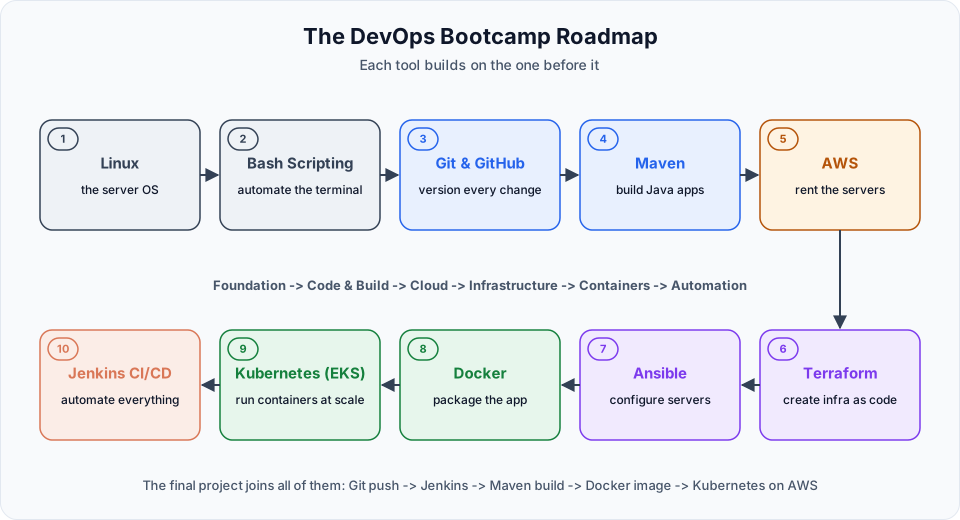
By the end you will be able to:
- Work comfortably on a Linux server over SSH and automate routine work with Bash scripts
- Version code with Git and collaborate through GitHub branches and pull requests
- Build, test and package Java and Spring Boot applications with Maven
- Use the core AWS services: IAM, EC2, EBS, S3, RDS, VPC, load balancers and auto scaling
- Create cloud infrastructure from code with Terraform, and configure servers with Ansible playbooks
- Containerize applications with Docker and multi-stage Dockerfiles
- Deploy and operate applications on Kubernetes using Amazon EKS
- Build CI/CD pipelines in Jenkins that take code from Git all the way to a Kubernetes cluster
Who this is for
Anyone who wants to start a career in DevOps or cloud: students, freshers, developers, testers, support engineers and system administrators. The bootcamp starts from zero, so the background you come from does not matter. What matters is that you practise. DevOps is not only about understanding a concept. It is about implementing it until it works, then breaking it and fixing it again.
How the bootcamp is organised
Each tool has its own course in these docs. Follow them in this order, because later tools assume the earlier ones.
| Stage | Course | What it covers |
|---|---|---|
| Foundation | Computer & Programming Essentials | How a CPU runs programs and how memory units work (optional) |
| Foundation | Linux | Lab setup on AWS, commands, files, permissions, users, networking, processes and Bash shell scripting |
| Code | Git | Commits, branches, merging, rebasing, stash, forks and pull requests |
| Build | Maven | Build tools, the POM, dependencies, repositories, the build lifecycle and Spring Boot builds |
| Cloud | AWS | IAM, EC2, EBS, S3, RDS, VPC, Route 53, CloudWatch, Beanstalk, ECR and ECS |
| Infrastructure | Terraform | Infrastructure as code, state, variables, outputs, taint and modules |
| Configuration | Ansible | Inventory, ad hoc commands, playbooks, variables, vault, handlers and tags |
| Containers | Docker | Images, containers, Dockerfiles, multi-stage builds and networking |
| Orchestration | Kubernetes | Pods, services, deployments, storage, autoscaling, Helm, Argo CD and monitoring on EKS |
| Automation | Jenkins | Jobs, agents, pipelines and an end-to-end CI/CD project with Docker and EKS |
How to actually learn this
Build your own lab
Create a free tier AWS account early, launch a small Linux instance and do every exercise on a real server. Watching someone type commands is not the same as typing them yourself.
Type every command
Small details decide whether DevOps commands work: a missing flag, a wrong port, a space in YAML. Typing them yourself trains your eye for those details.
Break things on purpose
Stop a service, delete a pod, change a permission, push a bad commit. Then find out what happened and fix it. Debugging is the real daily work of a DevOps engineer.
Clean up your cloud resources
EC2 instances, load balancers, NAT gateways and EKS clusters cost money while they run. Delete what you do not need at the end of each session, and set up a billing alert on day one.
Watch your AWS bill
An EKS cluster and its worker nodes are not covered by the free tier. Create the cluster when you start a Kubernetes or Jenkins session and delete it when you finish. The AWS Budgets page shows how to get an email before costs surprise you.
Start with the Introduction to understand what DevOps actually is, then move through the courses in the order of the table above.
Written By: Shramik Masti
How is this guide?
Last updated on
Artifact Registry, Cloud Run and Testing
Enable the required Google Cloud APIs, create an Artifact Registry repository, build the image with Cloud Build, deploy it to Cloud Run with a real secret, and test the live app.
Introduction
What DevOps really means, the problem it solves, the DevOps lifecycle, CI/CD, and how each tool in this bootcamp fits into the delivery pipeline.