
Programming Fundamentals
What a CPU really understands, why programs exist, and how we moved from machine language to assembly and high level languages with assemblers and compilers.
Many beginners try to learn programming by opening a big program and memorising variables, loops and functions. That is the slow way. If you understand what a program actually is and why it has to be translated before a machine can run it, every language you learn later, whether Java, Python, Go or Bash, becomes easier.
This lesson builds that foundation, starting from the computer itself.
The CPU is the brain of the computer
A computer has many parts: monitor, keyboard, mouse, RAM, hard disk. Your phone and your laptop are computers too. Of all these parts, the most important is the processor, also called the CPU or microprocessor. Whatever happens on your machine, playing music, dialling a number, running a server, the processor is the part that executes it.
Three facts about the processor explain everything that follows.
1. It is a semiconductor device
The CPU is built with semiconductor technology, which means it is made from transistors. You do not need to know how transistors work internally (NPN, PNP and so on). You only need one property: a transistor understands just two states.
| Voltage | Meaning in software |
|---|---|
| Low voltage (around 0 V) | 0 |
| High voltage (around 5 V) | 1 |
So the brain of your computer understands only binary: zeros and ones.
2. It is very fast
Semiconductor devices execute instructions extremely quickly. Keep this in mind, because it becomes the reason for the memory design in the next lesson.
3. It cannot do anything on its own
The processor is a powerful but "dumb" device. It never decides to do something by itself. You have to instruct it, and you have to instruct it in a form it understands. I can explain this lesson to you in English because you understand English. The CPU does not.
Machine level language
If the CPU only understands binary, the first way to instruct it is to write the instructions in binary:
0101 01    ->  add
1010 11    ->  subtract
0010 10    ->  multiply
1111 01    ->  divide
(These patterns are only for illustration. Real instruction encodings depend on the processor.)
Writing instructions in a form the machine understands directly is called machine level language. A set of instructions kept together in one place is a program.
Give this program to the processor and it works perfectly. The problem is the human. Remembering which pattern means "add", writing thousands of lines of zeros and ones, and finding the one wrong bit in a large program is almost impossible.
Assembly level language
Researchers then asked a simple question: why write 010101 when we could just write ADD?
ADD
SUB
MUL
DIV
These short words are called mnemonics, and writing programs with them is assembly level language. It is far friendlier than binary.
But the CPU still understands only zeros and ones, so it cannot run ADD directly. The solution is a piece of system software called an assembler, which converts assembly language into machine code.
ADD SUB MUL DIV --assembler--> 0101 01 1010 11 ... --> CPUAssembly is still used today in places like device drivers and microcontrollers, but for large applications it is still too low level and hard to maintain.
High level language
Around the 1960s, the next step arrived: write instructions using symbols and English-like commands.
total = a + b;
if (total > 100) {
    print(total);
}
+ means add, - means subtract, print means print, if and else mean exactly what they say. This style is called a high level language. C, C++, Java, Python, Go and almost every language you know belongs to this group.
Once again, the CPU cannot read print. A system software called a compiler translates the high level program into machine code.
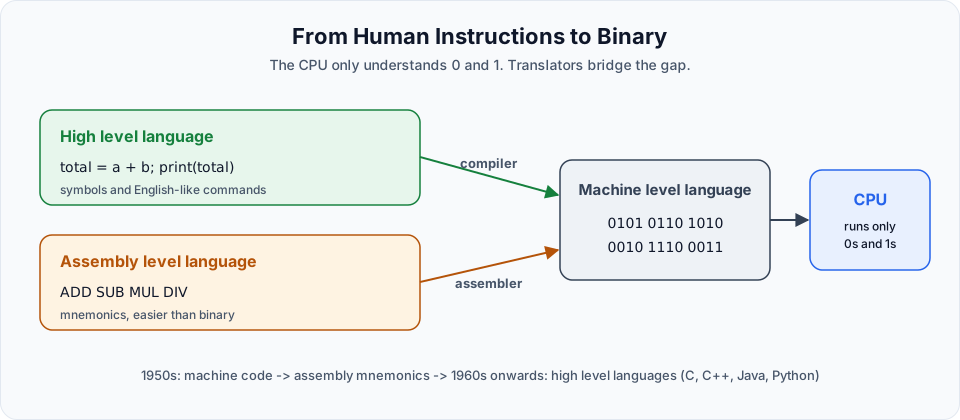
| Level | Example | Translator | Friendly for humans |
|---|---|---|---|
| Machine level | 0101 0110 | None, the CPU runs it directly | Very hard |
| Assembly level | ADD, SUB | Assembler | Better |
| High level | total = a + b | Compiler (or interpreter) | Easy |
Compilers and interpreters
A compiler translates the whole program before it runs, which is what happens with C or with javac in Java. An interpreter translates and runs it line by line, which is how Bash and (mostly) Python work. Java does both: javac compiles to bytecode, and the JVM runs that bytecode. Either way, the CPU finally receives machine code.
Why this matters for DevOps
You may wonder why a DevOps bootcamp starts here. Because a large part of DevOps is exactly this translation, automated:
- Maven runs the Java compiler and packages the result into a JAR or WAR
- Docker packages that compiled output together with the runtime it needs
- Jenkins runs the compile, test and package steps automatically on every Git push
- A Bash script is a program too, run by an interpreter called the shell
When a pipeline fails with "compilation error" or "class file has wrong version", you will know exactly which step of this chain broke.
Key takeaways
- The CPU is a semiconductor device built from transistors, so it understands only
0and1 - A program is a set of instructions kept together in one place
- Machine language is binary, assembly uses mnemonics, high level languages use symbols and English-like commands
- An assembler converts assembly to machine code, a compiler converts high level code to machine code
- Since the 1960s we write programs in high level languages and let translators do the rest
Try It Yourself
- Write down, in your own words, why the CPU cannot run
print("hello")directly. - Name one language you know that is compiled and one that is interpreted.
- If you have Java installed, run
javac Hello.javaand look at the generatedHello.classfile. That is the compiled form of your program.
Official references
Written By: Shramik Masti
How is this guide?
Last updated on
Introduction
What DevOps really means, the problem it solves, the DevOps lifecycle, CI/CD, and how each tool in this bootcamp fits into the delivery pipeline.
Memory Unit in Computer
How the CPU, RAM, hard disk and cache work together, why RAM exists, what volatile means, and what saving and loading really do.