
Memory Unit in Computer
How the CPU, RAM, hard disk and cache work together, why RAM exists, what volatile means, and what saving and loading really do.
In the previous lesson we saw that the CPU executes instructions very fast. But the instructions and the data have to be kept somewhere before the CPU can process them. This lesson explains where, and why a computer needs more than one kind of memory.
The hard disk: the first place to keep data
In the 1950s, companies such as IBM built the first device for storing data and instructions: the hard disk.
To get data from the disk to the CPU, the two are connected by a bus, which is simply a set of wires that carries information from one unit to another inside the computer.
That worked, with one big problem. The hard disk is an electro-mechanical device that uses magnetic technology. Compared to the semiconductor CPU, it is slow. The disk sent instructions slowly, the CPU executed each one instantly and then sat idle waiting for the next one.
That is a speed mismatch. It is like fitting a Ferrari engine to bullock cart wheels: the engine is capable of far more, but the whole vehicle moves at the speed of the slowest part.
The early hard disk had other disadvantages too:
- Slow compared to the CPU
- Bulky
- Noisy
RAM: memory that matches the CPU
After about a decade of research, in the mid 1960s, a new device appeared that could keep up with the processor: Random Access Memory (RAM).
Instructions and data were now kept in RAM, and RAM was connected to the CPU through the bus. Since RAM is built with the same semiconductor technology as the CPU, the speeds matched, and the processor no longer waited.
| Advantage of RAM | Why |
|---|---|
| Very fast | Semiconductor technology, same as the CPU |
| Compact | Much smaller than a hard disk |
| Silent | No moving parts |
The catch: RAM is volatile
RAM has one serious disadvantage: it is volatile. It needs continuous power. If the power goes for even a fraction of a second, everything stored in RAM is gone. It is also more expensive per gigabyte than disk storage.
Using both together
The hard disk was slow, but it had exactly the property RAM lacked: it is non-volatile. Data on a disk stays there for months or years without any power. It is also much cheaper.
So the final design uses both:
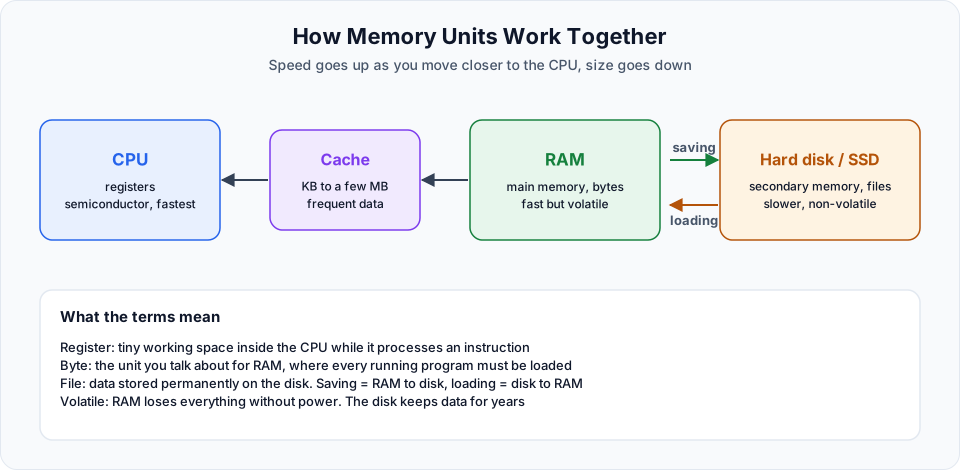
- Everything you are working on right now lives in RAM, which feeds the CPU quickly
- Anything you want to keep permanently goes to the hard disk
- The hard disk is not connected directly to the CPU. RAM sits in between
Saving and loading
Two everyday words now have a precise meaning:
| Term | What actually happens |
|---|---|
| Saving | Copying data from RAM to the hard disk so it survives without power |
| Loading | Copying data from the hard disk into RAM so the CPU can execute it |
Think about typing a new friend's phone number. While you type, the digits appear instantly because they are in RAM and the CPU is processing them. Switch the phone off without saving, and the number is gone. Press Save and the number is written to permanent storage, so it is still there after a restart.
The same happens when you open a large video file. The short "loading" moment is the file being copied from the disk into RAM. Once it is in RAM, it plays smoothly.
Registers, bytes and files
Each level has its own name for the place where data is held:
| Memory | Unit you talk about | Role |
|---|---|---|
| CPU | Register | Tiny working space used while an instruction is processed |
| RAM | Byte | Main memory, where every running program must be loaded |
| Hard disk | File | Secondary memory for permanent storage |
When someone says file, think disk. When they say byte in the context of execution, think RAM. When they say register, think CPU.
Because RAM is the only memory connected directly to the CPU, it is called main memory (or primary memory). The hard disk is secondary memory.
Why more RAM makes a computer faster
Every program you run must first be loaded into RAM. If you open many applications at once and RAM is too small to hold them all, the system starts moving data back and forth to the disk, and everything slows down or hangs. That is why a machine with more RAM usually feels faster.
Cache: even closer to the CPU
Between the CPU and RAM sits a small, very fast memory called cache. It is measured in kilobytes or a few megabytes, not gigabytes.
You cannot choose what goes into the cache. The hardware and operating system place frequently used data there automatically. Finding something in a small cache is quicker than searching all of RAM, just like finding a pin on a small table is easier than finding it in a large hall.
The speed order is:
Registers  >  Cache  >  RAM  >  Hard disk
(fastest, smallest)          (slowest, largest)
What about SSDs?
Modern laptops and cloud servers mostly use SSDs instead of spinning hard disks. An SSD uses flash memory with no moving parts, so it is much faster than an old hard disk. It is still non-volatile secondary storage, and it is still much slower than RAM, so everything in this lesson still applies.
Why this matters for DevOps
These ideas come back constantly once you manage servers:
- Choosing an EC2 instance type is mostly choosing CPU and RAM. A Java application that needs 2 GB of RAM will crash or swap on a
t2.microwith 1 GB - An EBS volume in AWS is the server's disk. Data there survives a reboot. Data only in memory does not
- Commands like
free -h,topanddf -hon Linux show exactly these resources: RAM, CPU and disk - In Kubernetes you set memory requests and limits for every container. If a container uses more than its limit, it is killed with
OOMKilled(out of memory)
Key takeaways
- The hard disk stores data permanently but is slow, because it is electro-mechanical and magnetic
- RAM is fast because it uses the same semiconductor technology as the CPU, but it is volatile
- Saving means RAM to disk. Loading means disk to RAM
- RAM is main memory, the disk is secondary memory, and cache holds frequently used data close to the CPU
- More RAM lets more programs stay loaded at once, which keeps the system responsive
Try It Yourself
- On a Linux machine or your EC2 instance, run
free -hand note your total and available memory. - Run
df -hand find how much disk space is free. - Open several heavy applications and watch memory usage rise in Task Manager or
top. Close them and watch it drop.
Official references
Written By: Shramik Masti
How is this guide?
Last updated on
Programming Fundamentals
What a CPU really understands, why programs exist, and how we moved from machine language to assembly and high level languages with assemblers and compilers.
Getting Started
A practical roadmap for learning Apache Maven, from why build tools exist to projects, goals, dependencies, repositories, the POM, IDEs, the build lifecycle, unit testing and Spring Boot.